-
react+ts手写cron表达式转换组件
前言
最近在写的一个分布式调度系统,后端同学需要让我传入cron表达式,给调度接口传参。我去了学习了解了cron表达式的用法,发现有3个通用的表达式刚好符合我们的需求:
需求
- 每天 xx 的时间:
0 11 20 * * ?
上面是每天20:11的cron表达式
- 每周的 xxx 星期 的 xxx 时间
0 14 20 * * WED,THU
上面是 每周星期三,星期四20:14的cron表达式
- 每周的 xxx号 的 xxx时间
0 15 20 3,7 * ?
上面是 每月的3,7号20:15的cron表达式
这三个表达式刚好符合我们的需求,并且每个符号表达的意思也很直观。那么,话不多说,直接开写!
环境
-
react
- 我的版本:“react”: “18.2.0”,用的函数组件+react hooks
-
moment
- npm install moment
-
semi-design(组件库)
- npm install semi-design
-
typescript
实现
数据
utils下创建cron.ts,对组件所用到的数据进行统一的管理:
export const dayOfTheWeekData = [ { key: 'MON', label: '星期一' }, { key: 'TUE', label: '星期二' }, { key: 'WED', label: '星期三' }, { key: 'THU', label: '星期四' }, { key: 'FRI', label: '星期五' }, { key: 'SAT', label: '星期六' }, { key: 'SUN', label: '星期天' } ]; export const dayOfTheWeekOption = [ { key: '1', label: '星期一' }, { key: '2', label: '星期二' }, { key: '3', label: '星期三' }, { key: '4', label: '星期四' }, { key: '5', label: '星期五' }, { key: '6', label: '星期六' }, { key: '7', label: '星期天' } ]; export const monthOption = [ { key: '1', label: '一月' }, { key: '2', label: '二月' }, { key: '3', label: '三月' }, { key: '4', label: '四月' }, { key: '5', label: '五月' }, { key: '6', label: '六月' }, { key: '7', label: '七月' }, { key: '8', label: '八月' }, { key: '9', label: '九月' }, { key: '10', label: '十月' }, { key: '11', label: '十一月' }, { key: '12', label: '十二月' } ]; //获取dayOfTheMonthOption的每月对象 function getDayOfTheMonthOption() { const days = []; for (let i = 1; i < 32; i += 1) { days.push({ key: i.toString(), label: i.toString().concat('号') }); } return days; } export const dayOfTheMonthOption = getDayOfTheMonthOption();- 1
- 2
- 3
- 4
- 5
- 6
- 7
- 8
- 9
- 10
- 11
- 12
- 13
- 14
- 15
- 16
- 17
- 18
- 19
- 20
- 21
- 22
- 23
- 24
- 25
- 26
- 27
- 28
- 29
- 30
- 31
- 32
- 33
- 34
- 35
- 36
- 37
- 38
- 39
- 40
- 41
- 42
- 43
- 44
- 45
- 46
组件
到了组件的具体实现,个人感觉我写的注释挺全的,就单挑几个核心重点讲下:
时间转换函数(handleTimeChange)
//时间选择函数 const handleTimeChange = (time: moment.Moment | null) => { setSelectTime(time); if (!time) return; const currentCron = expression ? expression.split(' ') : []; const [seconds, , , dayOfMonth, month1, dayOfWeek] = currentCron; const minutes = moment(time).minutes().toString(); //获取分钟 const hours = moment(time).hours().toString(); //获取小时 let result = null; if (!Number.isNaN(Number(hours)) && !Number.isNaN(Number(minutes))) { const minutesAndHour = seconds .concat(space) .concat(minutes) .concat(space) .concat(hours) .concat(space); if (defaultTimeType === 'everyDay') result = minutesAndHour.concat('* * ?'); if (defaultTimeType !== 'everyDay') result = minutesAndHour .concat(dayOfMonth) .concat(space) .concat(month1) .concat(space) .concat(dayOfWeek); } if (result) onChange?.(result); setExpression(result); };- 1
- 2
- 3
- 4
- 5
- 6
- 7
- 8
- 9
- 10
- 11
- 12
- 13
- 14
- 15
- 16
- 17
- 18
- 19
- 20
- 21
- 22
- 23
- 24
- 25
- 26
- 27
- 28
- 使用moment函数将time转成数字类型
- minutes = moment(time).minutes().toString(); //获取分钟
- hours = moment(time).hours().toString(); //获取小时
- 获取时间cron字符串minutesAndHour:
const minutesAndHour = seconds.concat(space).concat(minutes).concat(space).concat(hours).concat(space);- 1
- 拼接得到完整的cron表达式:
- defaultTimeType === ‘everyDay’
result = minutesAndHour.concat(‘* * ?’);
- defaultTimeType !== ‘everyDay’
result = minutesAndHour.concat(dayOfMonth).concat(space).concat(month1).concat(space).concat(dayOfWeek);- 1
日期转换函数(handleSelectChange)
setSelectedValue(data); const selectValues = data.join(','); const currentCron = expression ? expression.split(' ') : []; const [seconds, minutes, hours, dayOfMonth, month1, dayOfWeek] = currentCron; let result = ''; if (defaultTimeType === 'everyWeek') { result = seconds .concat(space) .concat(minutes) .concat(space) .concat(hours) .concat(space) .concat(dayOfMonth) .concat(space) .concat(month1) .concat(space) .concat(selectValues); } if (defaultTimeType === 'everyMonth') { result = seconds .concat(space) .concat(minutes) .concat(space) .concat(hours) .concat(space) .concat(data.length ? selectValues : '*') .concat(space) .concat(month1) .concat(space) .concat(dayOfWeek); } if (selectTime) onChange?.(result); setExpression(result);- 1
- 2
- 3
- 4
- 5
- 6
- 7
- 8
- 9
- 10
- 11
- 12
- 13
- 14
- 15
- 16
- 17
- 18
- 19
- 20
- 21
- 22
- 23
- 24
- 25
- 26
- 27
- 28
- 29
- 30
- 31
- 32
- 33
- defaultTimeType === ‘everyWeek’
result = seconds.concat(space).concat(minutes).concat(space).concat(hours).concat(space).concat(dayOfMonth).concat(space).concat(month1).concat(space).concat(selectValues);- 1
- defaultTimeType === ‘everyMonth’
result = seconds.concat(space).concat(minutes).concat(space).concat(hours).concat(space).concat(data.length ? selectValues : '*').concat(space).concat(month1).concat(space).concat(dayOfWeek);- 1
组件全部代码(CronInput)
import { ConfigProvider, TimePicker } from '@douyinfe/semi-ui'; import { Fragment, useState } from 'react'; import { Select } from '@douyinfe/semi-ui'; import moment from 'moment'; //引入数据 import { dayOfTheMonthOption, dayOfTheWeekData } from '@/utils/cron'; const { Option } = Select; const format = 'HH:mm'; const defaultCron = '0 * * * * ?'; const space = ' '; //空格 //类型选择 const timeTypes = [ { key: 'everyDay', label: '每天' }, { key: 'everyWeek', label: '每周' }, { key: 'everyMonth', label: '每月' } ]; interface Props { onChange?: (cron?: string) => void; } const CronInput: React.FC= ({ onChange }) => { const [defaultTimeType, setDefaultTimeType] = useState(timeTypes[0].key); //选择类型 const [selectedValue, setSelectedValue] = useState<[]>([]); //日期,多选数组 const [selectTime, setSelectTime] = useState (null); //时间 const [expression, setExpression] = useState (defaultCron); //bzd //类型选择函数 const handleTimeTypeChange = (selectValue: string) => { setDefaultTimeType(selectValue); setSelectTime(null); setSelectedValue([]); setExpression(defaultCron); }; //时间选择函数 const handleTimeChange = (time: moment.Moment | null) => { setSelectTime(time); if (!time) return; const currentCron = expression ? expression.split(' ') : []; const [seconds, , , dayOfMonth, month1, dayOfWeek] = currentCron; const minutes = moment(time).minutes().toString(); //获取分钟 const hours = moment(time).hours().toString(); //获取小时 let result = null; if (!Number.isNaN(Number(hours)) && !Number.isNaN(Number(minutes))) { const minutesAndHour = seconds .concat(space) .concat(minutes) .concat(space) .concat(hours) .concat(space); if (defaultTimeType === 'everyDay') result = minutesAndHour.concat('* * ?'); if (defaultTimeType !== 'everyDay') result = minutesAndHour .concat(dayOfMonth) .concat(space) .concat(month1) .concat(space) .concat(dayOfWeek); } if (result) onChange?.(result); setExpression(result); }; const handleSelectChange = (data: []) => { setSelectedValue(data); const selectValues = data.join(','); const currentCron = expression ? expression.split(' ') : []; const [seconds, minutes, hours, dayOfMonth, month1, dayOfWeek] = currentCron; let result = ''; if (defaultTimeType === 'everyWeek') { result = seconds .concat(space) .concat(minutes) .concat(space) .concat(hours) .concat(space) .concat(dayOfMonth) .concat(space) .concat(month1) .concat(space) .concat(selectValues); } if (defaultTimeType === 'everyMonth') { result = seconds .concat(space) .concat(minutes) .concat(space) .concat(hours) .concat(space) .concat(data.length ? selectValues : '*') .concat(space) .concat(month1) .concat(space) .concat(dayOfWeek); } if (selectTime) onChange?.(result); setExpression(result); }; const RenderSelect = ({ placeholder, data = [] }: { placeholder: string; data: { key: string; label: string }[]; }) => { return ( handleTimeChange(val)} /> {defaultTimeType === 'everyDay' && (); }; export default CronInput;handleTimeChange(val)} /> )} {defaultTimeType === 'everyMonth' && ( )} - 1
- 2
- 3
- 4
- 5
- 6
- 7
- 8
- 9
- 10
- 11
- 12
- 13
- 14
- 15
- 16
- 17
- 18
- 19
- 20
- 21
- 22
- 23
- 24
- 25
- 26
- 27
- 28
- 29
- 30
- 31
- 32
- 33
- 34
- 35
- 36
- 37
- 38
- 39
- 40
- 41
- 42
- 43
- 44
- 45
- 46
- 47
- 48
- 49
- 50
- 51
- 52
- 53
- 54
- 55
- 56
- 57
- 58
- 59
- 60
- 61
- 62
- 63
- 64
- 65
- 66
- 67
- 68
- 69
- 70
- 71
- 72
- 73
- 74
- 75
- 76
- 77
- 78
- 79
- 80
- 81
- 82
- 83
- 84
- 85
- 86
- 87
- 88
- 89
- 90
- 91
- 92
- 93
- 94
- 95
- 96
- 97
- 98
- 99
- 100
- 101
- 102
- 103
- 104
- 105
- 106
- 107
- 108
- 109
- 110
- 111
- 112
- 113
- 114
- 115
- 116
- 117
- 118
- 119
- 120
- 121
- 122
- 123
- 124
- 125
- 126
- 127
- 128
- 129
- 130
- 131
- 132
- 133
- 134
- 135
- 136
- 137
- 138
- 139
- 140
- 141
- 142
- 143
- 144
- 145
- 146
- 147
- 148
- 149
- 150
- 151
- 152
- 153
- 154
- 155
- 156
- 157
- 158
- 159
- 160
- 161
- 162
- 163
- 164
- 165
- 166
- 167
- 168
- 169
- 170
- 171
- 172
- 173
使用与效果
使用
使用方法很简单,接收onChange传来的cron表达式即可:
const App: FC= (props) => { const { datas = [] } = props; let [value, setValue] = useState (); return ( ); };setValue(cron)} /> {value}- 1
- 2
- 3
- 4
- 5
- 6
- 7
- 8
- 9
- 10
效果
- 每天
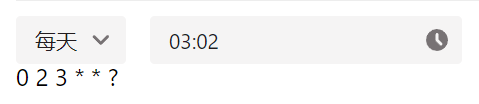
- 每周

- 每月

-
相关阅读:
使用推测解码 (Speculative Decoding) 使 Whisper 实现 2 倍的推理加速
图论的小技巧以及扩展
使用 kind 搭建 Kubernetes学习环境
win10 自带虚拟机软件 虚拟CentOS系统
【线性表 - 数组和矩阵】
第十四届蓝桥杯要开始了(2022年)
lssvm聚类研究(Matlab代码实现)
工作中非常重要的测试策略,你大概没注意过吧
NIFI使用InvokeHTTP发送http请求
腾讯云CVM服务器5年可选2核4G和4核8G配置
- 原文地址:https://blog.csdn.net/Azbtt/article/details/133888832
