前面基础管理的功能基本开发完了,接下来我们来优化一下开发功能,来添加EventBus功能。
EventBus也是我们使用场景非常广的东西。这里我会实现一个本地的EventBus以及分布式的EventBus。
分别使用MediatR和Cap来实现。
现在简单介绍一下这两者:
MediatR是一个轻量级的中介者库,用于实现应用程序内部的消息传递和处理。它提供了一种简单而强大的方式来解耦应用程序的不同部分,并促进了代码的可维护性和可测试性。使用MediatR,您可以定义请求和处理程序,然后通过发送请求来触发相应的处理程序。这种模式使得应用程序的不同组件可以通过消息进行通信,而不需要直接引用彼此的代码。MediatR还提供了管道处理功能,可以在请求到达处理程序之前或之后执行一些逻辑,例如验证、日志记录或缓存。
Cap是一个基于.NET的分布式事务消息队列框架,用于处理高并发、高可靠性的消息传递。它支持多种消息队列中间件,如RabbitMQ、Kafka和Redis。Cap提供了一种可靠的方式来处理分布式事务,确保消息的可靠传递和处理。它还支持事件发布/订阅模式,使得不同的服务可以通过发布和订阅事件来进行解耦和通信。Cap还提供了一些高级功能,如消息重试、消息顺序处理和消息回溯,以应对各种复杂的场景。
总结来说,MediatR适用于应用程序内部的消息传递和处理,它强调解耦和可测试性。而Cap则更适合处理分布式系统中的消息传递和事务,它提供了高可靠性和高并发的支持,并且适用于处理复杂的分布式场景。
定义接口#
添加一个ILocalEventBus接口,里面包含一个PublishAsync事件发布方法。
namespace Wheel.EventBus.Local
{
    public interface ILocalEventBus
    {
        Task PublishAsync<TEventData>(TEventData eventData, CancellationToken cancellationToken = default);
    }
}
添加一个IDistributedEventBus接口,里面包含一个PublishAsync事件发布方法。
namespace Wheel.EventBus.Distributed
{
    public interface IDistributedEventBus
    {
        Task PublishAsync<TEventData>(TEventData eventData, CancellationToken cancellationToken = default);
    }
}
添加一个IEventHandler的空接口,作为事件处理的基础接口
namespace Wheel.EventBus
{
    public interface IEventHandler
    {
    }
}
LocalEventBus#
这里我们用MediatR的Notification来实现我们的本地事件总线。
首先安装MediatR的Nuget包。
MediatREventBus#
然后实现MediatREventBus,这里其实就是包装以下IMediator.Publish方法。
using MediatR;
using Wheel.DependencyInjection;

namespace Wheel.EventBus.Local.MediatR
{
    public class MediatREventBus : ILocalEventBus, ITransientDependency
    {
        private readonly IMediator _mediator;

        public MediatREventBus(IMediator mediator)
        {
            _mediator = mediator;
        }

        public Task PublishAsync<TEventData>(TEventData eventData, CancellationToken cancellationToken)
        {
            return _mediator.Publish(eventData, cancellationToken);
        }
    }
}
添加一个ILocalEventHandler接口,用于处理LocalEventBus发出的内容。这里由于MediatR的强关联,必须继承INotification接口。
using MediatR;

namespace Wheel.EventBus.Local
{
    public interface ILocalEventHandler<in TEventData> : IEventHandler, INotificationHandler<TEventData> where TEventData : INotification
    {
        Task Handle(TEventData eventData, CancellationToken cancellationToken = default);
    }
}
然后我们来实现一个MediatR的INotificationPublisher接口,由于默认的两种实现方式都是会同步阻塞请求,所以我们单独实现一个不会阻塞请求的。
using MediatR;
namespace Wheel.EventBus.Local.MediatR
{
public class WheelPublisher : INotificationPublisher
{
public Task Publish(IEnumerable handlerExecutors, INotification notification, CancellationToken cancellationToken )
{
return Task.Factory.StartNew(async () =>
{
foreach (var handler in handlerExecutors)
{
await handler.HandlerCallback(notification, cancellationToken).ConfigureAwait(false);
}
}, cancellationToken);
}
}
}
接下来添加一个扩展方法,用于注册MediatR。
namespace Wheel.EventBus
{
    public static class EventBusExtensions
    {
        public static IServiceCollection AddLocalEventBus(this IServiceCollection services)
        {
            services.AddMediatR(cfg =>
            {
                cfg.RegisterServicesFromAssemblies(Directory.GetFiles(AppDomain.CurrentDomain.BaseDirectory, "*.dll")
                                    .Where(x => !x.Contains("Microsoft.") && !x.Contains("System."))
                                    .Select(x => Assembly.Load(AssemblyName.GetAssemblyName(x))).ToArray());
                cfg.NotificationPublisher = new WheelPublisher();
                cfg.NotificationPublisherType = typeof(WheelPublisher);
            });
            return services;
        }
    }
}
这里通过程序集注册,会自动注册所有集成MediatR接口的Handler。
然后指定NotificationPublisher和NotificationPublisherType是我们自定义的Publisher。
就这样我们完成了LocalEventBus的实现,我们只需要定义我们的EventData,同时实现一个ILocalEventHandler
DistributedEventBus#
这里我们通过CAP来实现我们的分布式事件总线。
首先需要安装DotNetCore.CAP的相关NUGET包。如消息队列使用RabbitMQ则安装DotNetCore.CAP.RabbitMQ,使用Redis则DotNetCore.CAP.RedisStreams,数据库存储用Sqlite则使用DotNetCore.CAP.Sqlite。
CapDistributedEventBus#
这里CapDistributedEventBus的实现其实就是包装以下Cap的ICapPublisher.PublishAsync方法。
using DotNetCore.CAP;
using System.Reflection;
using Wheel.DependencyInjection;

namespace Wheel.EventBus.Distributed.Cap
{
    public class CapDistributedEventBus : IDistributedEventBus, ITransientDependency
    {
        private readonly ICapPublisher _capBus;

        public CapDistributedEventBus(ICapPublisher capBus)
        {
            _capBus = capBus;
        }

        public Task PublishAsync<TEventData>(TEventData eventData, CancellationToken cancellationToken = default)
        {
            var sub = typeof(TEventData).GetCustomAttribute()?.Name;
            return _capBus.PublishAsync(sub ?? nameof(eventData), eventData, cancellationToken: cancellationToken);
        }
    }
}
这里使用了一个EventNameAttribute,这个用于自定义发布的事件名称。
using System.Diagnostics.CodeAnalysis;

namespace Wheel.EventBus
{
    [AttributeUsage(AttributeTargets.Class)]
    public class EventNameAttribute : Attribute
    {
        public string Name { get; set; }

        public EventNameAttribute([NotNull] string name)
        {
            Name = name;
        }

        public static string? GetNameOrDefault()
        {
            return GetNameOrDefault(typeof(TEvent));
        }

        public static string? GetNameOrDefault([NotNull] Type eventType)
        {
            return eventType
                       .GetCustomAttributes(true)
                       .OfType()
                       .FirstOrDefault()
                       ?.GetName(eventType)
                   ?? eventType.FullName;
        }

        public string? GetName(Type eventType)
        {
            return Name;
        }
    }
}
添加一个IDistributedEventHandler接口,用于处理DistributedEventBus发出的内容。
namespace Wheel.EventBus.Distributed
{
    public interface IDistributedEventBus
    {
        Task PublishAsync<TEventData>(TEventData eventData, CancellationToken cancellationToken = default);
    }
}
这里由于对CAP做了2次封装,所以需要重写一下ConsumerServiceSelector。
using DotNetCore.CAP;
using DotNetCore.CAP.Internal;
using System.Reflection;
using TopicAttribute = DotNetCore.CAP.Internal.TopicAttribute;
namespace Wheel.EventBus.Distributed.Cap
{
public class WheelConsumerServiceSelector : ConsumerServiceSelector
{
protected IServiceProvider ServiceProvider { get; }
/// FindConsumersFromInterfaceTypes(IServiceProvider provider)
{
var executorDescriptorList = base.FindConsumersFromInterfaceTypes(provider).ToList();
using var scope = provider.CreateScope();
var scopeProvider = scope.ServiceProvider;
//handlers
var handlers = scopeProvider.GetServices()
.Select(o => o.GetType()).ToList();
foreach (var handler in handlers)
{
var interfaces = handler.GetInterfaces();
foreach (var @interface in interfaces)
{
if (!typeof(IEventHandler).GetTypeInfo().IsAssignableFrom(@interface))
{
continue;
}
var genericArgs = @interface.GetGenericArguments();
if (genericArgs.Length != 1)
{
continue;
}
if (!(@interface.GetGenericTypeDefinition() == typeof(IDistributedEventHandler<>)))
{
continue;
}
var descriptors = GetHandlerDescription(genericArgs[0], handler);
foreach (var descriptor in descriptors)
{
var count = executorDescriptorList.Count(x =>
x.Attribute.Name == descriptor.Attribute.Name);
descriptor.Attribute.Group = descriptor.Attribute.Group.Insert(
descriptor.Attribute.Group.LastIndexOf(".", StringComparison.Ordinal), $".{count}");
executorDescriptorList.Add(descriptor);
}
}
}
return executorDescriptorList;
}
protected virtual IEnumerable GetHandlerDescription(Type eventType, Type typeInfo)
{
var serviceTypeInfo = typeof(IDistributedEventHandler<>)
.MakeGenericType(eventType);
var method = typeInfo
.GetMethod(
nameof(IDistributedEventHandler<object>.Handle)
);
var eventName = EventNameAttribute.GetNameOrDefault(eventType);
var topicAttr = method.GetCustomAttributes(true);
var topicAttributes = topicAttr.ToList();
if (topicAttributes.Count == 0)
{
topicAttributes.Add(new CapSubscribeAttribute(eventName));
}
foreach (var attr in topicAttributes)
{
SetSubscribeAttribute(attr);
var parameters = method.GetParameters()
.Select(parameter => new ParameterDescriptor
{
Name = parameter.Name,
ParameterType = parameter.ParameterType,
IsFromCap = parameter.GetCustomAttributes(typeof(FromCapAttribute)).Any()
|| typeof(CancellationToken).IsAssignableFrom(parameter.ParameterType)
}).ToList();
yield return InitDescriptor(attr, method, typeInfo.GetTypeInfo(), serviceTypeInfo.GetTypeInfo(), parameters);
}
}
private static ConsumerExecutorDescriptor InitDescriptor(
TopicAttribute attr,
MethodInfo methodInfo,
TypeInfo implType,
TypeInfo serviceTypeInfo,
IList parameters )
{
var descriptor = new ConsumerExecutorDescriptor
{
Attribute = attr,
MethodInfo = methodInfo,
ImplTypeInfo = implType,
ServiceTypeInfo = serviceTypeInfo,
Parameters = parameters
};
return descriptor;
}
}
}
WheelConsumerServiceSelector的主要作用是动态的给我们的IDistributedEventHandler打上CapSubscribeAttribute特性,使其可以正确订阅处理CAP的消息队列。
接下来添加一个扩展方法,用于注册CAP。
using DotNetCore.CAP.Internal;
using System.Reflection;
using Wheel.EntityFrameworkCore;
using Wheel.EventBus.Distributed.Cap;
using Wheel.EventBus.Local.MediatR;

namespace Wheel.EventBus
{
    public static class EventBusExtensions
    {
        public static IServiceCollection AddDistributedEventBus(this IServiceCollection services, IConfiguration configuration)
        {
            services.AddSingleton();
            services.AddCap(x =>
            {
                x.UseEntityFramework();

                x.UseSqlite(configuration.GetConnectionString("Default"));

                //x.UseRabbitMQ(configuration["RabbitMQ:ConnectionString"]);
                x.UseRedis(configuration["Cache:Redis"]);
            });
            return services;
        }
    }
}
就这样我们完成了DistributedEventBus的实现,我们只需要定义我们的EventData,同时实现一个IDistributedEventHandler
启用EventBus#
在Program中添加两行代码,这样即可完成我们本地事件总线和分布式事件总线的集成了。
builder.Services.AddLocalEventBus();
builder.Services.AddDistributedEventBus(builder.Configuration);
测试效果#
添加一个TestEventData,这里为了省事,我就公用一个EventData类
using MediatR;
using Wheel.EventBus;

namespace Wheel.TestEventBus
{
    [EventName("Test")]
    public class TestEventData : INotification
    {
        public string TestStr { get; set; }
    }
}
一个TestEventDataLocalEventHandler,这里注意的是,实现ILocalEventHandler不需要额外继承ITransientDependency,因为MediatR会自动注册所有继承INotification接口的实现。否则会出现重复执行两次的情况。
using Wheel.DependencyInjection;
using Wheel.EventBus.Local;
namespace Wheel.TestEventBus
{
public class TestEventDataLocalEventHandler : ILocalEventHandler<TestEventData>
{
private readonly ILogger _logger;
public TestEventDataLocalEventHandler(ILogger logger )
{
_logger = logger;
}
public Task Handle(TestEventData eventData, CancellationToken cancellationToken = default)
{
_logger.LogWarning($"TestEventDataLocalEventHandler: {eventData.TestStr}");
return Task.CompletedTask;
}
}
}
一个TestEventDataDistributedEventHandler
using Wheel.DependencyInjection;
using Wheel.EventBus.Distributed;
namespace Wheel.TestEventBus
{
public class TestEventDataDistributedEventHandler : IDistributedEventHandler<TestEventData>, ITransientDependency
{
private readonly ILogger _logger;
public TestEventDataDistributedEventHandler(ILogger logger )
{
_logger = logger;
}
public Task Handle(TestEventData eventData, CancellationToken cancellationToken = default)
{
_logger.LogWarning($"TestEventDataDistributedEventHandler: {eventData.TestStr}");
return Task.CompletedTask;
}
}
}
EventHandler通过日志打印数据。
添加一个API控制器用于测试调用
using Microsoft.AspNetCore.Authorization;
using Microsoft.AspNetCore.Mvc;
using Wheel.TestEventBus;

namespace Wheel.Controllers
{
    [Route("api/[controller]")]
    [ApiController]
    [AllowAnonymous]
    public class TestEventBusController : WheelControllerBase
    {
        [HttpGet("Local")]
        public async Task Local()
        {
            await LocalEventBus.PublishAsync(new TestEventData { TestStr = GuidGenerator.Create().ToString() });
            return Ok();
        }

        [HttpGet("Distributed")]
        public async Task Distributed()
        {
            await DistributedEventBus.PublishAsync(new TestEventData { TestStr = GuidGenerator.Create().ToString() });
            return Ok();
        }
    }
}
启用程序,调用API,可以看到,都成功执行了。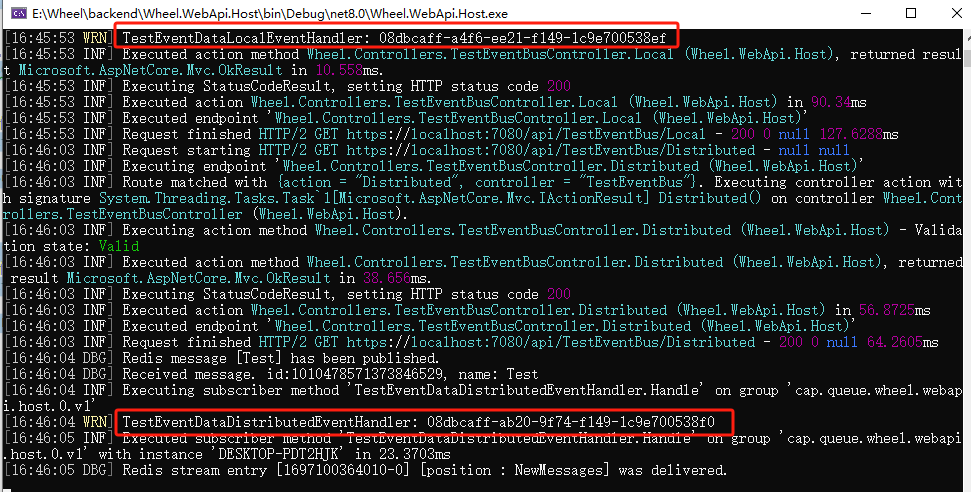


CAP的本地消息表也可以看到正常的发送接收。
到这我们就完成了我们EventBus的集成了。
轮子仓库地址https://github.com/Wheel-Framework/Wheel
欢迎进群催更。
