-
使用Django开发一款竞争对手产品监控系统
安装Django
1 使用Pychorm创建工程

2 运行项目
访问
http://127.0.0.1:8000/如果出现这个节目就说明Django环境部署成功功能开发
1. 创建 App
python manage.py startapp products- 1

2. 注册APP(settings)

3. 为App创建urls 配置文件
# 引入path from django.urls import path # 正在部署的应用的名称 app_name = 'products' urlpatterns = [ # 目前还没有urls ]- 1
- 2
- 3
- 4
- 5
- 6
- 7
- 8
- 9
- 10

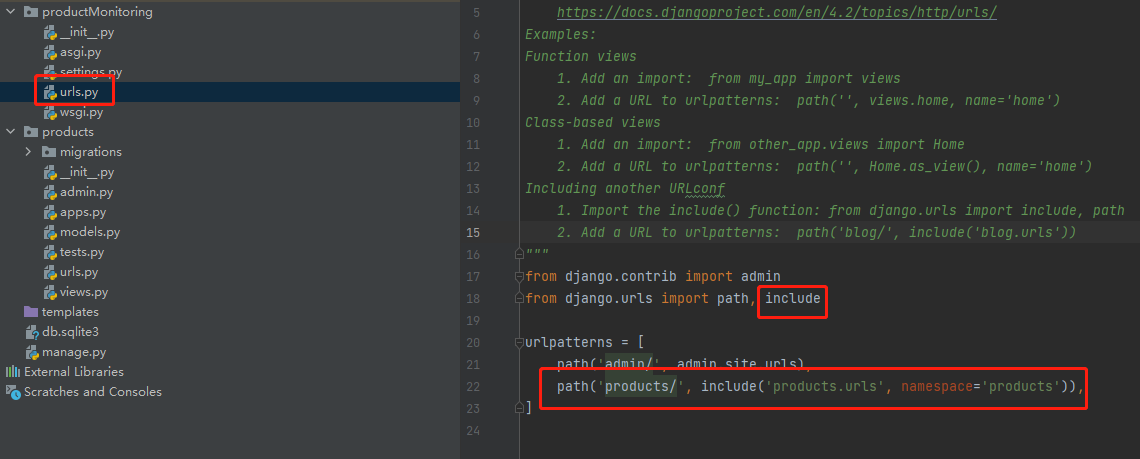
4. 配置访问路径(urls)
from django.contrib import admin from django.urls import path, include urlpatterns = [ path('admin/', admin.site.urls), path('products/', include('products.urls', namespace='products')), ]- 1
- 2
- 3
- 4
- 5
- 6
- 7
- 8
5.编写 Model
from django.db import models from django.utils import timezone # Create your models here. class Product(models.Model): title = models.CharField('标题', max_length=255) brand = models.CharField('品牌', max_length=100) product_url = models.CharField('产品链接', max_length=255) created = models.DateTimeField(default=timezone.now) image_url = models.CharField('图片链接', max_length=255) class Meta: # ordering 指定模型返回的数据的排列顺序 # '-created' 表明数据应该以倒序排列 ordering = ('-created',) # 函数 __str__ 定义当调用对象的 str() 方法时的返回值内容 def __str__(self): # return self.title 将文章标题返回 return self.title- 1
- 2
- 3
- 4
- 5
- 6
- 7
- 8
- 9
- 10
- 11
- 12
- 13
- 14
- 15
- 16
- 17
- 18
- 19
- 20
- 21
- 22

6. 数据迁移(Migrations)
python manage.py makemigrations- 1

python manage.py migrate- 1

7. 创建管理员账号(Superuser)
python manage.py createsuperuser- 1

8. 将Products注册到后台中
from django.contrib import admin # Register your models here. from .models import Product # 注册ArticlePost到admin中 admin.site.register(Product)- 1
- 2
- 3
- 4
- 5
- 6
- 7

9. 增加测试数据
访问
http://127.0.0.1:8000/admin/进行登录
根据要求增加数据

最终显示结果如下
10. View 视图编写
编写view 视图并新建模板(templates)文件
from django.shortcuts import render # Create your views here. # 导入数据模型ArticlePost from .models import Product def product_list(request): # 取出所有博客文章 products = Product.objects.all() # 需要传递给模板(templates)的对象 context = {'products': products} # render函数:载入模板,并返回context对象 return render(request, 'products/list.html', context)- 1
- 2
- 3
- 4
- 5
- 6
- 7
- 8
- 9
- 10
- 11
- 12
- 13
- 14
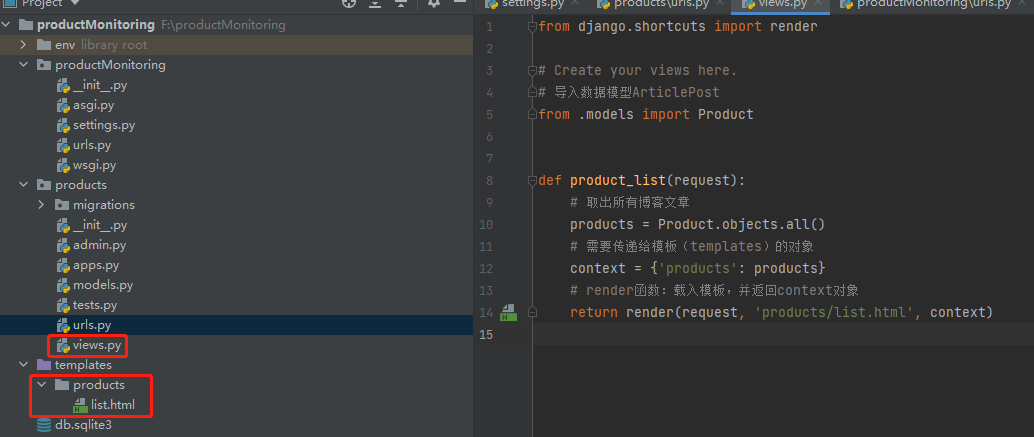
11. 编写
list.html{% for product in products %} <p>{{ product.title }}</p> {% endfor %}- 1
- 2
- 3

12. 配置
products/urls.py# 引入path from django.urls import path # 引入views.py from . import views # 正在部署的应用的名称 app_name = 'products' urlpatterns = [ # 目前还没有urls path('product-list/', views.product_list, name='article_list'), ]- 1
- 2
- 3
- 4
- 5
- 6
- 7
- 8
- 9
- 10
- 11
- 12
- 13

13 访问
http://127.0.0.1:8000/products/product-list/出现以下标题输出则说明 网站已经部署成功

脚本编写
Cubic
# -*- coding:utf-8 -*- import requests import re from lxml.html import etree import time import csv from lxml import html import htmlmin base_url = "https://en.gassensor.com.cn/" def get_one_page(url): try: headers = { "User-Agent": "Mozilla/5.0 (Windows NT 10.0; WOW64) AppleWebKit/537.36 (KHTML, like Gecko) Chrome/51.0.2704.103 Safari/537.36"} res = requests.get(url=url, headers=headers) res.encoding = 'utf-8' if res.status_code == 200: return res.text else: return None except Exception as e: print(e) return None content = get_one_page(base_url) base_tree = etree.HTML(content) cat_list = base_tree.xpath('//div[@class="NavPull naviL1wrap naviL1ul ProNavPull"]//a/@href') for cat_list in cat_list: print(cat_list) content = get_one_page(cat_list) base_tree = etree.HTML(content) product_list = base_tree.xpath('//ul[@class="Proul2023"]/li') for product in product_list: title_list = product.xpath('.//div[@class="cp1 bar dot2"]/text()') title = ' '.join(map(str, title_list)) brand = "Cubic" product_url = product.xpath('./a/@href')[0] image_url = product.xpath('./a/img/@src')[0] print(title) print(brand) print(product_url) print(image_url) print('=====================================================') print('------------------------------------------------------------------------------------------')- 1
- 2
- 3
- 4
- 5
- 6
- 7
- 8
- 9
- 10
- 11
- 12
- 13
- 14
- 15
- 16
- 17
- 18
- 19
- 20
- 21
- 22
- 23
- 24
- 25
- 26
- 27
- 28
- 29
- 30
- 31
- 32
- 33
- 34
- 35
- 36
- 37
- 38
- 39
- 40
- 41
- 42
- 43
- 44
- 45
- 46
- 47
- 48
Figaro
# -*- coding:utf-8 -*- import requests import re from lxml.html import etree import time import csv from lxml import html import htmlmin base_url = "https://www.figaro.co.jp/en/product/sensor/list.json" def get_one_page(url): try: headers = { "User-Agent": "Mozilla/5.0 (Windows NT 10.0; WOW64) AppleWebKit/537.36 (KHTML, like Gecko) Chrome/51.0.2704.103 Safari/537.36"} res = requests.get(url=url, headers=headers) res.encoding = 'utf-8' if res.status_code == 200: return res.json() else: return None except Exception as e: print(e) return None json_data = get_one_page(base_url) for result in json_data: title = result["title"] brand = "Figaro" product_url = result["permalink"] image_url = result["thumbURL"] print("title:", title) print("brand:", brand) print("permalink:", product_url) print("image_url:", image_url) print('========================================================')- 1
- 2
- 3
- 4
- 5
- 6
- 7
- 8
- 9
- 10
- 11
- 12
- 13
- 14
- 15
- 16
- 17
- 18
- 19
- 20
- 21
- 22
- 23
- 24
- 25
- 26
- 27
- 28
- 29
- 30
- 31
- 32
- 33
- 34
- 35
- 36
- 37
- 38
- 39
Senseair
# -*- coding:utf-8 -*- import requests import re from lxml.html import etree import time import csv from lxml import html import htmlmin base_url = "https://senseair.com/loadproducts" def get_one_page(url): try: headers = { "User-Agent": "Mozilla/5.0 (Windows NT 10.0; WOW64) AppleWebKit/537.36 (KHTML, like Gecko) Chrome/51.0.2704.103 Safari/537.36"} res = requests.get(url=url, headers=headers) res.encoding = 'utf-8' if res.status_code == 200: return res.text else: return None except Exception as e: print(e) return None content = get_one_page(base_url) base_tree = etree.HTML(content) cat_list = base_tree.xpath('//div[@class="col-sm-12"]//a/@href') fenye_list_url = base_tree.xpath('//ul[@class="pagination"]//a/@href')[1:-1] for fenye in range(1, int(len(fenye_list_url)) + 1): fenye_url = "https://senseair.com/loadproducts?page="+ str(fenye) print(fenye_url) content = get_one_page(fenye_url) base_tree = etree.HTML(content) pro_list = base_tree.xpath('//div[@class="col-sm-4"]') for pro in pro_list: title = pro.xpath('./div[@class="prodtextbottom"]/h2/a/text()')[0] brand = "Senseair" image = pro.xpath('./img/@src')[0] image_url = 'https://senseair.com'+ image url = pro.xpath('./div[@class="prodtextbottom"]/h2/a/@href')[0] product_url = 'https://senseair.com' + url # des = pro.xpath('div[@class="prodtextbottom"]/p/text()') print(title) print(image_url) print(brand) print(product_url) print('=========================================')- 1
- 2
- 3
- 4
- 5
- 6
- 7
- 8
- 9
- 10
- 11
- 12
- 13
- 14
- 15
- 16
- 17
- 18
- 19
- 20
- 21
- 22
- 23
- 24
- 25
- 26
- 27
- 28
- 29
- 30
- 31
- 32
- 33
- 34
- 35
- 36
- 37
- 38
- 39
- 40
- 41
- 42
- 43
- 44
- 45
- 46
- 47
- 48
- 49
- 50
- 51
Sensirion
# -*- coding: utf-8 -*- import requests import re from lxml.html import etree import time import csv from lxml import html import htmlmin import json base_url = "https://admin.sensirion.com/en/api/products/" def get_one_page(url): try: headers = { "User-Agent": "Mozilla/5.0 (Windows NT 10.0; WOW64) AppleWebKit/537.36 (KHTML, like Gecko) Chrome/51.0.2704.103 Safari/537.36"} res = requests.get(url=url, headers=headers) res.encoding = 'utf-8' if res.status_code == 200: return res.json() else: return None except Exception as e: print(e) return None json_data = get_one_page(base_url) page_count = int(json_data["pageCount"]) print(page_count) for page in range(1, page_count + 1): time.sleep(5) url = base_url + "?page=" + str(page) print(url) json_data = get_one_page(url) results = json_data["results"] for result in results: title = result["name"] brand = "Sensirion" image_url = result["images"][0]["image_url"] product_url = 'https://sensirion.com/products/catalog/' + title # status = result["status"] # primary_category_name = result["primary_category_name"] print("title:", title) print("brand:", brand) print("image_url:", image_url) print("product_url:", product_url) # print("Primary Category Name:", primary_category_name) print('========================================================')- 1
- 2
- 3
- 4
- 5
- 6
- 7
- 8
- 9
- 10
- 11
- 12
- 13
- 14
- 15
- 16
- 17
- 18
- 19
- 20
- 21
- 22
- 23
- 24
- 25
- 26
- 27
- 28
- 29
- 30
- 31
- 32
- 33
- 34
- 35
- 36
- 37
- 38
- 39
- 40
- 41
- 42
- 43
- 44
- 45
- 46
- 47
- 48
- 49
- 50
- 51
- 52
经过运行测试,4个脚本均获取到对应网站产品的标题,图片,产品链接,接下来就是将信息插入数据库中。
插入数据库
整理上述脚本,进行数据插入操作
import requests from lxml.html import etree import os import django os.environ.setdefault("DJANGO_SETTINGS_MODULE", "productMonitoring.settings") django.setup() from products.models import Product proxies = { 'http': 'http://127.0.0.1:10001', 'https': 'http://127.0.0.1:10001', } def get_one_page(url): try: headers = { "User-Agent": "Mozilla/5.0 (Windows NT 10.0; WOW64) AppleWebKit/537.36 (KHTML, like Gecko) Chrome/51.0.2704.103 Safari/537.36"} res = requests.get(url=url, headers=headers, timeout=30, proxies=proxies) res.encoding = 'utf-8' if res.status_code == 200: return res.text else: return None except Exception: return None def get_one_page_json(url): try: headers = { "User-Agent": "Mozilla/5.0 (Windows NT 10.0; WOW64) AppleWebKit/537.36 (KHTML, like Gecko) Chrome/51.0.2704.103 Safari/537.36"} res = requests.get(url=url, headers=headers, timeout=30, proxies=proxies) res.encoding = 'utf-8' if res.status_code == 200: return res.json() else: return None except Exception as e: print(e) return None def figaro(): base_url = "https://www.figaro.co.jp/en/product/sensor/list.json" json_data = get_one_page_json(base_url) data_list = [] for result in json_data: title = result["title"] brand = "Figaro" product_url = result["permalink"] image_url = result["thumbURL"] produc_info = {"title": title, "brand": brand, "product_url": product_url, "image_url": image_url} data_list.append(produc_info) return data_list def cubic(): base_url = "https://en.gassensor.com.cn/" content = get_one_page(base_url) base_tree = etree.HTML(content) cat_list = base_tree.xpath('//div[@class="NavPull naviL1wrap naviL1ul ProNavPull"]//a/@href') data_list = [] for cat_list in cat_list: print(cat_list) content = get_one_page(cat_list) base_tree = etree.HTML(content) product_list = base_tree.xpath('//ul[@class="Proul2023"]/li') for product in product_list: title_list = product.xpath('.//div[@class="cp1 bar dot2"]/text()') title = ' '.join(map(str, title_list)) brand = "Cubic" product_url = product.xpath('./a/@href')[0] image_url = product.xpath('./a/img/@src')[0] produc_info = {"title": title, "brand": brand, "product_url": product_url, "image_url": image_url} data_list.append(produc_info) return data_list def senseair(): base_url = "https://senseair.com/loadproducts" content = get_one_page(base_url) base_tree = etree.HTML(content) fenye_list_url = base_tree.xpath('//ul[@class="pagination"]//a/@href')[1:-1] data_list = [] for fenye in range(1, int(len(fenye_list_url)) + 1): fenye_url = "https://senseair.com/loadproducts?page=" + str(fenye) print(fenye_url) content = get_one_page(fenye_url) base_tree = etree.HTML(content) pro_list = base_tree.xpath('//div[@class="col-sm-4"]') for pro in pro_list: title = pro.xpath('./div[@class="prodtextbottom"]/h2/a/text()')[0] brand = "Senseair" image = pro.xpath('./img/@src')[0] image_url = 'https://senseair.com' + image url = pro.xpath('./div[@class="prodtextbottom"]/h2/a/@href')[0] product_url = 'https://senseair.com' + url # des = pro.xpath('div[@class="prodtextbottom"]/p/text()') produc_info = {"title": title, "brand": brand, "product_url": product_url, "image_url": image_url} data_list.append(produc_info) return data_list def sensirion(): base_url = "https://admin.sensirion.com/en/api/products/" json_data = get_one_page_json(base_url) page_count = int(json_data["pageCount"]) print(page_count) data_list = [] import time for page in range(1, page_count + 1): time.sleep(5) url = base_url + "?page=" + str(page) print(url) json_data = get_one_page_json(url) results = json_data["results"] for result in results: title = result["name"] brand = "Sensirion" image_url = result["images"][0]["image_url"] product_url = 'https://sensirion.com/products/catalog/' + title produc_info = {"title": title, "brand": brand, "product_url": product_url, "image_url": image_url} data_list.append(produc_info) return data_list if __name__ == '__main__': data_list = figaro() for item in data_list: product = Product.objects.filter(title=item['title']).exists() if product: pass else: product = Product(title=item['title'], brand=item['brand'], product_url=item['product_url'], image_url=item['image_url']) product.save() data_list = cubic() for item in data_list: product = Product.objects.filter(title=item['title']).exists() if product: pass else: product = Product(title=item['title'], brand=item['brand'], product_url=item['product_url'], image_url=item['image_url']) product.save() data_list = senseair() for item in data_list: product = Product.objects.filter(title=item['title']).exists() if product: pass else: product = Product(title=item['title'], brand=item['brand'], product_url=item['product_url'], image_url=item['image_url']) product.save() data_list = sensirion() for item in data_list: product = Product.objects.filter(title=item['title']).exists() if product: pass else: product = Product(title=item['title'], brand=item['brand'], product_url=item['product_url'], image_url=item['image_url']) product.save()- 1
- 2
- 3
- 4
- 5
- 6
- 7
- 8
- 9
- 10
- 11
- 12
- 13
- 14
- 15
- 16
- 17
- 18
- 19
- 20
- 21
- 22
- 23
- 24
- 25
- 26
- 27
- 28
- 29
- 30
- 31
- 32
- 33
- 34
- 35
- 36
- 37
- 38
- 39
- 40
- 41
- 42
- 43
- 44
- 45
- 46
- 47
- 48
- 49
- 50
- 51
- 52
- 53
- 54
- 55
- 56
- 57
- 58
- 59
- 60
- 61
- 62
- 63
- 64
- 65
- 66
- 67
- 68
- 69
- 70
- 71
- 72
- 73
- 74
- 75
- 76
- 77
- 78
- 79
- 80
- 81
- 82
- 83
- 84
- 85
- 86
- 87
- 88
- 89
- 90
- 91
- 92
- 93
- 94
- 95
- 96
- 97
- 98
- 99
- 100
- 101
- 102
- 103
- 104
- 105
- 106
- 107
- 108
- 109
- 110
- 111
- 112
- 113
- 114
- 115
- 116
- 117
- 118
- 119
- 120
- 121
- 122
- 123
- 124
- 125
- 126
- 127
- 128
- 129
- 130
- 131
- 132
- 133
- 134
- 135
- 136
- 137
- 138
- 139
- 140
- 141
- 142
- 143
- 144
- 145
- 146
- 147
- 148
- 149
- 150
- 151
- 152
- 153
- 154
- 155
- 156
- 157
- 158
- 159
- 160
- 161
- 162
- 163
- 164
- 165
- 166
- 167
- 168
- 169
运行脚本即可获取产品数据信息
注: 本脚本没有处理异常,可根据自身网站实际情况进行处理
网站细节优化
优化后台页面展示
我们制作此网站的目的是监控竞争对手新产品发布情况,因此登录后台最好能展示产品标题,产品品牌,添加时间,通过这三个数据即可直观监控竞争对手是否发布新品
from django.contrib import admin # Register your models here. from .models import Product # 注册ArticlePost到admin中 class ProductAdmin(admin.ModelAdmin): # 设置列表可显示的字段 list_display = ('title', 'brand', 'created') # 添加可显示的字段 fields = ('title', 'image_url', 'brand', 'created', 'product_url') admin.site.register(Product, ProductAdmin)- 1
- 2
- 3
- 4
- 5
- 6
- 7
- 8
- 9
- 10
- 11
- 12
- 13
- 14
- 15
- 16
- 17

优化前端展示效果
DOCTYPE html> <html> <head> <title>Product Tabletitle> <style> table { border-collapse: collapse; width: 100%; } th, td { padding: 8px; text-align: left; border-bottom: 1px solid #ddd; } style> head> <body> <h1>Product Tableh1> <table> <tr> {# <th>产品图片th>#} <th>爬取时间th> <th>标题th> <th>品牌th> <th>产品链接th> tr> {% for product in products %} <tr> {# <td><img width="80px" height="80px" src="{{ product.image_url }}">td>#} <td>{{ product.created }}td> <td>{{ product.title }}td> <td>{{ product.brand }}td> <td><a href="{{ product.product_url }}">查看详情a>td> tr> {% endfor %} table> body> html>- 1
- 2
- 3
- 4
- 5
- 6
- 7
- 8
- 9
- 10
- 11
- 12
- 13
- 14
- 15
- 16
- 17
- 18
- 19
- 20
- 21
- 22
- 23
- 24
- 25
- 26
- 27
- 28
- 29
- 30
- 31
- 32
- 33
- 34
- 35
- 36
- 37
- 38
- 39

服务器部署
此脚本只是个人选品参考,因此不进行线上部署,只需要美两周或每个月定期运行脚本即可
其他扩展
跨境电商
可以依据此思路进行监控竞争对手店铺。如:新品上传,产品销量
批量产品采集
批量将产品上传至独立站。通过脚本采集数据,生成一定结构的CSV文件,批量上传之独立站。
以下是一个实例,使用脚本将其英文网站产品批量上传之Wordpress Woocommerce独立站:
# -*- coding:utf-8 -*- import requests import re from lxml.html import etree import time import csv from lxml import html import htmlmin url_list = ["https://www.example.net/products/portable-detector", "https://www.example.net/products/sensor", "https://www.example.net/products/laser-range"] def get_one_page(url): try: headers = { "User-Agent": "Mozilla/5.0 (Windows NT 10.0; WOW64) AppleWebKit/537.36 (KHTML, like Gecko) Chrome/51.0.2704.103 Safari/537.36"} res = requests.get(url=url, headers=headers) res.encoding = 'utf-8' if res.status_code == 200: return res.text else: return None except Exception as e: print(e) return None with open('WooCommerce_Products1.csv', 'a', encoding='utf-8', newline='') as f: for url in url_list: content = get_one_page(url) base_tree = etree.HTML(content) product_urls = base_tree.xpath('//div[@class="pro_lis"]/ul/li/a/@href') for url in product_urls: print(url) content = get_one_page(url) tree = etree.HTML(content) name = tree.xpath('//h1/text()')[0] print(name) des = tree.xpath('//div[@class="fon"]/div/p//text()') if des: des = '
'.join(map(str, des)) des = des.replace("""
We provide
gas detector OEM/ODM
service.""","") print(des) des2 = tree.xpath('//div[@class="proinfo_box"]/div')[1] Short_description_html = html.tostring(des2).decode("utf-8") Short_description_html = htmlmin.minify(Short_description_html, remove_empty_space=True) import re pattern = r"(.*?)" Short_description_html = re.sub(pattern,"",Short_description_html) Description_html = Short_description_html.replace( """""", "") Description_html = Description_html.replace( """""", "") Description_html = Description_html.replace( """""", """
""") Description_html = Description_html.replace( """
""", """
""") print(Description_html) Published = "1" Visibility_in_catalog = "visible" image_list = tree.xpath('//div[@id="showArea"]/a/@href') image_list_url = ['https://www.example.net' + image for image in image_list] str_image_list = ','.join(map(str, image_list_url)) print(str_image_list) categories = tree.xpath('//div[@class="positionline"]//a/text()')[2:-1] str_categories = ' > '.join(map(str, categories)) str_categories = "Alarm & Detectors > "+ str_categories print(str_categories) Type = "Simple" brand = 'Brand' brand_name = "example" visible = '1' global_1 = '1' lines = [name, des, Description_html, Published, Visibility_in_catalog, str_image_list, Type, str_categories, brand, brand_name,visible,global_1] writer = csv.writer(f) writer.writerow(lines) print("=====================================================================") fenye_list_url = base_tree.xpath('//div[@class="digg4 metpager_8"]//a/@href')[:-1] if fenye_list_url: for url in fenye_list_url: print(url) content = get_one_page(url) tree = etree.HTML(content) product_urls = tree.xpath('//div[@class="pro_lis"]/ul/li/a/@href') for url in product_urls: print(url) content = get_one_page(url) tree = etree.HTML(content) name = tree.xpath('//h1/text()')[0] print(name) des = tree.xpath('//div[@class="fon"]/div/p//text()') if des: des = '
'.join(map(str, des)) des = des.replace("""
We provide
gas detector OEM/ODM
service.""", "") print(des) des2 = tree.xpath('//div[@class="proinfo_box"]/div')[1] Short_description_html = html.tostring(des2).decode("utf-8") Short_description_html = htmlmin.minify(Short_description_html, remove_empty_space=True) import re pattern = r"(.*?)" Short_description_html = re.sub(pattern, "", Short_description_html) Description_html = Short_description_html.replace( """""", "") Description_html = Description_html.replace( """""", "") Description_html = Description_html.replace( """""", """
""") Description_html = Description_html.replace( """
""", """
""") print(Description_html) Published = "1" Visibility_in_catalog = "visible" image_list = tree.xpath('//div[@id="showArea"]/a/@href') image_list_url = ['https://www.example.net' + image for image in image_list] str_image_list = ','.join(map(str, image_list_url)) print(str_image_list) categories = tree.xpath('//div[@class="positionline"]//a/text()')[2:-1] str_categories = ' > '.join(map(str, categories)) str_categories = "Alarm & Detectors > " + str_categories print(str_categories) Type = "Simple" brand = 'Brand' brand_name = "example" visible = '1' global_1 = '1' lines = [name, des, Description_html, Published, Visibility_in_catalog, str_image_list, Type, str_categories, brand, brand_name, visible, global_1] writer = csv.writer(f) writer.writerow(lines) print("=====================================================================")
- 1
- 2
- 3
- 4
- 5
- 6
- 7
- 8
- 9
- 10
- 11
- 12
- 13
- 14
- 15
- 16
- 17
- 18
- 19
- 20
- 21
- 22
- 23
- 24
- 25
- 26
- 27
- 28
- 29
- 30
- 31
- 32
- 33
- 34
- 35
- 36
- 37
- 38
- 39
- 40
- 41
- 42
- 43
- 44
- 45
- 46
- 47
- 48
- 49
- 50
- 51
- 52
- 53
- 54
- 55
- 56
- 57
- 58
- 59
- 60
- 61
- 62
- 63
- 64
- 65
- 66
- 67
- 68
- 69
- 70
- 71
- 72
- 73
- 74
- 75
- 76
- 77
- 78
- 79
- 80
- 81
- 82
- 83
- 84
- 85
- 86
- 87
- 88
- 89
- 90
- 91
- 92
- 93
- 94
- 95
- 96
- 97
- 98
- 99
- 100
- 101
- 102
- 103
- 104
- 105
- 106
- 107
- 108
- 109
- 110
- 111
- 112
- 113
- 114
- 115
- 116
- 117
- 118
- 119
- 120
- 121
- 122
- 123
- 124
- 125
- 126
- 127
- 128
- 129
- 130
- 131
- 132
- 133
- 134
- 135
- 136
- 137
- 138
- 139
- 140
- 141
- 142
- 143
- 144
该脚本会生成一个CSV文件,按照 Woocommerce 要求通过文件上传产品即可,最后手动优化细节,可大大减少人工成本。
- 相关阅读:
Ajax学习:如何在Chrome网络控制台查看通信报文(请求报文/响应报文)
【调制解调】ISB 独立边带调幅
Mysql 按照每小时,每天,每月,每年,不存在数据也显示
计算机网络中的CSMA/CD算法的操作流程(《自顶向下》里的提炼总结)
【性能测试】分布式压测之locust和Jmeter的使用
基于LSTM-Adaboost的电力负荷预测(Matlab代码实现)
【JavaScript复习十】数组入门知识
sklearn处理离散变量的问题——以决策树为例
Windows如何ping端口
07 图形学——曲线曲面理论
- 原文地址:https://blog.csdn.net/cll_869241/article/details/133770557
