-
BlueTooth
本文主要介绍,蓝牙开启、蓝牙扫描、配对,建立链接,进行通信。
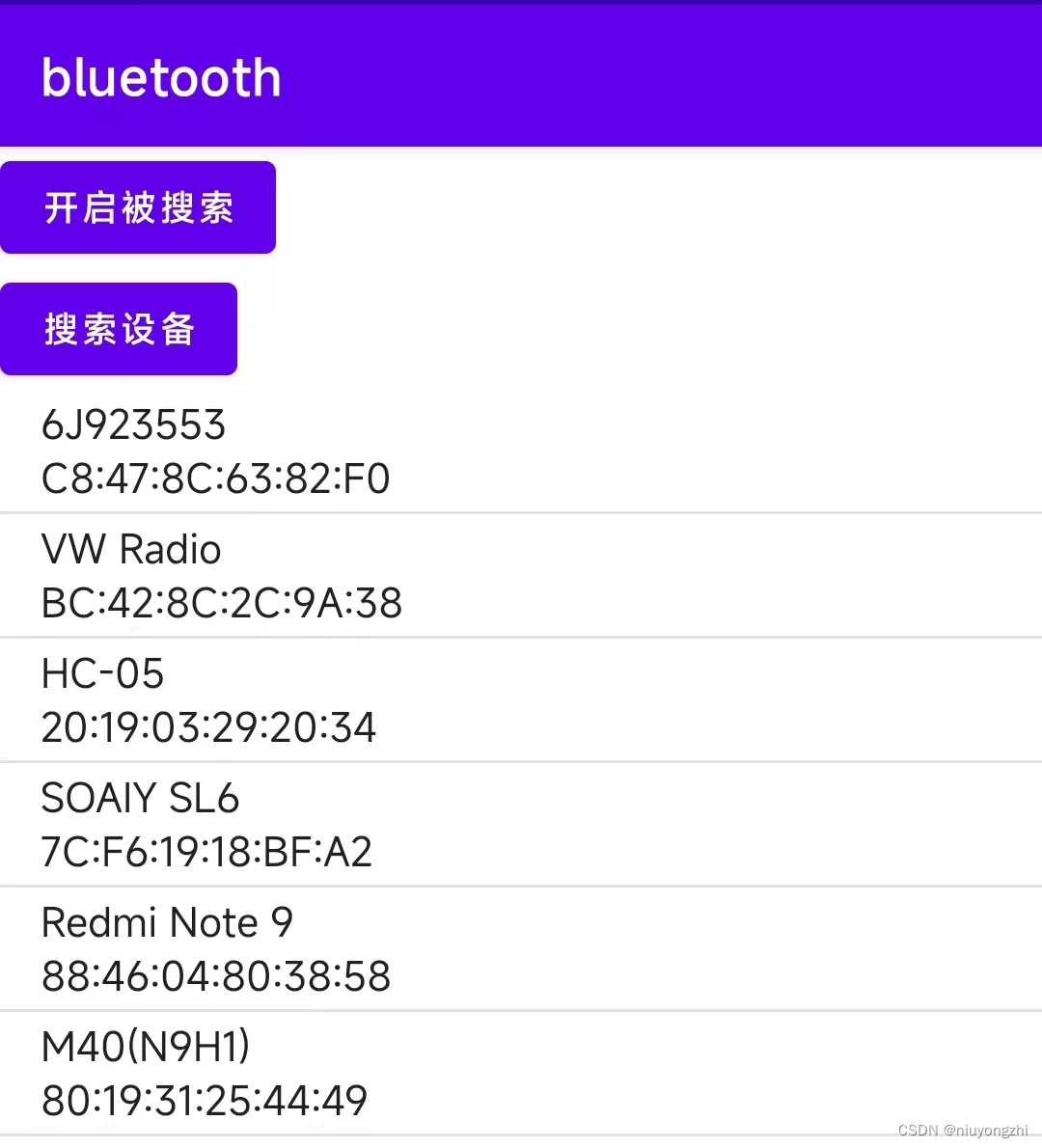
1.声明权限:
- <uses-permission android:name="android.permission.INTERNET" />
- <uses-permission android:name="android.permission.BLUETOOTH" />
- <uses-permission android:name="android.permission.BLUETOOTH_ADMIN" />
- <uses-permission android:name="android.permission.ACCESS_COARSE_LOCATION" />
- <uses-permission android:name="android.permission.BLUETOOTH_SCAN" />
- <uses-permission android:name="android.permission.BLUETOOTH_CONNECT"/>
- <uses-permission android:name="android.permission.ACCESS_FINE_LOCATION" />
2.获取蓝牙适配器:
- // 获取蓝牙配置器 BluetoothAdapter 方式1.
- BluetoothManager bluetoothManger =
- (BluetoothManager) getSystemService(Context.BLUETOOTH_SERVICE);
- bluetoothAdapter = bluetoothManger.getAdapter();
- //方式2
- // bluetoothAdapter = BluetoothAdapter.getDefaultAdapter();
3.开启蓝牙:
- if (!bluetoothAdapter.isEnabled()) {
- // 没有开启蓝牙 开启蓝牙
- Intent enableBtIntent = new Intent(BluetoothAdapter.ACTION_REQUEST_ENABLE);
- startActivityForResult(enableBtIntent, REQUEST_ENABLE_BT);
- }

4.动态申请权限:
- //判断是否有访问位置的权限,没有权限,直接申请位置权限
- if ((checkSelfPermission(Manifest.permission.ACCESS_COARSE_LOCATION) != PackageManager.PERMISSION_GRANTED)
- || (checkSelfPermission(Manifest.permission.ACCESS_FINE_LOCATION) != PackageManager.PERMISSION_GRANTED)) {
- requestPermissions(new String[]{Manifest.permission.ACCESS_COARSE_LOCATION, Manifest.permission.ACCESS_FINE_LOCATION}, 200);
- }
5.创建蓝牙结果列表,并添加点击事件。
- // 创建设备列表适配器
- deviceListAdapter = new ArrayAdapter<>(this, android.R.layout.simple_list_item_1);
- deviceListView = (ListView) findViewById(R.id.device_list);
- deviceListView.setAdapter(deviceListAdapter);
- deviceListView.setOnItemClickListener((adapterView, view, i, l) -> {
- if (bluetoothAdapter.isDiscovering()) {
- bluetoothAdapter.cancelDiscovery();
- }
- String deviceName = deviceListAdapter.getItem(i);
- Log.e("nyz", "deviceName " + deviceName);
- selectedDevice = bluetoothAdapter.getRemoteDevice(deviceName.split("\\n")[1]);
- Log.e("nyz", "name " + selectedDevice.getName());
- Log.e("nyz", "address " + selectedDevice.getAddress());
- ParcelUuid[] uuids = selectedDevice.getUuids();
- for (int index = 0; index < uuids.length; index++) {
- Log.e("nyz", "uuids " + uuids[index]);
- }
- connectToDevice(selectedDevice);
- });
6.创建广播接受者,用于接收扫描到蓝牙后的结果。
- @SuppressLint("MissingPermission")
- private final BroadcastReceiver deviceReceiver = new BroadcastReceiver() {
- @Override
- public void onReceive(Context context, Intent intent) {
- String action = intent.getAction();
- Log.e("nyz", "action " + action);
- // 当有新设备被发现时
- if (BluetoothDevice.ACTION_FOUND.equals(action)) {
- BluetoothDevice device = intent.getParcelableExtra(BluetoothDevice.EXTRA_DEVICE);
- deviceListAdapter.notifyDataSetChanged();
- if (!TextUtils.isEmpty(device.getName())) {
- deviceListAdapter.add(device.getName() + "\n" + device.getAddress());
- }
- }
- // 做配对使用
- else if (BluetoothDevice.ACTION_PAIRING_REQUEST.equals(action)) {
- BluetoothDevice device = intent.getParcelableExtra(BluetoothDevice.EXTRA_DEVICE);
- int pairingVariant = intent.getIntExtra(BluetoothDevice.EXTRA_PAIRING_VARIANT, BluetoothDevice.ERROR);
- // 如果需要 PIN 码,可以在这里自动输入
- if (pairingVariant == BluetoothDevice.PAIRING_VARIANT_PIN) {
- device.setPin("1234".getBytes()); // 替换为您的 PIN 码
- }
- // 如果需要用户确认配对请求,可以在这里显示对话框来请求用户确认
- } else if (BluetoothDevice.ACTION_BOND_STATE_CHANGED.equals(action)) {
- BluetoothDevice device = intent.getParcelableExtra(BluetoothDevice.EXTRA_DEVICE);
- int bondState = intent.getIntExtra(BluetoothDevice.EXTRA_BOND_STATE, BluetoothDevice.ERROR);
- int previousBondState = intent.getIntExtra(BluetoothDevice.EXTRA_PREVIOUS_BOND_STATE, BluetoothDevice.ERROR);
- // 配对状态改变的处理逻辑
- if (bondState == BluetoothDevice.BOND_BONDED && previousBondState == BluetoothDevice.BOND_BONDING) {
- // 配对成功
- } else if (bondState == BluetoothDevice.BOND_NONE && previousBondState == BluetoothDevice.BOND_BONDED) {
- // 配对解除
- }
- } else if (BluetoothAdapter.ACTION_DISCOVERY_STARTED.equals(action)) {
- Log.e("nyz", "搜索开始..");
- } else if (BluetoothAdapter.ACTION_DISCOVERY_FINISHED.equals(action)) {
- Log.e("nyz", "搜索结束..");
- } else if (BluetoothAdapter.ACTION_CONNECTION_STATE_CHANGED.equals(action)) {
- int state = intent.getIntExtra(BluetoothAdapter.EXTRA_CONNECTION_STATE, BluetoothAdapter.ERROR);
- if (state == BluetoothAdapter.STATE_CONNECTING) {
- Log.e("nyz", "正在链接...");
- } else if (state == BluetoothAdapter.STATE_CONNECTED) {
- // Log.e("nyz", "链接成功...");
- // InputStream inputStream = null;
- // try {
- // inputStream = bluetoothSocket.getInputStream();
- // OutputStream outputStream = bluetoothSocket.getOutputStream();
- // Log.e("nyz", "inputStream " + (inputStream != null));
- // Log.e("nyz", "outputStream " + (outputStream != null));
- // Log.e("nyz", "获取流成功..");
- // } catch (IOException e) {
- // e.printStackTrace();
- // }
- } else if (state == BluetoothAdapter.STATE_DISCONNECTED) {
- Log.e("nyz", "断开链接...");
- }
- }
- }
- };
7.注册和反注册:
- // 注册广播
- public void registerBroadcast() {
- // 注册广播接收器
- IntentFilter intent = new IntentFilter();
- intent.addAction(BluetoothDevice.ACTION_FOUND);//搜索发现设备
- intent.addAction(BluetoothDevice.ACTION_BOND_STATE_CHANGED);//状态改变
- intent.addAction(BluetoothDevice.ACTION_PAIRING_REQUEST);//配对请求
- intent.addAction(BluetoothAdapter.ACTION_SCAN_MODE_CHANGED);//行动扫描模式改变了
- intent.addAction(BluetoothAdapter.ACTION_STATE_CHANGED);//动作状态发生了变化
- intent.addAction(BluetoothAdapter.ACTION_DISCOVERY_FINISHED);//搜索结束
- intent.addAction(BluetoothAdapter.ACTION_DISCOVERY_STARTED);//开始搜索
- intent.addAction(BluetoothAdapter.ACTION_CONNECTION_STATE_CHANGED);//链接状态变化
- registerReceiver(deviceReceiver, intent);
- }
- @Override
- protected void onDestroy() {
- super.onDestroy();
- // 取消注册广播接收器
- unregisterReceiver(deviceReceiver);
- }
8.开始搜索附近蓝牙设备:
bluetoothAdapter.startDiscovery,搜索结束后,会通过广播的形式来接收。
bluetoothAdapter.getBondedDevices() 返回的是已经配对过的蓝牙设备列表。
- private void startDeviceDiscovery() {
- deviceListAdapter.clear();
- int state = bluetoothAdapter.getState();
- Log.e("nyz", "state " + state);
- boolean b = bluetoothAdapter.startDiscovery();
- Log.e("nyz", "bluetooth state " + b);
- //获取已经连接过的设备。
- Set<BluetoothDevice> bondedDevices = bluetoothAdapter.getBondedDevices();
- for (BluetoothDevice device : bondedDevices) {
- Log.e("nyz", "device " + device.getName());
- deviceListAdapter.add(device.getName() + "\n" + device.getAddress());
- deviceListAdapter.notifyDataSetChanged();
- }
- }
9.附近蓝牙设备结果:添加到列表中。
- // 当有新设备被发现时
- if (BluetoothDevice.ACTION_FOUND.equals(action)) {
- BluetoothDevice device = intent.getParcelableExtra(BluetoothDevice.EXTRA_DEVICE);
- deviceListAdapter.notifyDataSetChanged();
- if (!TextUtils.isEmpty(device.getName())) {
- deviceListAdapter.add(device.getName() + "\n" + device.getAddress());
- }
- }
10.点击列表中的蓝牙进行配对链接,没有配对过的需要配对,已经配对过的,可以直接链接。
1)点击事件
- deviceListView.setOnItemClickListener((adapterView, view, i, l) -> {
- //当点击某个蓝牙列表时,需要停止扫描,减少性能的消耗
- if (bluetoothAdapter.isDiscovering()) {
- bluetoothAdapter.cancelDiscovery();
- }
- String deviceName = deviceListAdapter.getItem(i);
- Log.e("nyz", "deviceName " + deviceName);
- selectedDevice = bluetoothAdapter.getRemoteDevice(deviceName.split("\\n")[1]);
- Log.e("nyz", "name " + selectedDevice.getName());
- Log.e("nyz", "address " + selectedDevice.getAddress());
- ParcelUuid[] uuids = selectedDevice.getUuids();
- for (int index = 0; index < uuids.length; index++) {
- Log.e("nyz", "uuids " + uuids[index]);
- }
- //开始链接
- connectToDevice(selectedDevice);
- });
2)开始配对链接:
需要放在子线程中执行。
- @SuppressLint("MissingPermission")
- private void connectToDevice(BluetoothDevice device) {
- new Thread() {
- @Override
- public void run() {
- super.run();
- UUID uuid = UUID.fromString("00001101-0000-1000-8000-00805F9B34FB"); // SPP UUID for serial communication
- try {
- // 进行配对
- if (!(device.getBondState() == BluetoothDevice.BOND_BONDED)) {
- Log.e("nyz", "等待配对");
- boolean success = device.createBond();
- Log.e("nyz", "配对结果 " + success);
- } else {
- Log.e("nyz", "已经配对过");
- }
- // 等待配对完成
- // Thread.sleep(500);
- Log.e("nyz", "创建 socket");
- bluetoothSocket = device.createRfcommSocketToServiceRecord(uuid);
- Log.e("nyz", "connect...");
- if (bluetoothSocket == null) {
- Log.e("nyz", "connect...failed");
- return;
- } else {
- Log.e("nyz", "socket 创建成功");
- }
- new Thread() {
- @Override
- public void run() {
- super.run();
- try {
- bluetoothSocket.connect();
- // 成功连接
- Log.e("nyz", "链接成功...");
- InputStream inputStream = bluetoothSocket.getInputStream();
- OutputStream outputStream = bluetoothSocket.getOutputStream();
- Log.e("nyz", "inputStream " + (inputStream != null));
- Log.e("nyz", "outputStream " + (outputStream != null));
- } catch (Exception e) {
- e.printStackTrace();
- }
- }
- }.start();
- } catch (Exception e) {
- Log.e("nyz", "conn failed");
- e.printStackTrace();
- }
- }
- }.start();
- }
配对成功后, bluetoothSocket = device.createRfcommSocketToServiceRecord(uuid);
拿到一个一个Socket对象。
开始链接:
- bluetoothSocket.connect();
- // 成功连接
- Log.e("nyz", "链接成功...");
- InputStream inputStream = bluetoothSocket.getInputStream();
- OutputStream outputStream = bluetoothSocket.getOutputStream();
- Log.e("nyz", "inputStream " + (inputStream != null));
- Log.e("nyz", "outputStream " + (outputStream != null));
链接成功后,可以从socket中拿到输入输出流,这样就可以和另外一台设计进行通信了。
和串口类似,串口通信,也是拿到一个输入输出流。
蓝牙通信官方文档:
-
相关阅读:
第二十章 运动函数的封装
基于Python的农业统计数据可视化系统设计与实现
在虚拟机Linux上写c语言代码
Hbase
30个有发展前景的创业项目
计算机毕业设计ssm电商后台管理系统tgm41系统+程序+源码+lw+远程部署
Opensuse Tumbleweed快速部署K8S-1.28.2
js 实现删除数组指定元素
uniapp接入萤石微信小程序插件
Kafka常用参数
- 原文地址:https://blog.csdn.net/niuyongzhi/article/details/133773269
