-
Hudi第三章:集成Flink
系列文章目录
Hudi第一章:编译安装
Hudi第二章:集成Spark
Hudi第二章:集成Spark(二)
Hudi第三章:集成Flink
前言
之前的两次博客学习了hudi和spark的集成,现在我们来学习hudi和flink的集成。
一、环境准备
1.上传并解压

2.修改配置文件
vim /opt/module/flink-1.13.6/conf/flink-conf.yaml
直接在最后追加即可。classloader.check-leaked-classloader: false taskmanager.numberOfTaskSlots: 4 state.backend: rocksdb execution.checkpointing.interval: 30000 state.checkpoints.dir: hdfs://hadoop102:8020/ckps state.backend.incremental: true- 1
- 2
- 3
- 4
- 5
- 6
- 7
sudo vim /etc/profile.d/my_env.sh
export HADOOP_CLASSPATH=`hadoop classpath` export HADOOP_CONF_DIR=$HADOOP_HOME/etc/hadoop- 1
- 2
source /etc/profile.d/my_env.sh
3.拷贝jar包
cp /opt/software/hudi-0.12.0/packaging/hudi-flink-bundle/target/hudi-flink1.13-bundle-0.12.0.jar /opt/module/flink-1.13.6/lib/ cp /opt/module/hadoop/share/hadoop/common/lib/guava-27.0-jre.jar /opt/module/flink-1.13.6/lib/ cp /opt/module/hadoop/share/hadoop/mapreduce/hadoop-mapreduce-client-core-3.1.3.jar /opt/module/flink-1.13.6/lib/- 1
- 2
- 3
4.启动sql-client
1.启动hadoop
2.启动session
/opt/module/flink-1.13.6/bin/yarn-session.sh -d- 1
3.启动sql-client
bin/sql-client.sh embedded -s yarn-session- 1
启动成功后可以在web端看一下。

也可以跳转到flink的webui。

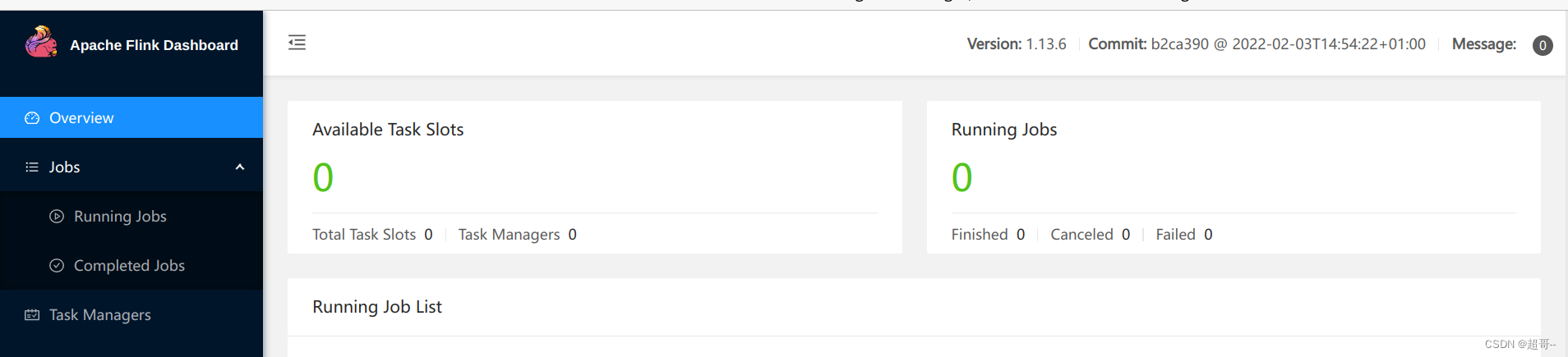
现在我们就可以在终端写代码了。

二、sql-client编码
1.创建表
CREATE TABLE t1( uuid VARCHAR(20) PRIMARY KEY NOT ENFORCED, name VARCHAR(10), age INT, ts TIMESTAMP(3), `partition` VARCHAR(20) ) PARTITIONED BY (`partition`) WITH ( 'connector' = 'hudi', 'path' = 'hdfs://hadoop102:8020/tmp/hudi_flink/t1', 'table.type' = 'MERGE_ON_READ' );- 1
- 2
- 3
- 4
- 5
- 6
- 7
- 8
- 9
- 10
- 11
- 12
- 13

2.插入数据
INSERT INTO t1 VALUES ('id1','Danny',23,TIMESTAMP '1970-01-01 00:00:01','par1'), ('id2','Stephen',33,TIMESTAMP '1970-01-01 00:00:02','par1'), ('id3','Julian',53,TIMESTAMP '1970-01-01 00:00:03','par2'), ('id4','Fabian',31,TIMESTAMP '1970-01-01 00:00:04','par2'), ('id5','Sophia',18,TIMESTAMP '1970-01-01 00:00:05','par3'), ('id6','Emma',20,TIMESTAMP '1970-01-01 00:00:06','par3'), ('id7','Bob',44,TIMESTAMP '1970-01-01 00:00:07','par4'), ('id8','Han',56,TIMESTAMP '1970-01-01 00:00:08','par4');- 1
- 2
- 3
- 4
- 5
- 6
- 7
- 8
- 9
3.查询数据
我们先更改一下表格式,默认的看得可能不习惯。
set sql-client.execution.result-mode=tableau; select * from t1;- 1
- 2

4.更新数据
前面说过hudi的更新操作就是插入一条主键相同的新数据,由更新的ts来覆盖旧的。
insert into t1 values ('id1','Danny',27,TIMESTAMP '1970-01-02 00:00:01','par1');- 1
- 2

可以看到数据已经完成了更新。5.流式插入
flink最常用的还是流式数据的处理。
CREATE TABLE sourceT ( uuid varchar(20), name varchar(10), age int, ts timestamp(3), `partition` varchar(20) ) WITH ( 'connector' = 'datagen', 'rows-per-second' = '1' ); create table t2( uuid varchar(20), name varchar(10), age int, ts timestamp(3), `partition` varchar(20) ) with ( 'connector' = 'hudi', 'path' = '/tmp/hudi_flink/t2', 'table.type' = 'MERGE_ON_READ' );- 1
- 2
- 3
- 4
- 5
- 6
- 7
- 8
- 9
- 10
- 11
- 12
- 13
- 14
- 15
- 16
- 17
- 18
- 19
- 20
- 21
- 22
- 23
我们创建两张表,第一张的连接器是datagen可以用来流式的生产数据。第二张表是正常的hudi表。
insert into t2 select * from sourceT;- 1
我们可以在webui看一下。

因为是流式处理,所以这个进程是不会停止的。select * from t2 limit 10;- 1

再查看一次

我们会发现是不断有数据产生。三、IDEA编码
我们需要将编译好的一个包拉到本地。

然后将他倒入maven仓库mvn install:install-file -DgroupId=org.apache.hudi -DartifactId=hudi-flink_2.12 -Dversion=0.12.0 -Dpackaging=jar -Dfile=./hudi-flink1.13-bundle-0.12.0.jar- 1
1.编写pom.xml
<?xml version="1.0" encoding="UTF-8"?> <project xmlns="http://maven.apache.org/POM/4.0.0" xmlns:xsi="http://www.w3.org/2001/XMLSchema-instance" xsi:schemaLocation="http://maven.apache.org/POM/4.0.0 http://maven.apache.org/xsd/maven-4.0.0.xsd"> <modelVersion>4.0.0</modelVersion> <groupId>com.atguigu.hudi</groupId> <artifactId>flink-hudi-demo</artifactId> <version>1.0-SNAPSHOT</version> <properties> <maven.compiler.source>8</maven.compiler.source> <maven.compiler.target>8</maven.compiler.target> <flink.version>1.13.6</flink.version> <hudi.version>0.12.0</hudi.version> <java.version>1.8</java.version> <scala.binary.version>2.12</scala.binary.version> <slf4j.version>1.7.30</slf4j.version> </properties> <dependencies> <dependency> <groupId>org.apache.flink</groupId> <artifactId>flink-java</artifactId> <version>${flink.version}</version> <scope>provided</scope> <!--不会打包到依赖中,只参与编译,不参与运行 --> </dependency> <dependency> <groupId>org.apache.flink</groupId> <artifactId>flink-streaming-java_${scala.binary.version}</artifactId> <version>${flink.version}</version> <scope>provided</scope> </dependency> <dependency> <groupId>org.apache.flink</groupId> <artifactId>flink-clients_${scala.binary.version}</artifactId> <version>${flink.version}</version> <scope>provided</scope> </dependency> <dependency> <groupId>org.apache.flink</groupId> <artifactId>flink-table-planner-blink_${scala.binary.version}</artifactId> <version>${flink.version}</version> <scope>provided</scope> </dependency> <!--idea运行时也有webui--> <dependency> <groupId>org.apache.flink</groupId> <artifactId>flink-runtime-web_${scala.binary.version}</artifactId> <version>${flink.version}</version> <scope>provided</scope> </dependency> <dependency> <groupId>org.slf4j</groupId> <artifactId>slf4j-api</artifactId> <version>${slf4j.version}</version> <scope>provided</scope> </dependency> <dependency> <groupId>org.slf4j</groupId> <artifactId>slf4j-log4j12</artifactId> <version>${slf4j.version}</version> <scope>provided</scope> </dependency> <dependency> <groupId>org.apache.logging.log4j</groupId> <artifactId>log4j-to-slf4j</artifactId> <version>2.14.0</version> <scope>provided</scope> </dependency> <dependency> <groupId>org.apache.flink</groupId> <artifactId>flink-statebackend-rocksdb_${scala.binary.version}</artifactId> <version>${flink.version}</version> </dependency> <dependency> <groupId>org.apache.hadoop</groupId> <artifactId>hadoop-client</artifactId> <version>3.1.3</version> <scope>provided</scope> </dependency> <!--手动install到本地maven仓库--> <dependency> <groupId>org.apache.hudi</groupId> <artifactId>hudi-flink_2.12</artifactId> <version>${hudi.version}</version> <scope>provided</scope> </dependency> </dependencies> <build> <plugins> <plugin> <groupId>org.apache.maven.plugins</groupId> <artifactId>maven-shade-plugin</artifactId> <version>3.2.4</version> <executions> <execution> <phase>package</phase> <goals> <goal>shade</goal> </goals> <configuration> <artifactSet> <excludes> <exclude>com.google.code.findbugs:jsr305</exclude> <exclude>org.slf4j:*</exclude> <exclude>log4j:*</exclude> <exclude>org.apache.hadoop:*</exclude> </excludes> </artifactSet> <filters> <filter> <!-- Do not copy the signatures in the META-INF folder. Otherwise, this might cause SecurityExceptions when using the JAR. --> <artifact>*:*</artifact> <excludes> <exclude>META-INF/*.SF</exclude> <exclude>META-INF/*.DSA</exclude> <exclude>META-INF/*.RSA</exclude> </excludes> </filter> </filters> <transformers combine.children="append"> <transformer implementation="org.apache.maven.plugins.shade.resource.ServicesResourceTransformer"> </transformer> </transformers> </configuration> </execution> </executions> </plugin> </plugins> </build> </project>- 1
- 2
- 3
- 4
- 5
- 6
- 7
- 8
- 9
- 10
- 11
- 12
- 13
- 14
- 15
- 16
- 17
- 18
- 19
- 20
- 21
- 22
- 23
- 24
- 25
- 26
- 27
- 28
- 29
- 30
- 31
- 32
- 33
- 34
- 35
- 36
- 37
- 38
- 39
- 40
- 41
- 42
- 43
- 44
- 45
- 46
- 47
- 48
- 49
- 50
- 51
- 52
- 53
- 54
- 55
- 56
- 57
- 58
- 59
- 60
- 61
- 62
- 63
- 64
- 65
- 66
- 67
- 68
- 69
- 70
- 71
- 72
- 73
- 74
- 75
- 76
- 77
- 78
- 79
- 80
- 81
- 82
- 83
- 84
- 85
- 86
- 87
- 88
- 89
- 90
- 91
- 92
- 93
- 94
- 95
- 96
- 97
- 98
- 99
- 100
- 101
- 102
- 103
- 104
- 105
- 106
- 107
- 108
- 109
- 110
- 111
- 112
- 113
- 114
- 115
- 116
- 117
- 118
- 119
- 120
- 121
- 122
- 123
- 124
- 125
- 126
- 127
- 128
- 129
- 130
- 131
- 132
- 133
- 134
- 135
- 136
- 137
- 138
- 139
- 140
- 141
- 142
- 143
2.编写demo
HudiDemo.java
一个简单的流式数据处理和刚刚一样。package com.atguigu.hudi.flink; import org.apache.flink.configuration.Configuration; import org.apache.flink.contrib.streaming.state.EmbeddedRocksDBStateBackend; import org.apache.flink.contrib.streaming.state.PredefinedOptions; import org.apache.flink.streaming.api.CheckpointingMode; import org.apache.flink.streaming.api.environment.CheckpointConfig; import org.apache.flink.streaming.api.environment.StreamExecutionEnvironment; import org.apache.flink.table.api.bridge.java.StreamTableEnvironment; import java.util.concurrent.TimeUnit; public class HudiDemo { public static void main(String[] args) { System.setProperty("HADOOP_USER_NAME", "atguigu"); StreamExecutionEnvironment env = StreamExecutionEnvironment.createLocalEnvironmentWithWebUI(new Configuration()); // 设置状态后端RocksDB EmbeddedRocksDBStateBackend embeddedRocksDBStateBackend = new EmbeddedRocksDBStateBackend(true); embeddedRocksDBStateBackend.setDbStoragePath("/home/chaoge/Downloads/hudi"); embeddedRocksDBStateBackend.setPredefinedOptions(PredefinedOptions.SPINNING_DISK_OPTIMIZED_HIGH_MEM); env.setStateBackend(embeddedRocksDBStateBackend); // checkpoint配置 env.enableCheckpointing(TimeUnit.SECONDS.toMillis(30), CheckpointingMode.EXACTLY_ONCE); CheckpointConfig checkpointConfig = env.getCheckpointConfig(); checkpointConfig.setCheckpointStorage("hdfs://hadoop102:8020/ckps"); checkpointConfig.setMinPauseBetweenCheckpoints(TimeUnit.SECONDS.toMillis(20)); checkpointConfig.setTolerableCheckpointFailureNumber(5); checkpointConfig.setCheckpointTimeout(TimeUnit.MINUTES.toMillis(1)); checkpointConfig.enableExternalizedCheckpoints(CheckpointConfig.ExternalizedCheckpointCleanup.RETAIN_ON_CANCELLATION); StreamTableEnvironment sTableEnv = StreamTableEnvironment.create(env); sTableEnv.executeSql("CREATE TABLE sourceT (\n" + " uuid varchar(20),\n" + " name varchar(10),\n" + " age int,\n" + " ts timestamp(3),\n" + " `partition` varchar(20)\n" + ") WITH (\n" + " 'connector' = 'datagen',\n" + " 'rows-per-second' = '1'\n" + ")"); sTableEnv.executeSql("create table t2(\n" + " uuid varchar(20),\n" + " name varchar(10),\n" + " age int,\n" + " ts timestamp(3),\n" + " `partition` varchar(20)\n" + ")\n" + "with (\n" + " 'connector' = 'hudi',\n" + " 'path' = 'hdfs://hadoop102:8020/tmp/hudi_idea/t2',\n" + " 'table.type' = 'MERGE_ON_READ'\n" + ")"); sTableEnv.executeSql("insert into t2 select * from sourceT"); } }- 1
- 2
- 3
- 4
- 5
- 6
- 7
- 8
- 9
- 10
- 11
- 12
- 13
- 14
- 15
- 16
- 17
- 18
- 19
- 20
- 21
- 22
- 23
- 24
- 25
- 26
- 27
- 28
- 29
- 30
- 31
- 32
- 33
- 34
- 35
- 36
- 37
- 38
- 39
- 40
- 41
- 42
- 43
- 44
- 45
- 46
- 47
- 48
- 49
- 50
- 51
- 52
- 53
- 54
- 55
- 56
- 57
- 58
- 59
- 60
- 61
- 62
- 63
- 64
当我们运行的时候,可以再本地webui查看。
127.0.0.1:8081/

也可以在hdfs路径看一下。

总结
flink第一次就先写到这里剩下的还要在写一次。
-
相关阅读:
目标检测YOLO实战应用案例100讲-基于改进YOLO v7的智能振动分拣系统开发(续)
【react】Hooks原理和实战
CentOS7 离线安装 Python
jenkins的安装
语音合成(TTS)应用方案一二三
第0章 前言
mysql索引入门-黑马
python pytorch- TextCNN TextRNN FastText Transfermer (中英文)文本情感分类实战(附数据集,代码皆可运行)
Docker从入门到进阶之进阶操作(4) —— docker数据的管理
MyBatis的xml实现
- 原文地址:https://blog.csdn.net/weixin_50835854/article/details/133696222