-
【vue3】wacth监听,监听ref定义的数据,监听reactive定义的数据,详解踩坑点
假期第二篇,对于基础的知识点,我感觉自己还是很薄弱的。
趁着假期,再去复习一遍之前已经记录了一篇【vue3基础知识点-computed和watch】
今天在学习的过程中发现,之前记录的这一篇果然是很基础的,很多东西都讲的不够细致话不多说,进入正题:
vue2
vue2中的watch写法,(vue3可以向下兼容vue2的写法)
<template> <div> <h1>当前求和为:{{sum}}</h1> <button @click="sum++">点我+1</button> </div> </template> <script > import { ref, watch } from 'vue'; export default { name:'demo', watch: { // vue2简单写法 sum(newVal, oldVal) { console.log('sum的值变化了', newVal, oldVal); } //vue2完整写法 sum:{ handler(newVal,oldval){ console.log('sum的值变化了', newVal, oldVal); }, deep:true, immediate:true } }, setup(){ let sum = ref(0) return { sum } } } </script>- 1
- 2
- 3
- 4
- 5
- 6
- 7
- 8
- 9
- 10
- 11
- 12
- 13
- 14
- 15
- 16
- 17
- 18
- 19
- 20
- 21
- 22
- 23
- 24
- 25
- 26
- 27
- 28
- 29
- 30
- 31
- 32
- 33
- 34
- 35

虽然vue3中可以使用vue2的写法,但是混合使用会导致代码风格不一致,增加维护成本。而且我们只是习惯了vue2的写法,全都使用vue3的写法,其实就是一个熟悉的过程,vue3 的 < script setup> 语法和 Composition API组合式api还是很香的,慢慢来吧组合式api其实就是一堆内置的函数,需要用什么就引入对应的函数,如ref、wacth等
vue3
1、监听ref定义的单个响应式数据
<template> <div> <h1>当前求和为:{{sum}}</h1> <button @click="sum++">点我+1</button> </div> </template> <script > import { ref, watch } from 'vue'; export default { name:'demo', setup(){ let sum = ref(0) //第一个参数,要监听的数据 //第二个参数,回调函数,两种写法:箭头函数或者普通函数都可以 //(在vue3中,wathc的回调函数可以写成箭头函数,因为setup中this是undefined,没有响应式的this上下文) //箭头函数写法 watch(sum,(newVal,oldval)=>{ console.log('sum变了',newVal,oldval) unde }) // 普通函数写法 watch(sum,function(newVal,oldval){ console.log('sum变了',newVal,oldval) }) return { sum } } }- 1
- 2
- 3
- 4
- 5
- 6
- 7
- 8
- 9
- 10
- 11
- 12
- 13
- 14
- 15
- 16
- 17
- 18
- 19
- 20
- 21
- 22
- 23
- 24
- 25
- 26
- 27
- 28
- 29
- 30
- 31
2、监听ref定义的多个响应式数据
<template> <div> <h1>当前求和为:{{sum}}</h1> <button @click="sum++">点我+1</button> <h2>当前招呼语:{{msg}}</h2> <button @click="msg+='wow'">点我打招呼</button> </div> </template> <script > import { ref, watch } from 'vue'; export default { name:'demo', setup(){ let sum = ref(0) let msg = ref('hello') //vue2中watch是配置项,只能写一个;vue3中watch是函数,可以调用n次 watch(sum,(newVal,oldVal)=>{ console.log('sum变了',newVal,oldVal); }) watch(msg,(newVal,oldVal)=>{ console.log('msg',newVal,oldVal); }) return { sum, msg } } } </script>- 1
- 2
- 3
- 4
- 5
- 6
- 7
- 8
- 9
- 10
- 11
- 12
- 13
- 14
- 15
- 16
- 17
- 18
- 19
- 20
- 21
- 22
- 23
- 24
- 25
- 26
- 27
- 28
- 29
这种写法虽然可以多次调用watch函数,但是还有更简化的写法
<template> <div> <h1>当前求和为:{{ sum }}</h1> <button @click="sum++">点我+1</button> <h2>当前招呼语:{{ msg }}</h2> <button @click="msg += 'wow'">点我打招呼</button> </div> </template> <script > import { ref, watch } from "vue"; export default { name: "demo", setup() { let sum = ref(0); let msg = ref("hello"); //第一个参数为数组,第二个参数为回调函数 watch([sum, msg], (newVal, oldVal) => { console.log("sum或msg变了", newVal, oldVal); }); return { sum, msg, }; }, }; </script>- 1
- 2
- 3
- 4
- 5
- 6
- 7
- 8
- 9
- 10
- 11
- 12
- 13
- 14
- 15
- 16
- 17
- 18
- 19
- 20
- 21
- 22
- 23
- 24
- 25
- 26

vue3 watch中的参数,第三个就是配置项注意点:监听ref定义的数据不需要写deep:true,简单数据类型不需要深度监听,ref定义的对象,本质上还是调用了reactive将其包装成响应式对象,所以ref定义的对象默认开启了深度监听
watch(source: WatchSource, cb: WatchCallback, options?: WatchOptions): StopHandle
source: 监听的源(可以是响应式数据、计算属性或ref等)
cb: 当源发生变化时被调用的回调函数
options(可选): 一个对象,包含额外的选项配置
返回一个停止监听的函数let sum = ref(0); let msg = ref("hello"); //监听单个 watch(sum, (newVal, oldVal) => { console.log("sum变了", newVal, oldVal); },{ immediate:true }); //监听多个 watch([sum, msg], (newVal, oldVal) => { console.log("sum或msg变了", newVal, oldVal); },{ immediate:true });- 1
- 2
- 3
- 4
- 5
- 6
- 7
- 8
- 9
- 10
- 11
- 12
- 13
- 14
- 15
3、监听reactive定义的单个响应式数据的全部属性
<template> <div> <h2>姓名:{{person.name}}</h2> <h2>性别:{{person.sex}}</h2> <button @click="person.name+='~'">姓名变了</button> <button @click="person.sex+='!'">性别变了</button> </div> </template> <script > import {reactive,watch } from "vue"; export default { name: "demo", setup() { let person = reactive({ name:'莲花', sex:'男' }) watch(person, (newVal, oldVal) => { console.log("person变了", newVal, oldVal); }); return { person }; }, }; </script>- 1
- 2
- 3
- 4
- 5
- 6
- 7
- 8
- 9
- 10
- 11
- 12
- 13
- 14
- 15
- 16
- 17
- 18
- 19
- 20
- 21
- 22
- 23
- 24
- 25
- 26
- 27
- 28
- 29
- 30
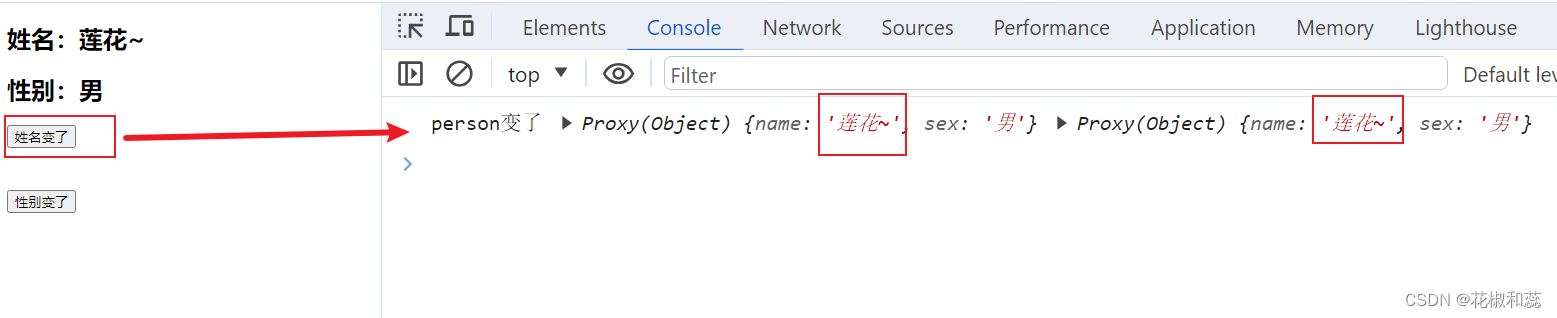
这有个踩坑点,recative定义的响应式数据,交给watch进行监听,此处无法正确的获得oldValue,watch默认只能追踪到响应式数据属性的变化,但并不会记录变化前的旧值
如果reactive定义的数据嵌套很深,在vue2中需要开启深度监听才能监听到,但是vue3中却不需要<template> <div> <h2>姓名:{{person.name}}</h2> <h2>性别:{{person.sex}}</h2> <h2>工作:{{person.job.job1.work}}</h2> <button @click="person.name+='~'">姓名变了</button> <br/> <br/> <br/> <button @click="person.sex+='!'">性别变了</button> <button @click="person.job.job1.work+='还有其他工作'">工作变了</button> </div> </template> <script > import { ref, reactive,watch } from "vue"; export default { name: "demo", setup() { let person = reactive({ name:'莲花', sex:'男', job:{ job1:{ work:'侦探' } } }) watch(person, (newVal, oldVal) => { console.log("person变了", newVal, oldVal); }); return { person }; }, }; </script>- 1
- 2
- 3
- 4
- 5
- 6
- 7
- 8
- 9
- 10
- 11
- 12
- 13
- 14
- 15
- 16
- 17
- 18
- 19
- 20
- 21
- 22
- 23
- 24
- 25
- 26
- 27
- 28
- 29
- 30
- 31
- 32
- 33
- 34
- 35
- 36
- 37
reactive定义的数据强制开启了深度监听,即使写deep:false,配置也无效,无法手动关闭深度监听

4、监听reactive定义的单个响应式数据中的某一个属性如果这样写,是没有效果的
<template> <div> <h2>姓名:{{person.name}}</h2> <h2>性别:{{person.sex}}</h2> <h2>工作:{{person.job.job1.work}}</h2> <button @click="person.name+='~'">姓名变了</button> <br/> <br/> <br/> <button @click="person.sex+='!'">性别变了</button> <br/> <br/> <br/> <button @click="person.job.job1.work+='还有其他工作'">工作变了</button> </div> </template> <script > import { ref, reactive,watch } from "vue"; export default { name: "demo", setup() { let person = reactive({ name:'莲花', sex:'男', job:{ job1:{ work:'侦探' } } }) watch(person.name, (newVal, oldVal) => { console.log("person.name变了", newVal, oldVal); }); return { person }; }, }; </script>- 1
- 2
- 3
- 4
- 5
- 6
- 7
- 8
- 9
- 10
- 11
- 12
- 13
- 14
- 15
- 16
- 17
- 18
- 19
- 20
- 21
- 22
- 23
- 24
- 25
- 26
- 27
- 28
- 29
- 30
- 31
- 32
- 33
- 34
- 35
- 36
- 37
- 38
- 39
控制台中会提示:这样不能监听,只能监听ref定义的值,或reactive生成的响应式对象,或者是一个数组,而person.name只是reactive生成的响应式对象中的一个属性

那么监听reactive生成的响应式对象中的一个属性,写法应该是这样的:先写一个函数,函数有返回值,想监听谁就返回谁
<template> <div> <h2>姓名:{{person.name}}</h2> <h2>性别:{{person.sex}}</h2> <h2>工作:{{person.job.job1.work}}</h2> <button @click="person.name+='~'">姓名变了</button> <br/> <br/> <br/> <button @click="person.sex+='!'">性别变了</button> <br/> <br/> <br/> <button @click="person.job.job1.work+='还有其他工作'">工作变了</button> </div> </template> <script > import { ref, reactive,watch } from "vue"; export default { name: "demo", setup() { let person = reactive({ name:'莲花', sex:'男', job:{ job1:{ work:'侦探' } } }) watch( () => person.name, (newValue, oldValue) => { console.log(`person变了 发生了变化: ${oldValue} -> ${newValue}`); } ) return { person }; }, }; </script>- 1
- 2
- 3
- 4
- 5
- 6
- 7
- 8
- 9
- 10
- 11
- 12
- 13
- 14
- 15
- 16
- 17
- 18
- 19
- 20
- 21
- 22
- 23
- 24
- 25
- 26
- 27
- 28
- 29
- 30
- 31
- 32
- 33
- 34
- 35
- 36
- 37
- 38
- 39
- 40
- 41
- 42

5、监听reactive定义的单个响应式数据中的某一些属性<template> <div> <h2>姓名:{{person.name}}</h2> <h2>性别:{{person.sex}}</h2> <h2>工作:{{person.job.job1.work}}</h2> <button @click="person.name+='~'">姓名变了</button> <br/> <br/> <br/> <button @click="person.sex+='!'">性别变了</button> <br/> <br/> <br/> <button @click="person.job.job1.work+='还有其他工作'">工作变了</button> </div> </template> <script > import { ref, reactive,watch } from "vue"; export default { name: "demo", setup() { let person = reactive({ name:'莲花', sex:'男', job:{ job1:{ work:'侦探' } } }) watch( //第一个参数改为数组 //newValue, oldValue也会变成数组格式 [ () => person.name,() => person.sex], (newValue, oldValue) => { console.log(`person的name或sex变了 `,newValue, oldValue); } ) return { person }; }, }; </script>- 1
- 2
- 3
- 4
- 5
- 6
- 7
- 8
- 9
- 10
- 11
- 12
- 13
- 14
- 15
- 16
- 17
- 18
- 19
- 20
- 21
- 22
- 23
- 24
- 25
- 26
- 27
- 28
- 29
- 30
- 31
- 32
- 33
- 34
- 35
- 36
- 37
- 38
- 39
- 40
- 41
- 42
- 43
- 44
- 45
- 46

6、特殊情况,监听job,job是person中的对象,直接这样写是监听不到的,原因是改的内容层次比较深,我们要改的是job中job1中的work
let person = reactive({ name:'莲花', sex:'男', job:{ job1:{ work:'侦探' } } }) watch( () => person.job, (newValue, oldValue) => { console.log(`person的job变了 `,newValue, oldValue); } )- 1
- 2
- 3
- 4
- 5
- 6
- 7
- 8
- 9
- 10
- 11
- 12
- 13
- 14
- 15
- 16
这个时候就需要配置项中配置deep了
watch( () => person.job, (newValue, oldValue) => { console.log(`person的job变了 `,newValue, oldValue); },{deep:true} )- 1
- 2
- 3
- 4
- 5
- 6

-
相关阅读:
推荐系统之BRP
信息系统项目管理师---第十二章 项目采购管理历年考题
基于安卓android微信小程序的个人管理小程序
python例题代码
colab切换目录的解决方案
03-链表(Linked List)应用分析
Python教程:with语句的用法
Ubuntu下串口工具 PicoCOM 的使用和时间戳显示
springboot+高校失物招领系统 毕业设计-附源码121441
27、Flink 的SQL之SELECT (select、where、distinct、order by、limit、集合操作和去重)介绍及详细示例(1)
- 原文地址:https://blog.csdn.net/weixin_49668076/article/details/133443463
