-
【Ambari】银河麒麟V10 ARM64架构_安装Ambari2.7.6&HDP3.3.1问题总结

🍁 博主 "开着拖拉机回家"带您 Go to New World.✨🍁
🦄 个人主页——🎐开着拖拉机回家_大数据运维-CSDN博客 🎐✨🍁
🪁🍁 希望本文能够给您带来一定的帮助🌸文章粗浅,敬请批评指正!🍁🐥
🪁🍁🪁🍁🪁🍁🪁🍁 🪁🍁🪁🍁🪁🍁🪁 🪁🍁🪁🍁🪁🍁🪁🍁🪁🍁🪁🍁
感谢点赞和关注 ,每天进步一点点!加油!
目录
🍁 博主 "开着拖拉机回家"带您 Go to New World.✨🍁
一、版本信息
组件
版本
操作系统
KylinV10 aarch64
Kernel
Linux 4.19.90-25.23.v2101.ky10.aarch64
ambari
2.7.6
HDP
3.3.1.0
HDP-GPL
3.3.1.0
HDP-UTILS
1.1.0.22
JDK
jdk-8u381-linux-aarch64
国内开源的Ambari官网: 一个可持续升级的免费Hadoop发行版 | HiDataPlus(HDP)

二、问题总结
2.1 Ambari安装组件版本获取问题
开始安装第一个组件报错 yarn-timerline-server报错, 报错信息如下
- stderr:
- Traceback (most recent call last):
- File "/var/lib/ambari-agent/cache/stacks/HDP/3.0/services/YARN/package/scripts/application_timeline_server.py", line 97, in
- ApplicationTimelineServer().execute()
- File "/usr/lib/ambari-agent/lib/resource_management/libraries/script/script.py", line 352, in execute
- method(env)
- File "/var/lib/ambari-agent/cache/stacks/HDP/3.0/services/YARN/package/scripts/application_timeline_server.py", line 42, in install
- self.install_packages(env)
- File "/usr/lib/ambari-agent/lib/resource_management/libraries/script/script.py", line 843, in install_packages
- name = self.format_package_name(package['name'])
- File "/usr/lib/ambari-agent/lib/resource_management/libraries/script/script.py", line 566, in format_package_name
- return self.get_package_from_available(name)
- File "/usr/lib/ambari-agent/lib/resource_management/libraries/script/script.py", line 533, in get_package_from_available
- raise Fail("No package found for {0}(expected name: {1})".format(name, name_with_version))
- resource_management.core.exceptions.Fail: No package found for hadoop_${stack_version}-yarn(expected name: hadoop_3_3-yarn)
- stdout:
- 2023-09-19 17:59:59,537 - Stack Feature Version Info: Cluster Stack=3.3, Command Stack=None, Command Version=None -> 3.3
- 2023-09-19 17:59:59,537 - Using hadoop conf dir: /usr/hdp/current/hadoop-client/conf
- 2023-09-19 17:59:59,538 - Group['livy'] {}
- 2023-09-19 17:59:59,540 - Group['spark'] {}
- 2023-09-19 17:59:59,540 - Group['ranger'] {}
- 2023-09-19 17:59:59,540 - Group['hdfs'] {}
- 2023-09-19 17:59:59,540 - Group['hadoop'] {}
- 2023-09-19 17:59:59,540 - Group['users'] {}
- 2023-09-19 17:59:59,541 - User['hive'] {'gid': 'hadoop', 'fetch_nonlocal_groups': True, 'groups': ['hadoop'], 'uid': None}
- 2023-09-19 17:59:59,542 - User['yarn-ats'] {'gid': 'hadoop', 'fetch_nonlocal_groups': True, 'groups': ['hadoop'], 'uid': None}
- 2023-09-19 17:59:59,543 - User['infra-solr'] {'gid': 'hadoop', 'fetch_nonlocal_groups': True, 'groups': ['hadoop'], 'uid': None}
- 2023-09-19 17:59:59,544 - User['zookeeper'] {'gid': 'hadoop', 'fetch_nonlocal_groups': True, 'groups': ['hadoop'], 'uid': None}
- 2023-09-19 17:59:59,545 - User['ams'] {'gid': 'hadoop', 'fetch_nonlocal_groups': True, 'groups': ['hadoop'], 'uid': None}
- 2023-09-19 17:59:59,546 - User['ranger'] {'gid': 'hadoop', 'fetch_nonlocal_groups': True, 'groups': ['ranger', 'hadoop'], 'uid': None}
- 2023-09-19 17:59:59,546 - User['tez'] {'gid': 'hadoop', 'fetch_nonlocal_groups': True, 'groups': ['hadoop', 'users'], 'uid': None}
- 2023-09-19 17:59:59,547 - User['livy'] {'gid': 'hadoop', 'fetch_nonlocal_groups': True, 'groups': ['livy', 'hadoop'], 'uid': None}
- 2023-09-19 17:59:59,548 - User['spark'] {'gid': 'hadoop', 'fetch_nonlocal_groups': True, 'groups': ['spark', 'hadoop'], 'uid': None}
- 2023-09-19 17:59:59,549 - User['ambari-qa'] {'gid': 'hadoop', 'fetch_nonlocal_groups': True, 'groups': ['hadoop', 'users'], 'uid': None}
- 2023-09-19 17:59:59,550 - User['hdfs'] {'gid': 'hadoop', 'fetch_nonlocal_groups': True, 'groups': ['hdfs', 'hadoop'], 'uid': None}
- 2023-09-19 17:59:59,551 - User['yarn'] {'gid': 'hadoop', 'fetch_nonlocal_groups': True, 'groups': ['hadoop'], 'uid': None}
- 2023-09-19 17:59:59,552 - User['mapred'] {'gid': 'hadoop', 'fetch_nonlocal_groups': True, 'groups': ['hadoop'], 'uid': None}
- 2023-09-19 17:59:59,552 - File['/var/lib/ambari-agent/tmp/changeUid.sh'] {'content': StaticFile('changeToSecureUid.sh'), 'mode': 0555}
- 2023-09-19 17:59:59,554 - Execute['/var/lib/ambari-agent/tmp/changeUid.sh ambari-qa /tmp/hadoop-ambari-qa,/tmp/hsperfdata_ambari-qa,/home/ambari-qa,/tmp/ambari-qa,/tmp/sqoop-ambari-qa 0'] {'not_if': '(test $(id -u ambari-qa) -gt 1000) || (false)'}
- 2023-09-19 17:59:59,557 - Skipping Execute['/var/lib/ambari-agent/tmp/changeUid.sh ambari-qa /tmp/hadoop-ambari-qa,/tmp/hsperfdata_ambari-qa,/home/ambari-qa,/tmp/ambari-qa,/tmp/sqoop-ambari-qa 0'] due to not_if
- 2023-09-19 17:59:59,558 - Group['hdfs'] {}
- 2023-09-19 17:59:59,558 - User['hdfs'] {'fetch_nonlocal_groups': True, 'groups': ['hdfs', 'hadoop', 'hdfs']}
- 2023-09-19 17:59:59,558 - FS Type: HDFS
- 2023-09-19 17:59:59,558 - Directory['/etc/hadoop'] {'mode': 0755}
- 2023-09-19 17:59:59,571 - File['/usr/hdp/current/hadoop-client/conf/hadoop-env.sh'] {'content': InlineTemplate(...), 'owner': 'hdfs', 'group': 'hadoop'}
- 2023-09-19 17:59:59,571 - Directory['/var/lib/ambari-agent/tmp/hadoop_java_io_tmpdir'] {'owner': 'hdfs', 'group': 'hadoop', 'mode': 01777}
- 2023-09-19 17:59:59,585 - Repository['HDP-3.3-repo-1'] {'base_url': 'http://windp-aio/ambari/2.7.6.0-4', 'action': ['prepare'], 'components': ['HDP', 'main'], 'repo_template': '[{{repo_id}}]\nname={{repo_id}}\n{% if mirror_list %}mirrorlist={{mirror_list}}{% else %}baseurl={{base_url}}{% endif %}\n\npath=/\nenabled=1\ngpgcheck=0', 'repo_file_name': 'ambari-hdp-1', 'mirror_list': None}
- 2023-09-19 17:59:59,591 - Repository['HDP-UTILS-1.1.0.22-repo-1'] {'base_url': 'http://windp-aio/HDP-UTILS/centos7/1.1.0.22', 'action': ['prepare'], 'components': ['HDP-UTILS', 'main'], 'repo_template': '[{{repo_id}}]\nname={{repo_id}}\n{% if mirror_list %}mirrorlist={{mirror_list}}{% else %}baseurl={{base_url}}{% endif %}\n\npath=/\nenabled=1\ngpgcheck=0', 'repo_file_name': 'ambari-hdp-1', 'mirror_list': None}
- 2023-09-19 17:59:59,593 - Repository with url http://repo.hdp.link:8383/HDP-GPL/centos7/3.2.1.0-001 is not created due to its tags: set(['GPL'])
- 2023-09-19 17:59:59,593 - Repository[None] {'action': ['create']}
- 2023-09-19 17:59:59,594 - File['/tmp/tmpzKfD1A'] {'content': '[HDP-3.3-repo-1]\nname=HDP-3.3-repo-1\nbaseurl=http://windp-aio/ambari/2.7.6.0-4\n\npath=/\nenabled=1\ngpgcheck=0\n[HDP-UTILS-1.1.0.22-repo-1]\nname=HDP-UTILS-1.1.0.22-repo-1\nbaseurl=http://windp-aio/HDP-UTILS/centos7/1.1.0.22\n\npath=/\nenabled=1\ngpgcheck=0'}
- 2023-09-19 17:59:59,594 - Writing File['/tmp/tmpzKfD1A'] because contents don't match
- 2023-09-19 17:59:59,595 - Rewriting /etc/yum.repos.d/ambari-hdp-1.repo since it has changed.
- 2023-09-19 17:59:59,595 - File['/etc/yum.repos.d/ambari-hdp-1.repo'] {'content': StaticFile('/tmp/tmpzKfD1A')}
- 2023-09-19 17:59:59,596 - Writing File['/etc/yum.repos.d/ambari-hdp-1.repo'] because it doesn't exist
- 2023-09-19 17:59:59,596 - Package['unzip'] {'retry_on_repo_unavailability': False, 'retry_count': 5}
- 2023-09-19 17:59:59,811 - Skipping installation of existing package unzip
- 2023-09-19 17:59:59,811 - Package['curl'] {'retry_on_repo_unavailability': False, 'retry_count': 5}
- 2023-09-19 18:00:00,024 - Skipping installation of existing package curl
- 2023-09-19 18:00:00,024 - Package['hdp-select'] {'retry_on_repo_unavailability': False, 'retry_count': 5}
- 2023-09-19 18:00:00,235 - Skipping installation of existing package hdp-select
- 2023-09-19 18:00:00,435 - Command repositories: HDP-3.3-repo-1, HDP-UTILS-1.1.0.22-repo-1
- 2023-09-19 18:00:00,435 - Applicable repositories: HDP-3.3-repo-1, HDP-UTILS-1.1.0.22-repo-1
- 2023-09-19 18:00:00,436 - Looking for matching packages in the following repositories: HDP-3.3-repo-1, HDP-UTILS-1.1.0.22-repo-1
问题总结: 获取不到组件安装的版本信息,选择直接写死stack_version的版本,修改如下脚本,定义版本信息
vim /usr/lib/ambari-agent/lib/ambari_commons/repo_manager/yum_manager.py
name = name.replace("${stack_version}", "3_3_1_0_004")
修改脚本后保存,再次运行安装问题解决,请教了开源的作者 Ambari-server 重装可能就不会出现此问题。
2.2 hiveserver2启动问题
hive-server2 启动报错日志如下:
- [root@windp-aio hive]# cat hive-server2.err
- Error: VM option 'UseG1GC' is experimental and must be enabled via -XX:+UnlockExperimentalVMOptions.
- Error: Could not create the Java Virtual Machine.
- Error: A fatal exception has occurred. Program will exit.
- Error: VM option 'UseG1GC' is experimental and must be enabled via -XX:+UnlockExperimentalVMOptions.
- Error: Could not create the Java Virtual Machine.
- Error: A fatal exception has occurred. Program will exit.
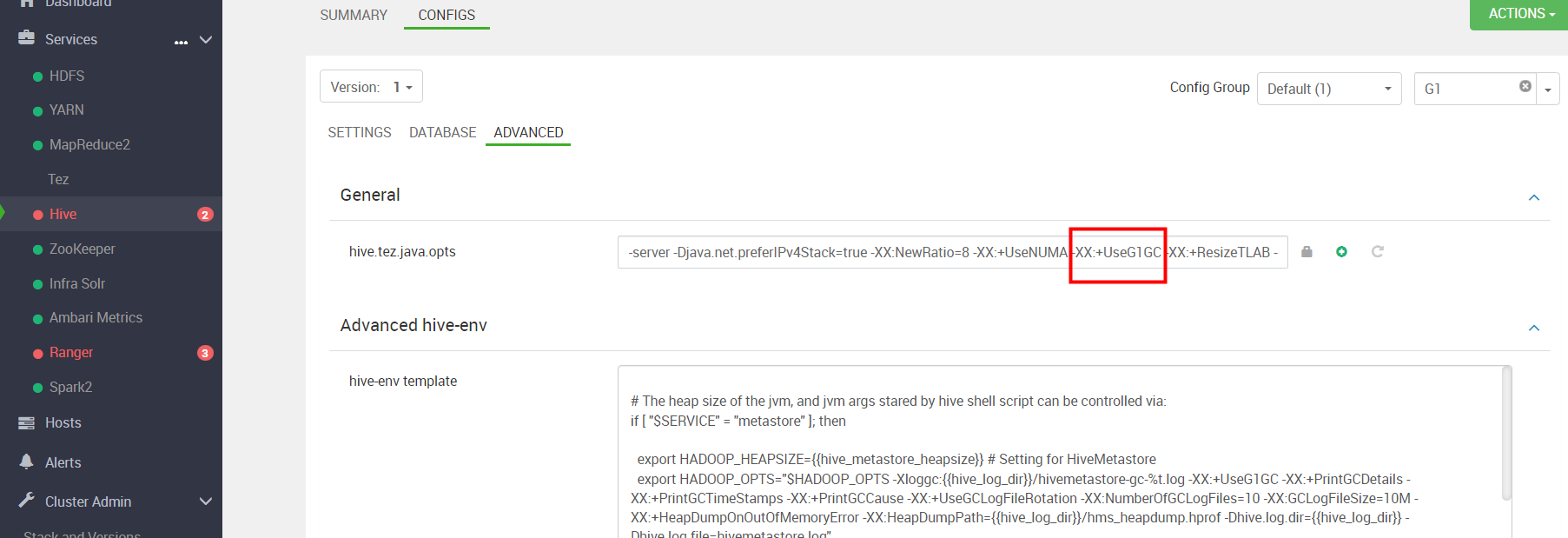
搜索 'UseG1GC' 我们把这个堆参数去掉 保存配置后 重新启动成功。

2.3 HBase问题
HBase启动报错,跟hive是一样的使用G1 GC参数就报错了 ,在Ambari 页面将 'UseG1GC' 参数去掉后 保存重启 问题解决,直接搜索 修改即可。
- [hdfs@windp-aio hbase]$ cat hbase-hbase-master-windp-aio.out
- Error: VM option 'UseG1GC' is experimental and must be enabled via -XX:+UnlockExperimentalVMOptions.
- Error: Could not create the Java Virtual Machine.
- Error: A fatal exception has occurred. Program will exit.
- [hdfs@windp-aio hbase]$
2.4 Ranger 启动问题
MySQL报错如下,看起来是驱动问题:
- resource_management.core.exceptions.ExecutionFailed: Execution of 'ambari-python-wrap /usr/hdp/current/ranger-admin/db_setup.py' returned 1. 2023-09-21 14:16:58,052 [I] DB FLAVOR :MYSQL
- 2023-09-21 14:16:58,052 [I] --------- Verifying Ranger DB connection ---------
- 2023-09-21 14:16:58,052 [I] Checking connection..
- 2023-09-21 14:16:58,052 [JISQL] /usr/java/jdk1.8.0_381/bin/java -cp /usr/hdp/current/ranger-admin/ews/lib/mysql-connector-java.jar:/usr/hdp/current/ranger-admin/jisql/lib/* org.apache.util.sql.Jisql -driver mysqlconj -cstring jdbc:mysql://xxxx/windp_aio_ranger?useSSL=false -u 'windp_aio' -p '********' -noheader -trim -c \; -query "select 1;"
- Loading class `com.mysql.jdbc.Driver'. This is deprecated. The new driver class is `com.mysql.cj.jdbc.Driver'. The driver is automatically registered via the SPI and manual loading of the driver class is generally unnecessary.
- SQLException : SQL state: 08S01 com.mysql.cj.jdbc.exceptions.CommunicationsException: Communications link failure
- The last packet sent successfully to the server was 0 milliseconds ago. The driver has not received any packets from the server. ErrorCode: 0
- 2023-09-21 14:19:11,747 [E] Can't establish connection!! Exiting..
- 2023-09-21 14:19:11,747 [I] Please run DB setup first or contact Administrator..
MySQL版本使用5.6 ,报驱动的错误, `com.mysql.cj.jdbc.Driver' 驱动为MySQL 8 版本的,随即我又将数据库换成MySQL8。
第二点要注意的是 Ranger admin 配置的密码规则, 规定密码最低为10位

将 ranger 密码 统一设置为:Winner123@001

在MySQL8中创建ranger 数据库和用户,并给用户授权
- create database ranger character set utf8;
- CREATE USER 'ranger'@'%' IDENTIFIED BY 'Winner@1';
- GRANT ALL PRIVILEGES ON *.* TO 'ranger'@'%';
- FLUSH PRIVILEGES;
/usr/hdp/current/ranger-admin/db_setup.py 修改脚本,这个一定要注意空格或者说是语法,不然会报错。
对原有的python 脚本有删减(854行开始),如果MySQL默认的端口有修改 也可以在此处修改。
- if is_unix:
- jisql_cmd = "%s %s -cp %s:%s/jisql/lib/* org.apache.util.sql.Jisql -driver com.mysql.cj.jdbc.Driver -cstring jdbc:mysql://%s/%s%s -u '%s' -p '%s' -noheader -trim -c \;" %(self.JAVA_BIN,db_ssl_cert_param,self.SQL_CONNECTOR_JAR,path,self.host,db_name,db_ssl_param,user,password)
- elif os_name == "WINDOWS":
- jisql_cmd = "%s %s -cp %s;%s\jisql\\lib\\* org.apache.util.sql.Jisql -driver mysqlconj -cstring jdbc:mysql://%s/%s%s -u \"%s\" -p \"%s\" -noheader -trim" %(self.JAVA_BIN,db_ssl_cert_param,self.SQL_CONNECTOR_JAR, path, self.host, db_name, db_ssl_param,user, password)
- return jisql_cmd

修改完成后 我们可以使用如下的 命令测试 MySQL 链接是否可用
/usr/java/jdk1.8.0_381/bin/java -cp /usr/hdp/current/ranger-admin/ews/lib/mysql-connector-java-8.0.20.jar:/usr/hdp/current/ranger-admin/jisql/lib/* org.apache.util.sql.Jisql -driver com.mysql.cj.jdbc.Driver -cstring jdbc:mysql://172.16.77.35/ranger?useSSL=false -u 'ranger' -p 'Winner@1' -noheader -trim -c \; -query "select 1;"测试成功
2.5 Grafana启动问题
ambari metric 有卸载重装,重装完成后 grafana 启动报错如下:
- stderr:
- Traceback (most recent call last):
- File "/usr/lib/ambari-agent/lib/resource_management/libraries/script/script.py", line 1000, in restart
- self.status(env)
- File "/var/lib/ambari-agent/cache/stacks/HDP/3.0/services/AMBARI_METRICS/package/scripts/metrics_grafana.py", line 77, in status
- check_service_status(env, name='grafana')
- File "/usr/lib/ambari-agent/lib/ambari_commons/os_family_impl.py", line 89, in thunk
- return fn(*args, **kwargs)
- File "/var/lib/ambari-agent/cache/stacks/HDP/3.0/services/AMBARI_METRICS/package/scripts/status.py", line 45, in check_service_status
- check_process_status(status_params.grafana_pid_file)
- File "/usr/lib/ambari-agent/lib/resource_management/libraries/functions/check_process_status.py", line 43, in check_process_status
- raise ComponentIsNotRunning()
- ComponentIsNotRunning
- The above exception was the cause of the following exception:
- Traceback (most recent call last):
- File "/var/lib/ambari-agent/cache/stacks/HDP/3.0/services/AMBARI_METRICS/package/scripts/metrics_grafana.py", line 84, in
- AmsGrafana().execute()
- File "/usr/lib/ambari-agent/lib/resource_management/libraries/script/script.py", line 353, in execute
- method(env)
- File "/usr/lib/ambari-agent/lib/resource_management/libraries/script/script.py", line 1011, in restart
- self.start(env, upgrade_type=upgrade_type)
- File "/var/lib/ambari-agent/cache/stacks/HDP/3.0/services/AMBARI_METRICS/package/scripts/metrics_grafana.py", line 59, in start
- create_grafana_admin_pwd()
- File "/var/lib/ambari-agent/cache/stacks/HDP/3.0/services/AMBARI_METRICS/package/scripts/metrics_grafana_util.py", line 281, in create_grafana_admin_pwd
- "PUT request status: %s %s \n%s" % (response.status, response.reason, data))
- resource_management.core.exceptions.Fail: Ambari Metrics Grafana password creation failed. PUT request status: 401 Unauthorized
- {"message":"Invalid username or password"}
- stdout:
可能是改了grafana的admin用户密码,经过测试发现一个奇怪的现象,当admin的密码不为admin,则修改配置过后重启报401错误,所以打算从数据库 更新回去。
- # 查看grafana中包含的表
- .tables
- # 查看user表内容
- select * from user;
- # 重置admin用户的密码为默认admin
- update user set password = '59acf18b94d7eb0694c61e60ce44c110c7a683ac6a8f09580d626f90f4a242000746579358d77dd9e570e83fa24faa88a8a6', salt = 'F3FAxVm33R' where login = 'admin';
- (需注意上面的密文为固定的,admin固定的密文)
- # 退出sqlite3
- .exit
grafana.db 上的具体操作
- [root@windp-aio ~]# sqlite3 /var/lib/ambari-metrics-grafana/grafana.db
- SQLite version 3.32.3 2020-06-18 14:00:33
- Enter ".help" for usage hints.
- sqlite> .tables
- alert dashboard_tag server_lock
- alert_notification dashboard_version session
- alert_notification_state data_source star
- alert_rule_tag login_attempt tag
- annotation migration_log team
- annotation_tag org team_member
- api_key org_user temp_user
- cache_data playlist test_data
- dashboard playlist_item user
- dashboard_acl plugin_setting user_auth
- dashboard_provisioning preferences user_auth_token
- dashboard_snapshot quota
- sqlite> select * from user;
- 1|0|admin|admin@localhost||643d1442b3ec94a235cb14a67a254f6fe3596559aaf5cb3a7190e4a1495006ff890332eb1b022c829f7e551a7f5e11d9d625|x9ZljFBdUe|h2AVscGm56||1|1|0||2023-09-20 04:17:49|2023-09-20 04:17:51|0|2023-09-21 06:49:50|0
- sqlite> update user set password = '59acf18b94d7eb0694c61e60ce44c110c7a683ac6a8f09580d626f90f4a242000746579358d77dd9e570e83fa24faa88a8a6', salt = 'F3FAxVm33R' where login = 'admin';
- sqlite> .exit
重启成功

2.6 HDFS shell 打印日志
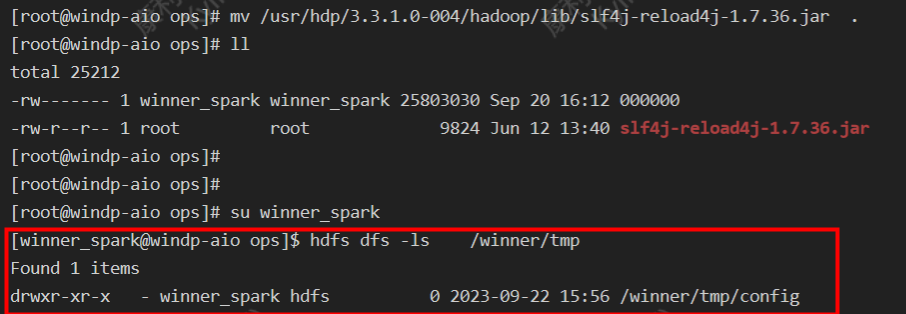
使用 hdfs shell 就会打印一串日志

大概意思是发生jar包冲突了:
分别为:
- /usr/hdp/3.3.1.0-004/hadoop/lib/slf4j-reload4j-1.7.36.jar
- /usr/hdp/3.3.1.0-004/tez/lib/slf4j-reload4j-1.7.36.jar
解决方案:移除其中一个jar包即可
2.7 hive 查询报错
- select count(*) from kangll.site_deviceprobe_map_history;
- Query ID = winner_spark_20230922162852_eb62ef6c-74c7-4950-82f8-33084a326de8
- Total jobs = 1
- Launching Job 1 out of 1
- FAILED: Execution Error, return code 1 from org.apache.hadoop.hive.ql.exec.tez.TezTask
Tez时检查到用过多内存或者资源不够而被NodeManager杀死进程问题,这种问题是从服务器上运行的Container试图使用过多的内存,而被NodeManager kill掉了。
内存问题,我们把hive server2 和metastore默认内存调小一点。

参考文章:
-
相关阅读:
Fiddler抓包常用功能介绍
Python 编程基础 | 第一章-预备知识 | 1.5、开发工具
DispatcherServlet初始化之遍历HandlerMethod
项目上线就炸,这谁受得了
ChatGPT AIGC 总结Vlookup的20种不同用法
17-spark任务划分
前端vue2中全局事件EventBus的使用方法
【数据结构】——单链表(增删查改)
10个设计人士应该关注的国内外资源网站
leetCode 1143.最长公共子序列 动态规划
- 原文地址:https://blog.csdn.net/qq_35995514/article/details/133413824
