-
NestJs和Vite使用monorepo管理项目中,需要使用共享的文件夹步骤
NestJs和Vite使用monorepo管理项目中,需要使用共享的文件夹步骤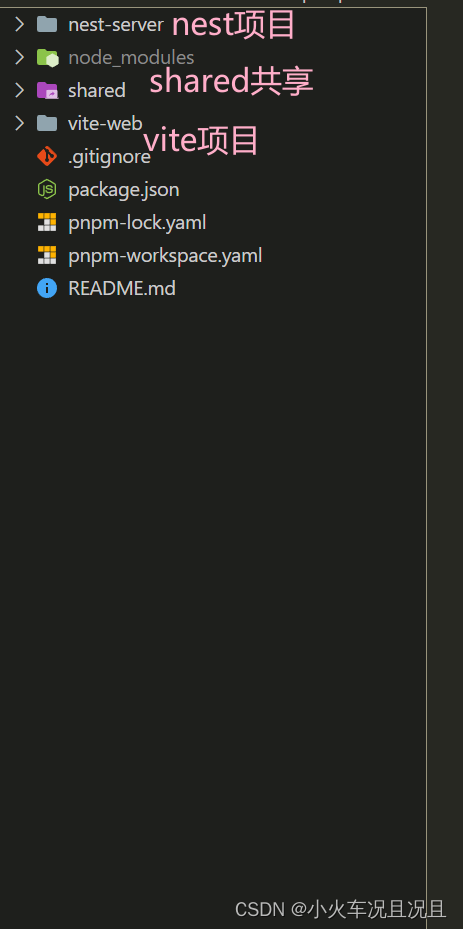
1 首先需要将
nest-cli打包的功能通过webpack接管nest-cli.json文件内容{ "$schema": "https://json.schemastore.org/nest-cli", "collection": "@nestjs/schematics", "sourceRoot": "src", "compilerOptions": { "webpack": true, "deleteOutDir": true, "tsConfigPath": "./tsconfig.build.json" } }- 1
- 2
- 3
- 4
- 5
- 6
- 7
- 8
- 9
- 10
根目录创建
webpack.config.js文件. 使用nest-cli创建项目时, 已经安装了webpack的基本模块,因此可以直接使用
文件内容, 就按照下面的内容进行修改即可const path = require("path") const webpack = require("webpack") const CopyPlugin = require("copy-webpack-plugin") const sharedDirPath = path.resolve(__dirname, "../shared") module.exports = { entry: "./src/main.ts", watch: true, target: "node", module: { rules: [ { test: /\.ts?$/, use: "ts-loader", exclude: /node_modules/ } ] }, mode: "development", resolve: { extensions: [".tsx", ".ts", ".js"], alias: { "@shared": sharedDirPath } }, plugins: [ new webpack.HotModuleReplacementPlugin(), new CopyPlugin({ patterns: [ { from: sharedDirPath, to: "shared" } ] }) ], output: { path: path.join(__dirname, "dist"), filename: "main.js" } }- 1
- 2
- 3
- 4
- 5
- 6
- 7
- 8
- 9
- 10
- 11
- 12
- 13
- 14
- 15
- 16
- 17
- 18
- 19
- 20
- 21
- 22
- 23
- 24
- 25
- 26
- 27
- 28
- 29
- 30
- 31
- 32
- 33
- 34
- 35
- 36
- 37
- 38
- 39
- 40
- 41
- 42
注意
copy-webpack-plugin的版本需要指定, 这里webpack的版本是5.73.0安装copy-webpack-plugin@9.1.0即可
pnpm add copy-webpack-plugin@9.1.0 -D, 不然会出现奇奇怪怪的问题 -
相关阅读:
微前端介绍
Open3D FPS最远点下采样
大数据有何优缺点
前端进击笔记第十九节 Angular,React,Vue 三大前端框架的设计特色
Java —— String类
DevOps-Jenkins-CI持续集成操作
Python----函数中的说明文档
Eureka介绍与使用
Python实现求解上个工作日逻辑
【Linux操作系统】进程间通信(管道、共享内存、信号量)
- 原文地址:https://blog.csdn.net/weixin_43972992/article/details/133359403
