-
uniapp Echart X轴Y轴文字被遮挡怎么办,或未能铺满整个容器
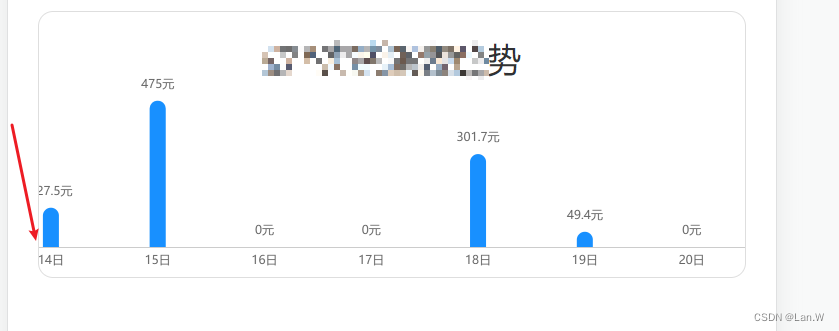
方法1: 直接设置
containLabel 字段options: {grid: {containLabel:true,},}方法2: 间接设置,但是不那么准确,自适应的页面会有问题
options: {grid: {left:'1%',right:'1%',bottom:'10%',},}方法3:同时调整4个方向 grid{} 与显示数值label同时配置
containLabel- <template>
- <view class="seven">
- <view class="chart-title">趋势</view>
- <view class="charts-box" v-if="chart">
- <qiun-data-charts
- type="column"
- :eopts="eopts"
- :chartData="chartData"
- :echartsH5="true"
- padding="0"
- margin="0"/>
- </view>
- </view>
- </template>
- //...
- eopts:{
- grid: {
- top: '8%',
- left: '-10%',
- right: '0%',
- bottom: '5%',
- containLabel: true
- },
- }
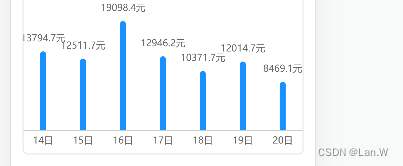
问题二:当前数据值比较多位时,也会导致图表偏移。
解决:
此问题解法:
方法5:与方法4结合,再动态调整。
grid{},
containLabel,再加动态判断数值label长度,动态调整。判断是左的数据长度了微调left的位置。增加watch观察api请求回来的数据,然后判断最左右数据值长度是多少?- todayCount(newValue) {
- console.log(">>|------------- todayCount", this.todayCount.money7)
- if (this.todayCount.money7) {
- let len = this.todayCount.money7[1].toString().length
- console.log(`-[${this.todayCount.money7[1].toString()}]`, len)// 1
- if (len < 2) {
- this.eopts.grid.left = '-10%'
- } else if (len >= 2 && len <= 5) {
- this.eopts.grid.left = '-10%'
- } else {
- this.eopts.grid.left = '-13%'
- }
- console.log(">>|-----------eopts", this.todayCount.money7, this.eopts.grid)
- }
- }
- }
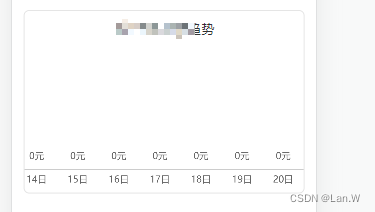
运行效果
数值为0:
数值长度为5位以上
-
相关阅读:
我对于测试团队建设的意见
Java设计模式教程
<Linux>(极简关键、省时省力)《Linux操作系统原理分析之Linux 进程管理 3》(7)
干货 | 认识数据库事务
【Java并发】聊聊ReentrantReadWriteLock锁降级和StampedLock邮戳锁
Doris实践——同程数科实时数仓建设
数据驱动的瑞幸咖啡未来会能赚!
9.5~10.5 GHz频段室内离体信道的测量与建模
linux内核结构介绍
火星车初级java面向对象
- 原文地址:https://blog.csdn.net/LlanyW/article/details/133071577
