-
【小沐学NLP】关联规则分析Apriori算法(Mlxtend库,Python)
文章目录
1、简介
官网地址:
https://rasbt.github.io/mlxtend/Mlxtend (machine learning extensions) is a Python library of useful tools for the day-to-day data science tasks.
关联规则分析是数据挖掘中最活跃的研究方法之一,目的是在一个数据集中找到各项之间的关联关系,而这种关系并没有在数据中直接体现出来。各种关联规则分析算法从不同方面入手减少可能的搜索空间大小以及减少扫描数据的次数。Apriori算法是最经典的挖掘频繁项集的算法,第一次实现在大数据集上的可行的关联规则提取,其核心思想是通过连接产生候选项及其支持度,然后通过剪枝生成频繁项集。
关联规则(Association Rules)是海量数据挖掘(Mining Massive Datasets,MMDs)非常经典的任务,其主要目标是试图从一系列事务集中挖掘出频繁项以及对应的关联规则。关联规则来自于一个家喻户晓的“啤酒与尿布”的故事。

2、Mlxtend库
2.1 安装
pip install mlxtend # or pip install mlxtend --upgrade --no-deps # or pip install -i https://pypi.tuna.tsinghua.edu.cn/simple mlxtend- 1
- 2
- 3
- 4
- 5

2.2 功能
2.2.1 User Guide
- classifier
- cluster
- data
- evaluate
- feature_extraction
- feature_selection
- file_io
- frequent_patterns
- image
- math
- plotting
- preprocessing
- regressor
- text
- utils
2.2.2 User Guide - data
- autompg_data
The Auto-MPG dataset for regression.
A function that loads the autompg dataset into NumPy arrays.
from mlxtend.data import autompg_data X, y = autompg_data() print('Dimensions: %s x %s' % (X.shape[0], X.shape[1])) print('\nHeader: %s' % ['cylinders', 'displacement', 'horsepower', 'weight', 'acceleration', 'model year', 'origin', 'car name']) print('1st row', X[0])- 1
- 2
- 3
- 4
- 5
- 6
- 7
- 8
- boston_housing_data
The Boston housing dataset for regression.
A function that loads the boston_housing_data dataset into NumPy arrays.
from mlxtend.data import boston_housing_data X, y = boston_housing_data() print('Dimensions: %s x %s' % (X.shape[0], X.shape[1])) print('1st row', X[0])- 1
- 2
- 3
- 4
- 5
- iris_data
The 3-class iris dataset for classification
A function that loads the iris dataset into NumPy arrays.
from mlxtend.data import iris_data X, y = iris_data() print('Dimensions: %s x %s' % (X.shape[0], X.shape[1])) print('\nHeader: %s' % ['sepal length', 'sepal width', 'petal length', 'petal width']) print('1st row', X[0])- 1
- 2
- 3
- 4
- 5
- 6
- 7
import numpy as np print('Classes: Setosa, Versicolor, Virginica') print(np.unique(y)) print('Class distribution: %s' % np.bincount(y))- 1
- 2
- 3
- 4
- loadlocal_mnist
A function for loading MNIST from the original ubyte files
A utility function that loads the MNIST dataset from byte-form into NumPy arrays.
from mlxtend.data import loadlocal_mnist import platform if not platform.system() == 'Windows': X, y = loadlocal_mnist( images_path='train-images-idx3-ubyte', labels_path='train-labels-idx1-ubyte') else: X, y = loadlocal_mnist( images_path='train-images.idx3-ubyte', labels_path='train-labels.idx1-ubyte') print('Dimensions: %s x %s' % (X.shape[0], X.shape[1])) print('\n1st row', X[0])- 1
- 2
- 3
- 4
- 5
- 6
- 7
- 8
- 9
- 10
- 11
- 12
- 13
import numpy as np print('Digits: 0 1 2 3 4 5 6 7 8 9') print('labels: %s' % np.unique(y)) print('Class distribution: %s' % np.bincount(y))- 1
- 2
- 3
- 4
- 5
- make_multiplexer_dataset
A function for creating multiplexer data
Function that creates a dataset generated by a n-bit Boolean multiplexer for evaluating supervised learning algorithms.
import numpy as np from mlxtend.data import make_multiplexer_dataset X, y = make_multiplexer_dataset(address_bits=2, sample_size=10, positive_class_ratio=0.5, shuffle=False, random_seed=123) print('Features:\n', X) print('\nClass labels:\n', y)- 1
- 2
- 3
- 4
- 5
- 6
- 7
- 8
- 9
- 10
- 11
- 12
- mnist_data
A subset of the MNIST dataset for classification
A function that loads the MNIST dataset into NumPy arrays.
from mlxtend.data import mnist_data X, y = mnist_data() print('Dimensions: %s x %s' % (X.shape[0], X.shape[1])) print('1st row', X[0])- 1
- 2
- 3
- 4
- 5
- three_blobs_data
The synthetic blobs for classification
A function that loads the three_blobs dataset into NumPy arrays.
from mlxtend.data import three_blobs_data X, y = three_blobs_data() print('Dimensions: %s x %s' % (X.shape[0], X.shape[1])) print('1st row', X[0])- 1
- 2
- 3
- 4
- 5
import numpy as np print('Suggested cluster labels') print(np.unique(y)) print('Label distribution: %s' % np.bincount(y))- 1
- 2
- 3
- 4
- 5
import matplotlib.pyplot as plt plt.scatter(X[:,0], X[:,1], c='white', marker='o', s=50) plt.grid() plt.show()- 1
- 2
- 3
- 4
- 5
- 6
- 7
- 8
- 9
- wine_data
A 3-class wine dataset for classification
A function that loads the Wine dataset into NumPy arrays.
from mlxtend.data import wine_data X, y = wine_data() print('Dimensions: %s x %s' % (X.shape[0], X.shape[1])) print('\nHeader: %s' % ['alcohol', 'malic acid', 'ash', 'ash alcalinity', 'magnesium', 'total phenols', 'flavanoids', 'nonflavanoid phenols', 'proanthocyanins', 'color intensity', 'hue', 'OD280/OD315 of diluted wines', 'proline']) print('1st row', X[0])- 1
- 2
- 3
- 4
- 5
- 6
- 7
- 8
- 9
- 10
import numpy as np print('Classes: %s' % np.unique(y)) print('Class distribution: %s' % np.bincount(y))- 1
- 2
- 3
2.2.3 User Guide - frequent_patterns
- apriori
(1)通过Apriori算法的频繁项集,用于提取频繁项集以进行关联规则挖掘的先验函数。
(2)Apriori 是一种流行的算法,用于提取具有关联规则学习应用的频繁项集。先验算法被设计为在包含交易的数据库上运行,例如商店顾客的购买。如果项集满足用户指定的支持阈值(support threshold),则将其视为“频繁”。例如,如果支持阈值(support threshold)设置为 0.5 (50%),则常用项集定义为在数据库中至少 50% 的事务中一起出现的一组项。
from mlxtend.frequent_patterns import apriori apriori(df, min_support=0.5, use_colnames=False, max_len=None, verbose=0, low_memory=False)- 1
- 2
- 3
- association_rules
从频繁项集生成关联规则,从频繁项集生成关联规则的函数。
from mlxtend.frequent_patterns import association_rules # 生成关联规则的数据帧,包括 指标“得分”、“置信度”和“提升” association_rules(df, metric='confidence', min_threshold=0.8, support_only=False)- 1
- 2
- 3
- 4
- fpgrowth
(1)通过 FP-growth 算法的频繁项集,实现 FP-Growth 以提取频繁项集以进行关联规则挖掘的函数。
(2)FP-Growth 是一种用于提取频繁项集的算法,其应用在关联规则学习中,成为已建立的先验算法的流行替代方案。- 通常,该算法被设计为在包含交易的数据库上运行,例如商店客户的购买。如果项集满足用户指定的支持阈值,则将其视为“频繁”。例如,如果支持阈值设置为 0.5 (50%),则常用项集定义为在数据库中至少 50% 的事务中一起出现的一组项。
- 特别是,与Apriori频繁模式挖掘算法的不同之处在于,FP-Growth是一种不需要生成候选模式的频繁模式挖掘算法。在内部,它使用所谓的FP树(频繁模式树)数据,而无需显式生成候选集,这对于大型数据集特别有吸引力。
from mlxtend.frequent_patterns import apriori # Get frequent itemsets from a one-hot DataFrame fpgrowth(df, min_support=0.5, use_colnames=False, max_len=None, verbose=0)- 1
- 2
- 3
- 4
- fpmax
(1)通过 FP-Max 算法实现的最大项集,实现 FP-Max 以提取最大项集以进行关联规则挖掘的函数。
(2)Apriori 算法是用于频繁生成项集的最早也是最流行的算法之一(然后频繁项集用于关联规则挖掘)。但是,Apriori 的运行时可能非常大,特别是对于具有大量唯一项的数据集,因为运行时会根据唯一项的数量呈指数级增长。- 与Apriori相比,FP-Growth 是一种频繁的模式生成算法,它将项目插入到模式搜索树中,这允许它在运行时相对于唯一项目或条目的数量线性增加。
- FP-Max是FP-Growth的变体,专注于获取最大项集。如果 X 频繁且不存在包含 X 的频繁超模式,则称项集 X 为最大值。换句话说,频繁模式 X 不能是较大频繁模式的子模式,以符合定义最大项集。
from mlxtend.frequent_patterns import apriori # Get maximal frequent itemsets from a one-hot DataFrame fpmax(df, min_support=0.5, use_colnames=False, max_len=None, verbose=0)- 1
- 2
- 3
- 4
2.3 入门示例
import numpy as np import matplotlib.pyplot as plt import matplotlib.gridspec as gridspec import itertools from sklearn.linear_model import LogisticRegression from sklearn.svm import SVC from sklearn.ensemble import RandomForestClassifier from mlxtend.classifier import EnsembleVoteClassifier from mlxtend.data import iris_data from mlxtend.plotting import plot_decision_regions # Initializing Classifiers clf1 = LogisticRegression(random_state=0) clf2 = RandomForestClassifier(random_state=0) clf3 = SVC(random_state=0, probability=True) eclf = EnsembleVoteClassifier(clfs=[clf1, clf2, clf3], weights=[2, 1, 1], voting='soft') # Loading some example data X, y = iris_data() X = X[:,[0, 2]] # Plotting Decision Regions gs = gridspec.GridSpec(2, 2) fig = plt.figure(figsize=(10, 8)) labels = ['Logistic Regression', 'Random Forest', 'RBF kernel SVM', 'Ensemble'] for clf, lab, grd in zip([clf1, clf2, clf3, eclf], labels, itertools.product([0, 1], repeat=2)): clf.fit(X, y) ax = plt.subplot(gs[grd[0], grd[1]]) fig = plot_decision_regions(X=X, y=y, clf=clf, legend=2) plt.title(lab) plt.show()- 1
- 2
- 3
- 4
- 5
- 6
- 7
- 8
- 9
- 10
- 11
- 12
- 13
- 14
- 15
- 16
- 17
- 18
- 19
- 20
- 21
- 22
- 23
- 24
- 25
- 26
- 27
- 28
- 29
- 30
- 31
- 32
- 33
- 34
- 35
- 36
- 37
- 38
- 39
- 40
- 41
- 42
- 43

3、Apriori算法
3.1 基本概念
-
关联规则的一般形式
- 关联规则的支持度(相对支持度)
项集A、B同时发生的概率称为关联规则的支持度(相对支持度)。Support(A=>B)=P(A∪B) - 关联规则的置信度
项集A发生,则项集B发生的概率为关联规则的置信度。Confidence(A=>B)=P(B∣A)
- 关联规则的支持度(相对支持度)
-
最小支持度和最小置信度
- 最小支持度是衡量支持度的一个阈值,表示项目集在统计意义上的最低重要性
- 最小置信度是衡量置信度的一个阈值,表示关联规则的最低可靠性
- 强规则是同时满足最小支持度阈值和最小置信度阈值的规则
-
项集
- 项集是项的集合。包含k 个项的集合称为k 项集
- 项集出现的频率是所有包含项集的事务计数,又称为绝对支持度或支持度计数
- 如果项集的相对支持度满足预定义的最小支持度阈值,则它是频繁项集。
-
支持度计数
- 项集A的支持度计数是事务数据集中包含项集A的事务个数,简称项集的频率或计数
- 一旦得到项集A 、 B 和A∪B的支持度计数以及所有事务个数,就可以导出对应的关联规则A=>B和B=>A,并可以检查该规则是否为强规则。
关联分析(Association Analysis):在大规模数据集中寻找有趣的关系。 频繁项集(Frequent Item Sets):经常出现在一块的物品的集合,即包含0个或者多个项的集合称为项集。 支持度(Support):数据集中包含该项集的记录所占的比例,是针对项集来说的。 置信度(Confidence):出现某些物品时,另外一些物品必定出现的概率,针对规则而言。 关联规则(Association Rules):暗示两个物品之间可能存在很强的关系。形如A->B的表达式,规则A->B的度量包括支持度和置信度 项集支持度:一个项集出现的次数与数据集所有事物数的百分比称为项集的支持度 支持度: 首先是个百分比值,指的是某个商品组合出现的次数与总次数之间的比例。支持度越高,代表这个组合(可以是单个商品)出现的频率越大。 置信度:首先是个条件概率。指的是当你购买了商品A,会有多大的概率购买商品B 提升度: 商品A的出现,对商品B的出现概率提升的程度。提升度(A→B)=置信度(A→B)/支持度(B) 什么样的数据才是频繁项集呢?从名字上来看就是出现次数多的集合,没错,但是上面算次数多呢?这里我们给出频繁项集的定义。**频繁项集:**支持度大于等于最小支持度(Min Support)阈值的项集。- 1
- 2
- 3
- 4
- 5
- 6
- 7
- 8
- 9
- 10
- 11
- 12
1、导入数据,并将数据预处理 2、计算频繁项集 3、根据各个频繁项集,分别计算支持度和置信度 4、根据提供的最小支持度和最小置信度,输出满足要求的关联规则- 1
- 2
- 3
- 4

(1)找出频繁项集(支持度必须大于等于给定的最小支持度阈值)
生成频繁项目集。
一个频繁项集的所有子集必须也是频繁的。
指定最小支持度(min_support),过滤掉非频繁项集,既能减轻计算负荷又能提高预测质量。(2)找出上步中频繁项集的规则
生成关联规则。
指定最小置信度(metric = “confidence”, min_threshold = 0.01),来过滤掉弱规则。
由频繁项集产生强关联规则。由第一步可知,未超过预定的最小支持阈值的项集已被剔除,如果剩下的这些项集又满足了预定的最小置信度阈值,那么就挖掘出了强关联规则。(3)Metrics
- ‘support’:

- ‘confidence’:

- ‘lift’:

- ‘leverage’:

- ‘conviction’:

- ‘zhangs_metric’:

Apriori算法的主要思想是找出存在于事务数据集中最大的频繁项集,再利用得到的最大频繁项集与预先设定的最小置信度阈值生成强关联规则。频繁项集的所有非空子集一定是频繁项集。
置信度confidence:confidence(x—>y)=support (xy)/ support x 提升度lift: confidence(x—>y)/ support y 规则杠杆率leverage:support (xy)- support x * support y 规则确信度conviction:(1-support y)/(1-confidence(x—>y))- 1
- 2
- 3
- 4
Apriori算法流程:
1、首先对数据库中进行一次扫描,统计每一个项出现的次数,形成候选1-项集; 2、根据minsupport阈值筛选出频繁1-项集; 3、将频繁1-项集进行组合,形成候选2-项集; 4、对数据库进行第二次扫描,为每个候选2-项集进行计数,并筛选出频繁2-项集; 5、重复上述流程,直到候选项集为空; 6、根据生成的频繁项集,通过计算相应的置信度来生成管理规则。- 1
- 2
- 3
- 4
- 5
- 6
3.2 apriori
Frequent itemsets via the Apriori algorithm.
Apriori function to extract frequent itemsets for association rule mining.3.2.1 示例 1 – 生成频繁项集
- 我们可以通过以下方式将其转换为正确的格式:TransactionEncoder
dataset = [['Milk', 'Onion', 'Nutmeg', 'Kidney Beans', 'Eggs', 'Yogurt'], ['Dill', 'Onion', 'Nutmeg', 'Kidney Beans', 'Eggs', 'Yogurt'], ['Milk', 'Apple', 'Kidney Beans', 'Eggs'], ['Milk', 'Unicorn', 'Corn', 'Kidney Beans', 'Yogurt'], ['Corn', 'Onion', 'Onion', 'Kidney Beans', 'Ice cream', 'Eggs']] import pandas as pd from mlxtend.preprocessing import TransactionEncoder te = TransactionEncoder() te_ary = te.fit(dataset).transform(dataset) df = pd.DataFrame(te_ary, columns=te.columns_) print(df)- 1
- 2
- 3
- 4
- 5
- 6
- 7
- 8
- 9
- 10
- 11
- 12
- 13

- 现在,让我们返回至少具有 60% 支持的项和项集:
from mlxtend.frequent_patterns import apriori frequent_itemsets = apriori(df, min_support=0.6) print(frequent_itemsets)- 1
- 2
- 3
- 4

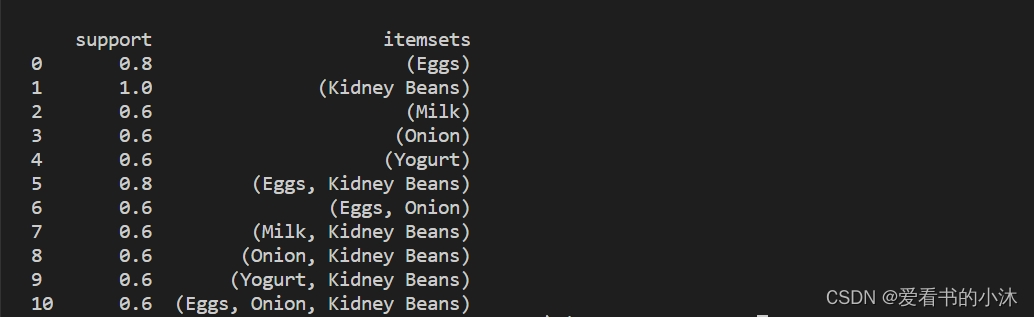
- 默认情况下, 返回项的列索引,这在下游操作(如关联规则挖掘)中可能很有用。为了更好的可读性,我们可以设置将这些整数值转换为相应的项目名称:aprioriuse_colnames=True
from mlxtend.frequent_patterns import apriori frequent_itemsets = apriori(df, min_support=0.6, use_colnames=True) print(frequent_itemsets)- 1
- 2
- 3
- 4

3.2.2 示例 2 – 选择和筛选结果
- 在于我们可以使用pandas它方便的功能来过滤结果。例如,假设我们只对长度为 2 且支持至少为 80% 的项集感兴趣。首先,我们通过创建频繁的项集,并添加一个新列来存储每个项集的长度.
from mlxtend.frequent_patterns import apriori frequent_itemsets = apriori(df, min_support=0.6, use_colnames=True) frequent_itemsets['length'] = frequent_itemsets['itemsets'].apply(lambda x: len(x)) print(frequent_itemsets)- 1
- 2
- 3
- 4
- 5
- 然后,我们可以选择满足我们所需标准的结果,如下所示:
from mlxtend.frequent_patterns import apriori frequent_itemsets = apriori(df, min_support=0.6, use_colnames=True) frequent_itemsets['length'] = frequent_itemsets['itemsets'].apply(lambda x: len(x)) frequent_itemsets = frequent_itemsets[ (frequent_itemsets['length'] == 2) & (frequent_itemsets['support'] >= 0.8) ] print(frequent_itemsets)- 1
- 2
- 3
- 4
- 5
- 6

- 同样,使用 Pandas API,我们可以根据“项集”列选择条目:
from mlxtend.frequent_patterns import apriori frequent_itemsets = apriori(df, min_support=0.6, use_colnames=True) frequent_itemsets['length'] = frequent_itemsets['itemsets'].apply(lambda x: len(x)) frequent_itemsets = frequent_itemsets[ frequent_itemsets['itemsets'] == {'Onion', 'Eggs'} ] print(frequent_itemsets)- 1
- 2
- 3
- 4
- 5
- 6

3.2.3 示例 3 – 使用稀疏表示
- 为了节省内存,您可能希望以稀疏格式表示事务数据。
import pandas as pd from mlxtend.preprocessing import TransactionEncoder te = TransactionEncoder() oht_ary = te.fit(dataset).transform(dataset, sparse=True) sparse_df = pd.DataFrame.sparse.from_spmatrix(oht_ary, columns=te.columns_) print(sparse_df)- 1
- 2
- 3
- 4
- 5
- 6
- 7

import pandas as pd from mlxtend.preprocessing import TransactionEncoder from mlxtend.frequent_patterns import apriori te = TransactionEncoder() oht_ary = te.fit(dataset).transform(dataset, sparse=True) sparse_df = pd.DataFrame.sparse.from_spmatrix(oht_ary, columns=te.columns_) # print(sparse_df) frequent_itemsets = apriori(sparse_df, min_support=0.6, use_colnames=True, verbose=1) print(frequent_itemsets)- 1
- 2
- 3
- 4
- 5
- 6
- 7
- 8
- 9
- 10
- 11
3.3 association_rules
Association rules generation from frequent itemsets.
Function to generate association rules from frequent itemsets.
模型构建,挖掘关联规则3.3.1 示例 1 – 从频繁项集生成关联规则
- 我们首先创建一个由 fpgrowth 函数生成的频繁项集的pandas.
import pandas as pd from mlxtend.preprocessing import TransactionEncoder from mlxtend.frequent_patterns import apriori, fpmax, fpgrowth dataset = [['Milk', 'Onion', 'Nutmeg', 'Kidney Beans', 'Eggs', 'Yogurt'], ['Dill', 'Onion', 'Nutmeg', 'Kidney Beans', 'Eggs', 'Yogurt'], ['Milk', 'Apple', 'Kidney Beans', 'Eggs'], ['Milk', 'Unicorn', 'Corn', 'Kidney Beans', 'Yogurt'], ['Corn', 'Onion', 'Onion', 'Kidney Beans', 'Ice cream', 'Eggs']] te = TransactionEncoder() te_ary = te.fit(dataset).transform(dataset) df = pd.DataFrame(te_ary, columns=te.columns_) frequent_itemsets = fpgrowth(df, min_support=0.6, use_colnames=True) ### alternatively: #frequent_itemsets = apriori(df, min_support=0.6, use_colnames=True) #frequent_itemsets = fpmax(df, min_support=0.6, use_colnames=True) print(frequent_itemsets)- 1
- 2
- 3
- 4
- 5
- 6
- 7
- 8
- 9
- 10
- 11
- 12
- 13
- 14
- 15
- 16
- 17
- 18
- 19
- 20

- 该函数允许您 (1) 指定您感兴趣的指标和 (2) 相应的阈值。目前实施的措施是信心和提升。假设,仅当置信度高于 70% 阈值 时,您才对从频繁项集派生的规则感兴趣。
from mlxtend.frequent_patterns import association_rules rules = association_rules(frequent_itemsets, metric="confidence", min_threshold=0.7) print(rules)- 1
- 2
- 3
- 4

3.3.2 示例 2 – 规则生成和选择标准
如果您对根据不同兴趣指标的规则感兴趣,您可以简单地调整和参数。例如,如果您只对提升分数为 >= 1.2 的规则感兴趣,则可以执行以下操作:
from mlxtend.frequent_patterns import association_rules rules = association_rules(frequent_itemsets, metric="lift", min_threshold=1.2) print(rules)- 1
- 2
- 3
- 4

我们可以按如下方式计算先行长度:from mlxtend.frequent_patterns import association_rules rules = association_rules(frequent_itemsets, metric="lift", min_threshold=1.2) # print(rules) rules["antecedent_len"] = rules["antecedents"].apply(lambda x: len(x)) print(rules)- 1
- 2
- 3
- 4
- 5
- 6

假设我们对满足以下条件的规则感兴趣:- 至少 2 个前因
- 置信度> 0.75
- 提升得分> 1.2
from mlxtend.frequent_patterns import association_rules rules = association_rules(frequent_itemsets, metric="lift", min_threshold=1.2) # print(rules) rules["antecedent_len"] = rules["antecedents"].apply(lambda x: len(x)) # print(rules) rules = rules[ (rules['antecedent_len'] >= 2) & (rules['confidence'] > 0.75) & (rules['lift'] > 1.2) ] print(rules)- 1
- 2
- 3
- 4
- 5
- 6
- 7
- 8
- 9
- 10

同样,使用 Pandas API,我们可以根据“前因”或“后因”列选择条目:from mlxtend.frequent_patterns import association_rules rules = association_rules(frequent_itemsets, metric="lift", min_threshold=1.2) # print(rules) rules["antecedent_len"] = rules["antecedents"].apply(lambda x: len(x)) # print(rules) rules[rules['antecedents'] == {'Eggs', 'Kidney Beans'}] print(rules)- 1
- 2
- 3
- 4
- 5
- 6
- 7
- 8

3.3.3 示例 3 – 具有不完整的先前和后续信息的频繁项集
计算的大多数指标取决于频繁项集输入数据帧中提供的给定规则的结果和先前支持分数。
import pandas as pd dict = {'itemsets': [['177', '176'], ['177', '179'], ['176', '178'], ['176', '179'], ['93', '100'], ['177', '178'], ['177', '176', '178']], 'support':[0.253623, 0.253623, 0.217391, 0.217391, 0.181159, 0.108696, 0.108696]} freq_itemsets = pd.DataFrame(dict) print(freq_itemsets)- 1
- 2
- 3
- 4
- 5
- 6
- 7
- 8
- 9
- 10
- 11

import pandas as pd dict = {'itemsets': [['177', '176'], ['177', '179'], ['176', '178'], ['176', '179'], ['93', '100'], ['177', '178'], ['177', '176', '178']], 'support':[0.253623, 0.253623, 0.217391, 0.217391, 0.181159, 0.108696, 0.108696]} freq_itemsets = pd.DataFrame(dict) print(freq_itemsets) from mlxtend.frequent_patterns import association_rules res = association_rules(freq_itemsets, support_only=True, min_threshold=0.1) print(res)- 1
- 2
- 3
- 4
- 5
- 6
- 7
- 8
- 9
- 10
- 11
- 12
- 13
- 14
- 15

import pandas as pd dict = {'itemsets': [['177', '176'], ['177', '179'], ['176', '178'], ['176', '179'], ['93', '100'], ['177', '178'], ['177', '176', '178']], 'support':[0.253623, 0.253623, 0.217391, 0.217391, 0.181159, 0.108696, 0.108696]} freq_itemsets = pd.DataFrame(dict) print(freq_itemsets) from mlxtend.frequent_patterns import association_rules res = association_rules(freq_itemsets, support_only=True, min_threshold=0.1) print(res) res = res[['antecedents', 'consequents', 'support']] print(res)- 1
- 2
- 3
- 4
- 5
- 6
- 7
- 8
- 9
- 10
- 11
- 12
- 13
- 14
- 15
- 16
- 17
- 18

3.3.4 示例 4 – 修剪关联规则
没有用于修剪的特定 API。相反,可以在生成的数据帧上使用 pandas API 来删除单个行。
import pandas as pd from mlxtend.preprocessing import TransactionEncoder from mlxtend.frequent_patterns import apriori, fpmax, fpgrowth from mlxtend.frequent_patterns import association_rules dataset = [['Milk', 'Onion', 'Nutmeg', 'Kidney Beans', 'Eggs', 'Yogurt'], ['Dill', 'Onion', 'Nutmeg', 'Kidney Beans', 'Eggs', 'Yogurt'], ['Milk', 'Apple', 'Kidney Beans', 'Eggs'], ['Milk', 'Unicorn', 'Corn', 'Kidney Beans', 'Yogurt'], ['Corn', 'Onion', 'Onion', 'Kidney Beans', 'Ice cream', 'Eggs']] te = TransactionEncoder() te_ary = te.fit(dataset).transform(dataset) df = pd.DataFrame(te_ary, columns=te.columns_) frequent_itemsets = fpgrowth(df, min_support=0.6, use_colnames=True) rules = association_rules(frequent_itemsets, metric="lift", min_threshold=1.2) print(rules)- 1
- 2
- 3
- 4
- 5
- 6
- 7
- 8
- 9
- 10
- 11
- 12
- 13
- 14
- 15
- 16
- 17
- 18
- 19

我们想删除规则“(洋葱、芸豆)->(鸡蛋)”。为此,我们可以定义选择掩码并删除此行import pandas as pd from mlxtend.preprocessing import TransactionEncoder from mlxtend.frequent_patterns import apriori, fpmax, fpgrowth from mlxtend.frequent_patterns import association_rules dataset = [['Milk', 'Onion', 'Nutmeg', 'Kidney Beans', 'Eggs', 'Yogurt'], ['Dill', 'Onion', 'Nutmeg', 'Kidney Beans', 'Eggs', 'Yogurt'], ['Milk', 'Apple', 'Kidney Beans', 'Eggs'], ['Milk', 'Unicorn', 'Corn', 'Kidney Beans', 'Yogurt'], ['Corn', 'Onion', 'Onion', 'Kidney Beans', 'Ice cream', 'Eggs']] te = TransactionEncoder() te_ary = te.fit(dataset).transform(dataset) df = pd.DataFrame(te_ary, columns=te.columns_) frequent_itemsets = fpgrowth(df, min_support=0.6, use_colnames=True) rules = association_rules(frequent_itemsets, metric="lift", min_threshold=1.2) print(rules) antecedent_sele = rules['antecedents'] == frozenset({'Onion', 'Kidney Beans'}) # or frozenset({'Kidney Beans', 'Onion'}) consequent_sele = rules['consequents'] == frozenset({'Eggs'}) final_sele = (antecedent_sele & consequent_sele) rules = rules.loc[ ~final_sele ] print(rules)- 1
- 2
- 3
- 4
- 5
- 6
- 7
- 8
- 9
- 10
- 11
- 12
- 13
- 14
- 15
- 16
- 17
- 18
- 19
- 20
- 21
- 22
- 23
- 24
- 25
- 26
- 27

结语
如果您觉得该方法或代码有一点点用处,可以给作者点个赞,或打赏杯咖啡;╮( ̄▽ ̄)╭
如果您感觉方法或代码不咋地//(ㄒoㄒ)//,就在评论处留言,作者继续改进;o_O???
如果您需要相关功能的代码定制化开发,可以留言私信作者;(✿◡‿◡)
感谢各位大佬童鞋们的支持!( ´ ▽´ )ノ ( ´ ▽´)っ!!! -
相关阅读:
三相组合式过电压保护器试验
09-锚点&精灵图
【附源码】Python计算机毕业设计民宿客房管理系统
To create the 45th Olympic logo by using CSS
Go-知识map
数据结构之空间复杂度、顺序表
2022.8.22-8.28 AI行业周刊(第112期):个人定位发展
程序员裁员潮:技术变革下的职业危机探讨及分析
BHQ-1 amine,1308657-79-5,BHQ染料通过FRET和静态猝灭的组合工作
Nmap漏洞检测实战
- 原文地址:https://blog.csdn.net/hhy321/article/details/132926186