-
【小程序】九宫格抽奖,页面不是有点丑,功能没啥问题,有需要直接拿去改吧
概述
常用活动抽奖功能,九宫格抽奖,两种方式切换,图片模式和文字模式,带抽奖次数。功能没啥问题,除了有点丑,css样式自己美化一下就可以了...
详细
微信小程序大转盘抽奖
演示图文字:
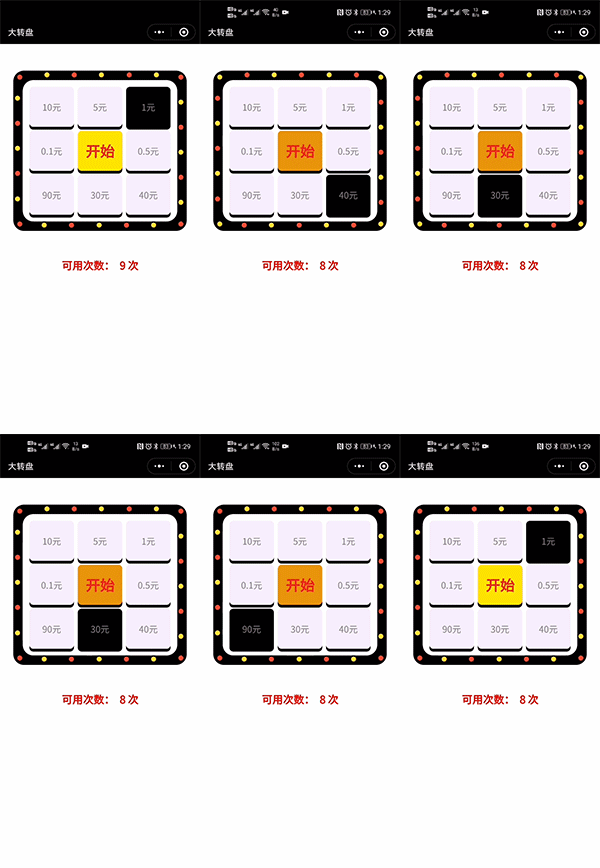
演示图 图片:

部分代码:
- //获取应用实例
- var app = getApp()
- Page({
- data: {
- circleList: [],//圆点数组
- awardList: [],//奖品数组
- colorCircleFirst: '#FFDF2F',//圆点颜色1
- colorCircleSecond: '#FE4D32',//圆点颜色2
- colorAwardDefault: '#F5F0FC',//奖品默认颜色
- colorAwardSelect: '#000000',//奖品选中颜色
- indexSelect: 0,//被选中的奖品index
- isRunning: false,//是否正在抽奖
- lawNum:10,
- imageAward: [
- '../../images/1.jpg',
- '../../images/2.jpg',
- '../../images/3.jpg',
- '../../images/4.jpg',
- '../../images/5.jpg',
- '../../images/6.jpg',
- '../../images/7.jpg',
- '../../images/8.jpg',
- ],//奖品图片数组
- textAward: [
- '10元',
- '5元',
- '1元',
- '0.5元',
- '40元',
- '30元',
- '90元',
- '0.1元',
- ],//奖品图片数组
- isImage:true,
- },
- onLoad: function () {
- var _this = this;
- //圆点设置
- var leftCircle = 7.5;
- var topCircle = 7.5;
- var circleList = [];
- for (var i = 0; i < 24; i++) {
- if (i == 0) {
- topCircle = 15;
- leftCircle = 15;
- } else if (i < 6) {
- topCircle = 7.5;
- leftCircle = leftCircle + 102.5;
- } else if (i == 6) {
- topCircle = 15
- leftCircle = 620;
- } else if (i < 12) {
- topCircle = topCircle + 94;
- leftCircle = 620;
- } else if (i == 12) {
- topCircle = 565;
- leftCircle = 620;
- } else if (i < 18) {
- topCircle = 570;
- leftCircle = leftCircle - 102.5;
- } else if (i == 18) {
- topCircle = 565;
- leftCircle = 15;
- } else if (i < 24) {
- topCircle = topCircle - 94;
- leftCircle = 7.5;
- } else {
- return
- }
- circleList.push({ topCircle: topCircle, leftCircle: leftCircle });
- }
- this.setData({
- circleList: circleList
- })
- //圆点闪烁
- setInterval(function () {
- if (_this.data.colorCircleFirst == '#FFDF2F') {
- _this.setData({
- colorCircleFirst: '#FE4D32',
- colorCircleSecond: '#FFDF2F',
- })
- } else {
- _this.setData({
- colorCircleFirst: '#FFDF2F',
- colorCircleSecond: '#FE4D32',
- })
- }
- }, 500)
- //奖品item设置
- var awardList = [];
- //间距,怎么顺眼怎么设置吧.
- var topAward = 25;
- var leftAward = 25;
- for (var j = 0; j < 8; j++) {
- if (j == 0) {
- topAward = 25;
- leftAward = 25;
- } else if (j < 3) {
- topAward = topAward;
- //166.6666是宽.15是间距.下同
- leftAward = leftAward + 166.6666 + 15;
- } else if (j < 5) {
- leftAward = leftAward;
- //150是高,15是间距,下同
- topAward = topAward + 150 + 15;
- } else if (j < 7) {
- leftAward = leftAward - 166.6666 - 15;
- topAward = topAward;
- } else if (j < 8) {
- leftAward = leftAward;
- topAward = topAward - 150 - 15;
- }
- var imageAward;
- if(this.data.isImage){
- imageAward = this.data.imageAward[j];
- }else{
- imageAward = this.data.textAward[j];
- }
- awardList.push({ topAward: topAward, leftAward: leftAward, imageAward: imageAward });
- }
- this.setData({
- awardList: awardList
- })
- },
- //开始游戏
- startGame: function () {
- if (this.data.isRunning) return
- if(this.data.lawNum<=0){
- wx.showModal({
- content: '没有更多次数了',
- showCancel: false,//去掉取消按钮
- success: function (res) {
- if (res.confirm) {
- _this.setData({
- isRunning: false
- })
- }
- }
- })
- return
- }
- let num = this.data.lawNum
- this.setData({
- isRunning: true,
- lawNum:num
- })
- var _this = this;
- var indexSelect = 0
- var i = 0;
- var timer = setInterval(function () {
- indexSelect++;
- //这里我只是简单粗暴用y=30*x+200函数做的处理.可根据自己的需求改变转盘速度
- i += 30;
- if (i > 1000) {
- //去除循环
- clearInterval(timer)
- //获奖提示
- wx.showModal({
- title: '恭喜您',
- content: '获得了第' + (_this.data.indexSelect + 1) + "个优惠券",
- showCancel: false,//去掉取消按钮
- success: function (res) {
- if (res.confirm) {
- _this.setData({
- isRunning: false
- })
- }
- }
- })
- }
- indexSelect = indexSelect % 8;
- _this.setData({
- indexSelect: indexSelect
- })
- }, (200 + i))
- }
- })
项目结构图:

-
相关阅读:
Bean 作用域和生命周期
Java面试题以及答案(六)Jvm
线上环境内存溢出-OutOfMemoryError
安全渗透测试基础知识之网络基础知识
一种多媒体框架中的零buffer拷贝实现机制
【技术分享】NetLogon于域内提权漏洞(CVE-2020-1472)
使用Golong轻松实现JWT身份验证
【C++】class的设计与使用(九)自定义函数对象(function object)
Apollo 应用与源码分析:Monitor监控-软件监控-时间延迟监控
【2022黑色星期五】5个有效的方法让客户打开您的电子邮件营销
- 原文地址:https://blog.csdn.net/hanjiepo/article/details/133026130
