-
Java之String类

作者简介: zoro-1,目前大二,正在学习Java,数据结构等
作者主页: zoro-1的主页
欢迎大家点赞 👍 收藏 ⭐ 加关注哦!💖💖String的构造
public static void main(String[] args) { // 使用常量串构造 String s1 = "hello bit"; System.out.println(s1); // 直接newString对象 String s2 = new String("hello bit"); System.out.println(s1); // 使用字符数组进行构造 char[] array = {'h','e','l','l','o','b','i','t'}; String s3 = new String(array); System.out.println(s1); }- 1
- 2
- 3
- 4
- 5
- 6
- 7
- 8
- 9
- 10
- 11
- 12
String底层
String是引用类型,内部并不存储字符串本身,在String类的实现源码中,String类实例变量如下

public static void main(String[] args) { // s1和s2引用的是不同对象 s1和s3引用的是同一对象 String s1 = new String("hello"); String s2 = new String("world"); String s3 = s1; System.out.println(s1.length()); // 获取字符串长度---输出5 System.out.println(s1.isEmpty()); // 如果字符串长度为0,返回true,否则返回false }- 1
- 2
- 3
- 4
- 5
- 6
- 7
- 8
- 9
- 10
- 11
- 12

String之间的比较
比较内容
以下是一个例子,比较两个字符串变量的内容是否相等:
str1 = "hello" str2 = "world" if str1 == str2: print("The strings are equal.") else: print("The strings are not equal.")- 1
- 2
- 3
- 4
- 5
- 6
- 7
输出结果为:
The strings are not equal.- 1
这是因为
str1变量包含的字符串与str2变量包含的字符串不同,因此它们的内容不相等。以下是一个例子,比较两个字符串变量的内容是否相等:str1 = "hello" str2 = "world" if str1 == str2: print("The strings are equal.") else: print("The strings are not equal.")- 1
- 2
- 3
- 4
- 5
- 6
- 7
输出结果为:
The strings are not equal.- 1
这是因为
str1变量包含的字符串与str2变量包含的字符串不同,因此它们的内容不相等。以下是一个例子,比较两个字符串变量的内容是否相等:str1 = "hello" str2 = "world" if str1 == str2: print("The strings are equal.") else: print("The strings are not equal.")- 1
- 2
- 3
- 4
- 5
- 6
- 7
输出结果为:
The strings are not equal.- 1
这是因为
str1变量包含的字符串与str2变量包含的字符串不同,因此它们的内容不相等。比较地址
假设有两个String对象,分别为str1和str2,它们的值都为"Hello"。
当我们使用"=="运算符比较这两个字符串时,实际上比较的是它们在内存中的地址。
例如:
String str1 = "Hello"; String str2 = "Hello"; if (str1 == str2) { System.out.println("str1和str2的地址相同"); } else { System.out.println("str1和str2的地址不同"); }- 1
- 2
- 3
- 4
- 5
- 6
- 7
- 8
输出结果为"str1和str2的地址相同",因为在Java中,如果两个字符串的值相同,则它们会被存储在同一个字符串常量池中,因此它们的地址是相同的。但是,如果我们使用new关键字创建字符串对象,则它们的地址是不同的,例如:
String str1 = new String("Hello"); String str2 = new String("Hello"); if (str1 == str2) { System.out.println("str1和str2的地址相同"); } else { System.out.println("str1和str2的地址不同"); }- 1
- 2
- 3
- 4
- 5
- 6
- 7
- 8
输出结果为"str1和str2的地址不同",因为每个字符串对象都有自己的地址空间,它们并不指向同一个地址。
字符串查找相关方法

代码演示
String s = "aaabbbcccaaabbbccc"; System.out.println(s.charAt(3)); //'b System.out.println(s.indexOf('c')); // 6 System.out.println(s.indexOf('c', 10));// 15 System.out.println(s.indexOf("bbb")); //3 System.out.println(s.indexOf("bbb", 10)); // 12 System.out.println(s.lastIndexOf('c'));// 17 System.out.println(s.lastIndexOf('c', 10)); // 8 System.out.println(s.lastIndexOf("bbb")); // 12 System.out.println(s.lastIndexOf("bbb", 10)); // 3- 1
- 2
- 3
- 4
- 5
- 6
- 7
- 8
- 9
- 10
- 11
- 12
- 13
- 14
- 15
- 16
- 17
代码执行结果:

字符串转化
数值类和字符串转化
public static void main(String[] args) { String s = "aaabbbcccaaabbbccc"; System.out.println(s.charAt(3)); // 'b' System.out.println(s.indexOf('c')); // 6 System.out.println(s.indexOf('c', 10)); // 15 System.out.println(s.indexOf("bbb")); // 3 System.out.println(s.indexOf("bbb", 10)); // 12 System.out.println(s.lastIndexOf('c')); // 17 System.out.println(s.lastIndexOf('c', 10)); // 8 System.out.println(s.lastIndexOf("bbb")); // 12 System.out.println(s.lastIndexOf("bbb", 10)); // 3 public static void main(String[] args) { // 数字转字符串 String s1 = String.valueOf(1234); String s2 = String.valueOf(12.34); String s3 = String.valueOf(true); String s4 = String.valueOf(new Student("Hanmeimei", 18)); System.out.println(s1); System.out.println(s2); System.out.println(s3); System.out.println(s4); System.out.println("================================="); // 字符串转数字 // 注意:Integer、Double等是Java中的包装类型,这个后面会讲到 int data1 = Integer.parseInt("1234"); double data2 = Double.parseDouble("12.34"); System.out.println(data1); System.out.println(data2); } }- 1
- 2
- 3
- 4
- 5
- 6
- 7
- 8
- 9
- 10
- 11
- 12
- 13
- 14
- 15
- 16
- 17
- 18
- 19
- 20
- 21
- 22
- 23
- 24
- 25
- 26
- 27
- 28
- 29
- 30
- 31
- 32
- 33
- 34
- 35
- 36
- 37
- 38
- 39
- 40
字符串大小写转化
public static void main(String[] args) { String s1 = "hello"; String s2 = "HELLO"; // 小写转大写 System.out.println(s1.toUpperCase()); // 大写转小写 System.out.println(s2.toLowerCase()); }- 1
- 2
- 3
- 4
- 5
- 6
字符串转数组
public static void main(String[] args) { String s = "hello"; // 字符串转数组 char[] ch = s.toCharArray(); for (int i = 0; i < ch.length; i++) { System.out.print(ch[i]); } System.out.println(); // 数组转字符串 String s2 = new String(ch); System.out.println(s2); }- 1
- 2
- 3
- 4
- 5
- 6
- 7
- 8
- 9
字符串格式化
public static void main(String[] args) { String s = String.format("%d-%d-%d", 2019, 9,14); System.out.println(s); }- 1
- 2
- 3
- 4
字符串替换

代码演示:public class Demo { public static void main(String[] args) { String str="abca"; System.out.println(str.replaceAll("a","b")); System.out.println(str.replaceFirst("a","b")); } }- 1
- 2
- 3
- 4
- 5
- 6
- 7
- 8
代码运行结果:

字符串拆分
代码演示:
public class Demo { public static void main(String[] args) { String str="aa aa bb"; String[] strs=str.split(" "); for(int i=0;i<strs.length;i++){ System.out.println(strs[i]); } } }- 1
- 2
- 3
- 4
- 5
- 6
- 7
- 8
- 9
运行结果:

字符串截取

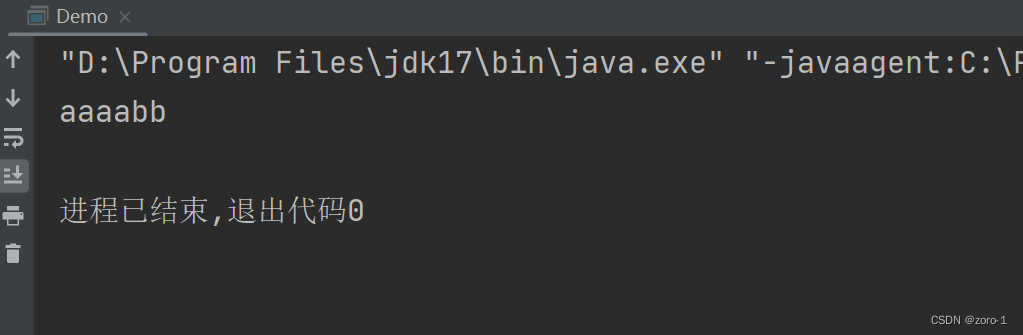
代码演示:public class Demo { public static void main(String[] args) { String str="aaaabb"; System.out.println(str.substring(5)); System.out.println(str.substring(2,5)); } }- 1
- 2
- 3
- 4
- 5
- 6
- 7
代码运行结果:

字符串的其他操作方法

public class Demo { public static void main(String[] args) { String str=" aaaabb "; System.out.println(str.trim()); } }- 1
- 2
- 3
- 4
- 5
- 6
public class Demo { public static void main(String[] args) { //这两个方法只针对字符串中的字母 String str = "hello%$$%@#$%world 哈哈哈 " ; System.out.println(str.toUpperCase()); System.out.println(str.toLowerCase()); } }- 1
- 2
- 3
- 4
- 5
- 6
- 7
- 8
- 9
- 10
- 11

重点:为什么字符串是不可变的

字符串的中的字符实际上存储在value数组中,大多数认为是因为final修饰了value数组,实际上final修饰的数组是说明这个数组不能指向其他引用,但其中的值是可以改变的,fianl修饰的String类说明这个类不能被继承
字符串的修改
注意:尽量避免直接对String类型对象进行修改,因为String类是不能修改的,所有的修改都会创建新对象,效率非常低下。
public static void main(String[] args) { String s = "hello"; s += " world"; System.out.println(s); // 输出:hello world }- 1
- 2
- 3
- 4
- 5
- 6

可以看待在对String类进行修改时,效率是非常慢的,因此:尽量避免对String的直接需要,如果要修改建议尽量使用StringBuffer或StringBuilder。
今天的介绍到这里就结束了下一篇我会介绍StringBuffer和StringBuilder的区别,,希望大家支持一下

-
相关阅读:
职场的边界感、底线原则与陷阱
揭秘GES超大规模图计算引擎HyG:图切分
C++11智能指针weak_ptr
ARFoundation系列讲解 - 79 AR室内导航四
CSS flex使用详解
2月21日,每日信息差
yolov5与yolov7算法
聊聊接口性能优化的11个小技巧
开发区块链DApp应用,引领数字经济新潮流
基于Java和IntelliJ IDEA的人事管理系统
- 原文地址:https://blog.csdn.net/ltzoro/article/details/132792190
