1 本节目标
- 使用构造函数创建对象
- 说出原型的作用
- 说出访问对象成员的规则
- 使用ES5新增的一些方法
2 构造函数和原型
2.1 概述
- 在典型的OOP语言中(如java),都存在类的概念,类就是对象的模板,对象就是类的实例,但在ES6之前,JS中并没有引入类的概念。
- ES6全称ECMAScript6.0。
- 在ES6之前,对象不是基于类创建的,而是用一种称为构建函数来定义对象和他们的特征。
- 回顾:
创建对象可通过以下三种方式:1> 对象字面量 2> new Object() 3> 自定义构造函数
<script>
var obj1 = new Object();
var obj2 = {};
function Star(uname, age) {
this.uname = uname;
this.age = age;
this.sing = function() {
console.log('我会唱歌');
}
}
var ldh = new Star('刘德华', 18);
</script>
2.2 构造函数
- 构造函数是一种特殊的函数,主要用来初始化对象,即为对象成员变量赋初始值,他总与new一起使用,我们可以把对象中一些公共的属性和方法抽取出来,然后封装到这个函数里面。
- 在JS中,使用构造函数时要注意以下两点:
1> 构造函数用于创建某一类对象,其首字母要大写
2> 构造函数要和new一起使用才有意义 - new在执行时会做四件事情:
1> 在内存中创建一个新的空对象
2> 让this指向这个新的对象
3> 执行构造函数里面的代码,给这个新对象添加属性和方法
4> 返回这个新对象(所以构造函数里面不需要return) - JavaScript的构造函数中可以添加一些成员,可以在构造函数本身上添加,也可以在构造函数内部的this上添加,通过这两种方式添加的成员,就分别称为静态成员和实例成员。
- 静态成员:在构造函数本身上添加的成员称为静态成员,只能由构造函数本身来访问。
- 实例成员:在构造函数内部创建的对象成员称为实例成员,只能由实例化的对象来访问。

2.3 构造函数的问题
- 构造函数很好用,但存在浪费内存的问题。

- 我们希望所有的对象使用同一个函数,这样就比较节省内存。
2.4 构造函数原型prototype
- 构造函数通过原型分配的函数是所有对象所共享的。
- JavaScript规定,每一个构造函数都有一个
prototype属性,指向另一个对象,注意这个prototype就是一个对象,这个对象的所有属性和方法,都会被构造函数所拥有。 - 我们可以把那些不变的方法,直接定义在prototype对象上,这样所有对象的实例就可以共享这些方法。

- 问答:
1> 原型是什么(一个对象,也称prototype为原型对象)
2> 原型的作用是什么(共享方法) - 一般情况下,我们的公共属性定义到构造函数里面,公共的方法放到原型对象身上。
2.5 对象原型__proto__
- 对象都会有一个属性
__proto__(左右两边各有两个下划线)指向构造函数的prototype原型对象,之所以我们对象可以使用构造函数prototype原型对象的属性和方法,就是因为对象有__proto__原型的存在。 - __proto__对象原型和原型对象prototype是等价的。

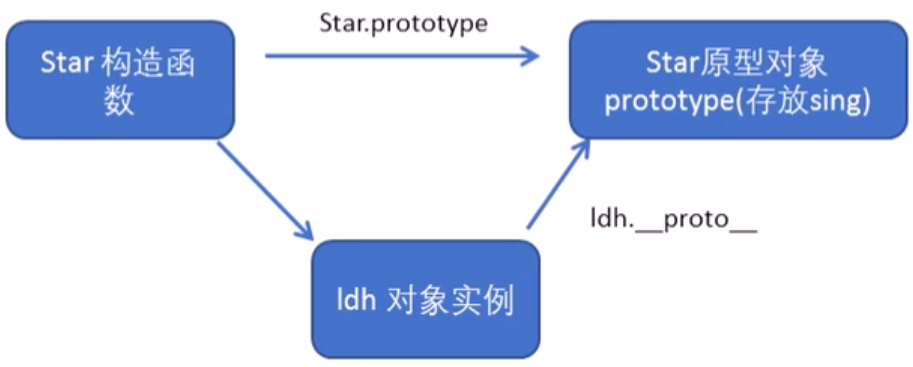
- __proto__对象原型的意义在于为对象的查找机制提供一个方向,或者说一条路线,但是他是一个非标准属性,因此在实际开发中,不可以使用这个属性,他只是内部指向原型对象prototype。
2.6 constructor构造函数
- 对象原型(
__proto__)和构造函数(prototype)原型对象里面都有一个属性constructor属性,constructor我们称为构造函数,因为它指回构造函数本身。 - constructor主要用于记录该对象引用于哪个构造函数,它可以让原型对象重新指向原来的构造函数。

2.7 构造函数、实例、原型对象三者之间的关系

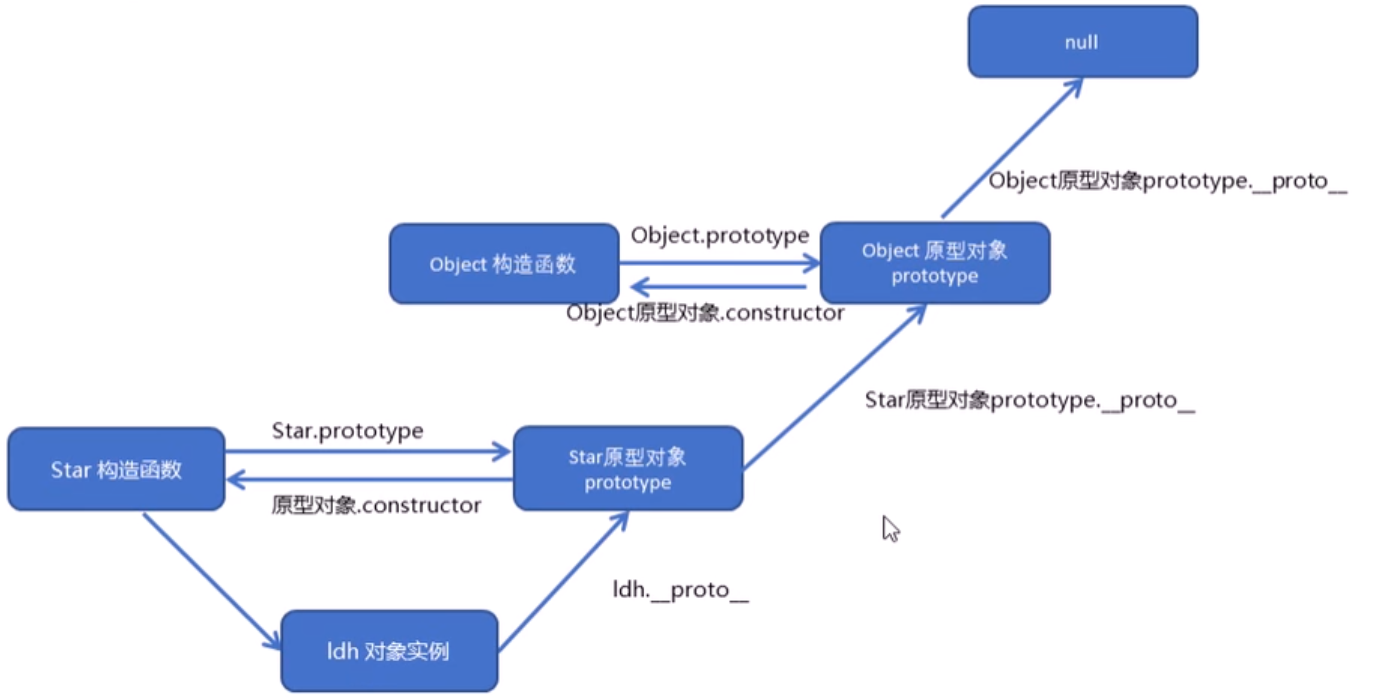
2.8 原型链

2.9 JavaScript的成员查找机制(规则)
- 当访问一个对象的属性(包括方法)时,首先查找这个对象自身有没有该属性。
- 如果没有就查找它的原型(也就是__proto__指向的prototype原型对象)。
- 如果还没有就查找原型对象的原型(Object的原型对象)。
- 以此类推一直找到Object为止(null)。
- __proto__对象原型的意义就在于为新对象成员查找机制提供一个方向,或者说一条路线。
2.10 原型对象this指向

2.11 扩展内置对象
- 可以通过原型对象,对原来的内置对象进行扩展自定义的方法,比如给数组增加自定义求偶数和的功能。
- 注意:数组和字符串内置对象不能给原型对象覆盖操作
Array.prototype = {},只能是Array.prototype.xxx = function() {}的方式

3 继承
- ES6之前并没有给我们提供extends继承,我们可以通过构造函数+原型对象模拟实现继承,被称为组合继承。
3.1 call()
- 作用:1> 调用某个函数;2> 修改函数运行时的this指向。
fun.call(thisArg, arg1, arg2, ...)- thisArg:当前调用函数this的指向对象。
- arg1, arg2:传递的其他参数。

3.2 借用构造函数继承父类型属性
- 核心原理:通过
call()把父类型的this指向子类型的this,这样就可以实现子类型继承父类型的属性。

3.3 借用原型对象继承父类型方法


4 类的本质
- 类class的本质还是函数function。
- 类的所有方法都定义在类的prototype属性上
- 类创建的实例,里面也有__proto__指向类的prototype原型对象
- 所以ES6的类他的绝大部分功能,ES5都可以做到,新的class写法只是让对象原型的写法更加清晰、更像面向对象编程的语法而已。
- 所以ES6的类其实就是语法糖。
- 语法糖:就是一种便捷写法,简单理解,有两种方法可以实现同样的功能,但是一种写法更加清晰、方便,那么这个方法就是语法糖。
- 例子:

5 ES5中的新增方法
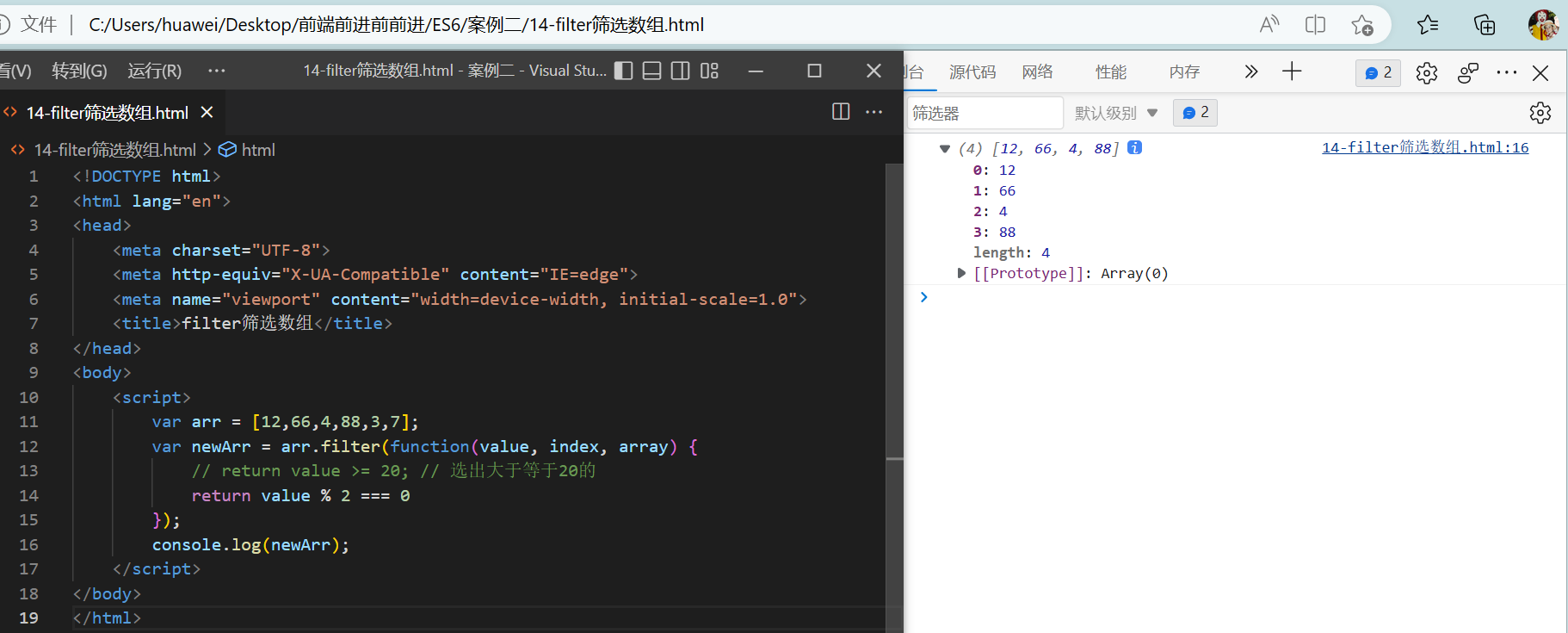
- ES5中新增了一些方法,可以很方便的操作数组或者字符串,这些方法包括:1>数组方法 2>字符串方法 3>对象方法
5.1 数组方法
DOCTYPE html>
<html lang="en">
<head>
<meta charset="UTF-8">
<meta http-equiv="X-UA-Compatible" content="IE=edge">
<meta name="viewport" content="width=device-width, initial-scale=1.0">
<title>查询商品案例title>
<style>
.search {
width: 600px;
margin: 30px auto;
}
input {
width: 65px;
padding: 0;
margin: 0;
}
input:focus {
outline: 2px solid #51c9ff;
border: 1px solid #fff;
border-radius: 2px;
}
button {
background-color: #51c9ff;
color: #fff;
border: none;
border-radius: 3px;
width: 60px;
height: 25px;
}
table {
width: 600px;
border: 1px solid #000;
border-collapse: collapse;
margin: 20px auto;
}
th,
td {
border: 1px solid #ccc;
text-align: center;
height: 50px;
}
tr:hover {
background-color: whitesmoke;
}
style>
head>
<body>
<div class="search">
按照价格查询: <input type="text" class="start"> - <input type="text" class="end">
<button class="search_price">搜索button>
按照商品名称查询: <input type="text" class="product">
<button class="search_pro">查询button>
div>
<table>
<thead>
<tr>
<th>idth>
<th>产品名称th>
<th>价格th>
tr>
thead>
<tbody>
tbody>
table>
<script>
var data = [
{
id: 1,
pname: '小米',
price: 3999
}, {
id: 2,
pname: 'oppo',
price: 999
}, {
id: 3,
pname: '荣耀',
price: 1299
}, {
id: 4,
pname: '华为',
price: 1999
}
];
var tbody = document.querySelector('tbody');
| '+ value.id +' | '+ value.pname +' | '+ value.price +' | ';
tbody.appendChild(tr); // 将行追加到tbody里面
}) */
setDate(data);
function setDate(mydata) {
tbody.innerHTML = '';
mydata.forEach(function(value) {
var tr = document.createElement('tr');
tr.innerHTML = ''+ value.id +' | '+ value.pname +' | '+ value.price +' | ';
tbody.appendChild(tr);
})
}
var search_price = document.querySelector('.search_price');
var start = document.querySelector('.start');
var end = document.querySelector('.end');
search_price.addEventListener('click',function() {
var newDate = data.filter(function(value) {
return value.price >= start.value && value.price <= end.value;
});
console.log(newDate);
setDate(newDate);
})
var search_pro = document.querySelector('.search_pro');
var product = document.querySelector('.product');
search_pro.addEventListener('click',function() {
var arr = [];
data.some(function(value) {
if(value.pname === product.value) {
arr.push(value);
return true;
}
});
setDate(arr);
})
script>
body>
html>

- 1
- 2
- 3
- 4
- 5
- 6
- 7
- 8
- 9
- 10
- 11
- 12
- 13
- 14
- 15
- 16
- 17
- 18
- 19
- 20
- 21
- 22
- 23
- 24
- 25
- 26
- 27
- 28
- 29
- 30
- 31
- 32
- 33
- 34
- 35
- 36
- 37
- 38
- 39
- 40
- 41
- 42
- 43
- 44
- 45
- 46
- 47
- 48
- 49
- 50
- 51
- 52
- 53
- 54
- 55
- 56
- 57
- 58
- 59
- 60
- 61
- 62
- 63
- 64
- 65
- 66
- 67
- 68
- 69
- 70
- 71
- 72
- 73
- 74
- 75
- 76
- 77
- 78
- 79
- 80
- 81
- 82
- 83
- 84
- 85
- 86
- 87
- 88
- 89
- 90
- 91
- 92
- 93
- 94
- 95
- 96
- 97
- 98
- 99
- 100
- 101
- 102
- 103
- 104
- 105
- 106
- 107
- 108
- 109
- 110
- 111
- 112
- 113
- 114
- 115
- 116
- 117
- 118
- 119
- 120
- 121
- 122
- 123
- 124
- 125
- 126
- 127
- 128
- 129
- 130
- 131
- 132
- 133
- 134
- 135
- 136
- 137
- 138
- 139
- 140
- 141
- 142
- 143
- 144
- 145
- 146
- 147
- 148
- 149
- 150
- 151
- 152
- 153
- 154
- 155
- 156
- 157
- 158
- 159
- 160
- 161
- 162
- 163
- 164
- 165
- 166
- 167
- 168
- 169
- 170
- 171


- forEach和some的区别:

5.2 字符串方法
trim()方法会从一个字符串的两端删除空白字符。str.trim()trim()方法并不影响字符串本身,它返回的是一个新的字符串。

5.3 对象方法
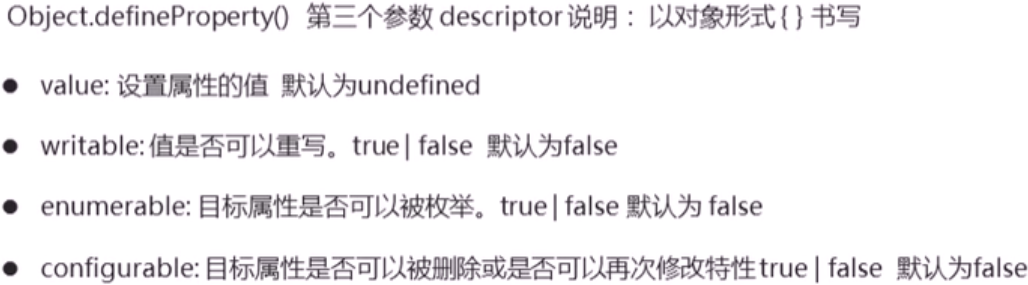
Object.defineProperty()定义对象中新属性或修改原有的属性。Object.defineProperty(obj, prop, descriptor)
obj:必需。目标对象
prop:必需。需定义或修改的属性的名字
descriptor:必需。目标属性所拥有的特性