-
springboot使用freemarker导出word
一、需求说明
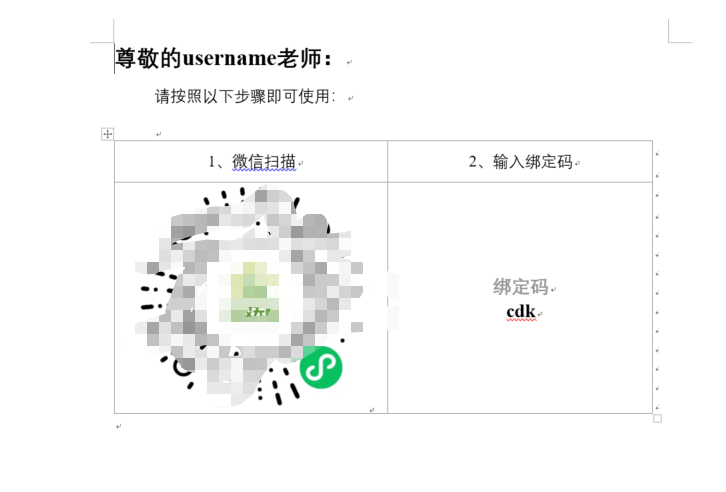
需要达到如下效果:根据需求导出word文档,在模板中渲染不通的参数图片

二、制作模板文件
1.修改word留下占位符并另存为.xml文件
此处我的占位符为username

2.将xml文件后缀名改为.ftl

3.打开ftl文件格式化内容
格式化地址:http://www.bejson.com/otherformat/xmlsort

4.将占位符替换成变量
需要会使用freemarker语法
将占位符替换成freemarker变量

三、代码实现
1.引入依赖
自行更改自己的依赖版本
<dependency> <groupId>org.springframework.bootgroupId> <artifactId>spring-boot-starter-freemarkerartifactId> dependency> <dependency> <groupId>org.springframework.bootgroupId> <artifactId>spring-boot-starter-webartifactId> dependency>- 1
- 2
- 3
- 4
- 5
- 6
- 7
- 8
- 9
- 10
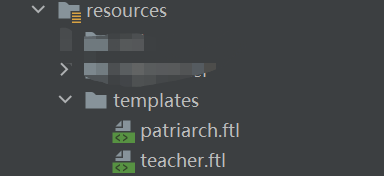
2.将模板引入resource下
3.编写word导出工具包
import freemarker.template.Configuration; import freemarker.template.Template; import lombok.extern.slf4j.Slf4j; import javax.servlet.ServletOutputStream; import javax.servlet.http.HttpServletRequest; import javax.servlet.http.HttpServletResponse; import java.io.*; import java.util.Map; import java.util.UUID; /** * word导出工具 */ @Slf4j public class WordUtils { private static Configuration configuration = null;//配置 private static String templateFolder; static { templateFolder = WordUtils.class.getResource("/templates").getPath(); configuration = new Configuration(); configuration.setDefaultEncoding("utf-8"); try { log.info("模板配置路径:" + templateFolder); configuration.setDirectoryForTemplateLoading(new File(templateFolder)); } catch (IOException e) { e.printStackTrace(); } } private WordUtils() { throw new AssertionError(); } /** * 导出word * * @param request * @param response * @param map 参数 * @param wordName 模板名,示例xxx.ftl * @param fileName 要到处的word文件名称,示例:test.doc * @throws IOException */ public static void exportMillCertificateWord(HttpServletRequest request, HttpServletResponse response, Map map, String wordName, String fileName) throws IOException { Template freemarkerTemplate = configuration.getTemplate(wordName); File file = null; InputStream fin = null; ServletOutputStream out = null; String uuName=UUID.randomUUID().toString(); try { // 调用createDoc方法生成Word文档 file = createDoc(map, freemarkerTemplate, uuName); fin = new FileInputStream(file); response.setCharacterEncoding("utf-8"); response.setContentType("application/x-download"); fileName = new String(fileName.getBytes(), "ISO-8859-1"); response.setHeader("Content-Disposition", "attachment;filename=".concat(String.valueOf(fileName))); out = response.getOutputStream(); byte[] buffer = new byte[512];// 缓冲区 int bytesToRead = -1; // 通过循环将读入的Word文件的内容输出到浏览器中 while ((bytesToRead = fin.read(buffer)) != -1) { out.write(buffer, 0, bytesToRead); } } finally { if (fin != null) fin.close(); if (out != null) out.close(); if (file != null) file.delete();// 删除临时文件 } } private static File createDoc(Map<?, ?> dataMap, Template template, String name) { File f = new File(name); Template t = template; try { //这个地方不能使用FileWriter因为需要指定编码类型否则生成的Word文档会因为有无法识别的编码而无法打开 Writer w = new OutputStreamWriter(new FileOutputStream(f), "utf-8"); t.process(dataMap, w); w.close(); } catch (Exception ex) { ex.printStackTrace(); throw new RuntimeException(ex); } return f; } }- 1
- 2
- 3
- 4
- 5
- 6
- 7
- 8
- 9
- 10
- 11
- 12
- 13
- 14
- 15
- 16
- 17
- 18
- 19
- 20
- 21
- 22
- 23
- 24
- 25
- 26
- 27
- 28
- 29
- 30
- 31
- 32
- 33
- 34
- 35
- 36
- 37
- 38
- 39
- 40
- 41
- 42
- 43
- 44
- 45
- 46
- 47
- 48
- 49
- 50
- 51
- 52
- 53
- 54
- 55
- 56
- 57
- 58
- 59
- 60
- 61
- 62
- 63
- 64
- 65
- 66
- 67
- 68
- 69
- 70
- 71
- 72
- 73
- 74
- 75
- 76
- 77
- 78
- 79
- 80
- 81
- 82
- 83
- 84
- 85
- 86
- 87
- 88
- 89
4.创建接口调用
/** * 打印导出 * @param dclx 导出类型:zhdy桌号打印、dzddy对照单打印、zkzdy准考证打印 */ @RequestMapping(value = "xxxxxForWord") public void xxxxxForWord(HttpServletRequest request, HttpServletResponse response, HttpSession session) throws IOException { //封装word需要的数据 Map<String, Object> map = new HashMap<>(); map.put("teachers",list); //模板名 String wordName="teacher.ftl"; //导出文件名 String fileName="invite_teacher_"+System.currentTimeMillis()+".doc"; WordUtils.exportMillCertificateWord(request, response, map, wordName, fileName); }- 1
- 2
- 3
- 4
- 5
- 6
- 7
- 8
- 9
- 10
- 11
- 12
- 13
- 14
- 15
- 16
-
相关阅读:
用docker部署公司的一个web系统
【sfu】network线程和主线程
Elasticsearch7.17 五 :ES读写原理、分片设计和性能优化
java-php-python-仁爱公益网站计算机毕业设计
调试bug心得
C++ :输出 Hello, World
系统编程 day10 管道的知识 (无名管道 ,有名管道 ,管道通信,管道的函数,管道的知识(什么是管道 ,,,) )
JSD-2204-酷莎商城(管理员模块)-密码加密-Day10
第10章 增长和扩展你的 Micro SaaS 应用程序
【TypeScript】枚举类型:详解常见枚举类型的 7 种用法
- 原文地址:https://blog.csdn.net/qq_43548590/article/details/132836438
