-
SpringBoot项目--电脑商城【增加/减少购物车商品数量】
1.持久层[Mapper]
1.1规划需要执行的SQL语句
1.更新该商品的数量.此SQL语句无需重复开发
update t_cart set num=?,modified_user=?,modified_time=? where cid=?2.首先进行查询需要操作的购物车数据信息【查看该条数据是否存在】
SELECT * FROM t_cart WHERE cid=?2.接口和抽象方法
在CartMapper接口中添加抽象方法
Cart findByCid(Integer cid);3 编写映射
在CartMapper文件中添加findByCid(Integer cid)方法的映射
- <select id="findByCid" resultMap="CartEntityMap">
- select *
- from t_cart
- where cid=#{cid};
- select>
4 单元测试
在CartMapperTests测试类中添加findByCid()测试方法
- @Test
- public void findByCid() {
- System.out.println(cartMapper.findByCid(1));
- }
2.业务层[service]
1规划异常
- 在更新时产生UpdateException未知异常,此异常类无需再次创建
- 可能该购物车列表数据归属不是登录的用户,抛AccessDeniedException异常,此异常类无需再次创建
- 要查询的数据不存在.抛出CartNotFoundException异常,创建该异常类并使其继承ServiceException
- /** 购物车数据不存在的异常 */
- public class CartNotFoundException extends ServiceException {
- /**重写ServiceException的所有构造方法*/
- }
2设计接口和抽象方法及实现
在业务层ICartService接口中添加addNum()抽象方法
1.先判断需要哪些参数,该抽象方法的实现依赖于CartMapper接口的两个方法:
updateNumByCid方法.参数是cid,num,String modifiedUser,Date modifiedTime
findByCid方法.参数是cid
在业务层中从购物车表查询到该商品的数量,然后再和前端传过来的增加的数量进行求和得到num
所以该方法的参数是cid,uid,username
2.判断一下该方法的返回值:
- 该方法返回值void.这样的话就需要在前端页面加location.href使该页面自己跳转到自己,实现刷新页面(不建议,每次都加载整个页面,数据量太大了)
- 返回值是Integer类型.这样的话就把数据库中更新后的数量层层传给前端,前端接收后填充到控件中就可以了
- /**
- * 增加用户的购物车中某商品的数量
- * @param cid
- * @param uid
- * @param username
- * @return 增加成功后新的数量
- */
- Integer addNum(Integer cid,Integer uid, String username);
3.在CartServiceImpl类中实现接口中的抽象方法
- /**
- * 更新用户的购物车数量的数据
- *
- * 调用了updateNumByCid(cid,num,modifiedUser,modifiedTime)
- * 和findByCid(cid)
- * Integer:返回的是最新的购物车数量
- */
- @Override
- public Integer addNum(Integer cid, Integer uid, String username) {
- Cart result = cartMapper.findByCid(cid);
- if(result == null) {
- throw new CartNotFoundException("购物车数据不存在");
- } else if(! result.getUid().equals(uid)) {
- throw new AccessDeniedException("数据非法访问");
- }
- Integer num = result.getNum() + 1;
- Integer rows = cartMapper.updateNumByCid(cid, num, username, new Date());
- if(rows != 1) {
- throw new UpdateException("更新数据失败");
- }
- return num;
- }
3单元测试
就接收个参数,然后业务层将其加一后返回,不需要再测了
3.控制层[Controller]
1处理异常
在BaseController类中添加CartNotFoundException异常类的统一管理
- else if (e instanceof CartNotFoundException) {
- result.setState(4007);
- result.setMessage("购物车表不存在该商品的异常");
- }
2设计请求
- /carts/{cid}/num/add
- post
- @PathVariable(“cid”) Integer cid, HttpSession session
- JsonResult
3处理请求
在CartController类中添加处理请求的addNum()方法
- @PostMapping("/{cid}/add_num")
- public JsonResult
addNum(@PathVariable("cid") Integer cid, - HttpSession session){
- Integer data = cartService.addNum(cid,
- getuidFromSession(session),
- getUsernameFromSession(session));
- return new JsonResult<>(OK,data);
- }
4.前端页面
1.首先确定在showCartList()函数中动态拼接的增加购物车按钮是绑定了addNum()事件,如果已经添加无需重复添加
"num-btn" type="button" value="+" onclick="addNum(#{cid})" />
2.在script标签中定义addNum()函数并编写增加购物车数量的逻辑代码
- //添加商品按钮
- function addNum(cid){
- $.ajax({
- url:"/cart/"+cid+"/add_num",
- type: "POST",
- dataType:"JSON",
- success(e){
- console.log(e.state)
- if (e.state==200){
- //
- //修改商品数量,
- // val(): 因为这里使用val,是为了修改value的值
- $("#goodsCount" + cid).val(e.data);
- //
¥#{singlePrice} - //商品单价
- //html():选中所选元素的html,可能有html元素
- let singlePrice=$("#goodsPrice"+cid).html();
- let totalPrice=singlePrice*e.data;
- //表示将总数加入页面中
- //
#{totalPrice} - $("#goodsCast"+cid).html(totalPrice);
- }else{
- alert("增加购物车数据失败"+e.message)
- }
- },
- error(xhr){
- alert("增加购物车商品数据加载产生未知的异常"+xhr.status)
- }
- })
- }
1.持久层[Mapper]
1.规划需要执行的SQL语句
1.判断当前要删除的商品是否还存在[原来的findById]
selct * from t_cart where uid=? and cid=?2.如果该商品在该用户的购物车中本来就有,则对其的操作是进行数据更新[原来的updateNumByCid]
2.接口和抽象方法
1.在CartMapper.java
- /**
- * 修改购物车数据中商品的数量
- * @param cid 购物车数据的id
- * @param num 新的数量
- * @param modifiedUser 修改执行人
- * @param modifiedTime 修改时间
- * @return 受影响的行数
- */
- Integer updateNumByCid(
- @Param("cid") Integer cid,
- @Param("num") Integer num,
- @Param("modifiedUser") String modifiedUser,
- @Param("modifiedTime") Date modifiedTime);
- /**
- * 根据用户id和商品id查询购物车中的数据
- * @param uid 用户id
- * @param pid 商品id
- * @return 匹配的购物车数据,如果该用户的购物车中并没有该商品,则返回null
- */
- Cart findByUidAndPid(
- @Param("uid") Integer uid,
- @Param("pid") Integer pid);
3.编写映射
- <update id="updateNumByCid">
- update t_cart set
- num=#{num},
- modified_user=#{modifiedUser},
- modified_time=#{modifiedTime}
- where cid=#{cid}
- update>
- <select id="findByUidAndPid" resultMap="CartEntityMap">
- select * from t_cart where uid=#{uid} AND pid=#{pid}
- select>
4.测试代码
此测试代码可以省略
2.业务层[Service]
1.规划异常
- 在删除的时候,可能该数据被删除,造成删除异常
- 在更新时产生UpdateException未知异常,此异常类无需再次创建
- 可能该购物车列表数据归属不是登录的用户,抛AccessDeniedException异常,此异常类无需再次创建
- 要查询的数据不存在.抛出CartNotFoundException异常,创建该异常类并使其继承ServiceException
2.设计接口和抽象方法的实现
1.ICartService
- /**
- * 更新用户的购物车数据--减少
- * @param cid
- * @param uid
- * @param username
- * @return
- */
- Integer subNum(Integer cid,Integer uid,String username);
2.ICartServiceImpl
- /**
- * 更新用户的购物车数据--减少
- * @param cid
- * @param uid
- * @param username
- * @return
- */
- @Override
- public Integer subNum(Integer cid, Integer uid, String username) {
- Cart result = cartMapper.findByCid(cid);
- if(result==null){
- throw new CartNotFoundException("购物车数据不存在");
- }
- if(!result.getUid().equals(uid)){
- throw new AccessDeniedException("数据非法访问");
- }
- Integer num=result.getNum()-1;
- Integer rows = cartMapper.updateNumByCid(cid, num, username, new Date());
- if(rows!=1){
- throw new UpdateException("更新数据失败");
- }
- return num;
- }
3.单元测试
- @Test
- public void subNum(){
- cartService.subNum(3,7,"管理员");
- }
3.控制层[Controller]
1.处理异常
前面增加功能已经实现,不用重复执行
2.设计请求
- /cart/sub_num/{cid}
- post
- @PathVariable("cid") Integer cid,HttpSession session
- JsonResult
3.处理请求
- /**
- * 在购物车列表中减少商品数量
- * @param cid
- * @param session
- * @return
- */
- @PostMapping("/sub_num/{cid}")
- public JsonResult
subNum(@PathVariable("cid") Integer cid, - HttpSession session){
- Integer data = cartService.subNum(cid,
- getuidFromSession(session),
- getUsernameFromSession(session));
- return new JsonResult<>(OK,data);
- }
4.前端页面
1.首先确定在showCartList()函数中动态拼接的增加购物车按钮是绑定了reduceNum()事件,如果已经添加无需重复添加
"price-#{cid}" type="button" value="-" class="num-btn" onclick="reduceNum(#{cid})" />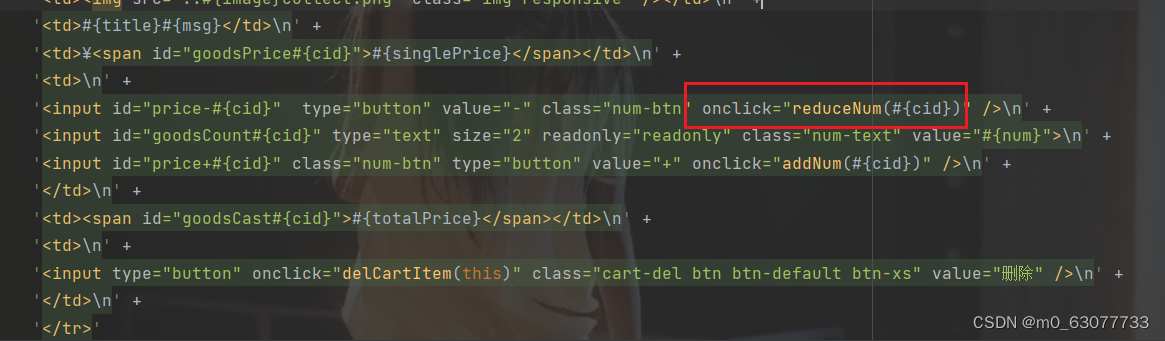
- function reduceNum(cid) {
- $.ajax({
- url: "/cart/sub_num/"+cid,
- type: "POST",
- dataType: "JSON",
- success: function(json) {
- if (json.state == 200) {
- // showCartList();
- $("#goodsCount" + cid).val(json.data);
- let price = $("#goodsPrice" + cid).html();
- let totalPrice = price * json.data;
- $("#goodsCast" + cid).html(totalPrice);
- } else {
- alert("修改商品数量失败!" + json.message);
- }
- },
- error: function(xhr) {
- alert("您的登录信息已经过期,请重新登录!HTTP响应码:" + xhr.status);
- location.href = "login.html";
- }
- });
- }

-
相关阅读:
插件创建Maven工程
语音人工智能的简单介绍
层次分析法求权重和最大特征值MATLAB代码(个人记录)
【Mqtt】学习MQTT利器 之 Mosquitto服务器的开源实现
3-1、python内置数据类型(字符串类型)
VM虚拟机无法拖拽、粘贴、复制
Elasticsearch--easy-ES框架使用,轻松操作查询Elasticsearch,简化开发
【常见算法】第三篇:回溯算法
[python]常用配置读取方法
【LLM】基于LLM的agent应用(上)
- 原文地址:https://blog.csdn.net/m0_63077733/article/details/132824236
