-
Vue2项目练手——通用后台管理项目第二节
路由限制重复跳转
路由重复跳转会出现bug

解决路由重复bug问题:clickMenu(item){ // console.log(item) // console.log(this.$route.path) // 当页面的路由与跳转的路由不一致才允许跳转 if(this.$route.path!==item.path && !(this.$route.path==='/home'&&(item.path==='/'))){ this.$router.push(item.path) } }- 1
- 2
- 3
- 4
- 5
- 6
- 7
- 8
CommonAside.vue
<template> <el-menu default-active="1-4-1" class="el-menu-vertical-demo" @open="handleOpen" @close="handleClose" :collapse="isCollapse" background-color="#545c64" text-color="#fff" active-text-color="#ffd04b"> <h3>通用后台管理系统h3> <el-menu-item @click="clickMenu(item)" v-for="item in noChildren" :key="item.name" :index="item.name"> <i :class="`el-icon-${item.icon}`">i> <span slot="title">{{item.label}}span> el-menu-item> <el-submenu :index="item.label" v-for="item in hasChildren" :key="item.label"> <template slot="title"> <i :class="`el-icon-${item.icon}`">i> <span slot="title">{{item.label}}span> template> <el-menu-item-group> <el-menu-item @click="clickMenu(subItem)" :index="subItem.path" :key="subItem.path" v-for="subItem in item.children"> {{subItem.label}} el-menu-item> el-menu-item-group> el-submenu> el-menu> template> <style lang="less" scoped> .el-menu-vertical-demo:not(.el-menu--collapse) { width: 200px; min-height: 400px; } .el-menu{ height: 100vh; //占据页面高度100% h3{ color: #fff; text-align: center; line-height: 48px; font-size: 16px; font-weight: 400; } } style> <script> export default { data() { return { isCollapse: false, menuData:[ { path:'/', name:"home", label:"首页", icon:"s-home", url:'Home/Home' }, { path:'/mall', name:"mall", label:"商品管理", icon:"video-play", url:'MallManage/MallManage' }, { path:'/user', name:"user", label:"用户管理", icon:"user", url:'userManage/userManage' }, { label:"其他", icon:"location", children:[ { path:'/page1', name:"page1", label:"页面1", icon:"setting", url:'Other/PageOne' }, { path:'/page2', name:"page2", label:"页面2", icon:"setting", url:'Other/PageTwo' }, ] }, ] }; }, methods: { handleOpen(key, keyPath) { console.log(key, keyPath); }, handleClose(key, keyPath) { console.log(key, keyPath); }, clickMenu(item){ // console.log(item) // console.log(this.$route.path) // 当页面的路由与跳转的路由不一致才允许跳转 if(this.$route.path!==item.path && !(this.$route.path==='/home'&&(item.path==='/'))){ this.$router.push(item.path) } } }, mounted() { console.log(this.$route.path) }, computed:{ //没有子菜单的数据 noChildren(){ return this.menuData.filter(item=>!item.children) }, //有子菜单数组 hasChildren(){ return this.menuData.filter(item=>item.children) } } } script>- 1
- 2
- 3
- 4
- 5
- 6
- 7
- 8
- 9
- 10
- 11
- 12
- 13
- 14
- 15
- 16
- 17
- 18
- 19
- 20
- 21
- 22
- 23
- 24
- 25
- 26
- 27
- 28
- 29
- 30
- 31
- 32
- 33
- 34
- 35
- 36
- 37
- 38
- 39
- 40
- 41
- 42
- 43
- 44
- 45
- 46
- 47
- 48
- 49
- 50
- 51
- 52
- 53
- 54
- 55
- 56
- 57
- 58
- 59
- 60
- 61
- 62
- 63
- 64
- 65
- 66
- 67
- 68
- 69
- 70
- 71
- 72
- 73
- 74
- 75
- 76
- 77
- 78
- 79
- 80
- 81
- 82
- 83
- 84
- 85
- 86
- 87
- 88
- 89
- 90
- 91
- 92
- 93
- 94
- 95
- 96
- 97
- 98
- 99
- 100
- 101
- 102
- 103
- 104
- 105
- 106
- 107
- 108
- 109
- 110
- 111
- 112
- 113
- 114
- 115
- 116
- 117
- 118
- 119
- 120
- 121
- 122
- 123
- 124
顶部header组件搭建与样式修改
右边用户菜单栏
使用的组件
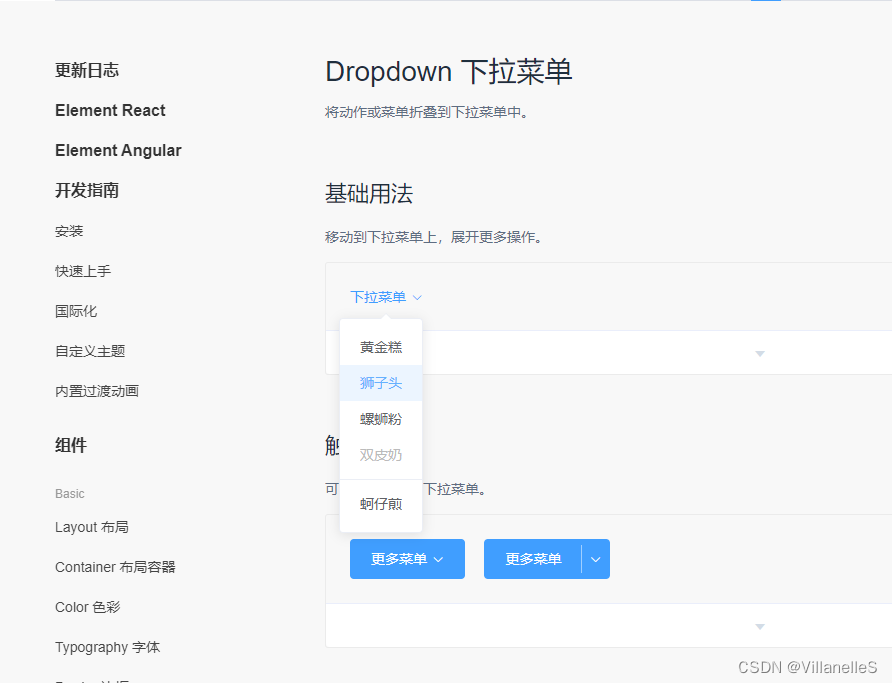
图片

CommonHeader.vue
<template> <div class="header-container"> <div class="l-content"> <el-button icon="el-icon-menu" size="mini">el-button> <span class="text">首页span> div> <div class="r-content"> <el-dropdown> <span class="el-dropdown-link"> <img src="@/assets/user.webp" alt=""> span> <el-dropdown-menu slot="dropdown"> <el-dropdown-item>个人中心el-dropdown-item> <el-dropdown-item>退出el-dropdown-item> el-dropdown-menu> el-dropdown> div> div> template> <script> export default { name: "CommonHeader", } script> <style scoped lang="less"> .header-container { height: 60px; background-color: #333; display: flex; justify-content: space-between; align-items: center; padding: 0 20px; .text { color: #fff; font-size: 14px; margin-left: 10px; } .r-content{ img{ width: 40px; height: 40px; border-radius: 50%; } } } style>- 1
- 2
- 3
- 4
- 5
- 6
- 7
- 8
- 9
- 10
- 11
- 12
- 13
- 14
- 15
- 16
- 17
- 18
- 19
- 20
- 21
- 22
- 23
- 24
- 25
- 26
- 27
- 28
- 29
- 30
- 31
- 32
- 33
- 34
- 35
- 36
- 37
- 38
- 39
- 40
- 41
- 42
- 43
- 44
- 45
- 46
- 47
- 48
- 49
- 50
- 51
- 52

Vuex实现左侧折叠
文件目录

store/index.js
import Vue from 'vue' import Vuex from 'vuex' import tab from './tab' Vue.use(Vuex) export default new Vuex.Store({ modules:{ tab } })- 1
- 2
- 3
- 4
- 5
- 6
- 7
- 8
- 9
- 10
- 11
store/tab.js
export default { state:{ isCollapse:false //控制菜单的展开还是收起 }, mutations:{ // 修改菜单展开收起的方法 collapseMenu(state){ state.isCollapse=!state.isCollapse } } }- 1
- 2
- 3
- 4
- 5
- 6
- 7
- 8
- 9
- 10
- 11
- 12
main.js
import Vue from 'vue' import App from './App.vue' import VueRouter from "vue-router"; import router from "@/router"; import ElementUI from 'element-ui'; import 'element-ui/lib/theme-chalk/index.css' import store from '@/store' Vue.config.productionTip = false Vue.use(VueRouter) Vue.use(ElementUI) new Vue({ store, router, render: h => h(App), }).$mount('#app')- 1
- 2
- 3
- 4
- 5
- 6
- 7
- 8
- 9
- 10
- 11
- 12
- 13
- 14
- 15
CommonHeader.vue
<template> <div class="header-container"> <div class="l-content"> <el-button icon="el-icon-menu" size="mini" @click="handleMenu">el-button> <span class="text">首页span> div> <div class="r-content"> <el-dropdown> <span class="el-dropdown-link"> <img src="@/assets/user.webp" alt=""> span> <el-dropdown-menu slot="dropdown"> <el-dropdown-item>个人中心el-dropdown-item> <el-dropdown-item>退出el-dropdown-item> el-dropdown-menu> el-dropdown> div> div> template> <script> export default { name: "CommonHeader", methods:{ handleMenu(){ this.$store.commit('collapseMenu') } } } script> <style scoped lang="less"> .header-container { height: 60px; background-color: #333; display: flex; justify-content: space-between; align-items: center; padding: 0 20px; .text { color: #fff; font-size: 14px; margin-left: 10px; } .r-content{ img{ width: 40px; height: 40px; border-radius: 50%; } } } style>- 1
- 2
- 3
- 4
- 5
- 6
- 7
- 8
- 9
- 10
- 11
- 12
- 13
- 14
- 15
- 16
- 17
- 18
- 19
- 20
- 21
- 22
- 23
- 24
- 25
- 26
- 27
- 28
- 29
- 30
- 31
- 32
- 33
- 34
- 35
- 36
- 37
- 38
- 39
- 40
- 41
- 42
- 43
- 44
- 45
- 46
- 47
- 48
- 49
- 50
- 51
- 52
- 53
- 54
- 55
- 56
- 57
CommonAside.vue
<template> <el-menu default-active="1-4-1" class="el-menu-vertical-demo" @open="handleOpen" @close="handleClose" :collapse="isCollapse" background-color="#545c64" text-color="#fff" active-text-color="#ffd04b"> <h3>{{isCollapse?'后台':'通用后台管理系统'}}h3> <el-menu-item @click="clickMenu(item)" v-for="item in noChildren" :key="item.name" :index="item.name"> <i :class="`el-icon-${item.icon}`">i> <span slot="title">{{item.label}}span> el-menu-item> <el-submenu :index="item.label" v-for="item in hasChildren" :key="item.label"> <template slot="title"> <i :class="`el-icon-${item.icon}`">i> <span slot="title">{{item.label}}span> template> <el-menu-item-group> <el-menu-item @click="clickMenu(subItem)" :index="subItem.path" :key="subItem.path" v-for="subItem in item.children"> {{subItem.label}} el-menu-item> el-menu-item-group> el-submenu> el-menu> template> <style lang="less" scoped> .el-menu-vertical-demo:not(.el-menu--collapse) { width: 200px; min-height: 400px; } .el-menu{ height: 100vh; //占据页面高度100% h3{ color: #fff; text-align: center; line-height: 48px; font-size: 16px; font-weight: 400; } } style> <script> export default { data() { return { menuData:[ { path:'/', name:"home", label:"首页", icon:"s-home", url:'Home/Home' }, { path:'/mall', name:"mall", label:"商品管理", icon:"video-play", url:'MallManage/MallManage' }, { path:'/user', name:"user", label:"用户管理", icon:"user", url:'userManage/userManage' }, { label:"其他", icon:"location", children:[ { path:'/page1', name:"page1", label:"页面1", icon:"setting", url:'Other/PageOne' }, { path:'/page2', name:"page2", label:"页面2", icon:"setting", url:'Other/PageTwo' }, ] }, ] }; }, methods: { handleOpen(key, keyPath) { console.log(key, keyPath); }, handleClose(key, keyPath) { console.log(key, keyPath); }, clickMenu(item){ // console.log(item) // console.log(this.$route.path) // 当页面的路由与跳转的路由不一致才允许跳转 if(this.$route.path!==item.path && !(this.$route.path==='/home'&&(item.path==='/'))){ this.$router.push(item.path) } } }, mounted() { console.log(this.$route.path) }, computed:{ //没有子菜单的数据 noChildren(){ return this.menuData.filter(item=>!item.children) }, //有子菜单数组 hasChildren(){ return this.menuData.filter(item=>item.children) }, isCollapse(){ return this.$store.state.tab.isCollapse } } } script>- 1
- 2
- 3
- 4
- 5
- 6
- 7
- 8
- 9
- 10
- 11
- 12
- 13
- 14
- 15
- 16
- 17
- 18
- 19
- 20
- 21
- 22
- 23
- 24
- 25
- 26
- 27
- 28
- 29
- 30
- 31
- 32
- 33
- 34
- 35
- 36
- 37
- 38
- 39
- 40
- 41
- 42
- 43
- 44
- 45
- 46
- 47
- 48
- 49
- 50
- 51
- 52
- 53
- 54
- 55
- 56
- 57
- 58
- 59
- 60
- 61
- 62
- 63
- 64
- 65
- 66
- 67
- 68
- 69
- 70
- 71
- 72
- 73
- 74
- 75
- 76
- 77
- 78
- 79
- 80
- 81
- 82
- 83
- 84
- 85
- 86
- 87
- 88
- 89
- 90
- 91
- 92
- 93
- 94
- 95
- 96
- 97
- 98
- 99
- 100
- 101
- 102
- 103
- 104
- 105
- 106
- 107
- 108
- 109
- 110
- 111
- 112
- 113
- 114
- 115
- 116
- 117
- 118
- 119
- 120
- 121
- 122
- 123
- 124
- 125
- 126
- 127
Main.vue
<template> <div> <el-container> <el-aside width="auto"> <CommonAside>CommonAside> el-aside> <el-container> <el-header> <CommonHeader>CommonHeader> el-header> <el-main> <router-view>router-view> el-main> el-container> el-container> div> template> <script> import CommonAside from "@/components/CommonAside.vue"; import CommonHeader from "@/components/CommonHeader.vue"; export default { name: "Main", components:{CommonAside,CommonHeader} } script> <style scoped> .el-header{ padding: 0; margin: 0; } .el-menu{ border-right: none; } style>- 1
- 2
- 3
- 4
- 5
- 6
- 7
- 8
- 9
- 10
- 11
- 12
- 13
- 14
- 15
- 16
- 17
- 18
- 19
- 20
- 21
- 22
- 23
- 24
- 25
- 26
- 27
- 28
- 29
- 30
- 31
- 32
- 33
- 34
- 35
- 36
- 37
- 38
- 39

-
相关阅读:
通过一个案例轻松入门OAuth协议
10分钟了解Flink SQL使用
TabLayout的一种圆角背景
电商业务--技术负责人 250K*15
ToDoList——原生JavaScript(超详细)
【C++11】右值引用和移动语义
打造南沙“强芯”,南沙首届IC Nansha大会召开
这份数据安全自查checklist请拿好,帮你补齐安全短板的妙招全在里面!
vue-h5移动Web的Flex布局
Virtualbox中对SD卡进行格式化和分区
- 原文地址:https://blog.csdn.net/qq_34306228/article/details/132513934
