-
PHP自己的框架留言板功能实现
目录
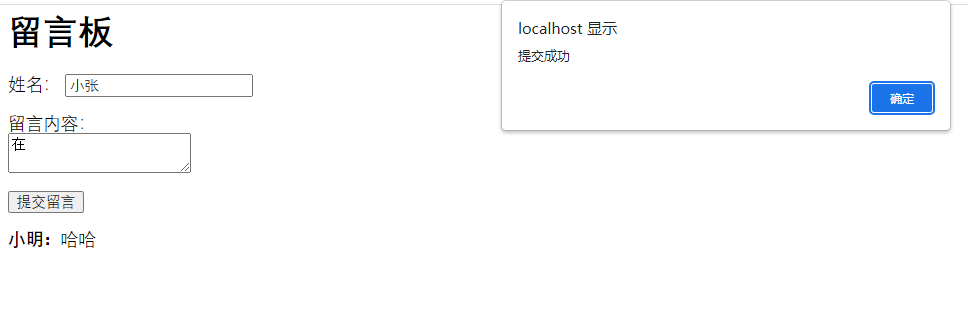
1、实现留言板功能效果

2、创建留言板数据表
- CREATE TABLE `msg` (
- `id` int(11) NOT NULL AUTO_INCREMENT,
- `name` varchar(30) DEFAULT NULL COMMENT '留言板姓名',
- `text` varchar(100) DEFAULT NULL COMMENT '留言板内容',
- `time` varchar(30) DEFAULT NULL COMMENT '添加时间',
- PRIMARY KEY (`id`)
- ) ENGINE=MyISAM AUTO_INCREMENT=6 DEFAULT CHARSET=utf8;
3、控制器提交和显示方法
- class indexCrl extends CrlBase {
- //留言板提交功能
- public function index(){
- if($_SERVER['REQUEST_METHOD'] == 'POST'){
- if($_POST['name'] && $_POST['text']){
- $data=[
- "name"=>$_POST['name'],
- "text"=>$_POST['text'],
- "time"=>date("Y-m-d H:i:s")
- ];
- $res= table("msg")->insert($data);
- if($res){
- echo json_encode(['status'=>1]);exit;
- }
- }
- echo json_encode(['status'=>0]);exit;
- }else{
- $this->display();
- }
- }
- //留言板列表
- public function lst(){
- $data= table("msg")->select();
- $this->assign('data',$data);
- $this->display();
- }
- }
4、提交留言板html
- <meta charset="UTF-8">
- html>
- <html>
- <head>
- <title>留言板title>
- head>
- <body>
- <h1>留言板h1>
- <form id="message-form">
- <label for="name">姓名:label>
- <input type="text" id="name" required><br><br>
- <label for="message">留言内容:label><br>
- <textarea id="message" required>textarea><br><br>
- <button type="submit">提交留言button>
- form>
- <div id="message-list">div>
- <script typet="text/javascript" src="http://libs.baidu.com/jquery/1.9.1/jquery.min.js">script>
- <script>
- // 当表单提交时
- document.getElementById("message-form").addEventListener("submit", function(e) {
- e.preventDefault(); // 阻止表单默认的提交行为
- // 获取用户输入的姓名和留言内容
- var name = document.getElementById("name").value;
- var message = document.getElementById("message").value;
- $.ajax({
- dataType: 'json',
- type: 'POST',
- url: '',
- data: {
- name: name,
- text: message
- },
- success: function (json) {
- if(json.status==1){
- alert('提交成功');
- // 创建一个新的留言元素
- var newMessage = document.createElement("div");
- newMessage.innerHTML = "" + name + ":" + message;
- // 将新留言添加到留言列表中
- document.getElementById("message-list").appendChild(newMessage);
- // 清空表单输入
- document.getElementById("name").value = "";
- document.getElementById("message").value = "";
- }else{
- alert('提交失败');
- }
- },
- error: function (jqXHR, textStatus, errorThrown) {
- alert('系统错误');
- }
- });
- });
- script>
- body>
- html>
5、留言板列表html
- html>
- <html>
- <head>
- <title>留言板title>
- <style>
- table {
- border-collapse: collapse;
- width: 100%;
- }
- th, td {
- padding: 8px;
- text-align: left;
- border-bottom: 1px solid #ddd;
- }
- th {
- background-color: #f2f2f2;
- }
- style>
- head>
- <body>
- <h1>留言板h1>
- <table id="message-table">
- <tr>
- <th>姓名th>
- <th>留言内容th>
- <th>时间th>
- tr>
- {foreach $data as $key=>$item}
- <tr>
- <td>{$item['name']}td>
- <td>{$item['text']}td>
- <td>{$item['time']}td>
- tr>
- {/foreach}
- table>
- body>
- html>
-
相关阅读:
Java中去掉字符串中的非中文字符
正确使用自旋锁、互斥锁
mac如何在item2中展示git分支
Navicat向mysql数据库中导入sql文件常见报错问题总结及解决办法
对自动化测试的一些展望与理解
AES和SM4各有什么特点?有什么不同之处?
PyTorch实现苹果M1芯片GPU加速:训练速度提升7倍,性能最高提升21倍
redis---分布式锁存在的问题及解决方案(Redisson)
在CentOS7上增加swap空间
开源模型应用落地-qwen2模型小试-入门篇(六)
- 原文地址:https://blog.csdn.net/weixin_39934453/article/details/132719929
