-
微信小程序地图应用总结版
1.应用场景:展示公司位置,并打开第三方app(高德,腾讯)导航到目标位置。
(1)展示位置地图

uniapp官网提供了相关组件,uniapp-map组件
 https://uniapp.dcloud.net.cn/component/map.html#
具体用法:
html结构
data数据
- startposition: {
- lat: 32.631379,//维度
- lng: 116.833490,//经度
- },
- covers: [{
- id: 1,
- latitude: 32.631379,
- longitude: 116.833490,
- iconPath: "../../static/位置.png",
- width: '50rpx',
- height: '50rpx',
- label: {
- content: '位置',
- color: '#fff',
- fontSize: 12,
- borderRadius: 5,
- padding: 5,
- textAlign: 'center',
- bgColor: '#2979ff',
- },
- }],
- address:'定位中.....'
(2)打开第三方软件
js方法uni.openLocation()
https://uniapp.dcloud.net.cn/api/location/open-location.html#openlocation用于唤起第三方软件(真机测试有效)- // 打开的点击事件, 传经纬度和地点名
- openMap() {
- // 打开第三方 (小程序)
- uni.openLocation({
- latitude: Number(this.startposition.lat),
- longitude: Number(this.startposition.lng),
- success: function() {
- console.log('success');
- },
- fail: (error) => {
- console.log(error);
- }
- });
- },
2.应用场景:软件初始定位
uniapp提供的apiuni.getLocation(OBJECT)
https://uniapp.dcloud.net.cn/api/location/location.html在微信端只能获取到经纬度,无法获取到详细中文地址,所以官方推荐使用第三方库,这里我使用的是腾讯地图,简单方便。(1)注册腾讯地图,申请key
打开微信小程序JavaScript SDK地址
https://lbs.qq.com/miniProgram/jsSdk/jsSdkGuide/jsSdkOverview,根据官网教程注册
(2)实现初始化当前定位信息
html部分
当前位置:{{address}} data数据
address:'定位中.....'函数部分
- import QQMapWX from '../tx/qqmap-wx-jssdk.js';
- onLoad() {
- // 实例化API核心类
- let qqmapsdk = new QQMapWX({
- key: '你自己获取到的KEY'
- });
- qqmapsdk.reverseGeocoder({
- success: (res)=> {
- console.log(res);
- this.address=res.result.address
- }
- })
- },
注意import引入的路径为你下载的js文件路径
3.当前定位不准确或者需要重新选择定位位置,如改变收获地址等...

实现该功能异常简单,直接使用uniapp提供的方法uni.chooseLocation(OBJECT)
https://uniapp.dcloud.net.cn/api/location/location.html#chooselocation实例代码:
- uni.chooseLocation({
- success: function (res) {
- console.log('位置名称:' + res.name);
- console.log('详细地址:' + res.address);
- console.log('纬度:' + res.latitude);
- console.log('经度:' + res.longitude);
- }
- });
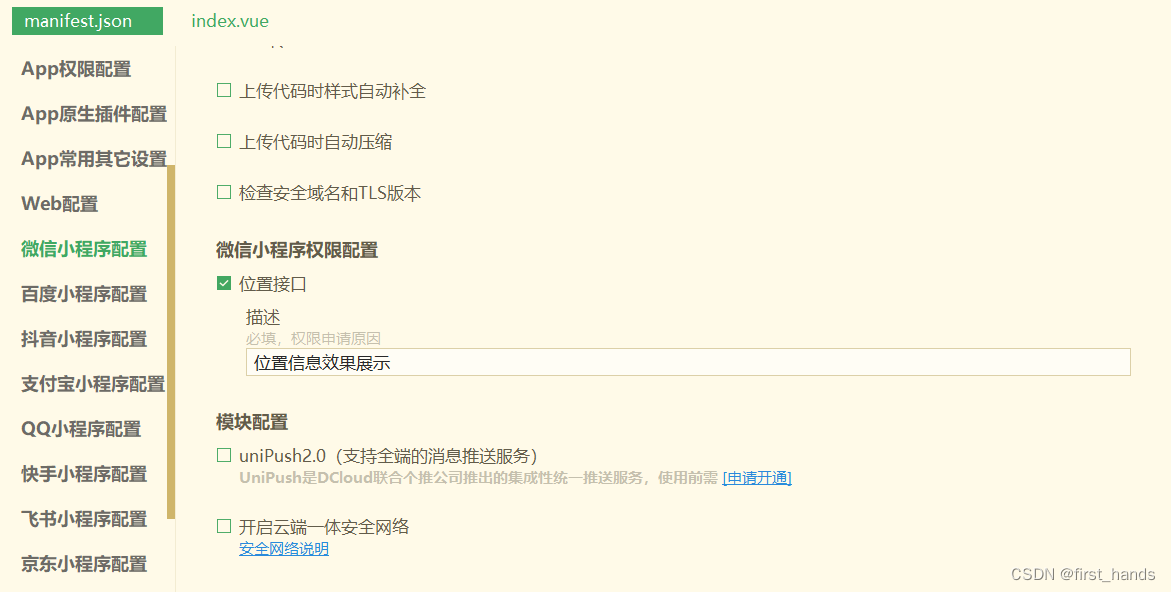
4.开启定位需要的配置

manifest.json需要在mp-weixi中添加代码
- "permission": {
- "scope.userLocation": {
- "desc": "位置信息效果展示"
- }
- },
- "requiredPrivateInfos": ["chooseLocation", "getLocation"]
也可以在配置中更改
-
相关阅读:
【数据结构】——排序
[Unity]对接华为sdk 登录
C++ fstream类移动读写指针和字节数形式获取该指针位置(seekp、seekg、tellg、tellp)
C++数据存储、表示形式和基本运算
Minio
Vue根据条件更改列表明细某一行的背景颜色-简单实现
rk3568 SDK的buildroot添加package
【活体检测】“深度学习驱动的人脸反欺诈检测系统:性能提升与多模型支持“
Python实验项目4 :面对对象程序设计
无代码开发发送邮件入门教程
- 原文地址:https://blog.csdn.net/first_hands/article/details/132637254
