可以先看下列文章
目录
ElasticSearch 实现分词全文检索 - 概述
ElasticSearch 实现分词全文检索 - ES、Kibana、IK安装
ElasticSearch 实现分词全文检索 - Restful基本操作
ElasticSearch 实现分词全文检索 - Java SpringBoot ES 索引操作
ElasticSearch 实现分词全文检索 - Java SpringBoot ES 文档操作
ElasticSearch 实现分词全文检索 - 测试数据准备
ElasticSearch 实现分词全文检索 - term、terms查询
ElasticSearch 实现分词全文检索 - match、match_all、multimatch查询
ElasticSearch 实现分词全文检索 - id、ids、prefix、fuzzy、wildcard、range、regexp 查询
ElasticSearch 实现分词全文检索 - Scroll 深分页
ElasticSearch 实现分词全文检索 - delete-by-query
ElasticSearch 实现分词全文检索 - 复合查询
ElasticSearch 实现分词全文检索 - filter查询
ElasticSearch 实现分词全文检索 - 高亮查询
ElasticSearch 实现分词全文检索 - 聚合查询 cardinality
ElasticSearch 实现分词全文检索 - 经纬度查询
ElasticSearch 实现分词全文检索 - 搜素关键字自动补全(suggest)
ElasticSearch 实现分词全文检索 - SpringBoot 完整实现 Demo 附源码
需求
做一个类似百度的全文搜索功能
- 搜素关键字自动补全(suggest)
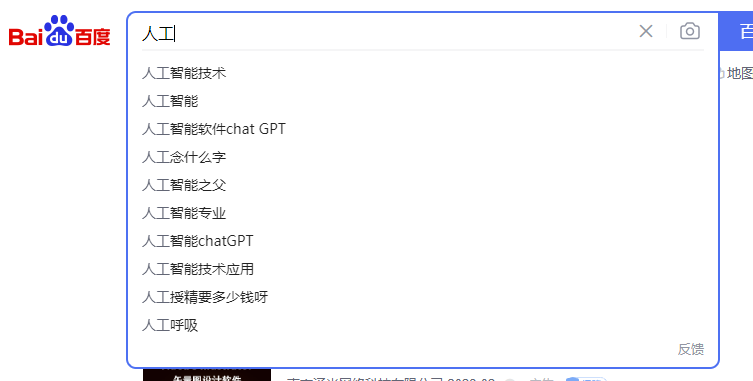
- 分词全文搜索

所用的技术如下:
- ElasticSearch
- Kibana 管理界面
- IK Analysis 分词器
- SpringBoot
实现流程
可以通过 Canal 对 MySQL binlog 进行数据同步,或者 flink 或者 SpringBoot 直接往ES里添加数据
当前以 SpringBoot 直接代码同步为例(小项目此方法简单)

全文步骤

- 启动项目时,通过 Bean ,对 ES Client 对象实例化(ElasticSearchConfig.java) 点击查看:Java Bean 注册对象
- 第一步:系统初始化,创建索引(EsIndexTest.createIndexTest)
- 第二步:模拟后台管理员,在添加文章时,将要检查的字段内容,同步到ES中(EsIndexTest.addArticleTest)
- 第三步:模拟用户搜索,在搜索框中查关键词“人工”(EsIndexTest.suggestTest) 点击查看:搜素关键字自动补全(suggest)
- 第四步:返回自动补全关键词,选择“人工智能技术”进行查询(EsIndexTest.earchTest)
ES 搜索方法
- term:完全匹配,搜索之前不会对搜索的关键字进行分词,直接拿关键字去文档分词库中的去匹配内容
- terms:和term的查询机制是一样,区别是可以去多个Field字段中匹配
- match:实际底层就是多个term查询,将多个term查询的结果给你封装到了一起
- match_all:查出全部内容,不指定任何查询条件。
- boolean match:基于一个Field匹配的内容,采用 and或 or 的方式 连接
- multi_match:match 针对一个field做检索,multi_match 针对多个 field 进行检索。多个 field 对应一个text
- id: 直接根据ID获取
- ids: 根据多个ID查询,类似MySQL中的 where id in (1,2,3)
- prefix:前缀查询,可以通过一个关键字去指定一个Field的前缀,从而查询到指定的文档
- fuzzy: 模糊查询,我们输入字符的大概,ES就可以 (天天凯心)可以有错别字
- wildcard:通配查询,和MySQL中的 like 差不多,可以在查询时,在字符串中指定通配符 * 和占位符?
- range:范围查询,只针对数值类型,对某一个Field进行大于或小于的范围指定查询
- regexp: 正则查询,通过你编写的正则表达式去匹配内容
PS:prefix,fuzzy,wildcard 和 regexp 查询效率相对比较低。要求效率比较高时,避免去使用]
分词器 analyzer 和 search_analyzer
- 分词器 analyzer 的作用有二:
一是 插入文档时,将 text 类型字段做分词,然后插入 倒排索引。
二是 在查询时,先对 text 类型输入做分词, 再去倒排索引搜索。 - 如果想要“索引”和“查询”, 使用不同的分词器,那么 只需要在字段上 使用 search_analyzer。这样,索引只看 analyzer,查询就看 search_analyzer。
如果没有定义,就看有没有 analyzer,再没有就去使用 ES 预设。
ik analyzer
- ik_max_word:会对文本做最细 力度的拆分
- ik_smart:会对文本做最粗粒度的拆分
两种 分词器的最佳实践: 索引时用 ik_max_word(面面俱到), 搜索时用 ik_smart(精准匹配)。
"title":{
    "type":"text",
    "analyzer":"ik_max_word",
    "search_analyzer":"ik_smart"
}
Field datatypes
String:
 text: 一般用于全文检索。将当前的Field进行分词
 keyword: 当前 Field 不会被分词
数值类型:
 long、 integer、 short、 byte、 double、 float、
 half_float:精度比float小一半
 scaled_float:根据一个long和scaled来表达一个浮点型, long=345,scaled=100 => 3.45
时间类型:
 date:针对时间类型指定具体格式,ES 可以对日期格式,化为字符串存储,但是我们建议存储为毫秒值 long,节省空间
布尔类型:
 boolean:表达true和false
二进制类型:
 binary:暂时支持Base64 encode string
范围类型(Range datatypes):
 long_range: 赋值时,无序指定具体的内容,只需要存储一个范围即可,指定gt,此,gte,lte
 integer_range:同上
 double_range:同上
 float_range: 同上
 date_range:同上
 ip_range: 同上。
经纬度类型:
 geo_point: 用来存储经纬度,结合定位的经纬度,来计算出距离
IP类型
 ip: 可以存付IPV4、IPV6
Completion 类型(Completion datatype):
  completion 提供自动补全建议
详细代码如下:
POM.XML
elasticsearch-rest-client 一定要引用,否则报错
[2023-03-10 10:57:41.793] [main] [WARN ] o.s.b.w.s.c.AnnotationConfigServletWebServerApplicationContext - Exception encountered during context initialization - cancelling refresh attempt: org.springframework.beans.factory.BeanCreationException: Error creating bean with name 'initEsClient' defined in class path resource [com/vipsoft/web/config/ElasticSearchConfig.class]: Post-processing of merged bean definition failed; nested exception is java.lang.IllegalStateException: Failed to introspect Class [org.elasticsearch.client.RestHighLevelClient] from ClassLoader [sun.misc.Launcher$AppClassLoader@18b4aac2]
10:57:41,793 |-INFO in c.q.l.core.rolling.DefaultTimeBasedFileNamingAndTriggeringPolicy - Elapsed period: Tue Mar 07 14:07:19 CST 2023
10:57:41,793 |-INFO in c.q.l.co.rolling.helper.RenameUtil - Renaming file [.\logs\warn.log] to [.\logs\warn.log.2023-03-07]
[2023-03-10 10:57:41.797] [main] [INFO ] org.apache.catalina.core.StandardService - Stopping service [Tomcat]
[2023-03-10 10:57:41.812] [main] [INFO ] o.s.b.a.l.ConditionEvaluationReportLoggingListener -

Error starting ApplicationContext. To display the conditions report re-run your application with 'debug' enabled.
[2023-03-10 10:57:41.824] [main] [ERROR] org.springframework.boot.SpringApplication - Application run failed
org.springframework.beans.factory.BeanCreationException: Error creating bean with name 'initEsClient' defined in class path resource [com/vipsoft/web/config/ElasticSearchConfig.class]: Post-processing of merged bean definition failed; nested exception is java.lang.IllegalStateException: Failed to introspect Class [org.elasticsearch.client.RestHighLevelClient] from ClassLoader [sun.misc.Launcher$AppClassLoader@18b4aac2]
	at org.springframework.beans.factory.support.AbstractAutowireCapableBeanFactory.doCreateBean(AbstractAutowireCapableBeanFactory.java:572)
	at org.springframework.beans.factory.support.AbstractAutowireCapableBeanFactory.createBean(AbstractAutowireCapableBeanFactory.java:517)
	at org.springframework.beans.factory.support.AbstractBeanFactory.lambda$doGetBean$0(AbstractBeanFactory.java:323)
	at org.springframework.beans.factory.support.DefaultSingletonBeanRegistry.getSingleton(DefaultSingletonBeanRegistry.java:226)
	at org.springframework.beans.factory.support.AbstractBeanFactory.doGetBean(AbstractBeanFactory.java:321)
	at org.springframework.beans.factory.support.AbstractBeanFactory.getBean(AbstractBeanFactory.java:202)
	at org.springframework.beans.factory.support.DefaultListableBeanFactory.preInstantiateSingletons(DefaultListableBeanFactory.java:893)
	at org.springframework.context.support.AbstractApplicationContext.finishBeanFactoryInitialization(AbstractApplicationContext.java:879)
	at org.springframework.context.support.AbstractApplicationContext.refresh(AbstractApplicationContext.java:551)
	at org.springframework.boot.web.servlet.context.ServletWebServerApplicationContext.refresh(ServletWebServerApplicationContext.java:141)
	at org.springframework.boot.SpringApplication.refresh(SpringApplication.java:747)
	at org.springframework.boot.SpringApplication.refreshContext(SpringApplication.java:397)
	at org.springframework.boot.SpringApplication.run(SpringApplication.java:315)
	at org.springframework.boot.SpringApplication.run(SpringApplication.java:1226)
	at org.springframework.boot.SpringApplication.run(SpringApplication.java:1215)
	at com.vipsoft.web.ESApplication.main(ESApplication.java:10)
Caused by: java.lang.IllegalStateException: Failed to introspect Class [org.elasticsearch.client.RestHighLevelClient] from ClassLoader [sun.misc.Launcher$AppClassLoader@18b4aac2]
	at org.springframework.util.ReflectionUtils.getDeclaredMethods(ReflectionUtils.java:481)
	at org.springframework.util.ReflectionUtils.doWithLocalMethods(ReflectionUtils.java:321)
	at org.springframework.beans.factory.annotation.InitDestroyAnnotationBeanPostProcessor.buildLifecycleMetadata(InitDestroyAnnotationBeanPostProcessor.java:232)
	at org.springframework.beans.factory.annotation.InitDestroyAnnotationBeanPostProcessor.findLifecycleMetadata(InitDestroyAnnotationBeanPostProcessor.java:210)
	at org.springframework.beans.factory.annotation.InitDestroyAnnotationBeanPostProcessor.postProcessMergedBeanDefinition(InitDestroyAnnotationBeanPostProcessor.java:149)
	at org.springframework.context.annotation.CommonAnnotationBeanPostProcessor.postProcessMergedBeanDefinition(CommonAnnotationBeanPostProcessor.java:294)
	at org.springframework.beans.factory.support.AbstractAutowireCapableBeanFactory.applyMergedBeanDefinitionPostProcessors(AbstractAutowireCapableBeanFactory.java:1094)
	at org.springframework.beans.factory.support.AbstractAutowireCapableBeanFactory.doCreateBean(AbstractAutowireCapableBeanFactory.java:569)
	... 15 common frames omitted
Caused by: java.lang.NoClassDefFoundError: org/elasticsearch/client/Cancellable
	at java.lang.Class.getDeclaredMethods0(Native Method)
	at java.lang.Class.privateGetDeclaredMethods(Class.java:2701)
	at java.lang.Class.getDeclaredMethods(Class.java:1975)
	at org.springframework.util.ReflectionUtils.getDeclaredMethods(ReflectionUtils.java:463)
	... 22 common frames omitted
Caused by: java.lang.ClassNotFoundException: org.elasticsearch.client.Cancellable
	at java.net.URLClassLoader.findClass(URLClassLoader.java:382)
	at java.lang.ClassLoader.loadClass(ClassLoader.java:418)
	at sun.misc.Launcher$AppClassLoader.loadClass(Launcher.java:355)
	at java.lang.ClassLoader.loadClass(ClassLoader.java:351)
	... 26 common frames omitted
10:57:41,825 |-INFO in c.q.l.core.rolling.DefaultTimeBasedFileNamingAndTriggeringPolicy - Elapsed period: Tue Mar 07 14:07:19 CST 2023
10:57:41,825 |-INFO in c.q.l.co.rolling.helper.RenameUtil - Renaming file [.\logs\error.log] to [.\logs\error.log.2023-03-07]
Disconnected from the target VM, address: '127.0.0.1:1810', transport: 'socket'
<dependency>
    <groupId>org.elasticsearchgroupId>
    <artifactId>elasticsearchartifactId>
    <version>7.10.1version>
dependency>

<dependency>
    <groupId>org.elasticsearch.clientgroupId>
    <artifactId>elasticsearch-rest-clientartifactId>
    <version>7.10.1version>
dependency>
<dependency>
    <groupId>org.elasticsearch.clientgroupId>
    <artifactId>elasticsearch-rest-high-level-clientartifactId>
    <version>7.10.1version>
dependency>
点击查看全部POM代码
<dependencies>

    <dependency>
        <groupId>org.elasticsearchgroupId>
        <artifactId>elasticsearchartifactId>
        <version>7.10.1version>
    dependency>

    <dependency>
        <groupId>org.elasticsearch.clientgroupId>
        <artifactId>elasticsearch-rest-clientartifactId>
        <version>7.10.1version>
    dependency>
    <dependency>
        <groupId>org.elasticsearch.clientgroupId>
        <artifactId>elasticsearch-rest-high-level-clientartifactId>
        <version>7.10.1version>
    dependency>

    <dependency>
        <groupId>cn.hutoolgroupId>
        <artifactId>hutool-allartifactId>
        <version>5.3.6version>
    dependency>

    <dependency>
        <groupId>com.alibabagroupId>
        <artifactId>fastjsonartifactId>
        <version>1.2.73version>
    dependency>


    <dependency>
        <groupId>org.springframework.bootgroupId>
        <artifactId>spring-boot-starter-webartifactId>
    dependency>
    <dependency>
        <groupId>org.springframework.bootgroupId>
        <artifactId>spring-boot-starter-actuatorartifactId>
    dependency>
    <dependency>
        <groupId>org.springframework.bootgroupId>
        <artifactId>spring-boot-starter-testartifactId>
        <scope>testscope>
        <exclusions>
            <exclusion>
                <groupId>org.junit.vintagegroupId>
                <artifactId>junit-vintage-engineartifactId>
            exclusion>
        exclusions>
    dependency>

dependencies>

<build>
    <plugins>
        <plugin>
            <groupId>org.springframework.bootgroupId>
            <artifactId>spring-boot-maven-pluginartifactId>
        plugin>
    plugins>
build>
详细程序
application.yml
server:
  port: 8088
  application:
    name: ElasticSearch Demo
Spring:
  es:
    cluster-name: VipSoft
    replicas-num: 1
    nodes: 172.16.3.88:9200
    keep-alive: 300 # 保持client 每 300秒 = 5分钟 发送数据保持http存活
ElasticSearchConfig.java
package com.vipsoft.web.config;

import org.apache.http.HttpHost;
import org.elasticsearch.client.RestClient;
import org.elasticsearch.client.RestHighLevelClient;
import org.slf4j.Logger;
import org.slf4j.LoggerFactory;
import org.springframework.boot.context.properties.ConfigurationProperties;
import org.springframework.context.annotation.Bean;
import org.springframework.context.annotation.Configuration;

import java.time.Duration;
import java.util.Arrays;


@Configuration
public class ElasticSearchConfig {

    Logger logger = LoggerFactory.getLogger(this.getClass());

    /**
     * 将 application.yml 中的配置,映射到 EsProperties 中,
     * 并 执行 EsProperties.init() 方法
     * @return
     */
    @Bean(initMethod = "init")
    @ConfigurationProperties(prefix = "spring.es")
    public EsProperties esProperties() {
        return new EsProperties();
    }

    @Bean
    public RestHighLevelClient initEsClient(EsProperties esProperties) {
        String[] nodes = esProperties.getNodes().split(EsProperties.SPLIT_NODES);
        HttpHost[] httpHosts = Arrays.stream(nodes).map(HttpHost::create).toArray(HttpHost[]::new);
        RestHighLevelClient client = new RestHighLevelClient(RestClient.builder(httpHosts).setHttpClientConfigCallback(
                requestConfig -> requestConfig.setKeepAliveStrategy((response, context) -> Duration.ofSeconds(esProperties.getKeepAlive()).toMillis())));
        logger.info("初始化 es client nodes: {}", Arrays.toString(httpHosts));
        return client;
    }
}
EsProperties.java
package com.vipsoft.web.config;

import org.slf4j.Logger;
import org.slf4j.LoggerFactory;


public class EsProperties {

    Logger logger = LoggerFactory.getLogger(this.getClass());

    public static final String SPLIT_NODES = ";";

    /**
     * 集群名称
     */
    private String clusterName;

    /**
     * 集群副本数
     */
    private Integer replicasNum;

    /**
     * 链接时长
     */
    private Integer keepAlive;

    /**
     * 节点列表
     */
    private String nodes;

    public void init() {
        String[] nodes = this.getNodes().split(EsProperties.SPLIT_NODES);
        if (this.getReplicasNum() == null) {
            int replicasNum = nodes.length - 1;
            this.setReplicasNum(replicasNum);
            logger.info("初始化 EsProperties 未指定副本数,设置默认副本数(节点数-1) replicasNum: {}", replicasNum);
        } else {
            logger.info("初始化 EsProperties 设置副本数 replicasNum: {}", this.getReplicasNum());
        }
    }

    public String getClusterName() {
        return clusterName;
    }

    public void setClusterName(String clusterName) {
        this.clusterName = clusterName;
    }

    public Integer getReplicasNum() {
        return replicasNum;
    }

    public void setReplicasNum(Integer replicasNum) {
        this.replicasNum = replicasNum;
    }

    public String getNodes() {
        return nodes;
    }

    public void setNodes(String nodes) {
        this.nodes = nodes;
    }

    public Integer getKeepAlive() {
        return keepAlive;
    }

    public void setKeepAlive(Integer keepAlive) {
        this.keepAlive = keepAlive;
    }
}
ElasticSearchUtil.java
package com.vipsoft.web.utils;

import org.elasticsearch.action.bulk.BulkRequest;
import org.elasticsearch.action.bulk.BulkResponse;
import org.elasticsearch.action.index.IndexRequest;
import org.elasticsearch.action.index.IndexResponse;
import org.elasticsearch.action.search.SearchRequest;
import org.elasticsearch.action.search.SearchResponse;
import org.elasticsearch.client.RequestOptions;
import org.elasticsearch.client.RestHighLevelClient;
import org.elasticsearch.client.indices.CreateIndexRequest;
import org.elasticsearch.client.indices.CreateIndexResponse;
import org.elasticsearch.client.indices.GetIndexRequest;
import org.elasticsearch.common.settings.Settings;
import org.elasticsearch.common.xcontent.XContentBuilder;
import org.elasticsearch.common.xcontent.XContentType;
import org.elasticsearch.index.query.QueryBuilders;
import org.elasticsearch.search.builder.SearchSourceBuilder;
import org.elasticsearch.search.sort.ScoreSortBuilder;
import org.elasticsearch.search.sort.SortOrder;
import org.elasticsearch.search.suggest.SuggestBuilder;
import org.elasticsearch.search.suggest.completion.CompletionSuggestion;
import org.elasticsearch.search.suggest.completion.CompletionSuggestionBuilder;
import org.springframework.beans.factory.annotation.Autowired;
import org.springframework.stereotype.Service;
import org.springframework.util.CollectionUtils;

import java.util.ArrayList;
import java.util.List;
import java.util.Map;

@Service
public class ElasticSearchUtil {

    /**
     * ES 服务注入
     */
    @Autowired
    private RestHighLevelClient esClient;

    /**
     * 判断索引是否存在
     */
    public Boolean indexExists(String indexName) throws Exception {
        GetIndexRequest request = new GetIndexRequest(indexName);
        return esClient.indices().exists(request, RequestOptions.DEFAULT);
    }

    /**
     * 创建 ES 索引
     */
    public CreateIndexResponse createIndex(String indexName, Settings.Builder settings, XContentBuilder mappings) throws Exception {
        //将 Settings 和 Mappings 封装到一个Request 对象中
        CreateIndexRequest request = new CreateIndexRequest(indexName)
                .settings(settings)
                .mapping(mappings);

        //通过 client 对象去连接ES并执行创建索引
        return esClient.indices().create(request, RequestOptions.DEFAULT);
    }

    /**
     * 批量创建 ES 文档
     */
    public IndexResponse createDoc(String indexName, String id, String json) throws Exception {
        //准备一个Request对象
        IndexRequest request = new IndexRequest(indexName);
        request.id(id); //手动指定ID
        request.source(json, XContentType.JSON);
        //request.opType(DocWriteRequest.OpType.INDEX); 默认使用 OpType.INDEX,如果 id 重复,会进行  覆盖更新, resp.getResult().toString() 返回 UPDATE
        //request.opType(DocWriteRequest.OpType.CREATE); 如果ID重复,会报异常 =>  document already exists

        //通过 Client 对象执行添加
        return esClient.index(request, RequestOptions.DEFAULT);
    }

    /**
     * 批量创建 ES 文档
     *
     * @param jsonMap Key = id,Value =  json
     */
    public BulkResponse batchCreateDoc(String indexName, Map jsonMap) throws Exception {
        //准备一个Request对象
        BulkRequest bulkRequest = new BulkRequest();
        for (String id : jsonMap.keySet()) {
            IndexRequest request = new IndexRequest(indexName)
                    .id(id) //手动指定ID
                    .source(jsonMap.get(id), XContentType.JSON);
            bulkRequest.add(request);
        }

        //通过 Client 对象执行添加
        return esClient.bulk(bulkRequest, RequestOptions.DEFAULT);
    }

    /**
     * 自动补全 根据用户的输入联想到可能的词或者短语
     *
     * @param indexName 索引名称
     * @param field     搜索条件字段
     * @param keywords  搜索关键字
     * @param size      匹配数量
     * @return
     * @throws Exception
     */
    public List suggest(String indexName, String field, String keywords, int size) throws Exception {
        //定义返回
        List suggestList = new ArrayList<>();
        //构建查询请求
        SearchRequest searchRequest = new SearchRequest(indexName);
        //通过查询构建器定义评分排序
        SearchSourceBuilder searchSourceBuilder = new SearchSourceBuilder();
        searchSourceBuilder.sort(new ScoreSortBuilder().order(SortOrder.DESC));
        //构造搜索建议语句,搜索条件字段
        CompletionSuggestionBuilder completionSuggestionBuilder = new CompletionSuggestionBuilder(field);
        //搜索关键字
        completionSuggestionBuilder.prefix(keywords);
        //去除重复
        completionSuggestionBuilder.skipDuplicates(true);
        //匹配数量
        completionSuggestionBuilder.size(size);
        searchSourceBuilder.suggest(new SuggestBuilder().addSuggestion("article-suggest", completionSuggestionBuilder));
        //article-suggest为返回的字段,所有返回将在article-suggest里面,可写死,sort按照评分排序
        searchRequest.source(searchSourceBuilder);
        //定义查找响应
        SearchResponse suggestResponse = esClient.search(searchRequest, RequestOptions.DEFAULT);
        //定义完成建议对象
        CompletionSuggestion completionSuggestion = suggestResponse.getSuggest().getSuggestion("article-suggest");
        List optionsList = completionSuggestion.getEntries().get(0).getOptions();
        //从optionsList取出结果
        if (!CollectionUtils.isEmpty(optionsList)) {
            optionsList.forEach(item -> suggestList.add(item.getText().toString()));
        }
        return suggestList;
    }

    /**
     * 前缀查询,可以通过一个关键字去指定一个Field的前缀,从而查询到指定的文档
     */
    public SearchResponse prefixQuery(String indexName, String searchField, String searchKeyword) throws Exception {

        //创建Request对象
        SearchRequest request = new SearchRequest(indexName);

        //XX开头的关键词查询
        SearchSourceBuilder builder = new SearchSourceBuilder();
        builder.query(QueryBuilders.prefixQuery(searchField, searchKeyword));
        request.source(builder);

        //执行查询
        return esClient.search(request, RequestOptions.DEFAULT);
    }

    /**
    * 通过 QueryBuilder 构建多字段匹配如:QueryBuilders.multiMatchQuery("人工智能","title","content")
    * multi_match => https://www.cnblogs.com/vipsoft/p/17164544.html
    */
    public SearchResponse search(String indexName, QueryBuilder query, int currPage, int pageSize) throws Exception {
        SearchRequest request = new SearchRequest(indexName);
        SearchSourceBuilder builder = new SearchSourceBuilder();
        int start = (currPage - 1) * pageSize;
        builder.from(start);
        builder.size(pageSize);
        builder.query(query);
        request.source(builder);
        return esClient.search(request, RequestOptions.DEFAULT);
    }
    //TODO 其它功能
}
ArticleDTO.java
package com.vipsoft.web.dto;

/**
 * 用于和 ES 交互的文章实体
 * 只需要匹配 标题、简介的文字,
 */
public class ArticleDTO {

    /**
     * ID 用于关联详细的数据库中的文章信息
     */
    private String id;

    /**
     * 标题 -- 用于查询
     */
    private String title;
    /**
     * 简介 -- 用于查询的结果,列表显示(不光显示标题,还要显示摘要)
     */
    private String summary;

    public String getId() {
        return id;
    }

    public void setId(String id) {
        this.id = id;
    }

    public String getTitle() {
        return title;
    }

    public void setTitle(String title) {
        this.title = title;
    }

    public String getSummary() {
        return summary;
    }

    public void setSummary(String summary) {
        this.summary = summary;
    }
}
ArticleInfo.java
package com.vipsoft.web.entity;

import java.util.Date;

/**
 * 用于和数据库交互的文章实体
 */
public class ArticleInfo {

    /**
     * ID
     */
    private String id;

    /**
     * 标题
     */
    private String title;

    /**
     * 作者
     */
    private String author;

    /**
     * 简介
     */
    private String summary;

    /**
     * 内容
     */
    private String content;

    /**
     * 创建时间
     */
    private Date createTime;

    public String getId() {
        return id;
    }

    public void setId(String id) {
        this.id = id;
    }

    public String getTitle() {
        return title;
    }

    public void setTitle(String title) {
        this.title = title;
    }

    public String getAuthor() {
        return author;
    }

    public void setAuthor(String author) {
        this.author = author;
    }

    public String getSummary() {
        return summary;
    }

    public void setSummary(String summary) {
        this.summary = summary;
    }

    public String getContent() {
        return content;
    }

    public void setContent(String content) {
        this.content = content;
    }

    public Date getCreateTime() {
        return createTime;
    }

    public void setCreateTime(Date createTime) {
        this.createTime = createTime;
    }
}
EsIndexTest.java
package com.vipsoft.web;


import com.alibaba.fastjson.JSON;
import com.vipsoft.web.config.EsProperties;
import com.vipsoft.web.dto.ArticleDTO;
import com.vipsoft.web.entity.ArticleInfo;
import com.vipsoft.web.utils.ElasticSearchUtil;

import org.elasticsearch.action.index.IndexResponse;
import org.elasticsearch.action.search.SearchResponse;
import org.elasticsearch.client.indices.CreateIndexResponse;
import org.elasticsearch.common.settings.Settings;
import org.elasticsearch.common.xcontent.XContentBuilder;
import org.elasticsearch.common.xcontent.json.JsonXContent;
import org.elasticsearch.search.SearchHit;
import org.junit.jupiter.api.Test;
import org.slf4j.Logger;
import org.slf4j.LoggerFactory;
import org.springframework.beans.BeanUtils;
import org.springframework.beans.factory.annotation.Autowired;
import org.springframework.boot.test.context.SpringBootTest;

import java.util.*;

/**
 * 单元测试
 */
@SpringBootTest
public class EsIndexTest {
    Logger logger = LoggerFactory.getLogger(this.getClass());

    @Autowired
    private ElasticSearchUtil elasticSearchUtil;
    @Autowired
    private EsProperties esProperties;

    int INDEX_NUMBER_OF_SHARDS = 5;

    String INDEX_NAME = "article-index";

    /**
     * 第一步:系统初始化,创建索引
     * 如果索引不存在,创建,输出
     */
    @Test
    void createIndexTest() throws Exception {
        boolean indexExists = elasticSearchUtil.indexExists(INDEX_NAME);
        if (!indexExists) {
            try {
                createIndex(INDEX_NAME);
                logger.info("索引【{}】,创建成功", INDEX_NAME);

                //测试效果 可再次查询验证。
                indexExists = elasticSearchUtil.indexExists(INDEX_NAME);
                logger.info("索引【{}】, {}", INDEX_NAME, indexExists ? "验证存在" : "验证不存在");
            } catch (Exception e) {
                logger.error(e.getMessage(), e);
            }
        } else {
            logger.info("索引【{}】已存在,无需创建", INDEX_NAME);
        }
    }

    /**
     * 第二步:模拟后台管理员,在添加文章时,将要检查的字段内容,同步到ES中
     */
    @Test
    void addArticleTest() throws Exception {
        Map titleMap = new HashMap<>();
        titleMap.put(1, "人工智能技术");
        titleMap.put(2, "人工智能软件 Chart GTP");
        titleMap.put(3, "Restful基本操作");
        titleMap.put(4, "Java SpringBoot ES 索引操作");
        titleMap.put(5, "Java SpringBoot ES 文档操作");
        titleMap.put(6, "人工呼吸");
        titleMap.put(7, "SpringBoot 全文检索实战");

        Map introMap = new HashMap<>();
        introMap.put(1, "ElasticSearch 实现分词全文检索 - 概述");
        introMap.put(2, "ElasticSearch 实现分词全文检索 - ES、Kibana、IK安装");
        introMap.put(3, "ElasticSearch 实现分词全文检索 - Restful基本操作");
        introMap.put(4, "ElasticSearch 实现分词全文检索 - Java SpringBoot ES 索引操作");
        introMap.put(5, "ElasticSearch 实现分词全文检索 - Java SpringBoot ES 文档操作");
        introMap.put(6, "ElasticSearch 实现分词全文检索 - 经纬度查询");
        introMap.put(7, "ElasticSearch 实现分词全文检索 - SpringBoot 全文检索实战");

        //短信内容
        Map contentMap = new HashMap<>();
        contentMap.put(1, "【阿里云】尊敬的vipsoft:您有2台云服务器ECS配置升级成功。如有CPU、内存变更或0Mbps带宽升级,您需要在ECS控制台手动重启云服务器后才能生效。");
        contentMap.put(2, "为更好地为您提供服务,温馨提醒:您本月有1次抽奖机会,赢取大额通用流量,月月抽月月领,点击掌厅链接 原URL:http://wap.js.10086.cn/Mq 快来试试你的运气吧,如本月已参与请忽略【江苏移动心级服务,让爱连接】");
        contentMap.put(3, "国家反诈中心提醒:公检法机关会当面向涉案人员出示证件或法律文书,绝对不会通过网络给当事人发送通缉令、拘留证、逮捕证等法律文书,并要求转账汇款。\n" +
                "切记:公检法机关不存在所谓“安全账户”,更不会让你远程转账汇款!");
        contentMap.put(4, "【江苏省公安厅、江苏省通信管理局】温馨提示:近期利用苹果手机iMessage消息冒充熟人、冒充领导换号、添加新微信号等诈骗形式多发。如有收到类似短信,请您谨慎判断,苹果手机用户如无需要可关闭iMessage功能,以免上当受骗。");
        contentMap.put(5, "多一点快乐,少一点懊恼,不管钞票有多少,只有天天开心就好,累了就睡觉,生活的甜苦,自己来调味。收到信息就要开心的笑");
        contentMap.put(6, "黄金周好运每天交,我把祝福来送到:愿您生活步步高,彩票期期中,股票每天涨,生意年年旺,祝您新年新景象!");
        contentMap.put(7, "【阿里云】当你手机响,那是我的问候;当你收到短信,那有我的心声;当你翻阅短信,那有我的牵挂;当你筹备关机时,记得我今天说过周末快乐!");
        contentMap.put(8, "我刚去了一趟银行,取了无数的幸福黄金好运珠宝平安翡翠成功股票健康基金。嘘!别作声,统统的送给你,因为我想提“钱”祝你国庆节快乐!");
        contentMap.put(9, "一个人的精彩,一个人的打拼,一个人的承载,一个人的舞蹈。光棍节送你祝福,不因你是光棍,只因你生活色彩。祝你:快乐打拼,生活出彩!");
        contentMap.put(10, "爆竹响激情燃放,雪花舞祥风欢畅,烟火腾期待闪亮,感动涌心中激荡,心情美春节冲浪,愿景好心中珍藏,祝与福短信奉上:祝您身体健康,兔年吉祥!");

        //模似7次 添加文章
        for (int i = 1; i <= 7; i++) {
            ArticleInfo article = new ArticleInfo();
            article.setId(String.valueOf(i));
            article.setTitle(titleMap.get(i));
            article.setAuthor("VipSoft");
            article.setSummary(introMap.get(i));
            article.setContent(contentMap.get(i));
            article.setCreateTime(new Date());
            //将article 保存到 MySQL --- 省略
            boolean flag = true; //保存数据到 MySQL 数据库成功
            if (flag) {
                //将需要查询的数据,赋给DTO,更新到 ES中
                ArticleDTO articleDTO = new ArticleDTO();
                BeanUtils.copyProperties(article, articleDTO);
                String json = JSON.toJSONStringWithDateFormat(articleDTO, "yyyyMMddHHmmss"); //FastJson 将日期格式化 --这种格式方便做条件搜索
                IndexResponse resp = elasticSearchUtil.createDoc(INDEX_NAME, articleDTO.getId(), json);
                logger.info(" {}", resp.getResult().toString());
            }
        }
    }

   /**
     * 第三步:模拟用户搜索,输入关键词“人”,带出和人有关的关键词
     */
    @Test
    void suggestTest() throws Exception {
        List  resp = elasticSearchUtil.suggest(INDEX_NAME, "title.suggest", "人", 2);
        //4. 获取到 _source 中的数据,并展示
        for (String hit : resp) {
            System.out.println(hit);
        }
    }


    /**
     * 第四步:模拟用户搜索,在搜索框中选择提示搜索关键词
     */
    @Test
    void earchTest() throws Exception {
        //Demo演示使用了 prefixQuery,实际应用时,会标题、摘要、内容,等多字段 Query组合查询
        SearchResponse resp = elasticSearchUtil.prefixQuery(INDEX_NAME,"title","人工智能");
        //4. 获取到 _source 中的数据,并展示
        for (SearchHit hit : resp.getHits().getHits()) {
            Map result = hit.getSourceAsMap();
            System.out.println(result);
        }
    }


    /**
    * 应用
    **/
    public void searchArticle(String keywords, Integer articleType, int currPage, int pageSize) {
        long totalCount = 0;
        long totalPage = 0;
        try {
            BoolQueryBuilder boolQueryBuilder = QueryBuilders.boolQuery();
            //多字段查询
            MultiMatchQueryBuilder query = QueryBuilders.multiMatchQuery(keywords, "title", "content", "author", "summary");
            boolQueryBuilder.must(query);
            if (articleType != null) {
                //指定类型下的搜索
                MatchPhraseQueryBuilder matchPhraseQueryBuilder = QueryBuilders.matchPhraseQuery("articleType", articleType + "");
                boolQueryBuilder.must(matchPhraseQueryBuilder);
                //搜索小于今天的文章
                String currentTime = DateUtil.format(new Date(), "yyyyMMdd235959");
                boolQueryBuilder.must(QueryBuilders.rangeQuery("createTime").lte(Long.valueOf(currentTime)));
            }
            SearchResponse resp = elasticSearchUtil.search(INDEX_NAME, boolQueryBuilder, currPage, pageSize);
            SearchHits hits = resp.getHits();
            totalCount = hits.getTotalHits().value;
            totalPage = (long) Math.ceil((double) totalCount / pageSize);
            for (SearchHit hit : hits.getHits()) {
                System.out.println(hit.getSourceAsString());
            }
        } catch (Exception e) {
            e.printStackTrace();
            return null;
        }
    }


    /**
     * 创建索引
     *
     * @param indexName
     * @throws Exception
     */
    void createIndex(String indexName) throws Exception {
        //准备索引的 settings
        Settings.Builder settings = Settings.builder()
                .put("number_of_shards", INDEX_NUMBER_OF_SHARDS)   //分片数,可以使用常量
                .put("number_of_replicas", esProperties.getReplicasNum()); //是否集群,需要多少副本,在配置文件中配置

        //准备索引的结构 Mappings
        XContentBuilder mappings = JsonXContent.contentBuilder()
                .startObject()
                .startObject("properties")
                .startObject("id").field("type", "keyword").endObject()
                .startObject("title").field("type", "text").field("analyzer", "ik_max_word")  //对该字段进行分词
                .startObject("fields").startObject("suggest").field("type", "completion").field("analyzer", "ik_max_word").endObject().endObject() //设置可以自动提示关键词
                .endObject()
                .startObject("summary").field("type", "text").field("analyzer", "ik_max_word").endObject()  //对该字段进行分词
                .startObject("createDate").field("type", "date").field("format", "yyyy-MM-dd HH:mm:ss").endObject()
                .endObject()
                .endObject();

        CreateIndexResponse resp = elasticSearchUtil.createIndex(indexName, settings, mappings);

        //输出
        logger.info("CreateIndexResponse => {} ", resp.toString());
    }
}
程序结构

Gitee 源码地址: https://gitee.com/VipSoft/VipBoot/tree/develop/vipsoft-elasticsearch