-
vue3(二)
前一篇讲了 vue3的生命周期钩子的使用。
本节接着讲 vue3的数据通信。provide/inject 依赖注入
App.vue
<script setup lang="ts"> import { ref, provide } from 'vue' import List from './components/List.vue' import User from './components/User.vue' import Demo from './components/Demo.vue' const count = ref<number>(1) const msg = ref<string>('hello world') interface DataObj { name: string readonly id?: number // 只读属性 age: number gender: string address?: string // 可选属性 [propName: string]: any // 任意的属性 sum?(a: number, b: number): number // 声明 可选方法 sum()返回值为 number updateData(): any // 声明 updateData() 返回值类型为 any } const updateData = (): void => { console.log('我是来自爷爷组件的方法') } const dataObj = ref<DataObj>({ name: 'zhangsan', age: 20, gender: 'male', updateData, }) const clickHandle = (): any => { console.log(count.value) count.value++ /**在js中需要通过 .value来访问变量,因为 count是 proxy代理的名称 */ } // 通过 provide 向外暴露一个变量,然后在所有后代组件中都可以获取,实现跨组件通信 provide('msg', msg) provide('dataObj', dataObj) const getDataFromSon = (params: string): any => { console.log('来自子组件的数据', params) } </script> <template> <!--在模板中直接使用变量--> <h1>{{ count }}</h1> <button @click="count++">{{ count }}</button> <button @click="clickHandle">增加</button> <List @getDataFromSon="getDataFromSon" :dataToSon="msg" /> <User /> <Demo /> </template> <style scoped></style>- 1
- 2
- 3
- 4
- 5
- 6
- 7
- 8
- 9
- 10
- 11
- 12
- 13
- 14
- 15
- 16
- 17
- 18
- 19
- 20
- 21
- 22
- 23
- 24
- 25
- 26
- 27
- 28
- 29
- 30
- 31
- 32
- 33
- 34
- 35
- 36
- 37
- 38
- 39
- 40
- 41
- 42
- 43
- 44
- 45
- 46
- 47
- 48
- 49
- 50
- 51
- 52
- 53
- 54
- 55
- 56
- 57
- 58
- 59
- 60
- 61
- 62
Info.vue 作为后代组件来消费根组件传递的数据
<script setup lang="ts"> import { ref, inject } from 'vue' import Home from './Home.vue' const txt = ref<string>('hello vue3') const list = ref<string[]>() // 通过 inject来消费顶层组件传递的数据 const message = inject<string>('msg') const dataObj = inject<any>('dataObj') </script> <template> <h1>{{ txt }} {{ message }}</h1> <h2>{{ dataObj.name }}</h2> <button @click="dataObj.updateData">调用爷爷组件的方法</button> <Home :txt="txt" /> </template> <style scoped></style>- 1
- 2
- 3
- 4
- 5
- 6
- 7
- 8
- 9
- 10
- 11
- 12
- 13
- 14
- 15
- 16
- 17
- 18
- 19
- 20
- 21
- 22
父子组件通信
创建一个List.vue
<script setup lang="ts"> import { ref, onMounted, watch, computed, reactive } from 'vue' import Info from './Info.vue' // 申明一个接口 interface Book { title: string year?: number // 可选属性,有可能不存在 } const book: Book = reactive({ title: 'Vue 3 指引' }) const txt = ref<string>('') const list = ref<string[]>([]) const infoRef = ref<any>() // 通过 defineEmits()方法来声明传递给父组件的方法,该方法接收一个数组,可以传递多个emit方法 // defineEmits()和 defineProps()都是在子组件中使用,声明的都是定义在子组件上的事件和属性 const emit = defineEmits(['getDataFromSon']) const props = defineProps<{ dataToSon: string }>() const saveText = (): any => { if (txt) list.value.push(txt.value) emit('getDataFromSon', txt.value) console.log('来自父组件的数据:', props.dataToSon) txt.value = '' } computed(() => {}) watch( () => txt.value, (txt, preText) => { console.log(txt, preText) } ) onMounted(() => { // 使用子组件暴露出来的属性和方法 console.log(infoRef.value.message) console.log(infoRef.value.dataObj) console.log('Dom 已经挂在完毕') }) const callSonMethod = (): any => { infoRef.value.callMe() } /** * 在script标签中添加 setup 属性是 vue 官方推荐的默认写法, * 这样在 script标签中定义的函数,变量,甚至是 imort 导入的,都可以在模板中直接使用 * 而setup()函数这种写法,需要将所有声明的变量,函数通过 renturn函数暴露处供模板使用 */ </script> <template> <input type="text" v-model="txt" @keyup.enter="saveText" placeholder="请输入内容" /> <div class="list"> <ul> <li v-for="item in list" :key="item"> {{ item }} </li> </ul> </div> <Info ref="infoRef"/> </template> <style scoped></style>- 1
- 2
- 3
- 4
- 5
- 6
- 7
- 8
- 9
- 10
- 11
- 12
- 13
- 14
- 15
- 16
- 17
- 18
- 19
- 20
- 21
- 22
- 23
- 24
- 25
- 26
- 27
- 28
- 29
- 30
- 31
- 32
- 33
- 34
- 35
- 36
- 37
- 38
- 39
- 40
- 41
- 42
- 43
- 44
- 45
- 46
- 47
- 48
- 49
- 50
- 51
- 52
- 53
- 54
- 55
- 56
- 57
- 58
- 59
- 60
- 61
- 62
- 63
- 64
- 65
- 66
- 67
- 68
- 69
- 70
- 71
- 72
- 73
创建Info.vue, 父组件传递 text 变量给子组件, 子组件通过触发getDataFromSon()向父组件传递数据
<script setup lang="ts"> import { ref, inject } from 'vue' import Home from './Home.vue' const txt = ref<string>('hello vue3.0') const list = ref<[]>() const message = inject<string>('msg') const dataObj = inject<any>('dataObj') const callMe = (): any => { console.log('this method is use defineExpose to parent') } // 通过 defineExpose({}) 方法暴露子组件的一些属性和方法,供父组件使用 defineExpose({ message, dataObj, callMe, }) </script> <template> <h1>{{ txt }} {{ message }}</h1> <h2>{{ dataObj.name }}</h2> <button @click="dataObj.updateData">调用爷爷组件的方法</button> <Home :txt="txt" /> </template> <style scoped></style>- 1
- 2
- 3
- 4
- 5
- 6
- 7
- 8
- 9
- 10
- 11
- 12
- 13
- 14
- 15
- 16
- 17
- 18
- 19
- 20
- 21
- 22
- 23
- 24
- 25
- 26
- 27
- 28
- 29
- 30
- 31
- 32
setup() 这种写法
<script lang="ts"> import { ref, reactive, onMounted } from 'vue' export default { /** * 组合式 API 我们可以将所有的属性方法都写在 setup()方法中,然后 return 出去 * 不再像 选项式API 哪种,需要写 data, methods, created等等 */ setup() { // ref用来定义基础数据类型,在 js中访问的时候要通过.value来访问 const count = ref<number>(1) const list = reactive<any>({ // reactive用来定义复杂数据类型,访问的时候不用.value num: 1, list: [], }) const increment = () => { count.value++ list.num += 1 } /** * 在 vue3中没有 beforeCreated 和 created钩子函数, * setup 方法就相当于这 2 个钩子 */ onMounted(() => { console.log('Dom 已经过载完毕') }) /** * 通过 return 将属性和方法暴露出去,供模板访问 */ return { count, list, increment, } }, } /** * 注意:使用reactive()声明复杂数据类型,给对象赋值时,通过下面这种方式来声明(如果嫌.value麻烦的话) * const obj = reactive({ * data: { * name: '',id: '',} * }) * 就是在对象外面给它包一个key值,赋值时: * obj.data = {name: 'zhangsan', id: 100} * * 第二种:就是直接用 ref 来声明对象或者数据,赋值时:obj.value = {name: 'Alex', id: 001} */ </script> <template> <h2>这是 User 组件 {{ count }}</h2> <h1>{{ list.num }}</h1> <button @click="increment">click</button> </template> <style></style>- 1
- 2
- 3
- 4
- 5
- 6
- 7
- 8
- 9
- 10
- 11
- 12
- 13
- 14
- 15
- 16
- 17
- 18
- 19
- 20
- 21
- 22
- 23
- 24
- 25
- 26
- 27
- 28
- 29
- 30
- 31
- 32
- 33
- 34
- 35
- 36
- 37
- 38
- 39
- 40
- 41
- 42
- 43
- 44
- 45
- 46
- 47
- 48
- 49
- 50
- 51
- 52
- 53
- 54
- 55
- 56
- 57
- 58
- 59
- 60
- 61
setup()和区别- setup()函数中定义的变量或者函数,需要 return 暴露出去,模板才能调用
- 而当使用
优势:

toRef()和toRefs()区别
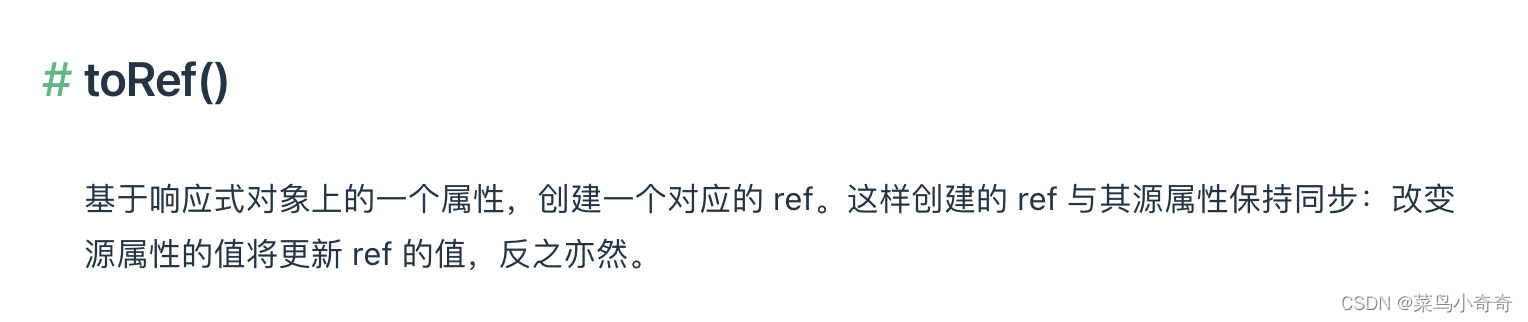
const state = reactive({ foo: 1, bar: 2 }) // 通过toRef()后 fooRef变量也是响应式的,改变foo的值,fooRef也改变 // 作用:将一个非响应式的变量转换为一个响应式变量 const fooRef = toRef(state, 'foo') // 更改该 ref 会更新源属性 fooRef.value++ console.log(state.foo) // 2 // 更改源属性也会更新该 ref state.foo++ console.log(fooRef.value) // 3- 1
- 2
- 3
- 4
- 5
- 6
- 7
- 8
- 9
- 10
- 11
- 12
- 13
- 14
- 15
- 16

ref()和shallowRef()区别ref()我们知道可以创建一个响应式变量
shallowRef(): ref() 的浅层作用形式。那么,shallowRef()就是可以创建一个浅层次的响应式变量,
应用场景:如果你的数据不赋值,不变更或者修改,只是做展示用,那么可以用 shallowRef(),可以节省性能消耗reactive()和shallowReactive()reactive(): 返回一个对象的响应式代理,
响应式转换是“深层”的:它会影响到所有嵌套的属性。一个响应式对象也将深层地解包任何 ref 属性,同时保持响应性shallowReactive():reactive() 的浅层作用形式。
和 reactive() 不同,这里没有深层级的转换:一个浅层响应式对象里只有根级别的属性是响应式的。属性的值会被原样存储和暴露,这也意味着值为 ref 的属性不会被自动解包了
若要避免深层响应式转换,只想保留对这个对象顶层次访问的响应性,请使用 shallowReactive() 作替代。const state = shallowReactive({ foo: 1, nested: { bar: 2 } }) // 更改状态自身的属性是响应式的 state.foo++ // ...但下层嵌套对象不会被转为响应式 isReactive(state.nested) // false // 不是响应式的 state.nested.bar++- 1
- 2
- 3
- 4
- 5
- 6
- 7
- 8
- 9
- 10
- 11
- 12
- 13
- 14
- 15
- 16
-
相关阅读:
Codeforces Round #790 (Div. 4) H. Maximum Crossings
第70步 时间序列建模实战:ARIMA建模(JMP)
springcloud程序启动后,nacos服务中心的服务名称与程序spring.application.name所配置的应用名不一致
网络基础知识点
Java类包+final声明
Windows 下 Sublime Text 2.0.2 下载及配置
第五十章 开发自定义标签 - 使用Rule类
谷歌新AI火了!世界最长单词都能画:Pneumonoultramicroscopicsilicovolcanoconiosis
Fragment之间进行通信的最佳实现方式
数据结构与算法——单链表的基本操作的实现
- 原文地址:https://blog.csdn.net/qyl_0316/article/details/128202655
