-
carla学习笔记(十)
实验室同学需要做仿真数据的采集实验,为记录以下整个采集过程。方便未来进行类似数据采集时减少写代码的时间。
采集数据要求:
控制一辆车,从a点到b点。然后在路侧架设一个lidar,采集车辆通过激光lidar区域时的数据。
一、首先确定a点和b点。
地图选取的是carla的town03。
具体区域是这里:

首先确定选择的a点:start_point;b点:end_point。
这里使用draw_string函数,将确定的点在地图中显示出来,方便之后的路径确定:
源码如下:
- import carla
- def show_point(world, point_location):
- world.debug.draw_string(point_location, 'X', draw_shadow=False,
- color=carla.Color(r=0, g=255, b=0), life_time=50,
- persistent_lines=True)
- def main():
- client = carla.Client('localhost', 2000)
- client.set_timeout(2.0)
- world = client.get_world()
- start_point = carla.Location(229, 116, 2)
- end_point = carla.Location(20,194,2)
- show_point(world, start_point)
- show_point(world, end_point)
- main()
地图显示:

图中两个绿色的x就是分别确定的start_point和end_point。
这里有几个点需要注意:
1.注意区分carla.Location和carla.Transform之间的关系。
2.注意在使用系统提供的函数的时候,它的参数的格式要求,尤其是spawn_vehicle函数。
怎么才好知道点的坐标呢?
可以使用这个函数测试。首先确定原点,然后确定x轴正向,再确定y轴正向。就可以将地图的坐标系确定出来。好久没有使用carla了,当时在这一步卡了好久,主要原因就是对于相关的函数的数据格式不熟悉了,解决报错问题花了快一个小时。。。
下面是源码:
- import carla
- def show_point(world, point_location):
- world.debug.draw_string(point_location, 'P', draw_shadow=False,
- color=carla.Color(r=0, g=255, b=0), life_time=50,
- persistent_lines=True)
- def show_x_point(world, point_location):
- world.debug.draw_string(point_location, 'X', draw_shadow=False,
- color=carla.Color(r=0, g=255, b=0), life_time=50,
- persistent_lines=True)
- def show_y_point(world, point_location):
- world.debug.draw_string(point_location, 'Y', draw_shadow=False,
- color=carla.Color(r=0, g=255, b=0), life_time=50,
- persistent_lines=True)
- def show_O_point(world, point_location):
- world.debug.draw_string(point_location, 'O', draw_shadow=False,
- color=carla.Color(r=0, g=255, b=0), life_time=50,
- persistent_lines=True)
- def main():
- client = carla.Client('localhost', 2000)
- client.set_timeout(2.0)
- world = client.get_world()
- start_point = carla.Location(229, 116, 2)
- end_point = carla.Location(20,194,2)
- origin_point = carla.Location(0,0,0)
- x_axis = carla.Location(10, 0, 0)
- y_axis = carla.Location(0, 10, 0)
- show_point(world, start_point)
- show_point(world, end_point)
- show_O_point(world, origin_point)
- show_x_point(world, x_axis)
- show_y_point(world, y_axis)
- main()
地图显示:

二、选择lidar点
和第一步类似,使用draw函数来找点。
源码就将上面的简单修改就可以了。
地图显示如下:
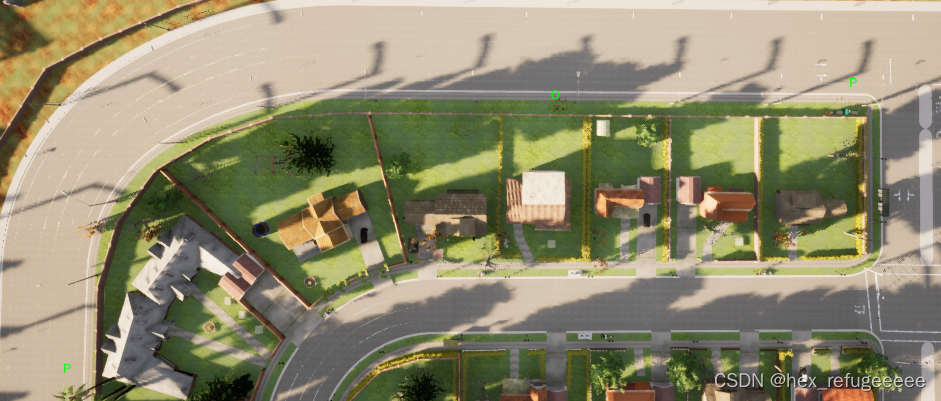
O为架设lidar的坐标。
三、实现vehilce从a点到b点
主要调用的是agent里面的set_destination函数。
参考小飞大佬的源码,自己改了一下:
- # -*- coding: utf-8 -*-
- import os
- import random
- import sys
- import carla
- from agents.navigation.behavior_agent import BehaviorAgent
- def main():
- try:
- client = carla.Client('localhost', 2000)
- client.set_timeout(2.0)
- world = client.get_world()
- origin_settings = world.get_settings()
- settings = world.get_settings()
- settings.synchronous_mode = True
- settings.fixed_delta_seconds = 0.05
- world.apply_settings(settings)
- blueprint_library = world.get_blueprint_library()
- # 确定起点和终点
- p1 = carla.Location(229, 116, 2)
- p2 = carla.Location(20, 194, 2)
- start_point = carla.Transform(p1, carla.Rotation(0,0,0))
- end_point = carla.Transform(p2, carla.Rotation(0, 0, 0))
- # 创建车辆
- ego_vehicle_bp = blueprint_library.find('vehicle.lincoln.mkz2017')
- ego_vehicle_bp.set_attribute('color', '0, 0, 0')
- vehicle = world.spawn_actor(ego_vehicle_bp, start_point)
- world.tick()
- # 设置车辆的驾驶模式
- agent = BehaviorAgent(vehicle, behavior='normal')
- # 核心函数
- agent.set_destination(agent.vehicle.get_location(), end_point.location, clean=True)
- while True:
- agent.update_information(vehicle)
- world.tick()
- if len(agent._local_planner.waypoints_queue)<1:
- print('======== Success, Arrivied at Target Point!')
- break
- # 设置速度限制
- speed_limit = vehicle.get_speed_limit()
- agent.get_local_planner().set_speed(speed_limit)
- control = agent.run_step(debug=True)
- vehicle.apply_control(control)
- finally:
- world.apply_settings(origin_settings)
- vehicle.destroy()
- if __name__ == '__main__':
- try:
- main()
- except KeyboardInterrupt:
- print(' - Exited by user.')
比较简单,看注释就好。
四、生成lidar并采集数据
将生成lidar的部分加入到第三章里面的源码中。
- # -*- coding: utf-8 -*-
- import os
- import carla
- from agents.navigation.behavior_agent import BehaviorAgent
- def main():
- try:
- client = carla.Client('localhost', 2000)
- client.set_timeout(2.0)
- world = client.get_world()
- origin_settings = world.get_settings()
- settings = world.get_settings()
- settings.synchronous_mode = True
- settings.fixed_delta_seconds = 0.05
- world.apply_settings(settings)
- blueprint_library = world.get_blueprint_library()
- # 设置储存位置
- output_path = 'lidar_data'
- # 确定起点和终点
- p1 = carla.Location(229, 116, 2)
- p2 = carla.Location(20, 194, 2)
- start_point = carla.Transform(p1, carla.Rotation(0,0,0))
- end_point = carla.Transform(p2, carla.Rotation(0, 0, 0))
- # 创建车辆
- ego_vehicle_bp = blueprint_library.find('vehicle.lincoln.mkz2017')
- ego_vehicle_bp.set_attribute('color', '0, 0, 0')
- vehicle = world.spawn_actor(ego_vehicle_bp, start_point)
- # 创建lidar,设置lidar的参数
- lidar_bp = blueprint_library.find('sensor.lidar.ray_cast')
- lidar_bp.set_attribute('channels', str(32))
- lidar_bp.set_attribute('points_per_second', str(90000))
- lidar_bp.set_attribute('rotation_frequency', str(40))
- lidar_bp.set_attribute('range', str(20))
- # 设置lidar架设的点
- lidar_location = carla.Location(100, 190, 2)
- lidar_rotation = carla.Rotation(0, 0, 0)
- lidar_transform = carla.Transform(lidar_location, lidar_rotation)
- # 生成lidar并采集数据
- lidar = world.spawn_actor(lidar_bp, lidar_transform)
- lidar.listen(
- lambda point_cloud: point_cloud.save_to_disk(os.path.join(output_path, '%06d.ply' % point_cloud.frame)))
- world.tick()
- # 设置车辆的驾驶模式
- agent = BehaviorAgent(vehicle, behavior='normal')
- # 核心函数
- agent.set_destination(agent.vehicle.get_location(), end_point.location, clean=True)
- while True:
- agent.update_information(vehicle)
- world.tick()
- if len(agent._local_planner.waypoints_queue)<1:
- print('======== Success, Arrivied at Target Point!')
- break
- # 设置速度限制
- speed_limit = vehicle.get_speed_limit()
- agent.get_local_planner().set_speed(speed_limit)
- control = agent.run_step(debug=True)
- vehicle.apply_control(control)
- finally:
- world.apply_settings(origin_settings)
- vehicle.destroy()
- if __name__ == '__main__':
- try:
- main()
- except KeyboardInterrupt:
- print(' - Exited by user.')
比较简单,整个实验采集都比较简单。在这里记录一下,方便未来做类似工作是可以直接代码服用。
-
相关阅读:
python生成中金所期权行权价
防火墙命令补充和dmz_远程管理
Java IDEA controller导出CSV,excel
十四、【图章工具组】
低代码技术的全面应用:加速创新、降低成本
AI 大框架基于python来实现基带处理之TensorFlow(信道估计和预测模型,信号解调和解码模型)
【附源码】计算机毕业设计SSM社区生鲜配送系统
【算法题】8029. 与车相交的点
坐月子真不能洗头吗?
大一学生HTML期末作业: 季奥林匹克运动会 8页 无js 带表单 带报告5200字
- 原文地址:https://blog.csdn.net/weixin_45572737/article/details/128161120
