-
httpclient
1.什么是httpclient
HttpClient 是Apache Jakarta Common 下的子项目,可以用来提供高效的、最新的、功能丰富的支持 HTTP 协议的客户端编程工具包,并且它支持 HTTP 协议最新的版本和建议。
2.http请求(结合spring的注解)
2-1GET请求
添加添加@PathVariable 带占位符的 URL
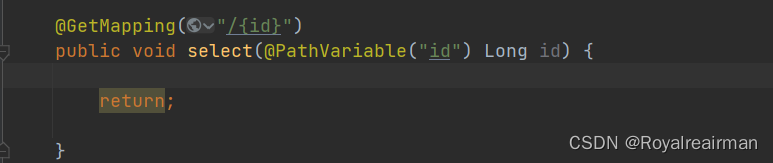

添加@RequestParam 将请求参数区域的数据(url中参数)映射到控制层方法的参数上


2-2 POST请求
添加@RequestBody JSON传参

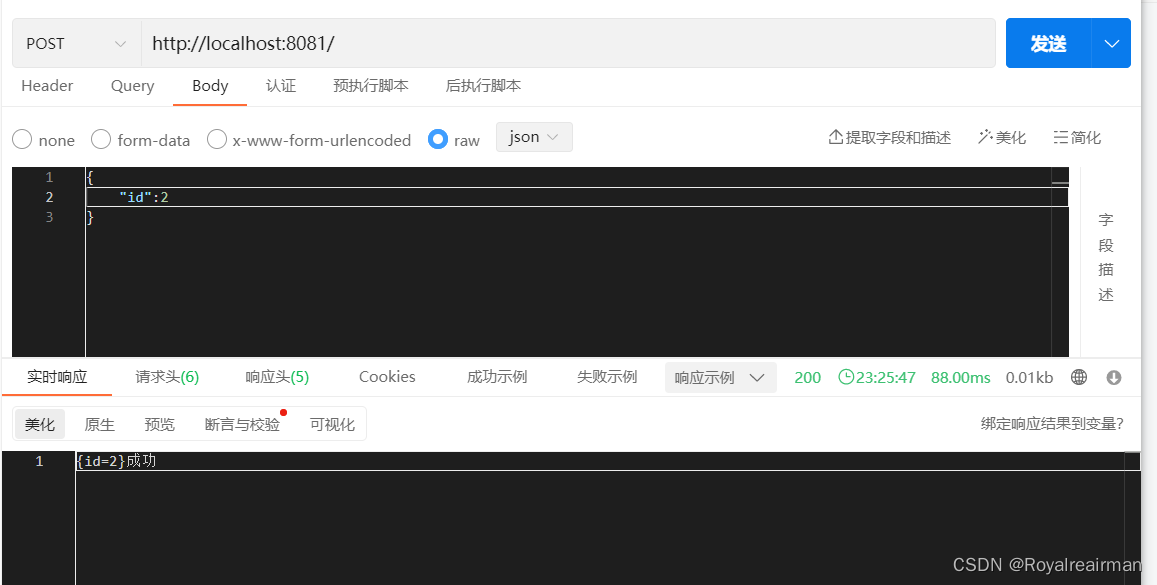 2-3.PUT请求
添加@RequestBody JSON传参

 2-4DELETE
添加@RequestBody JSON传参


3.导入相关依赖
lombok 和fastjson方便对数据进行处理
- <!-- https://mvnrepository.com/artifact/org.apache.httpcomponents/httpclient -->
- <dependency>
- <groupId>org.apache.httpcomponents</groupId>
- <artifactId>httpclient</artifactId>
- <version>4.5.13</version>
- </dependency>
- <dependency>
- <groupId>com.alibaba</groupId>
- <artifactId>fastjson</artifactId>
- <version>1.2.46</version>
- </dependency>
- <dependency>
- <groupId>org.projectlombok</groupId>
- <artifactId>lombok</artifactId>
- <optional>true</optional>
- </dependency>
4.准备工作
在使用这个框架之前你需要明白 请求的组成部分
1.请求报文(请求行/请求头/请求数据/空行)
请求行
求方法字段、URL字段和HTTP协议版本
例如:GET /index.html HTTP/1.1
get方法将数据拼接在url后面,传递参数受限
请求方法:
GET、POST、HEAD、PUT、DELETE、OPTIONS、TRACE、CONNECT
请求头(key value形式)
User-Agent:产生请求的浏览器类型。
Accept:客户端可识别的内容类型列表。
Host:主机地址
请求数据
post方法中,会把数据以key value形式发送请求
空行
发送回车符和换行符,通知服务器以下不再有请求头
2.响应报文(状态行、消息报头、响应正文)
状态行
消息报头
响应正文
请求头一般我们需要设置User-Agent,content-type 以及cookie ,我们要的数据都存放在响应体内
5.创建HttpClients实例
创建HttpClients实例你可以理解为打开一个浏览器,发送请求 点开这个类

5-1custom
为构造自定义CloseableHttpClient实例创建构建器对象。

- public class Test01 {
- public static void main(String[] args) {
- CloseableHttpClient httpClient = HttpClients.custom().setConnectionManager(httpUtils()).build();
- }
- //设置连接池
- public static PoolingHttpClientConnectionManager httpUtils() {
- PoolingHttpClientConnectionManager cm = new PoolingHttpClientConnectionManager();
- cm.setMaxTotal(200); //最大连接数
- cm.setDefaultMaxPerRoute(20); //设置每个主机的并发数
- return cm;
- }
- }
5-2createDefault
使用默认配置的实例。默认的无法设置连接池

6.设置请求
6-1不带参数
 6-2带参数
假设路径为 http://localhost:8081/?id=2 , 这里的id就是字段名,2就是字段的值,我们直接
发送请求只会有http://localhost:8081/,现在我就是有吧参数带进去

- //get请求
- String url = "http://localhost:8081/";
- URI build = new URIBuilder(url).addParameter("id", "2").build();
- HttpGet httpGet = new HttpGet(build.toString());
- //post请求 form-data 表单提交
- HttpPost httpPost = new HttpPost(url);//
- List
paramList = new ArrayList (); - paramList.add(new BasicNameValuePair("id","2"));
- UrlEncodedFormEntity entity = new UrlEncodedFormEntity(paramList);
- httpPost.setEntity(entity);
- //post请求json表单
- HashMap
- param.put("id", "2");
- // 创建Http Post请求
- HttpPost httpPost1 = new HttpPost(url);
- // 创建请求内容
- String json = JSONObject.toJSON(param).toString();
- // 设置参数为Json,模拟表单
- StringEntity entity1 = new StringEntity(json, ContentType.APPLICATION_JSON);
- // 把参数赋值给请求
- httpPost1.setEntity(entity);
7.设置请求头
token也是在请求头中 ,可以直接设置 以get请求为列

- String url = "http://localhost:8081/";
- URI build = new URIBuilder(url).addParameter("id", "2").build();
- HttpGet httpGet = new HttpGet(build.toString());
- httpGet.setHeader("User-Agent", "Mozilla/5.0 (Windows NT 10.0; Win64; x64) AppleWebKit/537.36 (KHTML, like Gecko) "
- + "Chrome/104.0.0.0 Safari/537.36");
- httpGet.setHeader("content-type", "application/json");
- //假设tokeen:xsxsxs
- httpGet.setHeader("X-Access-Token", "xsxsxs");
8.请求设置

- httpGet.setConfig(getConfig());
- }
- /**
- * @return 请求设置
- */
- private static RequestConfig getConfig() {
- //配置请求信息
- RequestConfig config = RequestConfig.custom().setConnectTimeout(1000000000)//创建连接最大时间,
- .setConnectionRequestTimeout(500000000) // 设置获取连接的最长时间 ,单位是毫秒
- .setSocketTimeout(10 * 100000) //设置传输的最长时间,单位是毫秒
- .build();
- return config;
- }
9.设置代理

- //设置代理
- HttpHost proxy = new HttpHost("58.60.255.82",8118);
- RequestConfig requestConfig = RequestConfig.custom()
- .setProxy(proxy)
- .setConnectTimeout(10000)
- .setSocketTimeout(10000)
- .setConnectionRequestTimeout(3000)
- .build();
- httpGet.setConfig(requestConfig);
10.工具类
我这里没有设置请求头,也没有设置请求,代码也没有设置,主要展示带参数的
- package com.example.list.list;
- import com.alibaba.fastjson.JSONObject;
- import org.apache.http.HttpHost;
- import org.apache.http.NameValuePair;
- import org.apache.http.client.config.RequestConfig;
- import org.apache.http.client.entity.UrlEncodedFormEntity;
- import org.apache.http.client.methods.CloseableHttpResponse;
- import org.apache.http.client.methods.HttpGet;
- import org.apache.http.client.methods.HttpPost;
- import org.apache.http.client.utils.URIBuilder;
- import org.apache.http.entity.ContentType;
- import org.apache.http.entity.StringEntity;
- import org.apache.http.impl.client.CloseableHttpClient;
- import org.apache.http.impl.client.HttpClients;
- import org.apache.http.impl.conn.PoolingHttpClientConnectionManager;
- import org.apache.http.message.BasicNameValuePair;
- import org.apache.http.util.EntityUtils;
- import org.springframework.stereotype.Component;
- import java.io.IOException;
- import java.util.ArrayList;
- import java.util.List;
- import java.util.Map;
- @Component
- public class HttpClientUtils {
- /**
- * @return 请求设置
- */
- private RequestConfig getConfig(HttpHost proxy) {
- //配置请求信息
- RequestConfig config = RequestConfig.custom()
- .setConnectTimeout(1000000000)//创建连接最大时间,
- .setConnectionRequestTimeout(500000000) // 设置获取连接的最长时间 ,单位是毫秒
- .setSocketTimeout(10 * 100000) //设置传输的最长时间,单位是毫秒
- .setProxy(proxy)
- .build();
- return config;
- }
- /**
- * get 请求带参数
- *
- * @param url
- * @param param
- * @return
- */
- public Object doGet(String url, Map
- //创建HttpClient对象
- CloseableHttpClient httpclient = HttpClients.createDefault();
- //返回的字符串
- String resultString = "";
- JSONObject jsonObject = new JSONObject();
- CloseableHttpResponse response = null;
- try {
- //创建url
- URIBuilder builder = new URIBuilder(url);
- if (param != null) {
- for (String key : param.keySet()) {
- builder.addParameter(key, param.get(key));
- }
- }
- //创建get请求
- HttpGet httpGet = new HttpGet(builder.toString());
- // 执行请求
- response = httpclient.execute(httpGet);
- //判断返回值是否为200
- if (response.getStatusLine().getStatusCode() == 200) {
- resultString = EntityUtils.toString(response.getEntity(), "UTF-8");
- }
- //将字符串转JSONObject(可以获取里面得某个元素),也可以直接返回字符串
- jsonObject = JSONObject.parseObject(resultString);
- } catch (Exception e) {
- e.printStackTrace();
- }
- return jsonObject;
- }
- //设置连接池
- public PoolingHttpClientConnectionManager httpUtils() {
- PoolingHttpClientConnectionManager cm = new PoolingHttpClientConnectionManager();
- cm.setMaxTotal(200); //最大连接数
- cm.setDefaultMaxPerRoute(20); //设置每个主机的并发数
- return cm;
- }
- /**
- * form表单 post请求
- *
- * @param url
- * @param param
- * @return
- */
- public String doPost(String url, Map
- // 创建Httpclient对象
- CloseableHttpClient httpClient = HttpClients.createDefault();
- CloseableHttpResponse response = null;
- String resultString = "";
- try {
- // 创建Http Post请求
- HttpPost httpPost = new HttpPost(url);
- // 创建参数列表
- if (param != null) {
- List
paramList = new ArrayList (); - for (String key : param.keySet()) {
- paramList.add(new BasicNameValuePair(key, param.get(key)));
- }
- // 模拟表单
- UrlEncodedFormEntity entity = new UrlEncodedFormEntity(paramList);
- httpPost.setEntity(entity);
- }
- // 执行http请求
- response = httpClient.execute(httpPost);
- resultString = EntityUtils.toString(response.getEntity(), "utf-8");
- } catch (Exception e) {
- e.printStackTrace();
- } finally {
- try {
- response.close();
- } catch (IOException e) {
- e.printStackTrace();
- }
- }
- return resultString;
- }
- /**
- * post设置参数json
- *
- * @param url
- * @param param
- * @return
- */
- public String doPostJson(String url, Map
- // 创建Httpclient对象
- CloseableHttpClient httpClient = HttpClients.createDefault();
- CloseableHttpResponse response = null;
- String resultString = "";
- try {
- // 创建Http Post请求
- HttpPost httpPost = new HttpPost(url);
- // 创建请求内容
- String json = JSONObject.toJSON(param).toString();
- // 设置参数为Json,模拟表单
- StringEntity entity = new StringEntity(json, ContentType.APPLICATION_JSON);
- // 把参数赋值给请求
- httpPost.setEntity(entity);
- // 执行http请求
- response = httpClient.execute(httpPost);
- if (response.getStatusLine().getStatusCode() == 200) {
- resultString = EntityUtils.toString(response.getEntity(), "utf-8");
- }
- } catch (Exception e) {
- e.printStackTrace();
- } finally {
- try {
- response.close();
- } catch (IOException e) {
- e.printStackTrace();
- }
- }
- return resultString;
- }
- }
11.文件下载
下载HTML、图片、PDF和压缩等文件时,一种方法是使用HttpEntity类将响应实体转化成字节数组,再利用输出流的方式写入指定文件。另一种方法是使用HttpEntity类中的writeTo(OutputStream)方法,直接将响应实体写入指定的输出流中,这种方法简单且常用,使用writeTo(OutputStream)下载“.tar.gz”格式的压缩文件
- @Test
- void contextLoads() throws Exception {
- String url = "https://**.jd.com/";
- //初始化httpClient
- CloseableHttpClient httpClient = HttpClients.custom().build();
- final HttpGet httpGet = new HttpGet(url);
- //获取结果
- HttpResponse httpResponse = null;
- try {
- httpResponse = httpClient.execute(httpGet);
- } catch (IOException e) {
- e.printStackTrace();
- }
- final FileOutputStream out = new FileOutputStream("file/httpd-2.4.37.tar.gz");
- httpResponse.getEntity().writeTo(out);
- EntityUtils.consume(httpResponse.getEntity()); //消耗实体
- }
12. HTTPS请求认证
使用HttpClient直接请求以https://为前缀的URL,有时也会产生图4.11所示的错误信息,即找不到合法证书请求目标URL。
首先,利用内部类SSL509TrustManager,创建X.509证书信任管理器;之后,使用SSLConnectionSocketFactory()方法创建SSL连接,并利用Registry注册http和https套接字工厂;接着,使用PoolingHttpClientConnectionManager()方法实例化连接池管理器;最后,基于实例化的连接池管理器和RequestConfig配置的信息,来实例化一个可以执行HTTPS请求的HttpClient。
- import org.apache.http.client.HttpClient;
- import org.apache.http.client.config.AuthSchemes;
- import org.apache.http.client.config.CookieSpecs;
- import org.apache.http.client.config.RequestConfig;
- import org.apache.http.config.Registry;
- import org.apache.http.config.RegistryBuilder;
- import org.apache.http.conn.socket.ConnectionSocketFactory;
- import org.apache.http.conn.socket.PlainConnectionSocketFactory;
- import org.apache.http.conn.ssl.NoopHostnameVerifier;
- import org.apache.http.conn.ssl.SSLConnectionSocketFactory;
- import org.apache.http.impl.client.HttpClients;
- import org.apache.http.impl.conn.PoolingHttpClientConnectionManager;
- import javax.net.ssl.SSLContext;
- import javax.net.ssl.X509TrustManager;
- import java.security.cert.CertificateException;
- import java.security.cert.X509Certificate;
- import java.util.Arrays;
- public class SSLClient {
- /**
- * 基于SSL配置 HttpClient
- * @param SSLProtocolVersion (SSL ,SSLv3 TLS TLSv1.1 TLSv1.2)
- * @return
- */
- public HttpClient initSSLClient(String SSLProtocolVersion) {
- RequestConfig defaultConfig = null;
- PoolingHttpClientConnectionManager pcm = null;
- try {
- SSL509TrustManager xtm = new SSL509TrustManager(); //创建信任管理
- SSLContext context = SSLContext.getInstance(SSLProtocolVersion);
- context.init(null, new X509TrustManager[]{xtm}, null);
- /**
- * 从 SSLContext 对象中得到SSLConnectionSocketFactory对象
- * NoopHostnameVerifier.INSTANCE 表示接收任何有效的符合目标
- */
- final SSLConnectionSocketFactory sslConnectionSocketFactory =
- new SSLConnectionSocketFactory(context, NoopHostnameVerifier.INSTANCE);
- defaultConfig = RequestConfig.custom().
- setCookieSpec(CookieSpecs.STANDARD_STRICT)
- .setExpectContinueEnabled(true)
- .setTargetPreferredAuthSchemes(Arrays.asList(AuthSchemes.NTLM, AuthSchemes.DIGEST)
- ).build();
- //注册http和https套接字工厂
- Registry
sfr = RegistryBuilder. create() - .register("http", PlainConnectionSocketFactory.INSTANCE)
- .register("https", sslConnectionSocketFactory).build();
- //基于sfr创建连接管理器
- pcm = new PoolingHttpClientConnectionManager(sfr);
- } catch (Exception e) {
- e.printStackTrace();
- }
- //创建连接管理器和配置 ,实例化HttpClient
- HttpClient httpClient = HttpClients.custom()
- .setConnectionManager(pcm).setDefaultRequestConfig(defaultConfig).build();
- return httpClient;
- }
- private static class SSL509TrustManager implements X509TrustManager {
- //检查客户端证书
- @Override
- public void checkClientTrusted(X509Certificate[] x509Certificates, String s) throws CertificateException {
- }
- //检查服务端证书
- @Override
- public void checkServerTrusted(X509Certificate[] x509Certificates, String s) throws CertificateException {
- }
- //返回受信任的X50证书
- @Override
- public X509Certificate[] getAcceptedIssuers() {
- return new X509Certificate[0];
- }
- }
- }
测试代码
- @Test
- void contextLoads() throws Exception {
- String url = "https://www.***.com";
- SSLClient sslClient = new SSLClient();
- HttpClient httpClientSSL = sslClient.initSSLClient("SSLv3");
- final HttpGet httpGet = new HttpGet(url);
- //获取结果
- HttpResponse httpResponse=null;
- try {
- httpResponse= httpClientSSL.execute(httpGet);
- } catch (IOException e) {
- e.printStackTrace();
- }
- if(httpResponse.getStatusLine().getStatusCode()== HttpStatus.SC_OK) { //状态码200表示响应成功
- //获取实体内容
- final String entity = EntityUtils.toString(httpResponse.getEntity(), StandardCharsets.UTF_8);
- //输出实体内容
- System.out.println(entity);
- EntityUtils.consume(httpResponse.getEntity());//消耗实体
- }else {
- //关闭HttpEntity的响应实体
- EntityUtils.consume(httpResponse.getEntity());//消耗实体
- }
- }
13.请求重试
使用HttpClient请求URL时,有时会出现请求异常的情况。针对一些非致命的异常,可以通过请求重试解决。HttpClient提供了默认重试策略DefaultHttpRequestRetryHandler。DefaultHttpRequestRetryHandler类实现了HttpRequestRetryHandler接口,重写了retryRequest()方法。DefaultHttpRequestRetryHandler类的一部分源码。由源码可以发现DefaultHttpRequestRetryHandler类定义的默认重试次数为3次;幂等方法(如GET和HEAD是幂等的)可以重试;如果网页请求失败,可以重试。另外,针对4种异常不进行重试,这四种异常分别是InterruptedIOException(线程中断异常)、UnknownHostException(未知的Host异常)、ConnectException(连接异常,如连接拒绝异常)和SSLException(HTTPS请求认证异常)。默认重试3次

- @Test
- void contextLoads() throws Exception {
- //默认重试3次
- HttpClient httpClient = HttpClients.custom()
- .setRetryHandler(new DefaultHttpRequestRetryHandler()).build();
- //自定义重试次数
- HttpClients.custom().
- setRetryHandler(new DefaultHttpRequestRetryHandler(5, true)).build();
- }
14.多线程执行请求
4.5版本的HttpClient中的连接池管理器PoolingHttpClientConnectionManager类实现了HTTP连接池化管理,其管理连接的单位为路由(Route),每个路由维护一定数量(默认是2)的连接;当给定路由的所有连接都被租用时,则新的连接请求将发生阻塞,直到某连接被释放回连接池。另外,PoolingHttpClientConnectionManager维护的连接次数也受总数MaxTotal(默认是20)的限制。当HttpClient配置了PoolingHttpClientConnectionManager时,其可以同时执行多个HTTP请求,即实现多线程操作。
- package com.example.jsoup;
- import lombok.SneakyThrows;
- import org.apache.http.Consts;
- import org.apache.http.ParseException;
- import org.apache.http.client.HttpClient;
- import org.apache.http.client.config.AuthSchemes;
- import org.apache.http.client.config.CookieSpecs;
- import org.apache.http.client.config.RequestConfig;
- import org.apache.http.client.methods.CloseableHttpResponse;
- import org.apache.http.client.methods.HttpGet;
- import org.apache.http.client.protocol.HttpClientContext;
- import org.apache.http.config.ConnectionConfig;
- import org.apache.http.config.SocketConfig;
- import org.apache.http.impl.client.CloseableHttpClient;
- import org.apache.http.impl.client.HttpClients;
- import org.apache.http.impl.conn.PoolingHttpClientConnectionManager;
- import org.apache.http.util.EntityUtils;
- import org.junit.jupiter.api.Test;
- import org.springframework.boot.test.context.SpringBootTest;
- import java.io.FileOutputStream;
- import java.io.IOException;
- import java.io.OutputStream;
- import java.nio.charset.CodingErrorAction;
- import java.util.Arrays;
- import java.util.concurrent.ExecutorService;
- import java.util.concurrent.Executors;
- @SpringBootTest
- class JsoupApplicationTests {
- @Test
- void contextLoads() throws Exception {
- // 添加连接参数
- ConnectionConfig connectionConfig = ConnectionConfig.custom()
- .setMalformedInputAction(CodingErrorAction.IGNORE)
- .setUnmappableInputAction(CodingErrorAction.IGNORE)
- .setCharset(Consts.UTF_8)
- .build();
- //添加socket参数
- SocketConfig socketConfig = SocketConfig.custom()
- .setTcpNoDelay(true)
- .build();
- //配置连接池管理器
- PoolingHttpClientConnectionManager pcm =
- new PoolingHttpClientConnectionManager();
- //设置最大连接数
- pcm.setMaxTotal(100);
- //设置连接信息
- pcm.setDefaultMaxPerRoute(10);
- //设置socket信息
- pcm.setDefaultSocketConfig(socketConfig);
- //设置全局请求配置 包括cookie规范、http认证 超时时间
- RequestConfig defaultConfig = RequestConfig.custom()
- .setCookieSpec(CookieSpecs.STANDARD_STRICT)
- .setExpectContinueEnabled(true)
- .setTargetPreferredAuthSchemes(
- Arrays.asList(AuthSchemes.NTLM, AuthSchemes.DIGEST))
- .setProxyPreferredAuthSchemes(Arrays.asList(AuthSchemes.BASIC))
- .setConnectionRequestTimeout(30 * 1000)
- .setConnectTimeout(30 * 1000)
- .setSocketTimeout(30 * 1000)
- .build();
- CloseableHttpClient httpClient = HttpClients.custom()
- .setConnectionManager(pcm)
- .setDefaultRequestConfig(defaultConfig)
- .build();
- //请求URL
- String[] urlArr = {
- "https://www.xxx.com",
- "https://www.xxj.com"
- };
- //创建固定大小的线程池
- ExecutorService exec = Executors.newFixedThreadPool(3);
- for (int i = 0; i < urlArr.length; i++) {
- //HTML需要输出的文件名
- String filename = urlArr[i].split("html/")[1];
- //创建HTML文件输出目录
- FileOutputStream out = new FileOutputStream("file/" + filename);
- HttpGet httpget = new HttpGet(urlArr[i]);
- //启动线程执行请求
- exec.execute(new DownHtmlFileThread(httpClient, httpget, out));
- //关闭线程
- exec.shutdown();
- }
- }
- static class DownHtmlFileThread extends Thread {
- private final CloseableHttpClient httpClient;
- private final HttpClientContext context;
- private final HttpGet httpget;
- private final OutputStream out;
- public DownHtmlFileThread(CloseableHttpClient httpClient, HttpGet httpget, OutputStream out) {
- this.httpClient = httpClient;
- this.context = HttpClientContext.create();
- this.httpget = httpget;
- this.out = out;
- }
- @SneakyThrows
- @Override
- public void run() {
- System.out.println(Thread.currentThread().getName() + "线程请求的URL为:" + httpget.getURI());
- try {
- CloseableHttpResponse response = httpClient.execute(httpget, context); //执行请求
- //将HTML文档写入文件
- try {
- out.write(EntityUtils.toString(response.getEntity(), "gbk")
- .getBytes());
- out.close();
- //消耗实体
- EntityUtils.consume(response.getEntity());
- } finally {
- response.close();
- }
- } catch (IOException e) {
- e.printStackTrace();
- } catch (ParseException e) {
- e.printStackTrace();
- }
- }
- }
- }
-
相关阅读:
ebay运营思路|学会这些技巧,新店铺销量翻倍
关于分布式锁你需要知道的事
生态系统服务——水源涵养水源涵养分布
Java常量池理解
【DesignMode】设计模式简介
如何封装安全的go
面试阿里技术专家岗,对答如流,这些面试题你能答出多少
netcore项目中的GC模式
html table 如何导出为excel表格案例分享
免费,开源,可批量的离线图片文字提取软件OCR
- 原文地址:https://blog.csdn.net/qq_42847719/article/details/128106182
