-
【零基础入门SpringMVC】第二期——匹配请求与获取请求参数
一、RequestMapping注解
-
该注解有什么作用呢?
- 将请求和处理请求的控制器方法关联起来 ,建立映射关系
- 当SpringMVC接收到指定的请求后,就会通过映射关系中对应的控制器方法处理请求
-
我们可以查看一下该注解的源码:
// // Source code recreated from a .class file by IntelliJ IDEA // (powered by FernFlower decompiler) // package org.springframework.web.bind.annotation; import java.lang.annotation.Documented; import java.lang.annotation.ElementType; import java.lang.annotation.Retention; import java.lang.annotation.RetentionPolicy; import java.lang.annotation.Target; import org.springframework.core.annotation.AliasFor; @Target({ElementType.TYPE, ElementType.METHOD}) @Retention(RetentionPolicy.RUNTIME) @Documented @Mapping public @interface RequestMapping { String name() default ""; @AliasFor("path") String[] value() default {}; @AliasFor("value") String[] path() default {}; RequestMethod[] method() default {}; String[] params() default {}; String[] headers() default {}; String[] consumes() default {}; String[] produces() default {}; }- 1
- 2
- 3
- 4
- 5
- 6
- 7
- 8
- 9
- 10
- 11
- 12
- 13
- 14
- 15
- 16
- 17
- 18
- 19
- 20
- 21
- 22
- 23
- 24
- 25
- 26
- 27
- 28
- 29
- 30
- 31
- 32
- 33
- 34
- 35
- 36
- 37
$ 注解的作用位置
-
通过Target注解标记的是当前注解可以使用的位置
- ElementType.TYPE 代表可以作用在类上,表示该控制器中所有请求方法都以该路径作为父路径【映射请求路径的初始信息】
- ElementType.METHOD 代表可以作用在方法上,表示映射请求路径的具体信息【进一步细分请求映射】
-
需求:我们分别在类和方法上都使用注解并指定路径和侧面测试一下
- 因为springMVC会默认index.html 为首页,所以我们将跳转作为超链接放到首页的页面中
- 额外编写一个页面
编写我们的 success.html 页面
<!DOCTYPE html> <html lang="en" xmlns:th="http://www.thymeleaf.org"> <head> <meta charset="UTF-8"> <title>Title</title> </head> <body> <p>"来到了我们的success页面,匹配成功!"</p> </body> </html>- 1
- 2
- 3
- 4
- 5
- 6
- 7
- 8
- 9
- 10
在我们 index.html 中添加一条超链接
<a th:href="@{/parentPath/target}">测试我们RequestMapping注解的位置</a>- 1
为了不影响我们首页文件的匹配,我们另外写一个控制器Test2测试
package com.atguigu.mvc.controller; import org.springframework.stereotype.Controller; import org.springframework.web.bind.annotation.RequestMapping; /** * @author Bonbons * @version 1.0 */ @Controller @RequestMapping("/parentPath") public class Test2 { @RequestMapping("/target") public String testLocation(){ return "success"; } }- 1
- 2
- 3
- 4
- 5
- 6
- 7
- 8
- 9
- 10
- 11
- 12
- 13
- 14
- 15
- 16
- 17
控制器Test我们只需要让它去匹配首页页面
package com.atguigu.mvc.controller; import org.springframework.stereotype.Controller; import org.springframework.web.bind.annotation.RequestMapping; /** * @author Bonbons * @version 1.0 */ @Controller public class Test { @RequestMapping("/") public String index() { //设置视图名称 return "index"; } }- 1
- 2
- 3
- 4
- 5
- 6
- 7
- 8
- 9
- 10
- 11
- 12
- 13
- 14
- 15
- 16
- 17
通过 tomcat 运行测试

点击链接可以正常跳转

- 我们可以看到注解有很多属性,那么都代表什么呢?
- value 通过字符串地址匹配
- method 通过请求方式匹配
- params 通过参数进行匹配
- headers 通过标头进行匹配
$ 注解的value属性
- value 属性代表通过请求地址匹配请求映射,当我们注解传入的值只有一个的时候,就代表是value属性值
- 我们只是省略了value关键词,实际为
@RequestMapping(value = "路径")
- 我们只是省略了value关键词,实际为
- 我们可以看到该属性的类型为字符串数组,所以一个控制器方法可以对应多个请求,彼此用逗号分开
- 注解的value属性必须有,其他的作为选项使用
- 需求:我们测试多路径的映射设置是否可以成功【多个请求地址跳到一个页面】
在首页编写我们的条用于测试的超链接
<a th:href="@{/test}">value属性对应多个路径的请求</a>- 1
在我们的控制器 Test2 中编写控制器方法
package com.atguigu.mvc.controller; import org.springframework.stereotype.Controller; import org.springframework.web.bind.annotation.RequestMapping; /** * @author Bonbons * @version 1.0 */ @Controller public class Test2 { @RequestMapping( value = {"/parentPath/target", "/test"} ) public String testLocation(){ return "success"; } }- 1
- 2
- 3
- 4
- 5
- 6
- 7
- 8
- 9
- 10
- 11
- 12
- 13
- 14
- 15
- 16
- 17
- 18
运行tomcat服务器查看测试结果 >> 点击都可以跳转到我们指定的页面

$ 注解的method属性
- method 属性代表通过请求方式进行匹配请求映射
- 通过上面的源码我们得知,method的类型是 RequestMethod ,一个枚举型的数组,包含以下参数【因为我们常用post、get请求,所以不对其他方法详细叙述】

- 需求:超链接就是get的请求方式,所以我们写一个表来完成post请求的测试
在首页编写我们的表单代码
<!DOCTYPE html> <html lang="en" xmlns:th="http://www.thymeleaf.org"> <head> <meta charset="UTF-8"> <title>Title</title> </head> <body> <h1>爷青结!!!</h1> <a th:href="@{/parentPath/target}">测试我们RequestMapping注解的位置</a><br> <!--以post方式请求的表单--> <form th:action="@{/test}" method="post"> <input type="submit"> </form> </body> </html>- 1
- 2
- 3
- 4
- 5
- 6
- 7
- 8
- 9
- 10
- 11
- 12
- 13
- 14
- 15
修改我们的控制器
package com.atguigu.mvc.controller; import org.springframework.stereotype.Controller; import org.springframework.web.bind.annotation.RequestMapping; import org.springframework.web.bind.annotation.RequestMethod; /** * @author Bonbons * @version 1.0 */ @Controller public class Test2 { @RequestMapping( value = {"/parentPath/target", "/test"}, // 此处我们就将请求方式设置为post,预计超链接的请求找不到对应的映射 method = {RequestMethod.POST} ) public String testLocation(){ return "success"; } }- 1
- 2
- 3
- 4
- 5
- 6
- 7
- 8
- 9
- 10
- 11
- 12
- 13
- 14
- 15
- 16
- 17
- 18
- 19
- 20
- 21
运行我们的 tomcat 进行测试
-
点击以get方式请求的超链接

-
点击以post方式请求表单的提交按钮

-
通过运行结果我们可以得知
- 如果不设置method属性值,那么以浏览器支持的任何请求方式都可以
- 但是如果我们设置了 method 属性后,只支持我们指定的几种方式
-
SpringMVC 为我们提供了@RequestMapping派生注解,用于处理我们指定请求方式的控制器方法
- @GetMapping 处理get请求的映射
- @PostMapping 处理post请求的映射
- @PutMapping 处理put请求的映射
- @DeleteMapping 处理delete请求的映射
-
我们常用的请求方式有 get、post、put、delete
- 但是我们浏览器只支持post和get的请求
- 如果将表单的请求方式 设置为其他的,默认按get请求处理
$ 注解的params参数
-
该参数是通过请求参数匹配映射的,如果传递过来的请求不符合我们请求参数的规定,那么就不会被处理
-
该参数的类型是一个字符串类型的数组,我们一般有四种表达式:
- “param”:代表请求映射的请求必须携带 param 请求参数
- “!param”:代表请求映射的请求必须不能携带 param 请求参数
- “param = value”:代表请求映射的请求必须携带 param 请求参数,并且参数值需要为 value
- “param != value”:代表请求映射的请求必须携带 param 请求参数,并且参数值不能为 value
-
需求:我们编写两条超链接,一个满足参数要求,一个不满足参数要求进行测试
编写我们的控制器方法
package com.atguigu.mvc.controller; import org.springframework.stereotype.Controller; import org.springframework.web.bind.annotation.RequestMapping; import org.springframework.web.bind.annotation.RequestMethod; /** * @author Bonbons * @version 1.0 */ @Controller public class Test2 { @RequestMapping( value = {"/parentPath/target", "/test"}, // 此处我们就将请求方式设置为post,预计超链接的请求找不到对应的映射 method = {RequestMethod.POST}, params = {"username=root"} ) public String testLocation(){ return "success"; } }- 1
- 2
- 3
- 4
- 5
- 6
- 7
- 8
- 9
- 10
- 11
- 12
- 13
- 14
- 15
- 16
- 17
- 18
- 19
- 20
- 21
- 22
对我们的首页进行配置,添加一条不符合参数要求的请求
<!DOCTYPE html> <html lang="en" xmlns:th="http://www.thymeleaf.org"> <head> <meta charset="UTF-8"> <title>Title</title> </head> <body> <h1>爷青结!!!</h1> <a th:href="@{/parentPath/target(username=root)}">测试我们RequestMapping注解的位置</a><br> <a th:href="@{/test(username=admin)}">用户名不满足我们参数要求的请求</a> </body> </html>- 1
- 2
- 3
- 4
- 5
- 6
- 7
- 8
- 9
- 10
- 11
- 12
运行我们tomcat服务器进行测试
- 不满足参数要求的请求

- 满足参数要求的请求才可以正常跳转

$ 注解的headers属性
-
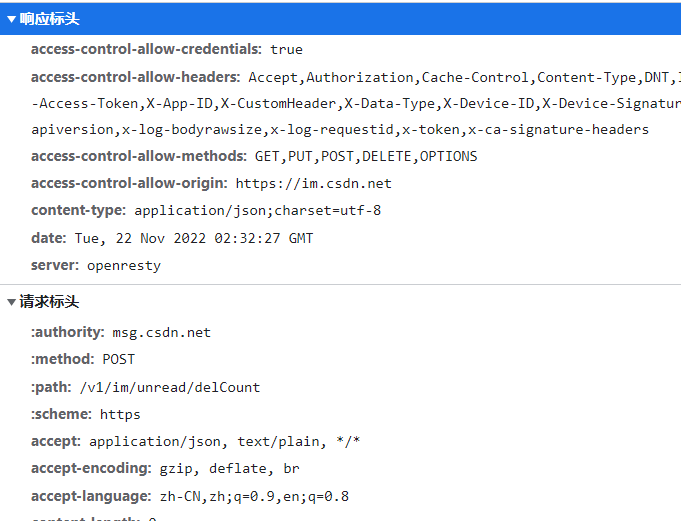
该属性通过请求的请求头信息匹配请求映射
-
与params属性类似,无论有多少属性值,都要同时满足才能匹配成功,也有四种表达式
- “header” 代表请求映射所匹配的请求必须携带header请求头信息
- “!header” 代表请求映射所匹配的请求不能携带header请求头信息
- "header = value"代表请求映射所匹配的请求必须携带header请求头信息,并且对应的值为value
- “header != value” ,代表请求映射所匹配的请求必须携带header请求头信息,并且对应的值不能为value
-
通过浏览器的检查功能我们可以查看请求头信息
$ 注解的小技巧
-
SpringMVC 支持 ant 风格的路径,也就是支持使用通配符
- ? 代表单个任意字符
*代表任意个字符- ** 代表一层或多层目录,我们使用的时候两侧只能为正斜杠
/**/
-
SpringMVC 也支持路径中的占位符,也就是有些参数值我们可以采用位置对应的方式进行传递
- 我们可以看一下默认方式和rest方式传递参数值的方法
// 原始方式 /deleteUser?id=1 // rest方式 /deleteUser/1- 1
- 2
- 3
- 4
- 我们可以看一下默认方式和rest方式传递参数值的方法
-
我们在请求处传递参数值,在控制器的方法形参处获得参数值【使用了@PathVariable注解类似于Spring的@Parameter注解】

二、获取请求参数
- 上面我们讲述的是关于如何匹配请求的问题,那么匹配成功后我们的控制器方法如何处理这个请求呢?
- 大致流程为:获取请求处理编码、获取请求参数,调用Service处理业务,然后将业务处理的结果作为响应返回
- 接下来我们研究的问题就是,如何获得请求中的参数?
- 需求:我们编写一个单独的html作为首页发起我们编写的各种请求,然后再单独编写一个控制器,测试我们的各种获取请求参数的方法
$ 通过ServletAPI获取
- 因为我们前端控制器Dispatcher底层是基于原生的Servlet实现的,所以我们可以用ServletAPI来获取参数
- 将HttpServletRequest作为控制器方法的形参,那么这个形参表示为当前请求报文的对象
我们编写一个param_test.html 页面,后续测试的请求也都写在这个页面里
<!DOCTYPE html> <html lang="en" xmlns:th="http://www.thymeleaf.org"> <head> <meta charset="UTF-8"> <title>请求参数专题</title> </head> <body> <h1>练习使用获取请求参数</h1> <a th:href="@{/testServletAPI(username = 'root', password = 123456)}">测试通过ServletAPI获取我们的参数</a> </body> </html>- 1
- 2
- 3
- 4
- 5
- 6
- 7
- 8
- 9
- 10
- 11
- 这里使用了thymeleaf的命名空间,浏览器解析绝对路径
/为localhost:8080,所以此处自动会为我们补全绝对路径 - 我们用大括号的形式传递参数和参数值,多个参数用逗号分隔开
编写我们的 ParamController 控制类,后续的控制器方法也都写在这个源文件中
package com.atguigu.mvc.controller; import com.atguigu.mvc.bean.User; import org.springframework.stereotype.Controller; import org.springframework.web.bind.annotation.CookieValue; import org.springframework.web.bind.annotation.RequestHeader; import org.springframework.web.bind.annotation.RequestMapping; import org.springframework.web.bind.annotation.RequestParam; import javax.servlet.http.HttpServlet; import javax.servlet.http.HttpServletRequest; import java.util.Arrays; /** * @author Bonbons * @version 1.0 */ @Controller public class ParamController { // 使用Servlet的API获取参数 >> 不推荐使用,如果我们传递参数的时候没用属性名就没法用 @RequestMapping("/testServletAPI") public String testServletAPI(HttpServletRequest request){ // 当我们使用HttpServletRequest作为形参时,Dispatcher控制器会将数据封装到我们的形参之中 // request >> 代表我们当前的这个请求 String username = request.getParameter("username"); String password = request.getParameter("password"); // 输出我们获取到的形参数据 System.out.println("username = " + username + ", password = " + password); return "success"; } }- 1
- 2
- 3
- 4
- 5
- 6
- 7
- 8
- 9
- 10
- 11
- 12
- 13
- 14
- 15
- 16
- 17
- 18
- 19
- 20
- 21
- 22
- 23
- 24
- 25
- 26
- 27
- 28
- 29
- 30
- 31
- 此处我们将控制器方法的形参定义为 HttpServletRequest类型,这个形参对象就代表我们的请求
- 然后调用 getParameter(“参数名”) 就可以获取我们对应的参数值,如果存在多个同名参数那么通过该方法我们只能获取到第一个该参数名的值
- 我们可以通过 getParameterValues(“参数名”)的方式获取存在同名参数的参数值,返回的是一个字符串数组【复选框的情况】
运行我们 tomcat 服务器进行测试

点击超链接后,成功跳转我们指定也页面,并且控制台打印出了我们获取到的参数

$ 通过控制器方法形参获取
- 尽管通过ServletAPI可以获取到参数,但是很不方便,我们并不推荐使用
- 我们只需要使控制器方法的形参和请求参数命名相同,当浏览器发送请求,成功匹配到映射之后,我们前端控制器就会将请求参数赋值给方法相应的形参
我们添加一条请求语句 ,用于测试控制器方法获取参数【在前端页面里添加一条超链接】
<a th:href="@{/testParam(username = 'root', password = 123456)}">测试通过springMVC的构造器方法获取我们的参数</a><br>- 1
然后在我们控制器类中编写对应的方法
// 使用SpringMVC的控制器方法来获取参数 -- 只需要方法的形参和传递参数的名一致就可以 @RequestMapping("/testParam") public String testParam(String username,String password){ // 输出信息 System.out.println("username = " + username + ", password = " + password + "); // 返回要跳转的页面 return "success"; }- 1
- 2
- 3
- 4
- 5
- 6
- 7
- 8
运行测试


-
如果存在多个同名的请求参数,我们可以使用字符串来接收或字符串数组来接收
- 字符串接收会返回一个有多个属性值拼接成的字符串,中间用逗号分隔
- 如果有字符串数组来接收,就会返回一个字符串数组
-
我们思考一个问题,既然能用对应属性名相同的形参接收,那么我们是不是可以把这些形参封装下一呢?
$ 通过POJO类获取
- 在控制器方法的形参位置设置一个实体类型的形参(pojo类),浏览器传递的请求参数名与实体类的属性名一致,请求参数值就会赋值给普通Java类的属性
- 之后我们直接调用POJO类的属性就可以获取请求参数值了
我们通过表单来获取数据,先编写我们的请求页面的代码
<!--为了演示通过pojo类来封装表单数据,我们需要写一个表单--> <form th:action="@{/testPOJO}" method="post"> 用户名 <input type="text" name="username"><br> 密码 <input type="text" name="password"><br> 性别 <input type="radio" name="sex">男<input type="radio" name="sex">女<br> 年龄 <input type="text" name="age"><br> 邮箱 <input type="text" name="email"><br> <input type="submit" value="用实体类接收请求参数"> </form>- 1
- 2
- 3
- 4
- 5
- 6
- 7
- 8
- 9
编写我们的POJO类User,有点类似于Spring中POJO类封装数据对象
package com.atguigu.mvc.bean; /** * @author Bonbons * @version 1.0 */ public class User { private String username; private String password; private Integer age; private String sex; private String email; // 因为我们使用反射机制创建对象,所以如果存在有参构造方法就一定要有无参构造方法 public User() { } public User(String username, String password, Integer age, String sex, String email) { this.username = username; this.password = password; this.age = age; this.sex = sex; this.email = email; } public String getUsername() { return username; } public void setUsername(String username) { this.username = username; } public String getPassword() { return password; } public void setPassword(String password) { this.password = password; } public Integer getAge() { return age; } public void setAge(Integer age) { this.age = age; } public String getSex() { return sex; } public void setSex(String sex) { this.sex = sex; } public String getEmail() { return email; } public void setEmail(String email) { this.email = email; } @Override public String toString() { return "User{" + "username='" + username + '\'' + ", password='" + password + '\'' + ", age=" + age + ", sex='" + sex + '\'' + ", email='" + email + '\'' + '}'; } }- 1
- 2
- 3
- 4
- 5
- 6
- 7
- 8
- 9
- 10
- 11
- 12
- 13
- 14
- 15
- 16
- 17
- 18
- 19
- 20
- 21
- 22
- 23
- 24
- 25
- 26
- 27
- 28
- 29
- 30
- 31
- 32
- 33
- 34
- 35
- 36
- 37
- 38
- 39
- 40
- 41
- 42
- 43
- 44
- 45
- 46
- 47
- 48
- 49
- 50
- 51
- 52
- 53
- 54
- 55
- 56
- 57
- 58
- 59
- 60
- 61
- 62
- 63
- 64
- 65
- 66
- 67
- 68
- 69
- 70
- 71
- 72
- 73
- 74
- 75
- 76
- 77
编写我们的控制器方法
// 测试我们利用实体类接收参数 @RequestMapping("/testPOJO") public String testPOJO(User user){ // 因为我们提供了toString方法,所以此处直接输出 System.out.println(user); return "success"; }- 1
- 2
- 3
- 4
- 5
- 6
- 7
运行服务器进行测试

跳转页面成功,并在控制台成功打印获取到的参数值

- 我们思考一个问题,如果我们不想用请求的参数名,有没有类似于起别名的方式呢?
$ @ RequestParam 注解
-
在SpringMVC中为我们提供了 @Request 注解,可以将请求参数和控制器方法的形参创建映射关系
-
该注解具有四个属性值:
// // Source code recreated from a .class file by IntelliJ IDEA // (powered by FernFlower decompiler) // package org.springframework.web.bind.annotation; import java.lang.annotation.Documented; import java.lang.annotation.ElementType; import java.lang.annotation.Retention; import java.lang.annotation.RetentionPolicy; import java.lang.annotation.Target; import org.springframework.core.annotation.AliasFor; @Target({ElementType.PARAMETER}) @Retention(RetentionPolicy.RUNTIME) @Documented public @interface RequestParam { @AliasFor("name") String value() default ""; @AliasFor("value") String name() default ""; boolean required() default true; String defaultValue() default "\n\t\t\n\t\t\n\ue000\ue001\ue002\n\t\t\t\t\n"; }- 1
- 2
- 3
- 4
- 5
- 6
- 7
- 8
- 9
- 10
- 11
- 12
- 13
- 14
- 15
- 16
- 17
- 18
- 19
- 20
- 21
- 22
- 23
- 24
- 25
- 26
- 27
- 28
- 我们可以看到 name 和 value 互为别名,该属性执行请求参数的参数名,放在我们自定义形参前面
- required 属性代表是否必须传输我们通过value指定的请求参数,默认为true【使用了该注解,这个属性没指定为false,并且属性最后没得到属性值,就会报错】
- defaultValue 属性代表如果我们value指定的参数没有赋值或赋值为空串,那么就会采用defaultValue的值作为参数值
编写控制器方法演示一下正确用法,此处就不挨个测试错误的用法了
// 使用SpringMVC的控制器方法来获取参数 -- 只需要方法的形参和传递参数的名一致就可以 @RequestMapping("/testParam") public String testParam(@RequestParam(value = "user_name", required = false, defaultValue = "default") String username, String password) { // 如果使用了@RequestParam()注解,就自动装配机制默认必须为其传递参数名 // 输出信息 System.out.println("username = " + username + ", password = " + password); return "success"; }- 1
- 2
- 3
- 4
- 5
- 6
- 7
- 8
- 9
- 10
编写我们用于请求的超链接
<a th:href="@{/testParam(user_name, password = 123)}">测试使用@RequestParam注解获取参数</a>- 1

点击超链接后成功跳转我们预设的页面
控制台打印出我们预期的信息,我们通过 required 字段指定 user_name 是请求必须传递的参数,通过 value 字段指定将我们user_name 参数名用username代替,然后在请求的超链接种我特意不给user_name赋值,然后通过defaultValue字段使用我们预设的默认属性值

- 我们还有两个注解,与这个注解类似,同样也是具有这三个属性,而且属性用法也一致
- @RequestHeader 用于请求头信息和控制器方法的形参创建映射关系
- @CookieValue 用于将cookie数据和控制器方法的形参创建映射关系
$ 解决乱码问题
- 乱码出现的原因大致分为两种
-
一种为 get 请求出现的乱码,我们需要修改 tomcat 服务器的配置
- tomcat路径>>conf>>server.xml >> 添加URIEncoding属性解决get请求的乱码

- tomcat路径>>conf>>server.xml >> 添加URIEncoding属性解决get请求的乱码
-
另一种为 post 请求出现的乱码,我们需要通过手动配置过滤器去解决【在web.xml中注册】
<filter> <filter-name>CharacterEncodingFilter</filter-name> <filter-class>org.springframework.web.filter.CharacterEncodingFilter</filter-class> <!--我们需要自己设置编码 >> 我们设置的是请求的编码[可以看源码图辅助理解]--> <init-param> <param-name>encoding</param-name> <param-value>UTF-8</param-value> </init-param> <init-param> <param-name>forceResponseEncoding</param-name> <param-value>true</param-value> </init-param> </filter> <filter-mapping> <filter-name>CharacterEncodingFilter</filter-name> <url-pattern>/*- 1
- 2
- 3
- 4
- 5
- 6
- 7
- 8
- 9
- 10
- 11
- 12
- 13
- 14
- 15
- 16
- 17
-

- 有一个需要注意的点,就是web.xml中运行存在多个过滤器,为了让设置编码方式的过滤器生效我们将其放在最前面【由注册顺序决定】
- 在项目启动后,容器会首先创建声明各种监听器,为后继事件监听做准备,然后创建过滤器,最后是Servlet【监听器 > 过滤器 > Servlet】
- 1
-
-
相关阅读:
智慧管廊解决方案-最新全套文件
保姆级JAVA 性能指标、压测入门
机器学习与数据挖掘——数据预处理
zk中session的基本原理、create、set、delete命令的使用(重补早期学习记录)
基于yolov5轻量级的学生上课姿势检测识别分析系统
【零散技术】妙用Odoo开发者模式下的数据模型
后入能先出,一文搞懂栈
P6773 [NOI2020] 命运(dp、线段树合并)
限制条件加入构造范围:Gym - 102832L
Spring自动配置原理
- 原文地址:https://blog.csdn.net/qq_61323055/article/details/127975819