-
[Spring cloud alibaba][Sentinel][Gateway] 微服务整合sentinel流控未发现注册服务(监控空白问题)
问题描述
本项目是Spring cloud alibaba搭建的微服务包括gateway和user-service服务。但是启动项目和sentinel发现sentinel并未真的的发现注册的gateway服务。
sentinel版本是v1.8.0,下载地址项目
pom
com.alibaba.csp sentinel-spring-cloud-gateway-adapter com.alibaba.cloud spring-cloud-starter-alibaba-sentinel com.alibaba.csp sentinel-datasource-nacos - 1
- 2
- 3
- 4
- 5
- 6
- 7
- 8
- 9
- 10
- 11
- 12
- 13
- 14
- 15
- 16
application:
spring: cloud: sentinel: enabled: true # 是否开启。默认为 true 开启 eager: true # 是否饥饿加载。默认为 false 关闭 transport: dashboard: 192.168.2.106:18080 # 控制台 port: 8720 clientIp: 192.168.2.106 #指定和控制台通信的IP,若不配置,会自动选择一个IP注册 client-ip: 192.168.2.106 # 注册心跳ip filter: url-patterns: - /**- 1
- 2
- 3
- 4
- 5
- 6
- 7
- 8
- 9
- 10
- 11
- 12
- 13
解决sentinel界面未发现服务
需要在pom添加以下依赖
com.alibaba.csp sentinel-transport-simple-http - 1
- 2
- 3
- 4
- 5
解决监控空白问题
虽然能够注册服务到sentinel界面上,也进行了接口访问请求,但是并不能看到监控和簇点链路有相对应的东西。
gateway代码结构
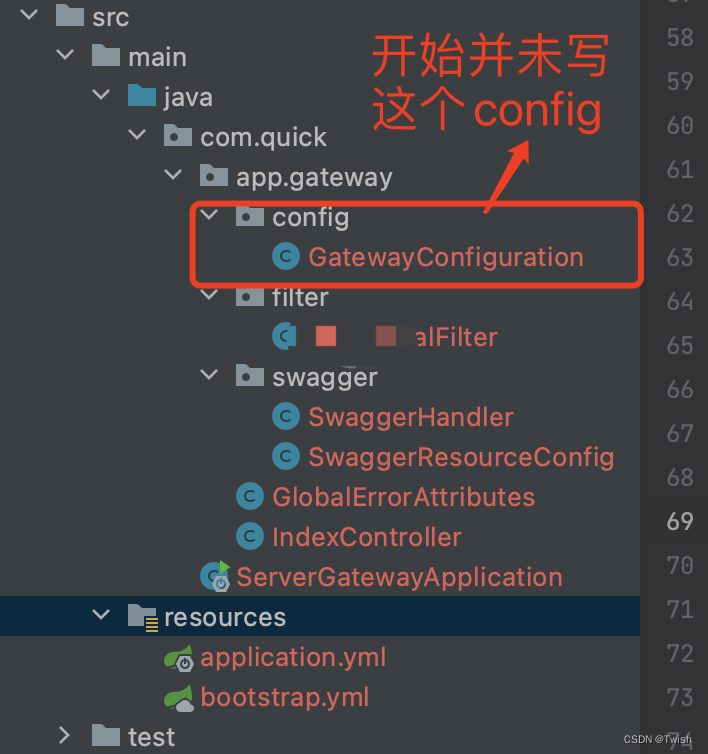
这个GatewayConfiguration主要是代码层面设置sentinel的监控、api以及流控规则使用的。需要添加此类,不然sentinel监控、 簇点链路界面为空白。
代码参考的sentinel官方@Configuration public class GatewayConfiguration { private final List<ViewResolver> viewResolvers; private final ServerCodecConfigurer serverCodecConfigurer; public GatewayConfiguration(ObjectProvider<List<ViewResolver>> viewResolversProvider, ServerCodecConfigurer serverCodecConfigurer) { this.viewResolvers = viewResolversProvider.getIfAvailable(Collections::emptyList); this.serverCodecConfigurer = serverCodecConfigurer; } @Bean @Order(Ordered.HIGHEST_PRECEDENCE) public SentinelGatewayBlockExceptionHandler sentinelGatewayBlockExceptionHandler() { // Register the block exception handler for Spring Cloud Gateway. return new SentinelGatewayBlockExceptionHandler(viewResolvers, serverCodecConfigurer); } @Bean @Order(-1) public GlobalFilter sentinelGatewayFilter() { return new SentinelGatewayFilter(); } @PostConstruct public void doInit() { initCustomizedApis(); initGatewayRules(); } private void initCustomizedApis() { Set<ApiDefinition> definitions = new HashSet<>(); ApiDefinition api1 = new ApiDefinition("user_service") .setPredicateItems(new HashSet<ApiPredicateItem>() {{ add(new ApiPathPredicateItem().setPattern("/user")); add(new ApiPathPredicateItem().setPattern("/user/**") .setMatchStrategy(SentinelGatewayConstants.URL_MATCH_STRATEGY_PREFIX)); }}); definitions.add(api1); GatewayApiDefinitionManager.loadApiDefinitions(definitions); } private void initGatewayRules() { Set<GatewayFlowRule> rules = new HashSet<>(); rules.add(new GatewayFlowRule("user_service") .setCount(1) .setIntervalSec(1) ); GatewayRuleManager.loadRules(rules); } }- 1
- 2
- 3
- 4
- 5
- 6
- 7
- 8
- 9
- 10
- 11
- 12
- 13
- 14
- 15
- 16
- 17
- 18
- 19
- 20
- 21
- 22
- 23
- 24
- 25
- 26
- 27
- 28
- 29
- 30
- 31
- 32
- 33
- 34
- 35
- 36
- 37
- 38
- 39
- 40
- 41
- 42
- 43
- 44
- 45
- 46
- 47
- 48
- 49
- 50
- 51
- 52
启动
idea启动
需要再gateway启动服务加
-Dcsp.sentinel.app.type=1 -Dcsp.sentinel.dashboard.server=localhost:18080- 1
不清楚为啥application.yml里面的dashboard不起作用


Java命令启动
java -Dcsp.sentinel.app.type=1 -Dcsp.sentinel.dashboard.server=localhost:18080 -jar quick-gateway.jar- 1
综上
1、pom需要添加链接界面的依赖库。
2、空白问题需要在gateway里面进行配置。参考官方代码
官方demo
3、添加-Dcsp.sentinel.app.type=1 -Dcsp.sentinel.dashboard.server=localhost:18080注意
微服务整合下的gateway可能因为请求注册的组件比较多,所以sentinel注册服务可能会有很大的延迟才会注册到sentinel,请耐心等待(因为这个问题我折腾晚上2点多,第二天启动会不管,去查相关资料,然后再去看sentinel界面才发现,我靠注册上了)

-
相关阅读:
系统调用理论详解,Linux操作系统原理与应用
一篇文章彻底理解自定义View
Java集合框架详解(二)——泛型
ODS、数据集市、数据仓库的异同点
App测试中ios和Android有哪些区别呢?
深度学习基础--神经网络(1)激活函数
从 Hadoop 到云原生, 大数据平台如何做存算分离
AOP的动态代理机制
Git常用命令与术语
小白优化Oracle的利器”sqltrpt.sql”脚本
- 原文地址:https://blog.csdn.net/qq_27695659/article/details/127990686