-
springmvc-ssm整合
前言:在座的各位大佬好,最近学习了ssm,然后这是一篇整合ssm的笔记,参考的网上某马视频课的笔记嘿嘿~
SSM整合需要掌握↓↓↓↓↓↓↓↓
- 能够掌握SSM整合的流程
- 能够编写SSM整合功能模块类
- 能够使用Result统一表现层响应结果
- 能够编写异常处理器进行项目异常
- 能够完成SSM整合前端页面发送请求实现增删改查操作
- 能够编写拦截器并配置拦截器
一、SSM整合【重点】
1 SSM整合配置
问题导入
请描述“SSM整合流程”中各个配置类的作用?
1.1 SSM整合流程
- 创建工程
- SSM整合
- Spring
- SpringConfig
- MyBatis
- MybatisConfig
- JdbcConfig
- jdbc.properties
- SpringMVC
- ServletConfig
- SpringMvcConfig
- Spring
- 功能模块
- 数据库表与实体类(domain)
- dao(接口+自动代理)
- service(接口+实现类)
- 业务层接口测试(整合JUnit)
- controller
- 表现层接口测试(PostMan)
1.2 SSM整合配置
1.2.1 创建工程,添加依赖和插件

<project xmlns="http://maven.apache.org/POM/4.0.0" xmlns:xsi="http://www.w3.org/2001/XMLSchema-instance" xsi:schemaLocation="http://maven.apache.org/POM/4.0.0 http://maven.apache.org/xsd/maven-4.0.0.xsd"> <modelVersion>4.0.0modelVersion> <groupId>com.itheimagroupId> <artifactId>spingmvc_08_ssmartifactId> <version>1.0-SNAPSHOTversion> <packaging>warpackaging> <dependencies> <dependency> <groupId>org.springframeworkgroupId> <artifactId>spring-webmvcartifactId> <version>5.2.10.RELEASEversion> dependency> <dependency> <groupId>org.springframeworkgroupId> <artifactId>spring-jdbcartifactId> <version>5.2.10.RELEASEversion> dependency> <dependency> <groupId>org.springframeworkgroupId> <artifactId>spring-testartifactId> <version>5.2.10.RELEASEversion> dependency> <dependency> <groupId>org.mybatisgroupId> <artifactId>mybatis-springartifactId> <version>1.3.0version> dependency> <dependency> <groupId>org.mybatisgroupId> <artifactId>mybatisartifactId> <version>3.5.5version> dependency> <dependency> <groupId>mysqlgroupId> <artifactId>mysql-connector-javaartifactId> <version>8.0.29version> dependency> <dependency> <groupId>javax.servletgroupId> <artifactId>javax.servlet-apiartifactId> <version>4.0.1version> <scope>providedscope> dependency> <dependency> <groupId>com.alibabagroupId> <artifactId>druidartifactId> <version>1.1.16version> dependency> <dependency> <groupId>junitgroupId> <artifactId>junitartifactId> <version>4.12version> <scope>testscope> dependency> <dependency> <groupId>com.fasterxml.jackson.coregroupId> <artifactId>jackson-databindartifactId> <version>2.9.0version> dependency> dependencies> <build> <plugins> <plugin> <groupId>org.apache.tomcat.mavengroupId> <artifactId>tomcat7-maven-pluginartifactId> <version>2.1version> <configuration> <port>80port> <path>/path> configuration> plugin> plugins> build> project>- 1
- 2
- 3
- 4
- 5
- 6
- 7
- 8
- 9
- 10
- 11
- 12
- 13
- 14
- 15
- 16
- 17
- 18
- 19
- 20
- 21
- 22
- 23
- 24
- 25
- 26
- 27
- 28
- 29
- 30
- 31
- 32
- 33
- 34
- 35
- 36
- 37
- 38
- 39
- 40
- 41
- 42
- 43
- 44
- 45
- 46
- 47
- 48
- 49
- 50
- 51
- 52
- 53
- 54
- 55
- 56
- 57
- 58
- 59
- 60
- 61
- 62
- 63
- 64
- 65
- 66
- 67
- 68
- 69
- 70
- 71
- 72
- 73
- 74
- 75
- 76
- 77
- 78
- 79
- 80
- 81
- 82
- 83
- 84
- 85
- 86
- 87
- 88
- 89
- 90
- 91
- 92
- 93
- 94
- 95
1.2.2 Spring整合Mybatis
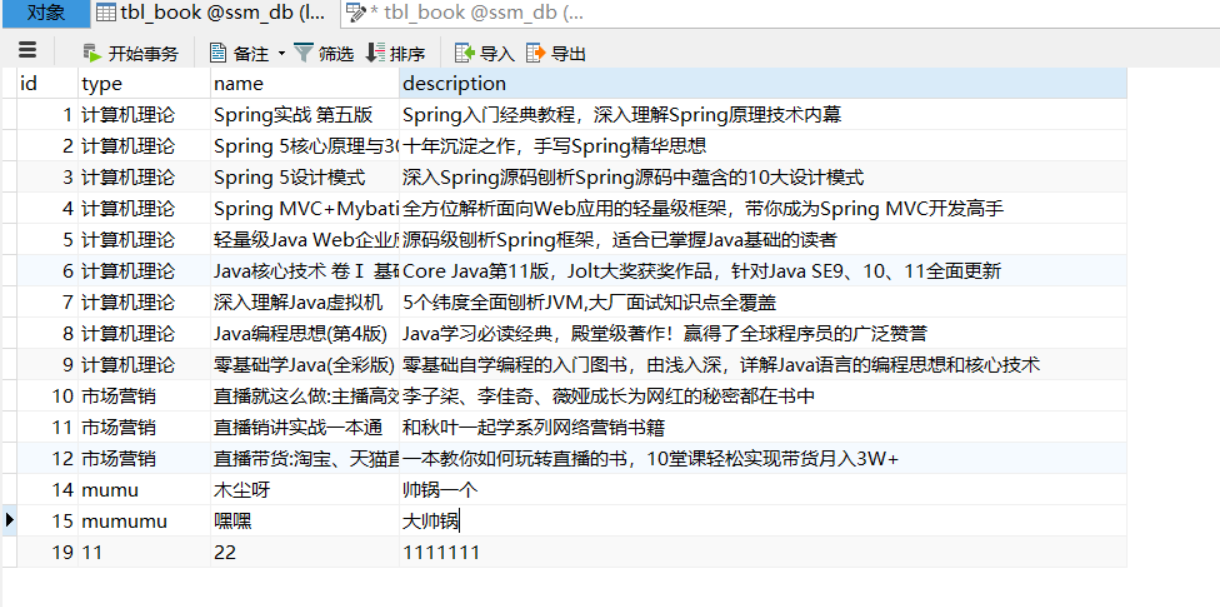
- 创建数据库和表
-- 创建ssm_db数据库 CREATE DATABASE IF NOT EXISTS ssm_db CHARACTER SET utf8; -- 使用ssm_db数据库 USE ssm_db; -- 创建tbl_book表 CREATE TABLE tbl_book( id INT PRIMARY KEY AUTO_INCREMENT, -- 图书编号 TYPE VARCHAR(100), -- 图书类型 NAME VARCHAR(100), -- 图书名称 description VARCHAR(100) -- 图书描述 ); -- 添加初始化数据 INSERT INTO tbl_book VALUES(NULL,'计算机理论','Spring实战 第5版','Spring入门经典教材,深入理解Spring原理技术内幕'); INSERT INTO tbl_book VALUES(NULL,'计算机理论','Spring 5核心原理与30个类手写实战','十年沉淀之作,手写Spring精华思想'); INSERT INTO tbl_book VALUES(NULL,'计算机理论','Spring 5设计模式','深入Spring源码剖析,Spring源码蕴含的10大设计模式'); INSERT INTO tbl_book VALUES(NULL,'市场营销','直播就该这么做:主播高效沟通实战指南','李子柒、李佳琦、薇娅成长为网红的秘密都在书中'); INSERT INTO tbl_book VALUES(NULL,'市场营销','直播销讲实战一本通','和秋叶一起学系列网络营销书籍'); INSERT INTO tbl_book VALUES(NULL,'市场营销','直播带货:淘宝、天猫直播从新手到高手','一本教你如何玩转直播的书,10堂课轻松实现带货月入3W+');- 1
- 2
- 3
- 4
- 5
- 6
- 7
- 8
- 9
- 10
- 11
- 12
- 13
- 14
- 15
- 16
- 17
- 18
- 19
- 20
- jdbc.properties属性文件
jdbc.driver=com.mysql.cj.jdbc.Driver jdbc.url=jdbc:mysql://localhost:3306/ssm_db jdbc.username=root jdbc.password=*****- 1
- 2
- 3
- 4
- JdbcConfig配置类
package com.itheima.config; public class JdbcConfig { @Value("${jdbc.driver}") private String driver; @Value("${jdbc.url}") private String url; @Value("${jdbc.username}") private String username; @Value("${jdbc.password}") private String password; @Bean public DataSource dataSource() { DruidDataSource dataSource = new DruidDataSource(); dataSource.setDriverClassName(driver); dataSource.setUrl(url); dataSource.setUsername(username); dataSource.setPassword(password); return dataSource; } //平台事务管理器 @Bean public PlatformTransactionManager transactionManager(DataSource dataSource){ DataSourceTransactionManager ds = new DataSourceTransactionManager(); ds.setDataSource(dataSource); return ds; } }- 1
- 2
- 3
- 4
- 5
- 6
- 7
- 8
- 9
- 10
- 11
- 12
- 13
- 14
- 15
- 16
- 17
- 18
- 19
- 20
- 21
- 22
- 23
- 24
- 25
- 26
- 27
- 28
- 29
- 30
- MybatisConfig配置类
package com.itheima.config; //DataSource是从容器中spring根据类型自动装配的 public class MyBatisConfig { @Bean public SqlSessionFactoryBean sqlSessionFactoryBean(DataSource dataSource){ SqlSessionFactoryBean factoryBean = new SqlSessionFactoryBean(); factoryBean.setDataSource(dataSource); //类型别名的扫描包 factoryBean.setTypeAliasesPackage("com.itheima.domain"); return factoryBean; } @Bean public MapperScannerConfigurer mapperScannerConfigurer(){ MapperScannerConfigurer msc = new MapperScannerConfigurer(); msc.setBasePackage("com.itheima.dao"); return msc; } }- 1
- 2
- 3
- 4
- 5
- 6
- 7
- 8
- 9
- 10
- 11
- 12
- 13
- 14
- 15
- 16
- 17
- 18
- 19
- SpringConfig配置类
package com.itheima.config; //定义为配置类 //@Configuration //扫描包 @ComponentScan({"com.itheima.service"}) //加载配置文件 @PropertySource("classpath:jdbc.properties") //导入配置类包用于整合mybatis @Import({JdbcConfig.class,MyBatisConfig.class}) //开启注解操作事务 @EnableTransactionManagement public class SpringConfig { }- 1
- 2
- 3
- 4
- 5
- 6
- 7
- 8
- 9
- 10
- 11
- 12
- 13
- 14
1.2.3 Spring整合SpringMVC
- SpringMvcConfig配置类
package com.itheima.config; @Configuration @ComponentScan({"com.itheima.controller","com.itheima.config"}) @Import(SpringConfig.class) @EnableWebMvc public class SpringMvcConfig { }- 1
- 2
- 3
- 4
- 5
- 6
- 7
- 8
- ServletConfig配置类,加载SpringMvcConfig和SpringConfig配置类
package com.itheima.config; public class ServletConfig extends AbstractAnnotationConfigDispatcherServletInitializer { //加载Spring配置类 根配置 protected Class<?>[] getRootConfigClasses() { return new Class[0]; } //加载SpringMVC配置类 protected Class<?>[] getServletConfigClasses() { return new Class[]{SpringMvcConfig.class}; } //设置SpringMVC请求地址拦截规则 protected String[] getServletMappings() { return new String[]{"/"}; } //设置post请求中文乱码过滤器 @Override protected Filter[] getServletFilters() { CharacterEncodingFilter filter = new CharacterEncodingFilter(); filter.setEncoding("utf-8"); return new Filter[]{filter}; } }- 1
- 2
- 3
- 4
- 5
- 6
- 7
- 8
- 9
- 10
- 11
- 12
- 13
- 14
- 15
- 16
- 17
- 18
- 19
- 20
- 21
- 22
- 23
2 功能模块开发
2.1 数据层开发(BookDao)
- Book实体类
public class Book { private Integer id; private String type; private String name; private String description; //可以自己添加getter、setter、toString()方法 }- 1
- 2
- 3
- 4
- 5
- 6
- 7
- BookDao接口
package com.itheima.dao; public interface BookDao { @Insert("insert into tbl_book(type,name,description) values(#{type},#{name},#{description})") //增加 public int save(Book book); @Update("update tbl_book set type=#{type},name=#{name},description=#{description} where id=#{id}") //更新 public int update(Book book); @Delete("delete from tbl_book where id=#{id}") //删除 public int delete(Integer id); @Select("select *from tbl_book where id=#{id}") //根据id查询 public Book selectById(Integer id); @Select("select *from tbl_book") //查询所有 public List<Book> getAll(); }- 1
- 2
- 3
- 4
- 5
- 6
- 7
- 8
- 9
- 10
- 11
- 12
- 13
- 14
- 15
- 16
- 17
- 18
- 19
- 20
- 21
- 22
- 23
2.2 业务层开发(BookService/BookServiceImpl)
- BookService接口
package com.itheima.service; @Transactional public interface BookService { /** *增加 * @param book * @return */ public boolean save(Book book); /** * 更新 * @param book * @return */ public boolean update(Book book); /** * 根据id查询 * @param id * @return */ public Book selectById(Integer id); /** * 查询所有 * @return */ public List<Book> getAll(); /** * 根据id删除 * @param id * @return */ public boolean delete(Integer id); }- 1
- 2
- 3
- 4
- 5
- 6
- 7
- 8
- 9
- 10
- 11
- 12
- 13
- 14
- 15
- 16
- 17
- 18
- 19
- 20
- 21
- 22
- 23
- 24
- 25
- 26
- 27
- 28
- 29
- 30
- 31
- 32
- 33
- 34
- 35
- 36
- 37
- 38
- BookServiceImpl实现类
package com.hnu.service.impl; @Service public class BookServiceImpl implements BookService { @Autowired private BookDao bookDao; public boolean save(Book book) { bookDao.save(book); return true; } public boolean update(Book book) { bookDao.update(book); return true; } public boolean delete(Integer id) { bookDao.delete(id); return true; } public Book selectById(Integer id) { return bookDao.getById(id); } public List<Book> getAll() { return bookDao.getAll(); } }- 1
- 2
- 3
- 4
- 5
- 6
- 7
- 8
- 9
- 10
- 11
- 12
- 13
- 14
- 15
- 16
- 17
- 18
- 19
- 20
- 21
- 22
- 23
- 24
- 25
- 26
- 27
- 28
- 29
- 30
- 31
2.3 表现层开发(BookController)
@RestController @RequestMapping("/books") public class BookController { @Autowired private BookService bookService; @PostMapping public boolean save(@RequestBody Book book) { return bookService.save(book); } @PutMapping public boolean update(@RequestBody Book book) { return bookService.update(book); } @DeleteMapping("/{id}") public boolean delete(@PathVariable Integer id) { return bookService.delete(id); } @GetMapping("/{id}") public Book selectById(@PathVariable Integer id) { return bookService.selectById(id); } @GetMapping public List<Book> getAll() { return bookService.getAll(); } }- 1
- 2
- 3
- 4
- 5
- 6
- 7
- 8
- 9
- 10
- 11
- 12
- 13
- 14
- 15
- 16
- 17
- 18
- 19
- 20
- 21
- 22
- 23
- 24
- 25
- 26
- 27
- 28
- 29
- 30
- 31
- 32
3 接口测试
3.1 Spring整合Junit测试业务层方法
@RunWith(SpringJUnit4ClassRunner.class) @ContextConfiguration(classes = SpringConfig.class) public class BookServiceTest { @Autowired private BookService bookService; @Test public void testSelectById() { Book book = bookService.selectById(2); System.out.println(book); } }- 1
- 2
- 3
- 4
- 5
- 6
- 7
- 8
- 9
- 10
- 11
- 12
可以使用apifox或者postman进行接口测试
二、表现层数据封装【重点】
问题导入
目前我们表现层响应给客户端的数据有哪几种?
1 表现层响应数据的问题
问题:我们表现层增删改方法返回true或者false表示是否成功,selectById()方法返回一个json对象,getAll()方法返回一个json对象数组,这里就出现了三种格式的响应结果,极其不利于前端解析。

解决:我们需要统一响应结果的格式
2 定义Result类封装响应结果
2.1 Result类封装响应结果
public class Result { //描述统一格式中的数据 private Object data; //描述统一格式中的编码,用于区分操作,可以简化配置0或1表示成功失败 private Integer code; //描述统一格式中的消息,可选属性 private String msg; public Result() { } public Result(Integer code,Object data) { this.data = data; this.code = code; } public Result(Integer code, Object data, String msg) { this.data = data; this.code = code; this.msg = msg; } //大家可以自己添加getter、setter、toString()方法 }- 1
- 2
- 3
- 4
- 5
- 6
- 7
- 8
- 9
- 10
- 11
- 12
- 13
- 14
- 15
- 16
- 17
- 18
- 19
- 20
- 21
注意事项:
Result类中的字段并不是固定的,可以根据需要自行增减
2.2 Code类封装响应码
//状态码 public class Code { public static final Integer SAVE_OK = 20011; public static final Integer DELETE_OK = 20021; public static final Integer UPDATE_OK = 20031; public static final Integer GET_OK = 20041; public static final Integer SAVE_ERR = 20010; public static final Integer DELETE_ERR = 20020; public static final Integer UPDATE_ERR = 20030; public static final Integer GET_ERR = 20040; }- 1
- 2
- 3
- 4
- 5
- 6
- 7
- 8
- 9
- 10
- 11
- 12
注意事项:
Code类的常量设计也不是固定的,可以根据需要自行增减,例如将查询再进行细分为GET_OK,GET_ALL_OK,GET_PAGE_OK
3 表现层数据封装返回Result对象
package com.hnu.controller; @RestController @RequestMapping("/books") public class BookController { @Autowired private BookService bookService; @PostMapping public Result save(@RequestBody Book book) { boolean flag = bookService.save(book); return new Result(flag ? Code.SAVE_OK:Code.SAVE_ERR,flag); } @PutMapping public Result update(@RequestBody Book book) { boolean flag = bookService.update(book); return new Result(flag ? Code.UPDATE_OK:Code.UPDATE_ERR,flag); } @DeleteMapping("/{id}") public Result delete(@PathVariable Integer id) { boolean flag = bookService.delete(id); return new Result(flag ? Code.DELETE_OK:Code.DELETE_ERR,flag); } @GetMapping("/{id}") public Result getById(@PathVariable Integer id) { Book book = bookService.getById(id); Integer code = book != null ? Code.GET_OK : Code.GET_ERR; String msg = book != null ? "" : "数据查询失败,请重试!"; return new Result(code,book,msg); } @GetMapping public Result getAll() { List<Book> bookList = bookService.getAll(); Integer code = bookList != null ? Code.GET_OK : Code.GET_ERR; String msg = bookList != null ? "" : "数据查询失败,请重试!"; return new Result(code,bookList,msg); } }- 1
- 2
- 3
- 4
- 5
- 6
- 7
- 8
- 9
- 10
- 11
- 12
- 13
- 14
- 15
- 16
- 17
- 18
- 19
- 20
- 21
- 22
- 23
- 24
- 25
- 26
- 27
- 28
- 29
- 30
- 31
- 32
- 33
- 34
- 35
- 36
- 37
- 38
- 39
- 40
- 41
- 42
- 43
三、异常处理器【理解】
问题导入
问题1:项目各个个层级均可能出现异常,异常处理代码书写在哪一层?
1 异常介绍
- 程序开发过程中不可避免的会遇到异常现象,我们不能让用户看到这样的页面数据

- 出现异常现象的常见位置与常见诱因如下:
- 框架内部抛出的异常:因使用不合规导致
- 数据层抛出的异常:因外部服务器故障导致(例如:服务器访问超时)
- 业务层抛出的异常:因业务逻辑书写错误导致(例如:遍历业务书写操作,导致索引异常等)
- 表现层抛出的异常:因数据收集、校验等规则导致(例如:不匹配的数据类型间导致异常)
- 工具类抛出的异常:因工具类书写不严谨不够健壮导致(例如:必要释放的连接长期未释放等)
1.1 @RestControllerAdvice注解介绍
-
名称:@RestControllerAdvice
-
类型:类注解
-
位置:Rest风格开发的控制器增强类定义上方
-
作用:为Rest风格开发的控制器类做增强
-
说明:此注解自带@ResponseBody注解与@Component注解,具备对应的功能
1.2 @ExceptionHandler注解介绍
- 名称:@ExceptionHandler
- 类型:方法注解
- 位置:专用于异常处理的控制器方法上方
- 作用:设置指定异常的处理方案,功能等同于控制器方法,出现异常后终止原始控制器执行,并转入当前方法执行
- 说明:此类方法可以根据处理的异常不同,制作多个方法分别处理对应的异常
2、项目异常处理方案【理解】
问题导入
请说出项目当前异常的分类以及对应类型异常该如何处理?
1 项目异常分类
- 业务异常(BusinessException)
- 规范的用户行为产生的异常
- 不规范的用户行为操作产生的异常
- 发送对应消息传递给用户,提醒规范操作
- 系统异常(SystemException)
- 项目运行过程中可预计且无法避免的异常
- 发送固定消息传递给用户,安抚用户
- 记录日志
- 其他异常(Exception)
- 编程人员未预期到的异常
- 发送固定消息传递给用户,安抚用户
- 发送特定消息给编程人员,提醒维护(纳入预期范围内)
- 记录日志
2 项目异常处理代码实现
3.1 根据异常分类自定义异常类
3.1.1 自定义项目系统级异常
package com.itheima.exception; //自定义异常处理器,用于封装异常信息,对异常进行分类 public class SystemException extends RuntimeException{ private Integer code; public Integer getCode() { return code; } public void setCode(Integer code) { this.code = code; } public SystemException(Integer code) { this.code = code; } public SystemException(Integer code, String message) { super(message); this.code = code; } public SystemException(Integer code, String message, Throwable cause) { super(message, cause); this.code = code; } }- 1
- 2
- 3
- 4
- 5
- 6
- 7
- 8
- 9
- 10
- 11
- 12
- 13
- 14
- 15
- 16
- 17
- 18
- 19
- 20
- 21
- 22
- 23
- 24
- 25
- 26
- 27
- 28
3.1.2 自定义项目业务级异常
package com.itheima.exception; public class BusinessException extends RuntimeException{ private Integer code; public Integer getCode() { return code; } public void setCode(Integer code) { this.code = code; } public BusinessException(Integer code, String message) { //带有super关键字的放在代码第一行 super(message); this.code = code; } public BusinessException(Integer code, String message, Throwable cause) { super(message, cause); this.code = code; } }- 1
- 2
- 3
- 4
- 5
- 6
- 7
- 8
- 9
- 10
- 11
- 12
- 13
- 14
- 15
- 16
- 17
- 18
- 19
- 20
- 21
- 22
- 23
- 24
3.2 自定义异常编码(持续补充)
package com.itheima.framework; public class Code { public static final Integer SAVE_OK = 20011; public static final Integer DELETE_OK = 20021; public static final Integer UPDATE_OK = 20031; public static final Integer GET_OK = 20041; public static final Integer SAVE_ERR = 20010; public static final Integer DELETE_ERR = 20020; public static final Integer UPDATE_ERR = 20030; public static final Integer GET_ERR = 20040; //系统异常 public static final Integer SYSTEM_ERR = 50001; public static final Integer SYSTEM_TIMEOUT_ERR = 50002; public static final Integer SYSTEM_UNKNOW_ERR = 59999; //业务异常 public static final Integer BUSINESS_ERR = 60002; }- 1
- 2
- 3
- 4
- 5
- 6
- 7
- 8
- 9
- 10
- 11
- 12
- 13
- 14
- 15
- 16
- 17
- 18
- 19
- 20
3.3 触发自定义异常
package com.itheima.service; //业务层 写业务逻辑,什么都在表现层写的话就会很杂乱 @Service public class BookServiceImpl implements BookService { @Autowired private BookDao bookDao; public boolean save(Book book) { return bookDao.save(book) > 0; } public boolean update(Book book) { return bookDao.update(book) > 0; } public Book selectById(Integer id) { return bookDao.selectById(id); } public List<Book> getAll() { return bookDao.getAll(); } public boolean delete(Integer id) { return bookDao.delete(id) > 0; } }- 1
- 2
- 3
- 4
- 5
- 6
- 7
- 8
- 9
- 10
- 11
- 12
- 13
- 14
- 15
- 16
- 17
- 18
- 19
- 20
- 21
- 22
- 23
- 24
- 25
- 26
- 27
3.4 在异常通知类中拦截并处理异常
package com.itheima.controller; //@RestControllerAdvice用于标识当前类为REST风格对应的异常处理器 @RestControllerAdvice public class ProjectExceptionAdvice { //@RestControllerAdvice用于标识当前类为REST风格对应的异常处理器 @ExceptionHandler(SystemException.class) public Result doSystemException(SystemException ex){ //记录日志 //发送消息给运维 //发送邮件给开发人员,ex对象发送给开发人员 return new Result(ex.getCode(),null,ex.getMessage()); } @ExceptionHandler(BusinessException.class) public Result doBusinessException(BusinessException ex){ return new Result(ex.getCode(),null,ex.getMessage()); } //除了自定义的异常处理器,保留对Exception类型的异常处理,用于处理非预期的异常 @ExceptionHandler(Exception.class) public Result doOtherException(Exception ex){ //记录日志 //发送消息给运维 //发送邮件给开发人员,ex对象发送给开发人员 return new Result(Code.SYSTEM_UNKNOW_ERR,null,"系统繁忙,请稍后再试"); } }- 1
- 2
- 3
- 4
- 5
- 6
- 7
- 8
- 9
- 10
- 11
- 12
- 13
- 14
- 15
- 16
- 17
- 18
- 19
- 20
- 21
- 22
- 23
- 24
- 25
- 26
测试:在postman中发送请求访问getById方法,传递参数-1,得到以下结果:

五、SSM整合页面开发【重点】
1 准备工作
为了确保静态资源能够被访问到,需要设置静态资源过滤
package com.itheima.config; @Configuration public class SpringMvcSupport extends WebMvcConfigurationSupport { @Override protected void addResourceHandlers(ResourceHandlerRegistry registry) { registry.addResourceHandler("/pages/**").addResourceLocations("/pages/"); registry.addResourceHandler("/js/**").addResourceLocations("/js/"); registry.addResourceHandler("/css/**").addResourceLocations("/css/"); registry.addResourceHandler("/plugins/**").addResourceLocations("/plugins/"); } }- 1
- 2
- 3
- 4
- 5
- 6
- 7
- 8
- 9
- 10
- 11
- 12
在SpringMvcConfig中扫描SpringMvcSuppor
@Configuration @ComponentScan({"com.itheima.controller","com.itheima.config"}) @EnableWebMvc public class SpringMvcConfig { }- 1
- 2
- 3
- 4
- 5
2 列表查询功能
需求:页面加载完后发送异步请求到后台获取列表数据进行展示。
1.找到页面的钩子函数,
created()2.
created()方法中调用了this.getAll()方法3.在getAll()方法中使用axios发送异步请求从后台获取数据
4.访问的路径为
http://localhost/books5.返回数据
返回数据res.data的内容如下:
 前端代码,发送方式:
//列表 getAll() { //发送ajax请求 axios.get("../books").then((res)=>{ this.dataList = res.data.data; }); }- 1
- 2
- 3
- 4
- 5
- 6
- 7

3 添加功能

需求:完成图片的新增功能模块
1.找到页面上的
新建按钮,按钮上绑定了@click="handleCreate()"方法2.在method中找到
handleCreate方法,方法中打开新增面板3.新增面板中找到
确定按钮,按钮上绑定了@click="handleAdd()"方法4.在method中找到
handleAdd方法5.在方法中发送请求和数据,响应成功后将新增面板关闭并重新查询数据
- 前端代码
//弹出添加窗口 handleCreate() { this.dialogFormVisible = true; this.resetForm(); }, //重置表单 resetForm() { this.formData = {}; }, //添加 handleAdd () { //发送ajax请求 axios.post("../books",this.formData).then((res)=>{ console.log(res.data); //如果操作成功,关闭弹层,显示数据 //this.formData是表单中的数据,最后是一个json数据 if(res.data.code == 20011){ this.dialogFormVisible = false; this.$message.success("添加成功"); }else if(res.data.code == 20010){ this.$message.error("添加失败"); }else{ this.$message.error(res.data.msg); } }).finally(()=>{ this.getAll(); }); }- 1
- 2
- 3
- 4
- 5
- 6
- 7
- 8
- 9
- 10
- 11
- 12
- 13
- 14
- 15
- 16
- 17
- 18
- 19
- 20
- 21
- 22
- 23
- 24
- 25
- 26
- 27
- 28
4 修改功能
- 显示弹出框查询图书信息
//弹出编辑窗口 handleUpdate(row) { // console.log(row); //row.id 查询条件 //查询数据,根据id查询 axios.get("../books/" + row.id).then((res) => { if (res.data.code == 20041) { //展示弹层,加载数据 this.formData = res.data.data; this.dialogFormVisible4Edit = true; } else { this.$message.error(res.data.msg); } }) }- 1
- 2
- 3
- 4
- 5
- 6
- 7
- 8
- 9
- 10
- 11
- 12
- 13
- 14
- 保存修改后的图书信息
//编辑 handleEdit() { //发送ajax请求 axios.put("/books", this.formData).then((res) => { //如果操作成功,关闭弹层,显示数据 if (res.data.code = 20031) { this.dialogFormVisible4Edit = false; this.$message.success("修改成功"); } else if (res.data.code == 20030) { this.$message.error("修改失败"); } else { this.$message.error(res.data.msg); } }).finally(() => { this.getAll(); }) },- 1
- 2
- 3
- 4
- 5
- 6
- 7
- 8
- 9
- 10
- 11
- 12
- 13
- 14
- 15
- 16
- 17
5 删除功能
// 删除 handleDelete(row) { //1.弹出提示框 this.$confirm("此操作永久删除当前数据,是否继续?", "提示", {type: 'info'}).then(() => { //2.做删除业务 axios.delete("/books/" + row.id).then((res) => { if (res.data.code = 20021) { this.$message.success("删除成功"); } else { this.$message.error("删除失败");0 } }); }).catch(() => { //3.取消删除 this.$message.info("取消删除操作"); }).finally(() => { this.getAll(); }); }- 1
- 2
- 3
- 4
- 5
- 6
- 7
- 8
- 9
- 10
- 11
- 12
- 13
- 14
- 15
- 16
- 17
- 18
- 19
六、 ssm整合源代码gitee地址
大家可以在idea中clone下来看哦~
-
相关阅读:
Dapr 中文社区汇总
C++编程功底和常用规则
伸展树原理介绍
世界经济和金融秩序再定义 | 零数科技受邀出席第三届世界金融论坛
知识点6--CMS项目管理员后台
vue-:visible.sync的作用
论文解读:ToxinPred2:一种预测蛋白质毒性的改进方法
关于Nginx跨域配置的一些问题,详解如何正确的配置跨域
uni-app 获取视频第一帧转换为图片 并展示
并发与并行,同步和异步,Go lang1.18入门精炼教程,由白丁入鸿儒,Go lang并发编程之GoroutineEP13
- 原文地址:https://blog.csdn.net/weixin_51470901/article/details/127962857