-
前后端分类 (增加,查询)
目录
一,后台代码
一,配置文件

application.yml
- server:
- port: 8080
- servlet:
- context-path: /spboot
- spring:
- datasource:
- type: com.alibaba.druid.pool.DruidDataSource
- driver-class-name: com.mysql.jdbc.Driver
- url: jdbc:mysql://localhost:3306/bookshop?useUnicode=true&characterEncoding=utf8&useSSL=false
- username: root
- password: 123456
- druid:
- initial-size: 5
- min-idle: 5
- max-active: 20
- max-wait: 60000
- time-between-eviction-runs-millis: 60000
- min-evictable-idle-time-millis: 30000
- validation-query: SELECT 1 FROM DUAL
- test-while-idle: true
- test-on-borrow: true
- test-on-return: false
- pool-prepared-statements: true
- max-pool-prepared-statement-per-connection-size: 20
- filter:
- stat:
- merge-sql: true
- slow-sql-millis: 5000
- web-stat-filter:
- enabled: true
- url-pattern: /*
- exclusions: "*.js,*.gif,*.jpg,*.png,*.css,*.ico,/druid/*"
- session-stat-enable: true
- session-stat-max-count: 100
- stat-view-servlet:
- enabled: true
- url-pattern: /druid/*
- reset-enable: true
- login-username: admin
- login-password: admin
- allow: 127.0.0.1
- #deny: 192.168.1.100
- freemarker:
- cache: false
- charset: UTF-8
- content-type: text/html
- suffix: .ftl
- template-loader-path: classpath:/templates
- mybatis:
- mapper-locations: classpath:mapper/*.xml
- type-aliases-package: com.zking.spboot.model
- configuration:
- map-underscore-to-camel-case: true
- logging:
- level:
- com.zking.spboot.mapper: debug
- pagehelper:
- helperDialect: mysql
- reasonable: true
- supportMethodsArguments: true
- params: count=countSql
generatorConfig.xml
- "1.0" encoding="UTF-8" ?>
- generatorConfiguration PUBLIC "-//mybatis.org//DTD MyBatis Generator Configuration 1.0//EN"
- "http://mybatis.org/dtd/mybatis-generator-config_1_0.dtd" >
- <generatorConfiguration>
- <properties resource="jdbc.properties"/>
- <classPathEntry location="E:\maven mulu\mvn_repository2\mysql\mysql-connector-java\5.1.44\mysql-connector-java-5.1.44.jar"/>
- <context id="infoGuardian">
- <commentGenerator>
- <property name="suppressAllComments" value="true"/>
- <property name="suppressDate" value="true"/>
- commentGenerator>
- <jdbcConnection driverClass="${jdbc.driver}"
- connectionURL="${jdbc.url}" userId="${jdbc.username}" password="${jdbc.password}"/>
- <javaTypeResolver>
- <property name="forceBigDecimals" value="false"/>
- javaTypeResolver>
- <javaModelGenerator targetPackage="com.zking.spboot.model"
- targetProject="src/main/java">
- <property name="enableSubPackages" value="false"/>
- <property name="constructorBased" value="true"/>
- <property name="trimStrings" value="false"/>
- <property name="immutable" value="false"/>
- javaModelGenerator>
- <sqlMapGenerator targetPackage="com.zking.spboot.mapper"
- targetProject="src/main/resources">
- <property name="enableSubPackages" value="false"/>
- sqlMapGenerator>
- <javaClientGenerator targetPackage="com.zking.spboot.mapper"
- targetProject="src/main/java" type="XMLMAPPER">
- <property name="enableSubPackages" value="false"/>
- javaClientGenerator>
- <table schema="" tableName="t_book" domainObjectName="Book"
- enableCountByExample="false" enableDeleteByExample="false"
- enableSelectByExample="false" enableUpdateByExample="false">
- table>
- context>
- generatorConfiguration>
jdbc.properties
- jdbc.driver=com.mysql.jdbc.Driver
- jdbc.url=jdbc:mysql://localhost:3306/bookshop?useUnicode=true&characterEncoding=UTF-8
- jdbc.username=root
- jdbc.password=123456
二,代码部分
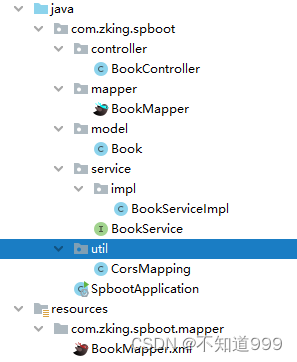
**Mapper.xml
- "1.0" encoding="UTF-8" ?>
- mapper PUBLIC "-//mybatis.org//DTD Mapper 3.0//EN" "http://mybatis.org/dtd/mybatis-3-mapper.dtd" >
- <mapper namespace="com.zking.spboot.mapper.BookMapper" >
- <resultMap id="BaseResultMap" type="com.zking.spboot.model.Book" >
- <constructor >
- <idArg column="id" jdbcType="INTEGER" javaType="java.lang.Integer" />
- <arg column="bookname" jdbcType="VARCHAR" javaType="java.lang.String" />
- <arg column="price" jdbcType="REAL" javaType="java.lang.Float" />
- <arg column="booktype" jdbcType="VARCHAR" javaType="java.lang.String" />
- constructor>
- resultMap>
- <sql id="Base_Column_List" >
- id, bookname, price, booktype
- sql>
- <select id="selectByPrimaryKey" resultMap="BaseResultMap" parameterType="java.lang.Integer" >
- select
- <include refid="Base_Column_List" />
- from t_book
- where id = #{id,jdbcType=INTEGER}
- select>
- <select id="qurey" resultType="com.zking.spboot.model.Book">
- select <include refid="Base_Column_List">include> from t_book where 1=1
- <if test="bookname!='' and bookname!=null">
- and bookname like concat('%',#{bookname},'%')
- if>
- select>
- <delete id="deleteByPrimaryKey" parameterType="java.lang.Integer" >
- delete from t_book
- where id = #{id,jdbcType=INTEGER}
- delete>
- <insert id="insert" parameterType="com.zking.spboot.model.Book" >
- insert into t_book (id, bookname, price,
- booktype)
- values (#{id,jdbcType=INTEGER}, #{bookname,jdbcType=VARCHAR}, #{price,jdbcType=REAL},
- #{booktype,jdbcType=VARCHAR})
- insert>
- <insert id="insertSelective" parameterType="com.zking.spboot.model.Book" >
- insert into t_book
- <trim prefix="(" suffix=")" suffixOverrides="," >
- <if test="id != null" >
- id,
- if>
- <if test="bookname != null" >
- bookname,
- if>
- <if test="price != null" >
- price,
- if>
- <if test="booktype != null" >
- booktype,
- if>
- trim>
- <trim prefix="values (" suffix=")" suffixOverrides="," >
- <if test="id != null" >
- #{id,jdbcType=INTEGER},
- if>
- <if test="bookname != null" >
- #{bookname,jdbcType=VARCHAR},
- if>
- <if test="price != null" >
- #{price,jdbcType=REAL},
- if>
- <if test="booktype != null" >
- #{booktype,jdbcType=VARCHAR},
- if>
- trim>
- insert>
- <update id="updateByPrimaryKeySelective" parameterType="com.zking.spboot.model.Book" >
- update t_book
- <set >
- <if test="bookname != null" >
- bookname = #{bookname,jdbcType=VARCHAR},
- if>
- <if test="price != null" >
- price = #{price,jdbcType=REAL},
- if>
- <if test="booktype != null" >
- booktype = #{booktype,jdbcType=VARCHAR},
- if>
- set>
- where id = #{id,jdbcType=INTEGER}
- update>
- <update id="updateByPrimaryKey" parameterType="com.zking.spboot.model.Book" >
- update t_book
- set bookname = #{bookname,jdbcType=VARCHAR},
- price = #{price,jdbcType=REAL},
- booktype = #{booktype,jdbcType=VARCHAR}
- where id = #{id,jdbcType=INTEGER}
- update>
- mapper>
**Mapper
- package com.zking.spboot.mapper;
- import com.zking.spboot.model.Book;
- import org.springframework.stereotype.Repository;
- import java.util.List;
- @Repository
- public interface BookMapper {
- int deleteByPrimaryKey(Integer id);
- //增加
- int insert(Book record);
- //模糊查询
- List
qurey(Book book); - int insertSelective(Book record);
- Book selectByPrimaryKey(Integer id);
- int updateByPrimaryKeySelective(Book record);
- int updateByPrimaryKey(Book record);
- }
实体类:
- package com.zking.spboot.model;
- public class Book {
- private Integer id;
- private String bookname;
- private Float price;
- private String booktype;
- public Book(Integer id, String bookname, Float price, String booktype) {
- this.id = id;
- this.bookname = bookname;
- this.price = price;
- this.booktype = booktype;
- }
- public Book() {
- super();
- }
- public Integer getId() {
- return id;
- }
- public void setId(Integer id) {
- this.id = id;
- }
- public String getBookname() {
- return bookname;
- }
- public void setBookname(String bookname) {
- this.bookname = bookname;
- }
- public Float getPrice() {
- return price;
- }
- public void setPrice(Float price) {
- this.price = price;
- }
- public String getBooktype() {
- return booktype;
- }
- public void setBooktype(String booktype) {
- this.booktype = booktype;
- }
- }
**Service
- package com.zking.spboot.service;
- import com.zking.spboot.model.Book;
- import java.util.List;
- public interface BookService {
- //增加
- int insert(Book record);
- //模糊查询
- List
qurey(Book book); - }
***Impl
- package com.zking.spboot.service.impl;
- import com.zking.spboot.mapper.BookMapper;
- import com.zking.spboot.model.Book;
- import com.zking.spboot.service.BookService;
- import org.springframework.beans.factory.annotation.Autowired;
- import org.springframework.stereotype.Service;
- import java.util.List;
- @Service
- public class BookServiceImpl implements BookService {
- @Autowired
- private BookMapper bookMapper;
- @Override
- public int insert(Book record) {
- return bookMapper.insert(record);
- }
- @Override
- public List
qurey(Book book) { - return bookMapper.qurey(book);
- }
- }
**Controller
- package com.zking.spboot.controller;
- import com.zking.spboot.model.Book;
- import com.zking.spboot.service.BookService;
- import lombok.AllArgsConstructor;
- import lombok.Data;
- import lombok.NoArgsConstructor;
- import org.springframework.beans.factory.annotation.Autowired;
- import org.springframework.web.bind.annotation.RequestMapping;
- import org.springframework.web.bind.annotation.RestController;
- import java.util.List;
- /**
- * @author ruojuan
- * @site www.ruojuan.com
- * @company 玉渊工作室
- * @create 2022年11月18日 18:34
- **/
- @RestController
- @RequestMapping("/book")
- public class BookController {
- @Autowired
- private BookService bookService;
- //模糊查询
- @RequestMapping("/list")
- public JsonResponseBody list(Book book){
- List
qurey = bookService.qurey(book); - return new JsonResponseBody<>(1,"ok",qurey);
- }
- //增加
- @RequestMapping("/add")
- public JsonResponseBody insert(Book book){
- int insert = bookService.insert(book);
- return new JsonResponseBody<>();
- }
- @Data
- @AllArgsConstructor
- @NoArgsConstructor
- class JsonResponseBody
{ - private Integer code = 200;
- private String msg="ok";
- private T date;
- }
- }
- package com.zking.spboot.util;
- import org.springframework.context.annotation.Configuration;
- import org.springframework.web.servlet.config.annotation.CorsRegistry;
- import org.springframework.web.servlet.config.annotation.WebMvcConfigurer;
- @Configuration
- public class CorsMapping implements WebMvcConfigurer {
- /*@Override
- *
- * 重新跨域支持方法
- * CorsRegistry 开启跨域注册
- */
- public void addCorsMappings(CorsRegistry registry) {
- //addMapping 添加可跨域的请求地址
- registry.addMapping("/**")
- //设置跨域 域名权限 规定由某一个指定的域名+端口能访问跨域项目
- .allowedOrigins("*")
- //是否开启cookie跨域
- .allowCredentials(false)
- //规定能够跨域访问的方法类型
- .allowedMethods("GET","POST","DELETE","PUT","OPTIONS")
- //添加验证头信息 token
- //.allowedHeaders()
- //预检请求存活时间 在此期间不再次发送预检请求
- .maxAge(3600);
- }
- }
二,前台代码
首先输入命令 npm install
npm install

main.js
- // The Vue build version to load with the `import` command
- // (runtime-only or standalone) has been set in webpack.base.conf with an alias.
- import Vue from 'vue'
- import ElementUI from 'element-ui' //新添加1
- import 'element-ui/lib/theme-chalk/index.css' //新添加2,避免后期打包样式不同,要放在import App from './App';之前
- import axios from '@/api/http' //vue项目对axios的全局配置
- import App from './App'
- import router from './router'
- import VueAxios from 'vue-axios'
- Vue.use(VueAxios,axios)
- Vue.use(ElementUI) //新添加3
- Vue.config.productionTip = false
- /* eslint-disable no-new */
- new Vue({
- el: '#app',
- router,
- components: { App },
- template: '
' - })
App.vue
- <template>
- <div id="app">
- <router-view/>
- div>
- template>
- <script>
- export default {
- name: 'App'
- }
- script>
- <style>
- #app {
- font-family: 'Avenir', Helvetica, Arial, sans-serif;
- -webkit-font-smoothing: antialiased;
- -moz-osx-font-smoothing: grayscale;
- text-align: center;
- color: #2c3e50;
- margin-top: 60px;
- }
- style>
router/index.js
- import Vue from 'vue'
- import Router from 'vue-router'
- import BookList from '@/views/BookList'
- Vue.use(Router)
- export default new Router({
- routes: [
- {
- path: '/',
- name: 'BookList',
- component: BookList
- }
- ]
- })
api/actoin.js
- /**
- * 对后台请求的地址的封装,URL格式如下:
- * 模块名_实体名_操作
- */
- export default {
- //服务器
- 'SERVER': 'http://localhost:8080/spboot',
- 'getAll': '/book/list',
- 'add': '/book/add',
- //获得请求的完整地址,用于mockjs测试时使用
- 'getFullPath': k => {
- return this.SERVER + this[k];
- }
- }
api/http.js
- /**
- * vue项目对axios的全局配置
- */
- import axios from 'axios'
- import qs from 'qs'
- //引入action模块,并添加至axios的类属性urls上
- import action from '@/api/action'
- axios.urls = action
- // axios默认配置
- axios.defaults.timeout = 10000; // 超时时间
- // axios.defaults.baseURL = 'http://localhost:8080/crm'; // 默认地址
- axios.defaults.baseURL = action.SERVER;
- //整理数据
- // 只适用于 POST,PUT,PATCH,transformRequest` 允许在向服务器发送前,修改请求数据
- axios.defaults.transformRequest = function(data) {
- data = qs.stringify(data);
- return data;
- };
- // 请求拦截器
- axios.interceptors.request.use(function(config) {
- // let jwt = sessionStorage.getItem('jwt');
- // if (jwt) {
- // config.headers['jwt'] = jwt;
- // }
- return config;
- }, function(error) {
- return Promise.reject(error);
- });
- // 响应拦截器
- axios.interceptors.response.use(function(response) {
- // let jwt = response.headers['jwt'];
- // if (jwt) {
- // sessionStorage.setItem('jwt', jwt);
- // }
- return response;
- }, function(error) {
- return Promise.reject(error);
- });
- // // 路由请求拦截
- // // http request 拦截器
- // axios.interceptors.request.use(
- // config => {
- // //config.data = JSON.stringify(config.data);
- // //config.headers['Content-Type'] = 'application/json;charset=UTF-8';
- // //config.headers['Token'] = 'abcxyz';
- // //判断是否存在ticket,如果存在的话,则每个http header都加上ticket
- // // if (cookie.get("token")) {
- // // //用户每次操作,都将cookie设置成2小时
- // // cookie.set("token", cookie.get("token"), 1 / 12)
- // // cookie.set("name", cookie.get("name"), 1 / 12)
- // // config.headers.token = cookie.get("token");
- // // config.headers.name = cookie.get("name");
- // // }
- // return config;
- // },
- // error => {
- // return Promise.reject(error.response);
- // });
- // // 路由响应拦截
- // // http response 拦截器
- // axios.interceptors.response.use(
- // response => {
- // if (response.data.resultCode == "404") {
- // console.log("response.data.resultCode是404")
- // // 返回 错误代码-1 清除ticket信息并跳转到登录页面
- // // cookie.del("ticket")
- // // window.location.href='http://login.com'
- // return
- // } else {
- // return response;
- // }
- // },
- // error => {
- // return Promise.reject(error.response) // 返回接口返回的错误信息
- // });
- export default axios;
view/界面
- <template>
- <div>
- <h1 align="center">SpringBoot阶段机试,ts={{ts}}h1>
- <el-form :inline="true">
- <el-form-item label="书本名称:">
- <el-input v-model="bookname" placeholder="请输入书本名称">el-input>
- el-form-item>
- <el-form-item>
- <el-button type="primary" @click="onSubmit">查询el-button>
- <el-button type="primary" @click="open">增加el-button>
- el-form-item>
- el-form>
- <el-table :data="tableData" style="width: 100%" :row-class-name="tableRowClassName">
- <el-table-column prop="id" label="书本编号" width="180">
- el-table-column>
- <el-table-column prop="bookname" label="书本名称" width="180">
- el-table-column>
- <el-table-column prop="price" label="书本价格" width="180">
- el-table-column>
- <el-table-column prop="booktype" label="书本类型" width="180">
- el-table-column>
- el-table>
- <el-dialog @close="close" title="增加书籍" :visible.sync="dialogFormVisible">
- <el-form :model="book" :rules="rules" ref="book">
- <el-form-item prop="bookname" label="书本名称" :label-width="formLabelWidth">
- <el-input v-model="book.bookname" autocomplete="off">el-input>
- el-form-item>
- <el-form-item prop="price" label="书本价格" :label-width="formLabelWidth">
- <el-input v-model="book.price" autocomplete="off">el-input>
- el-form-item>
- <el-form-item prop="booktype" label="书本类型" :label-width="formLabelWidth">
- <el-select v-model="book.booktype" placeholder="请选择书本类型">
- <el-option label="历史" value="历史">el-option>
- <el-option label="科学" value="科学">el-option>
- el-select>
- el-form-item>
- el-form>
- <div slot="footer" class="dialog-footer">
- <el-button @click="dialogFormVisible = false">取 消el-button>
- <el-button type="primary" @click="onSubmit1">确 定el-button>
- div>
- el-dialog>
- div>
- template>
- <style>
- .el-table .warning-row {
- background: oldlace;
- }
- .el-table .success-row {
- background: #f0f9eb;
- }
- style>
- <script>
- export default {
- data:function(){
- return {
- ts:new Date().getTime(),
- bookname:'',
- tableData:[],
- dialogFormVisible:false,
- book:{
- bookname:'',
- price:'',
- booktype:'',
- },
- rules: {
- bookname: [
- { required: true, message: '请输入书本名称', trigger: 'blur' },
- ],
- price: [
- { required: true, message: '请输入书本价格', trigger: 'blur' },
- ],
- booktype: [
- { required: true, message: '请选择书本类型', trigger: 'blur' },
- ],
- },
- };
- },
- methods:{
- tableRowClassName({row, rowIndex}) {
- if (rowIndex === 1) {
- return 'warning-row';
- } else if (rowIndex === 3) {
- return 'success-row';
- }
- return '';
- },
- open:function(){
- this.dialogFormVisible=true;
- },
- close:function(){
- this.$refs['book'].resetFields();
- },
- onSubmit:function(){
- //1.查询参数
- let params = {
- bookname:this.bookname
- };
- //2.请求路径
- let url = this.axios.urls.getAll;
- //3.发送
- this.axios.post(url,params).then(resp=>{
- let rs = resp.data;
- console.log(rs);
- this.tableData = rs.date;
- }).catch(err=>{
- })
- },
- onSubmit1:function(){
- this.$refs['book'].validate((valid) => {
- if(valid){
- let url = this.axios.urls.add;
- this.axios.post(url,this.book).then(resp=>{
- let rs = resp.data;
- if(rs.code==200){
- this.dialogFormVisible=false;
- this.onSubmit();
- }
- }).catch(err=>{
- })
- }else{
- console.log('error submit!!');
- return false;
- }
- });
- }
- }
- }
- script>
- <style>
- style>
==========================以下内容一样可以不用看了===========================
SpringBoot阶段机试,ts={{ts}}
查询
增加
SpringBoot阶段机试,ts={{ts}}
查询
增加
-
相关阅读:
这些仪表板常用的数据分析模型,你都见过吗?
或许你也想做一个这样的动态魔方吗?
Ribbon负载均衡
MySQL数据库管理
怎样自动开始播放网页视频?
Windows系统配置CUDA编程环境
pdfjs简单用法
【Linux】基础:进程的概念
vue生态技术总结
go fmt包详解
- 原文地址:https://blog.csdn.net/weixin_67338832/article/details/127957286
