-
两种方式实现websocket获取数据库查询进度
两种方式实现websocket获取数据库查询进度
本文实现了两种方式用websocket连接实现前端通过API获取数据库查询进度,作为websocket初步学习的记录
内容目录概要:
- 使用额外接口获取指定数据库查询进度,查询进度的接口与获取数据的接口分开实现
- 查询数据的同时可以同时返回进度
- 使aiomysql支持pandas的read_sql_query方法
食用前提:
- sanic web服务
- pandas分块读取mysql数据库,示例中伪造了dataframe代替数据库中的数据,pandas异步查询mysql的实现方式放在最后额外的part
第一种方式,查询进度的接口和获取数据的接口分开实现
# -*- coding: utf-8 -*- import asyncio import json import pandas as pd from sanic import Sanic from sanic import Websocket, Request app = Sanic("sanic") # 这里为了简单,将进度存储设置成了全局变量容器,合理的做法可以放到一个可共用的类、第三方存储位置等,并设置过期自动清理 query_progress = {} class MysqlDatabaseQuery: async def read_query(self): data = pd.DataFrame({"id": [3, 5, 8], "name": ["a", "b", "c"]}, index=[1, 2, 3]) rowcount = len(data) for idx, row in data.iterrows(): await asyncio.sleep(1) rownumber = idx yield dict(row), f"{(rownumber / rowcount): .2%}" # 方式一 # 尝试单独用一个接口来查询数据库query的进度 async def read_query_progress(requests: Request, ws: Websocket): query_id = requests.args.get("query_id") while True: progress = query_progress.get(str(query_id)) or "0%" if ws.recv_cancel: break _ = await ws.recv() await ws.send(progress) # 异步处理的任务:储存数据库查询的进度 async def dispatch_query_progress(**context): global query_progress query_progress = context # 获取的数据接口 async def read_query(requests: Request, ws: Websocket): data_reader = MysqlDatabaseQuery().read_query() records = [] query_id = "1" # 需要提前定义好查询id async for record, progress in data_reader: records.append(record) # sanic提供的发布信号并在后台执行任务的方法,定义事件名称,传递参数,任务会异步执行:https://sanic.dev/zh/guide/advanced/signals.html#%E6%B7%BB%E5%8A%A0%E4%BF%A1%E5%8F%B7-adding-a-signal await requests.app.dispatch("query.read.progress", context={query_id: progress}) if ws.recv_cancel: break else: await ws.send(json.dumps(records)) app.add_websocket_route(read_query, "/query1") app.add_websocket_route(read_query_progress, "/read_progress1") app.add_signal(dispatch_query_progress, "query.read.progress") # 添加接收信号后的处理方法handler到app中 if __name__ == '__main__': app.run(auto_reload=True, dev=True)- 1
- 2
- 3
- 4
- 5
- 6
- 7
- 8
- 9
- 10
- 11
- 12
- 13
- 14
- 15
- 16
- 17
- 18
- 19
- 20
- 21
- 22
- 23
- 24
- 25
- 26
- 27
- 28
- 29
- 30
- 31
- 32
- 33
- 34
- 35
- 36
- 37
- 38
- 39
- 40
- 41
- 42
- 43
- 44
- 45
- 46
- 47
- 48
- 49
- 50
- 51
- 52
- 53
- 54
- 55
- 56
- 57
- 58
- 59
- 60
- 61
- 62
- 63
- 64
接口调用效果:
# 查询接口ws://127.0.0.1:8000/query1的返回数据: [{"id": 3, "name": "a"}, {"id": 5, "name": "b"}, {"id": 8, "name": "c"}]- 1
- 2
在查询接口查询的过程中,调用进度接口
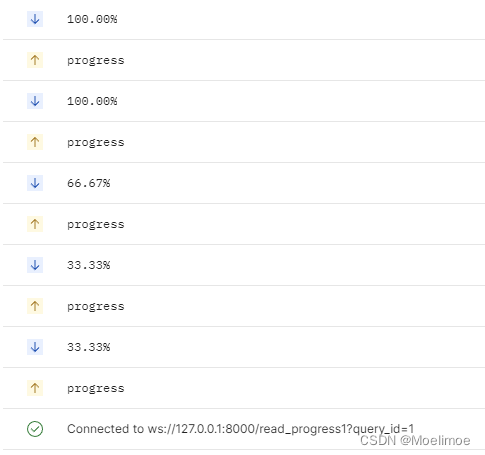
第二种方式,数据边查询边返回进度
# -*- coding: utf-8 -*- import asyncio import json import pandas as pd from sanic import Sanic from sanic import Websocket, Request app = Sanic("sanic") # 这里为了简单,将进度存储设置成了全局变量容器,合理的做法可以放到一个可共用的类、第三方存储位置等,并设置过期自动清理 query_progress = {} class MysqlDatabaseQuery: async def read_query(self): data = pd.DataFrame({"id": [3, 5, 8], "name": ["a", "b", "c"]}, index=[1, 2, 3]) rowcount = len(data) for idx, row in data.iterrows(): await asyncio.sleep(1) rownumber = idx # 这里将row转成了dataframe,模拟了pd.read_sql_query(sql, chunksize=...)传递了chunksize参数时得到生成器(不是异步生成器,但是文章最后会介绍将pd.read_sql_query(sql, chunksize=...)修改成异步生成器的方式) yield row.to_frame().T, f"{(rownumber / rowcount): .2%}" # 方式二: # 边读取数据边返回进度,不需要额外维护进度的存储,也不需要定义query_id,这种方式感觉更优雅 async def read_query(requests, ws: Websocket): data_reader = MysqlDatabaseQuery().read_query() df = pd.DataFrame() progress = '' async for frame_part, progress in data_reader: df = pd.concat([df, frame_part], ignore_index=True) data = await ws.recv(0.0001) # 只等待一小会儿,如果没有接收到progress的请求就继续下一轮循环,等了但没完全等(bushi if data == "progress": await ws.send(progress) if ws.recv_cancel: break else: await ws.send(progress) # 如果必须保证最后100%要送给前端,可以加上这一句,虽然可能会重复,但在前端展示时不会有啥影响 await ws.send(df.to_json(orient="records")) app.add_websocket_route(read_query, "/query2") if __name__ == '__main__': app.run(auto_reload=True, dev=True)- 1
- 2
- 3
- 4
- 5
- 6
- 7
- 8
- 9
- 10
- 11
- 12
- 13
- 14
- 15
- 16
- 17
- 18
- 19
- 20
- 21
- 22
- 23
- 24
- 25
- 26
- 27
- 28
- 29
- 30
- 31
- 32
- 33
- 34
- 35
- 36
- 37
- 38
- 39
- 40
- 41
- 42
- 43
- 44
- 45
- 46
- 47
- 48
接口调用效果:

有可能会多返回1个100%,不过在前端展示时应该没什么变化对比两种实现方式,第二种显然更简便优雅一下,不过如果想要在当前查询之外还能随时查询某个数据库查询的进度时,就必须用第一种实现方式了
需要注意的是:如果使用第一种实现方式,还需要考虑query_id的定义以及储存的查询进度应该设置一定的过期时间,过期之后就删除,否则可能会导致数据一直增长而占用内存过多的情况既然是使用异步框架,查询就应该支持异步查询
因此顺便介绍一种实现了可使用aiomysql连接的pandas read_query方式:
aiomysql_pool# -*- coding:utf-8 -*- from __future__ import annotations import asyncio import logging from abc import ABC from asyncio import AbstractEventLoop import aiomysql import pandas as pd from pandas._typing import DtypeArg from pypika.queries import QueryBuilder from aio_pandas_database import AIOPandasSQLDatabase loop_ = asyncio.get_event_loop() class AIOMysqlPool(aiomysql.Pool, ABC): def __init__(self, minsize=1, maxsize=10, echo=False, pool_recycle=-1, loop=None, host="localhost", port=3306, user="root", password="root", db="services", # 改成自己数据库的信息 cursorclass=aiomysql.DictCursor, **kwargs) -> None: """ Parameters ---------- minsize maxsize echo pool_recycle: int 值应该>=-1,-1表示不会回收 代表一个连接多久未被使用了之后就回收,如果此时再获取连接会返回一个新的连接 loop host port user password database kwargs """ super().__init__(minsize, maxsize, echo, pool_recycle, loop, host=host, port=int(port), user=user, password=password, db=db, cursorclass=cursorclass, **kwargs) self._loop = loop or asyncio.get_event_loop() async def execute(self, sql, query_params=None, is_fetchone=False): await asyncio.sleep(1) if isinstance(sql, QueryBuilder): sql = sql.get_sql() query_params = query_params or () async with self.acquire() as conn: async with conn.cursor() as cursor: try: row = await cursor.execute(sql, query_params) res = await cursor.fetchall() await conn.commit() # update时需要更新,但其他类型查询例如select时commit也无妨 if is_fetchone: assert row <= 1 return res[0] if row else None return row, res except Exception as e: logging.error( f"SQL execution met an unexpected error, " f"hint:\n {e}\n, " f"the error query sql is: \n{sql}\n" ) await conn.rollback() raise e def get_loop(self) -> AbstractEventLoop: return self._loop async def fetchone(self, sql): res = await self.execute(sql, is_fetchone=True) return res async def fetchall(self, sql): row, res = await self.execute(sql) return row, res async def update(self, sql): row, res = await self.execute(sql) return row, res async def delete(self, sql): row, res = await self.execute(sql) return row, res async def async_read_query( self, sql, ws=None, index_col=None, coerce_float: bool = True, params=None, parse_dates=None, chunksize: int | None = None, dtype: DtypeArg | None = None, ): conn = await self.acquire() aiodb = AIOPandasSQLDatabase(conn) frame_or_async_generator = await aiodb.async_read_query( sql, None, index_col, coerce_float, params, parse_dates, chunksize, dtype ) if chunksize and ws is not None: frames = [pd.DataFrame()] progress = '' async for frame_part in frame_or_async_generator: progress = conn.progress frames.append(frame_part) data = await ws.recv(0.0001) # 只等待一小会儿,如果没有接收到progress的请求就继续下一轮循环,等了但没完全等(bushi if data == "progress": await ws.send(progress) if ws.recv_cancel: break else: await ws.send(progress) # 如果必须保证最后100%要送给前端,可以加上这一句,虽然可能会重复,但在前端展示时不会有啥影响 df = pd.concat(frames, ignore_index=True) return df return frame_or_async_generator async def async_read_query2( self, sql, app=None, index_col=None, coerce_float: bool = True, params=None, parse_dates=None, chunksize: int | None = None, dtype: DtypeArg | None = None, ): # 一般读取方式,不考虑读取查询进度 conn = await self.acquire() aiodb = AIOPandasSQLDatabase(conn) frame_or_async_generator = await aiodb.async_read_query( sql, app, index_col, coerce_float, params, parse_dates, chunksize, dtype ) return frame_or_async_generator p = AIOMysqlPool() async def run_test(): # res = await p.fetchone("select 1;") # print(res) row, res = await p.execute("select 2 as a, 3 as b union all select 1 as a, 2 as b;") print(row, res) try: row, res = await p.execute("select 2 as a, 3 as b union all select 1 as a, 2 as b;", is_fetchone=True) print(row, res) except AssertionError as e: print(f"查询的结果超过1行") async def run_test2(): sql = """select * from test_table""" tasks = [] for i in range(3): tasks.append(p.execute(sql)) results = await asyncio.gather(*tasks) for result in results: print(result) async def run_update(): u_sql = """ update test_table set `name` = 'abc' where id = 1 """ row, res = await p.execute(u_sql) print(row, res) s_sql = """ select * from test_table where `name` = 'abc' """ row, res = await p.execute(s_sql) print(row, res) async def rsq_t(): sql = """select * from test_table""" tasks = [] for i in range(3): tasks.append(p.async_read_query(sql)) results = await asyncio.gather(*tasks) for result in results: print(result) async def run_async_stream_query(): sql = """select * from test_table""" df = await p.async_read_query(sql, chunksize=1) print(df) async def run_async_stream_query2(): sql = """select * from test_table""" ag = await p.async_read_query2(sql, chunksize=1) while True: try: r = await ag.__anext__() print(r) except StopAsyncIteration: print("break") break async def run_async_stream_query3(): sql = """select * from test_table""" async for f in await p.async_read_query(sql, chunksize=1): print(f) if __name__ == '__main__': loop_.run_until_complete(run_test()) loop_.run_until_complete(run_test2()) loop_.run_until_complete(run_update()) loop_.run_until_complete(rsq_t()) loop_.run_until_complete(run_async_stream_query()) loop_.run_until_complete(run_async_stream_query2()) loop_.run_until_complete(run_async_stream_query3())- 1
- 2
- 3
- 4
- 5
- 6
- 7
- 8
- 9
- 10
- 11
- 12
- 13
- 14
- 15
- 16
- 17
- 18
- 19
- 20
- 21
- 22
- 23
- 24
- 25
- 26
- 27
- 28
- 29
- 30
- 31
- 32
- 33
- 34
- 35
- 36
- 37
- 38
- 39
- 40
- 41
- 42
- 43
- 44
- 45
- 46
- 47
- 48
- 49
- 50
- 51
- 52
- 53
- 54
- 55
- 56
- 57
- 58
- 59
- 60
- 61
- 62
- 63
- 64
- 65
- 66
- 67
- 68
- 69
- 70
- 71
- 72
- 73
- 74
- 75
- 76
- 77
- 78
- 79
- 80
- 81
- 82
- 83
- 84
- 85
- 86
- 87
- 88
- 89
- 90
- 91
- 92
- 93
- 94
- 95
- 96
- 97
- 98
- 99
- 100
- 101
- 102
- 103
- 104
- 105
- 106
- 107
- 108
- 109
- 110
- 111
- 112
- 113
- 114
- 115
- 116
- 117
- 118
- 119
- 120
- 121
- 122
- 123
- 124
- 125
- 126
- 127
- 128
- 129
- 130
- 131
- 132
- 133
- 134
- 135
- 136
- 137
- 138
- 139
- 140
- 141
- 142
- 143
- 144
- 145
- 146
- 147
- 148
- 149
- 150
- 151
- 152
- 153
- 154
- 155
- 156
- 157
- 158
- 159
- 160
- 161
- 162
- 163
- 164
- 165
- 166
- 167
- 168
- 169
- 170
- 171
- 172
- 173
- 174
- 175
- 176
- 177
- 178
- 179
- 180
- 181
- 182
- 183
- 184
- 185
- 186
- 187
- 188
- 189
- 190
- 191
- 192
- 193
- 194
- 195
- 196
- 197
- 198
- 199
- 200
- 201
- 202
- 203
- 204
- 205
- 206
- 207
- 208
- 209
- 210
- 211
- 212
- 213
- 214
- 215
- 216
- 217
- 218
- 219
- 220
- 221
- 222
- 223
- 224
- 225
- 226
- 227
- 228
- 229
- 230
- 231
- 232
- 233
- 234
- 235
- 236
- 237
- 238
- 239
async pandas read_query,实现了将pandas的read_sql_query支持aiomysql:
# aio_pandas_database.py # -*- coding: utf-8 -*- from __future__ import annotations import asyncio from pandas._typing import DtypeArg from pandas.io.sql import _convert_params, _wrap_result, DatabaseError class AIOPandasSQLDatabase: def __init__(self, con): self.con = con self.con.progress = None async def _fetchall_as_list(self, cur): result = await cur.fetchall() if not isinstance(result, list): result = list(result) return result async def async_read_query( self, sql, app, index_col=None, coerce_float: bool = True, params=None, parse_dates=None, chunksize: int | None = None, dtype: DtypeArg | None = None, ): try: async with self.con as conn: async with conn.cursor() as cursor: args = _convert_params(sql, params) await cursor.execute(*args) columns = [col_desc[0] for col_desc in cursor.description] if chunksize is not None: return self._query_iterator( cursor, app, chunksize, columns, index_col=index_col, coerce_float=coerce_float, parse_dates=parse_dates, dtype=dtype, ) else: data = await self._fetchall_as_list(cursor) frame = _wrap_result( data, columns, index_col=index_col, coerce_float=coerce_float, parse_dates=parse_dates, dtype=dtype, ) return frame except Exception as exc: try: await conn.rollback() except Exception as inner_exc: # pragma: no cover ex = DatabaseError( f"Execution failed on sql: {args[0]}\n{exc}\nunable to rollback" ) raise ex from inner_exc ex = DatabaseError(f"Execution failed on sql '{args[0]}': {exc}") raise ex from exc async_read_sql = async_read_query # @staticmethod async def _query_iterator( self, result, app, chunksize: int, columns, index_col=None, coerce_float=True, parse_dates=None, dtype: DtypeArg | None = None, ): """Return generator through chunked result set""" has_read_data = False query_id = "1" while True: data = await result.fetchmany(chunksize) # 这种进度的方式设定存在一个问题:一个connection中多个查询开了事务分布执行语句会导致进度不正常(大概会,没验证过) progress = f"{(result.rownumber/result.rowcount): .2%}" self.con.progress = progress if app is not None: await app.dispatch("query.read.progress", context={query_id: progress}) await asyncio.sleep(1) if not data: if not has_read_data: yield _wrap_result( [], columns, index_col=index_col, coerce_float=coerce_float, parse_dates=parse_dates, ) break else: has_read_data = True yield _wrap_result( data, columns, index_col=index_col, coerce_float=coerce_float, parse_dates=parse_dates, dtype=dtype, )- 1
- 2
- 3
- 4
- 5
- 6
- 7
- 8
- 9
- 10
- 11
- 12
- 13
- 14
- 15
- 16
- 17
- 18
- 19
- 20
- 21
- 22
- 23
- 24
- 25
- 26
- 27
- 28
- 29
- 30
- 31
- 32
- 33
- 34
- 35
- 36
- 37
- 38
- 39
- 40
- 41
- 42
- 43
- 44
- 45
- 46
- 47
- 48
- 49
- 50
- 51
- 52
- 53
- 54
- 55
- 56
- 57
- 58
- 59
- 60
- 61
- 62
- 63
- 64
- 65
- 66
- 67
- 68
- 69
- 70
- 71
- 72
- 73
- 74
- 75
- 76
- 77
- 78
- 79
- 80
- 81
- 82
- 83
- 84
- 85
- 86
- 87
- 88
- 89
- 90
- 91
- 92
- 93
- 94
- 95
- 96
- 97
- 98
- 99
- 100
- 101
- 102
- 103
- 104
- 105
- 106
- 107
- 108
- 109
- 110
- 111
- 112
- 113
- 114
- 115
- 116
- 117
- 118
pandas官方对于read_sql_query方法所依赖的数据库连接实现,其建议是使用sqlalchemy的连接,同时sqlalchemy现在也有异步的数据库连接支持,所以合适的话可以考虑使用sqlalchemy连接来实现read_sql_query依赖的数据库连接
小结
这篇文章内容的出发点来自于实时进度的查询需求,尝试了在web服务中使用websocket通信方式实现了数据库的进度的实时查询、获取并发送到前端的模拟,算是websocket一次小的功能实现。此外为了让pandas的read_sql_query支持异步查询和方便读取进度,对read_sql_query所依赖的方法做了小小的改造,让pandas支持了数据库异步查询
-
相关阅读:
【原创】java+swing+mysql运动会管理系统设计与实现
docker swarm下部署的spring cloud,时不时就会取到ingress网络的ip
『从零开始学小程序』媒体组件video组件
阿里云林小平:如何实现资源高效运维及成本分析
高压放大器有哪些实际应用场景
有没有一款让人爱不释手的知识库工具?知识库管理工具不难选!
泛型的约束不止一面
社交电商如何运营推广?
Whale News | 帷幄获公安部信息安全「等保三级」认证,信息安全体系建设行业领先
机器学习线性回归学习总结笔记
- 原文地址:https://blog.csdn.net/Moelimoe/article/details/127949621
