-
Spring Security OAuth2 实战
Spring Security OAuth2
OAuth(Open Authorization)是一个关于授权(authorization)的开放网络标准,允许用户授权第三
方应用访问他们存储在另外的服务提供者上的信息,而不需要将用户名和密码提供给第三方移动应用或
分享他们数据的所有内容
OAuth协议:https://tools.ietf.org/html/rfc6749协议特点:
简单:不管是OAuth服务提供者还是应用开发者,都很易于理解与使用;
安全:没有涉及到用户密钥等信息,更安全更灵活;
开放:任何服务提供商都可以实现OAuth,任何软件开发商都可以使用OAuth;适用场景
原生app授权:app登录请求后台接口,为了安全认证,所有请求都带token信息,如果登录验证、
请求后台数据。
前后端分离单页面应用:前后端分离框架,前端请求后台数据,需要进行oauth2安全认证,比如
使用vue、react后者h5开发的app
第三方应用授权登录,比如QQ,微博,微信的授权登录。优缺点
优点:
更安全,客户端不接触用户密码,服务器端更易集中保护
广泛传播并被持续采用
短寿命和封装的token
资源服务器和授权服务器解耦
集中式授权,简化客户端
HTTP/JSON友好,易于请求和传递token
考虑多种客户端架构场景
客户可以具有不同的信任级别
缺点:
协议框架太宽泛,造成各种实现的兼容性和互操作性差
不是一个认证协议,本身并不能告诉你任何用户信息。颁发令牌方式
授权码模式(authorization code)
密码模式(resource owner password credentials)
简化(隐式)模式(implicit)
客户端模式(client credentials)授权码模式
授权码(authorization code)方式,指的是第三方应用先申请一个授权码,然后再用该码获取令牌。
这种方式是最常用的流程,安全性也最高,它适用于那些有后端的 Web 应用。授权码通过前端传送,
令牌则是储存在后端,而且所有与资源服务器的通信都在后端完成。这样的前后端分离,可以避免令牌
泄漏。
适用场景:目前市面上主流的第三方验证都是采用这种模式
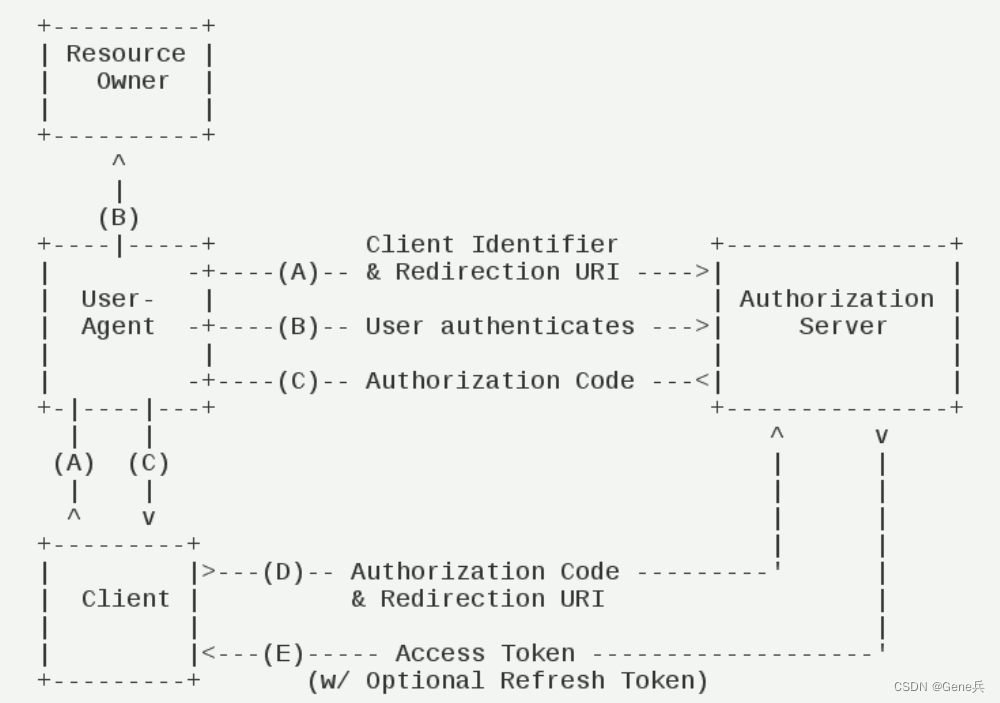
http://localhost:60818/oauth2/oauth/authorize?response_type=code&client_id=client&redirect_uri=http://www.baidu.com&scope=all
或者: http://localhost:60818/oauth2/oauth/authorize?response_type=code&client_id=client
response_type:表示授权类型,必选项,此处的值固定为"code"
client_id:表示客户端的ID,必选项
redirect_uri:表示重定向URI,可选项
scope:表示申请的权限范围,可选项
state:表示客户端的当前状态,可以指定任意值,授权服务器会原封不动地返回这个值。密码模式
如果你高度信任某个应用,RFC 6749 也允许用户把用户名和密码,直接告诉该应用。该应用就使用你
的密码,申请令牌,这种方式称为"密码式"(password)。
在这种模式中,用户必须把自己的密码给客户端,但是客户端不得储存密码。这通常用在用户对客户端
高度信任的情况下,比如客户端是操作系统的一部分,或者由一个著名公司出品。而授权服务器只有在
其他授权模式无法执行的情况下,才能考虑使用这种模式。
适用场景:自家公司搭建的授权服务器

客户端模式
客户端模式(Client Credentials Grant)指客户端以自己的名义,而不是以用户的名义,向"服务提供
商"进行授权。
适用于没有前端的命令行应用,即在命令行下请求令牌。一般用来提供给我们完全信任的服务器端服
务

更新令牌
令牌的有效期到了,如果让用户重新走一遍上面的流程,再申请一个新的令牌,很可能体验不好,而且
也没有必要。OAuth 2.0 允许用户自动更新令牌。
关键配置
认证授权服务配置
@Configuration @EnableAuthorizationServer public class AuthorizationServerConfig extends AuthorizationServerConfigurerAdapter { @Resource private AuthenticationManager authenticationManager; @Resource private MemberUserService memberUserService; @Resource private DataSource dataSource; @Resource private SecurityConfigProperties jwtConfigProperties; @Bean public TokenStore tokenStore() { return new JwtTokenStore(jwtAccessTokenConverter()); } @Bean public JwtAccessTokenConverter jwtAccessTokenConverter() { JwtAccessTokenConverter converter = new JwtAccessTokenConverter(); //jwt的密钥 converter.setSigningKey(jwtConfigProperties.getSignatureKey()); return converter; } @Bean public TokenEnhancer oAuthTokenEnhancer() { return new OauthTokenEnhancer(); } /** * 方法实现说明:认证服务器能够给哪些 客户端颁发token 我们需要把客户端的配置 存储到 * 数据库中 可以基于内存存储和db存储 *授权码模式 *http://localhost:60818/oauth2/oauth/authorize?response_type=code&client_id=client&redirect_uri=http://www.baidu.com&scope=all 或者: http://localhost:60818/oauth2/oauth/authorize?response_type=code&client_id=client * password模式 * http://localhost:60818/oauth2/oauth/token?username=gene&password=123456&grant_type=password&client_id=client&client_secret=123123&scope=all * * 客户端模式,可进行完全信任客户端 * http://localhost:60818/oauth2/oauth/token?grant_type=client_credentials&scope=all&client_id=client&client_secret=123123 * * 简化模式 * http://localhost:60818/oauth2/oauth/token?response_type=token&scope=read&client_id=client&redirect_uri=xxxxx * * 刷新令牌 * http://localhost:60818/oauth2/oauth/token?grant_type==refresh_token&scope=all&client_id=client&client_secret=123123&refresh_token=REFRESH_TOKEN */ @Override public void configure(ClientDetailsServiceConfigurer clients) throws Exception { clients.withClientDetails(clientDetails()); } /** * 方法实现说明:用于查找我们第三方客户端的组件 主要用于查找 数据库表 oauth_client_details * 查找授权client_id client-secret grant_type 权限范围 token的有效期/刷新token有效期/redirect_uri 等信息 */ @Bean public ClientDetailsService clientDetails() { return new JdbcClientDetailsService(dataSource); } /** * 方法实现说明:授权服务器的配置的配置 * * @author:smlz * @return: * @exception: * @date:2020/1/15 20:21 */ @Override public void configure(AuthorizationServerEndpointsConfigurer endpoints) throws Exception { // token增强器 TokenEnhancerChain tokenEnhancerChain = new TokenEnhancerChain(); tokenEnhancerChain.setTokenEnhancers(Arrays.asList(oAuthTokenEnhancer(), jwtAccessTokenConverter())); //使用密码模式需要配置 endpoints.authenticationManager(authenticationManager) //refresh_token是否重复使用 .reuseRefreshTokens(false) //刷新令牌授权包含对用户信息的检查 .userDetailsService(memberUserService) //指定token存储策略是jwt .tokenStore(tokenStore()) .accessTokenConverter(jwtAccessTokenConverter()) //配置tokenEnhancer .tokenEnhancer(tokenEnhancerChain) //支持GET,POST请求 .allowedTokenEndpointRequestMethods(HttpMethod.GET, HttpMethod.POST); } /** * 方法实现说明:授权服务器安全配置 */ @Override public void configure(AuthorizationServerSecurityConfigurer security) throws Exception { //第三方客户端校验token需要带入 clientId 和clientSecret来校验 security.checkTokenAccess("isAuthenticated()") //来获取我们的tokenKey需要带入clientId,clientSecret .tokenKeyAccess("isAuthenticated()"); //允许表单认证 security.allowFormAuthenticationForClients(); } }- 1
- 2
- 3
- 4
- 5
- 6
- 7
- 8
- 9
- 10
- 11
- 12
- 13
- 14
- 15
- 16
- 17
- 18
- 19
- 20
- 21
- 22
- 23
- 24
- 25
- 26
- 27
- 28
- 29
- 30
- 31
- 32
- 33
- 34
- 35
- 36
- 37
- 38
- 39
- 40
- 41
- 42
- 43
- 44
- 45
- 46
- 47
- 48
- 49
- 50
- 51
- 52
- 53
- 54
- 55
- 56
- 57
- 58
- 59
- 60
- 61
- 62
- 63
- 64
- 65
- 66
- 67
- 68
- 69
- 70
- 71
- 72
- 73
- 74
- 75
- 76
- 77
- 78
- 79
- 80
- 81
- 82
- 83
- 84
- 85
- 86
- 87
- 88
- 89
- 90
- 91
- 92
- 93
- 94
- 95
- 96
- 97
- 98
- 99
- 100
- 101
- 102
- 103
- 104
- 105
- 106
资源服务器配置
@Configuration @EnableResourceServer public class ResourceServiceConfig extends ResourceServerConfigurerAdapter { @Resource private SecurityConfigProperties securityConfigProperties; @Override public void configure(HttpSecurity http) throws Exception { ExpressionUrlAuthorizationConfigurer.ExpressionInterceptUrlRegistry registry = http .authorizeRequests(); for (String url : securityConfigProperties.getUrls()) { registry.antMatchers(url).permitAll(); } http.authorizeRequests() .anyRequest().authenticated() // member服务授权 .and().requestMatchers().antMatchers("/member/**"); } } - 1
- 2
- 3
- 4
- 5
- 6
- 7
- 8
- 9
- 10
- 11
- 12
- 13
- 14
- 15
- 16
- 17
- 18
- 19
spring security配置
@Configuration @EnableWebSecurity public class WebSecurityConfig extends WebSecurityConfigurerAdapter { @Resource public MemberUserService memberUserService; /** * 方法实现说明:用于构建用户认证组件,需要传递userDetailsService和密码加密器 */ @Override protected void configure(AuthenticationManagerBuilder auth) throws Exception { auth.userDetailsService(memberUserService).passwordEncoder(passwordEncoder()); } @Bean public PasswordEncoder passwordEncoder() { return new BCryptPasswordEncoder(); } @Bean public AuthenticationManager authenticationManagerBean() throws Exception { return super.authenticationManagerBean(); } @Resource private SecurityConfigProperties securityConfigProperties; @Override protected void configure(HttpSecurity http) throws Exception { ExpressionUrlAuthorizationConfigurer.ExpressionInterceptUrlRegistry registry = http .authorizeRequests(); for (String url : securityConfigProperties.getUrls()) { registry.antMatchers(url).permitAll(); } http.formLogin().permitAll() .and().authorizeRequests() .antMatchers("/oauth/**").permitAll() .anyRequest().authenticated() .and().logout().permitAll() .and().csrf().disable(); } } - 1
- 2
- 3
- 4
- 5
- 6
- 7
- 8
- 9
- 10
- 11
- 12
- 13
- 14
- 15
- 16
- 17
- 18
- 19
- 20
- 21
- 22
- 23
- 24
- 25
- 26
- 27
- 28
- 29
- 30
- 31
- 32
- 33
- 34
- 35
- 36
- 37
- 38
- 39
- 40
- 41
- 42
- 43
@Data @Component @RefreshScope public class SecurityConfigProperties { // jwt 放开的请求 @Value("#{'${security.url.ignored:login}'.split(',')}") private Listurls = new ArrayList<>(); @Value("${security.url.login.path:wx/login}") private String loginPath; @Value("${jwt.signature-key:xxxxxxx") private String signatureKey; } - 1
- 2
- 3
- 4
- 5
- 6
- 7
- 8
- 9
- 10
- 11
- 12
- 13
- 14
token增强器
@Slf4j public class OauthTokenEnhancer implements TokenEnhancer { @Override public OAuth2AccessToken enhance(OAuth2AccessToken accessToken, OAuth2Authentication authentication) { // 通过openFegin调用会员信息 if (authentication.getPrincipal() instanceof MemberDetails) { MemberDetails userDetails = (MemberDetails) authentication.getPrincipal(); final Map- 1
- 2
- 3
- 4
- 5
- 6
- 7
- 8
- 9
- 10
- 11
- 12
- 13
- 14
- 15
- 16
- 17
- 18
- 19
- 20
- 21
- 22
- 23
- 24
用户名密码认证UserDetailsService
@Service @Slf4j public class MemberUserService implements UserDetailsService { @Autowired private MemberFeignService memberFeignService; @Override public UserDetails loadUserByUsername(String username) throws UsernameNotFoundException { if (StringUtils.isEmpty(username)) { log.warn("用户登陆用户名为空:{}", username); throw new UsernameNotFoundException("用户名不能为空"); } MemberData memberData = getByUsername(username); if (null == memberData) { log.warn("根据用户名没有查询到对应的用户信息:{}", username); } log.info("根据用户名:{}获取用户登陆信息:{}", username, memberData); MemberDetails memberDetails = new MemberDetails(memberData); return memberDetails; } public MemberData getByUsername(String username) { // fegin获取会员信息 CommonResultmemberCommonResult = memberFeignService.loadUserByUsername(username); return umsMemberCommonResult.getResult(); // 测试阶段模拟 /*return MemberData.builder().memberNo("root123").username(username).password(new BCryptPasswordEncoder().encode("123")).miniOpenid("xxxxopenid") .status(1).unionId("xxxunionId").build();*/ } } - 1
- 2
- 3
- 4
- 5
- 6
- 7
- 8
- 9
- 10
- 11
- 12
- 13
- 14
- 15
- 16
- 17
- 18
- 19
- 20
- 21
- 22
- 23
- 24
- 25
- 26
- 27
- 28
- 29
- 30
- 31
官方的Oauth2.sql
/* SQLyog Ultimate v12.08 (64 bit) MySQL - 8.0.16 : Database - security_authority 网址: https://github.com/spring-attic/spring-security-oauth/blob/main/spring-security-oauth2/src/test/resources/schema.sql ********************************************************************* */ /*Table structure for table `oauth_access_token` */ DROP TABLE IF EXISTS `oauth_access_token`; CREATE TABLE `oauth_access_token` ( `token_id` varchar(255) DEFAULT NULL, `token` longblob, `authentication_id` varchar(255) DEFAULT NULL, `user_name` varchar(255) DEFAULT NULL, `client_id` varchar(255) DEFAULT NULL, `authentication` longblob, `refresh_token` varchar(255) DEFAULT NULL ) ENGINE=InnoDB DEFAULT CHARSET=utf8; /*Data for the table `oauth_access_token` */ /*Table structure for table `oauth_approvals` */ DROP TABLE IF EXISTS `oauth_approvals`; CREATE TABLE `oauth_approvals` ( `userId` varchar(255) DEFAULT NULL, `clientId` varchar(255) DEFAULT NULL, `scope` varchar(255) DEFAULT NULL, `status` varchar(10) DEFAULT NULL, `expiresAt` datetime DEFAULT NULL, `lastModifiedAt` datetime DEFAULT NULL ) ENGINE=InnoDB DEFAULT CHARSET=utf8; /*Data for the table `oauth_approvals` */ /*Table structure for table `oauth_client_details` */ DROP TABLE IF EXISTS `oauth_client_details`; CREATE TABLE `oauth_client_details` ( `client_id` varchar(255) NOT NULL, `resource_ids` varchar(255) DEFAULT NULL, `client_secret` varchar(255) DEFAULT NULL, `scope` varchar(255) DEFAULT NULL, `authorized_grant_types` varchar(255) DEFAULT NULL, `web_server_redirect_uri` varchar(255) DEFAULT NULL, `authorities` varchar(255) DEFAULT NULL, `access_token_validity` int(11) DEFAULT NULL, `refresh_token_validity` int(11) DEFAULT NULL, `additional_information` varchar(255) DEFAULT NULL, `autoapprove` varchar(255) DEFAULT NULL ) ENGINE=InnoDB DEFAULT CHARSET=utf8; /*Data for the table `oauth_client_details` */ /*Table structure for table `oauth_client_token` */ DROP TABLE IF EXISTS `oauth_client_token`; CREATE TABLE `oauth_client_token` ( `token_id` varchar(255) DEFAULT NULL, `token` longblob, `authentication_id` varchar(255) DEFAULT NULL, `user_name` varchar(255) DEFAULT NULL, `client_id` varchar(255) DEFAULT NULL ) ENGINE=InnoDB DEFAULT CHARSET=utf8; /*Data for the table `oauth_client_token` */ /*Table structure for table `oauth_code` */ DROP TABLE IF EXISTS `oauth_code`; CREATE TABLE `oauth_code` ( `code` varchar(255) DEFAULT NULL, `authentication` varbinary(2550) DEFAULT NULL ) ENGINE=InnoDB DEFAULT CHARSET=utf8; /*Data for the table `oauth_code` */ /*Table structure for table `oauth_refresh_token` */ DROP TABLE IF EXISTS `oauth_refresh_token`; CREATE TABLE `oauth_refresh_token` ( `token_id` varchar(255) DEFAULT NULL, `token` longblob, `authentication` longblob ) ENGINE=InnoDB DEFAULT CHARSET=utf8; /*Data for the table `oauth_refresh_token` */- 1
- 2
- 3
- 4
- 5
- 6
- 7
- 8
- 9
- 10
- 11
- 12
- 13
- 14
- 15
- 16
- 17
- 18
- 19
- 20
- 21
- 22
- 23
- 24
- 25
- 26
- 27
- 28
- 29
- 30
- 31
- 32
- 33
- 34
- 35
- 36
- 37
- 38
- 39
- 40
- 41
- 42
- 43
- 44
- 45
- 46
- 47
- 48
- 49
- 50
- 51
- 52
- 53
- 54
- 55
- 56
- 57
- 58
- 59
- 60
- 61
- 62
- 63
- 64
- 65
- 66
- 67
- 68
- 69
- 70
- 71
- 72
- 73
- 74
- 75
- 76
- 77
- 78
- 79
- 80
- 81
- 82
- 83
- 84
- 85
- 86
- 87
- 88
- 89
- 90
- 91
- 92
- 93
- 94
- 95
表描述
oauth_client_details【核心表】
字段名 字段说明 client_id 主键,必须唯一,不能为空. 用于唯一标识每一个客户端(client); 在注册时必须填写(也可由服务端自动生成). 对于不同的grant_type,该字段都是必须的. 在实际应用中的另一个名称叫appKey,与client_id是同一个概念 resource_ids 客户端所能访问的资源id集合,多个资源时用逗号(,)分隔,如: “unity-resource,mobileresource”. 该字段的值必须来源于与security.xml中标签‹oauth2:resource-server的属性resource-id值一致. 在security.xml配置有几个‹oauth2:resource-server标签, 则该字段可以使用几个值. 在实际应用中, 我们一般将资源进行分类,并分别配置对应的‹oauth2:resource-server,如订单资源配置一个‹oauth2:resource-server, 用户资源又配置一个‹oauth2:resource-server. 当注册客户端时,根据实际需要可选择资源id,也可根据不同的注册流程,赋予对应的资源id client_secret 用于指定客户端(client)的访问密匙; 在注册时必须填写(也可由服务端自动生成). 对于不同的grant_type,该字段都是必须的. 在实际应用中的另一个名称叫appSecret,与client_secret是同一个概念 scope 指定客户端申请的权限范围,可选值包括read,write,trust;若有多个权限范围用逗号(,)分隔,如:“read,write”. scope的值与security.xml中配置的‹intercept-url的access属性有关系.如‹intercept-url的配置为‹intercept-url pattern="/m/**"access=“ROLE_MOBILE,SCOPE_READ”/>则说明访问该URL时的客户端必须有read权限范围. write的配置值为SCOPE_WRITE, trust的配置值为SCOPE_TRUST. 在实际应该中, 该值一般由服务端指定, 常用的值为read,write authorized_grant_types 指定客户端支持的grant_type,可选值包括authorization_code,password,refresh_token,implicit,client_credentials, 若支持多个grant_type用逗号(,)分隔,如: “authorization_code,password”. 在实际应用中,当注册时,该字段是一般服务器端指定的,而不是由申请者去选择的,最常用的grant_type组合有:“authorization_code,refresh_token”(针对通过浏览器访问的客户端);“password,refresh_token”(针对移动设备的客户端). implicit与client_credentials在实际中很少使用. web_server_redirect_uri 客户端的重定向URI,可为空, 当grant_type为authorization_code或implicit时, 在Oauth的流程中会使用并检查与注册时填写的redirect_uri是否一致. 下面分别说明:当grant_type=authorization_code时, 第一步 从 spring-oauth-server获取 'code’时客户端发起请求时必须有redirect_uri参数, 该参数的值必须与 web_server_redirect_uri的值一致. 第二步 用 ‘code’ 换取 ‘access_token’ 时客户也必须传递相同的redirect_uri. 在实际应用中,web_server_redirect_uri在注册时是必须填写的, 一般用来处理服务器返回的code, 验证state是否合法与通过code去换取access_token值.在spring-oauth-client项目中, 可具体参考AuthorizationCodeController.java中的authorizationCodeCallback方法.当grant_type=implicit时通过redirect_uri的hash值来传递access_token值.如:http://localhost:7777/spring-oauth-client/implicit#access_token=dc891f4a-ac88-4ba6-8224-a2497e013865&token_type=bearer&expires_in=43199然后客户端通过JS等从hash值中取到access_token值. authorities 指定客户端所拥有的Spring Security的权限值,可选, 若有多个权限值,用逗号(,)分隔, 如:"ROLE_ access_token_validity 设定客户端的access_token的有效时间值(单位:秒),可选, 若不设定值则使用默认的有效时间值(60 * 60 * 12, 12小时). 在服务端获取的access_token JSON数据中的expires_in字段的值即为当前access_token的有效时间值. 在项目中, 可具体参考DefaultTokenServices.java中属性accessTokenValiditySeconds. 在实际应用中, 该值一般是由服务端处理的, 不需要客户端自定义.refresh_token_validity 设定客户端的refresh_token的有效时间值(单位:秒),可选,若不设定值则使用默认的有效时间值(60 * 60 * 24 * 30, 30天). 若客户端的grant_type不包括refresh_token,则不用关心该字段 在项目中, 可具体参考DefaultTokenServices.java中属性refreshTokenValiditySeconds. 在实际应用中, 该值一般是由服务端处理的, 不需要客户端自定义. additional_information 这是一个预留的字段,在Oauth的流程中没有实际的使用,可选,但若设置值,必须是JSON格式的数据,如:{“country”:“CN”,“country_code”:“086”}按照spring-security-oauth项目中对该字段的描述 Additional information for this client, not need by the vanilla OAuth protocolbut might be useful, for example,for storing descriptive information. (详见ClientDetails.java的getAdditionalInformation()方法的注释)在实际应用中, 可以用该字段来存储关于客户端的一些其他信息,如客户端的国家,地区,注册时的IP地址等等.create_time数据的创建时间,精确到秒,由数据库在插入数据时取当前系统时间自动生成(扩展字段) archived 用于标识客户端是否已存档(即实现逻辑删除),默认值为’0’(即未存档). 对该字段的具体使用请参考CustomJdbcClientDetailsService.java,在该类中,扩展了在查询client_details的SQL加上archived = 0条件 (扩展字段) trusted 设置客户端是否为受信任的,默认为’0’(即不受信任的,1为受信任的). 该字段只适用于grant_type="authorization_code"的情况,当用户登录成功后,若该值为0,则会跳转到让用户Approve的页面让用户同意授权, 若该字段为1,则在登录后不需要再让用户Approve同意授权(因为是受信任的). 对该字段的具体使用请参考OauthUserApprovalHandler.java. (扩展字段) autoapprove 设置用户是否自动Approval操作, 默认值为 ‘false’, 可选值包括 ‘true’,‘false’, ‘read’,‘write’. 该字段只适用于grant_type="authorization_code"的情况,当用户登录成功后,若该值为’true’或支持的scope值,则会跳过用户Approve的页面, 直接授权. 该字段与 trusted 有类似的功能, 是spring-security-oauth2 的 2.0 版本后添加的新属性. 在项目中,主要操作oauth_client_details表的类是JdbcClientDetailsService.java, 更多的细节请参考该类. 也可以根据实际的需要,去扩展或修改该类的实现 oauth_client_token 该表用于在客户端系统中存储从服务端获取的token数据, 在spring-oauth-server项目中未使用到. 对oauth_client_token表的主要操作在JdbcClientTokenServices.java类中, 更多的细节请参考该类
字段名 字段说明 create_time 数据的创建时间,精确到秒,由数据库在插入数据时取当前系统时间自动生成(扩展字段) token_id 从服务器端获取到的access_token的值. token 这是一个二进制的字段, 存储的数据是OAuth2AccessToken.java对象序列化后的二进制数据 authentication_id 该字段具有唯一性, 是根据当前的username(如果有),client_id与scope通过MD5加密生成的. 具体实现请参考DefaultClientKeyGenerator.java类. user_name 登录时的用户名 client_id oauth_access_token
字段名 字段说明 create_time 数据的创建时间,精确到秒,由数据库在插入数据时取当前系统时间自动生成(扩展字段) token_id 该字段的值是将access_token的值通过MD5加密后存储的. token 存储将OAuth2AccessToken.java对象序列化后的二进制数据, 是真实的AccessToken的数据值. authentication_id 该字段具有唯一性, 其值是根据当前的username(如果有),client_id与scope通过MD5加密生成的. 具体实现请参考DefaultAuthenticationKeyGenerator.java类. user_name 登录时的用户名, 若客户端没有用户名(如grant_type=“client_credentials”),则该值等于client_id client_id authentication 存储将OAuth2Authentication.java对象序列化后的二进制数据 refresh_token 该字段的值是将refresh_token的值通过MD5加密后存储的. 在项目中,主要操作oauth_access_token表的对象是JdbcTokenStore.java. 更多的细节请参考该类 oauth_refresh_token 在项目中,主要操作oauth_refresh_token表的对象是JdbcTokenStore.java. (与操作oauth_access_token表的对象一样);更多的细节请参考该类. 如果客户端的grant_type不支持refresh_token,则不会使用该表
字段名 字段说明 create_time 数据的创建时间,精确到秒,由数据库在插入数据时取当前系统时间自动生成(扩展字段) token_id . 该字段的值是将refresh_token的值通过MD5加密后存储的 token 存储将OAuth2RefreshToken.java对象序列化后的二进制数据 authentication 存储将OAuth2Authentication.java对象序列化后的二进制数据 oauth_code 在项目中,主要操作oauth_code表的对象是JdbcAuthorizationCodeServices.java. 更多的细节请参考该类。 只有当grant_type为"authorization_code"时,该表中才会有数据产生; 其他的grant_type没有使用该表 字段名 字段说明 create_time 数据的创建时间,精确到秒,由数据库在插入数据时取当前系统时间自动生成(扩展字段) code 存储服务端系统生成的code的值(未加密) authentication 存储将AuthorizationRequestHolder.java对象序列化后的二进制数据 Spring Security默认的过滤器顺序列表
order 过滤器名称 100 ChannelProcessingFilter 200 ConcurrentSessionFilter 300 SecurityContextPersistenceFilter 400 LogoutFilter 500 X509AuthenticationFilter 600 RequestHeaderAuthenticationFilter 700 CasAuthenticationFilter 800 UsernamePasswordAuthenticationFilter 900 OpenIDAuthenticationFilter 1000 DefaultLoginPageGeneratingFilter 1100 DigestAuthenticationFilter 1200 BasicAuthenticationFilter 1300 RequestCacheAwareFilter 1400 SecurityContextHolderAwareRequestFilter 1500 RememberMeAuthenticationFilter 1600 AnonymousAuthenticationFilter 1700 SessionManagementFilter 1800 ExceptionTranslationFilter 1900 FilterSecurityInterceptor 2000 SwitchUserFilter -
相关阅读:
如何调整 Kubernetes StatefulSet 卷的大小
海思3559万能平台搭建:RTSP实时播放的优化
数据库平滑扩容方案剖析
抖音真机抓包frida脚本
JavaScript设计模式——命令模式
小目标检测QueryDet
搭建开放式与认证式个人网站
音视频开发进阶——YUV与RGB的采样与存储格式
建模规范:环境设置
大模型训练框架
- 原文地址:https://blog.csdn.net/qq_34898847/article/details/127881164
