-
S3 Client:Timeout waiting for connection from pool 问题追踪
目录
背景
在处理ceph上的文件时,出现如下报错

解决过程
上github搜了相关issue,其中该issue是因为采取并行处理读取ceph,打满链接池,而本地逻辑是串行,并不适用,但其提及从监控面板看链接池相关属性,用于辅助排查,而由于本地没有cloudwatch相关依赖,只能从本地监控面板观察情况
前置工作
查询相关资料,发现指标类
com.amazonaws.util.AWSRequestMetricsFullSupport通过以下方法进行收集指标
com.amazonaws.http.AmazonHttpClient.RequestExecutor#executeOneRequest通过以下方法来进行指标信息传递
com.amazonaws.AmazonWebServiceClient#endClientExecution(com.amazonaws.util.AWSRequestMetrics, com.amazonaws.Request, com.amazonaws.Response, boolean)其中链接池信息是通过以下方法来进行传递收集到指标的counter
com.amazonaws.http.AmazonHttpClient.RequestExecutor#captureConnectionPoolMetrics以getObjectRequest为例,下面为时序图
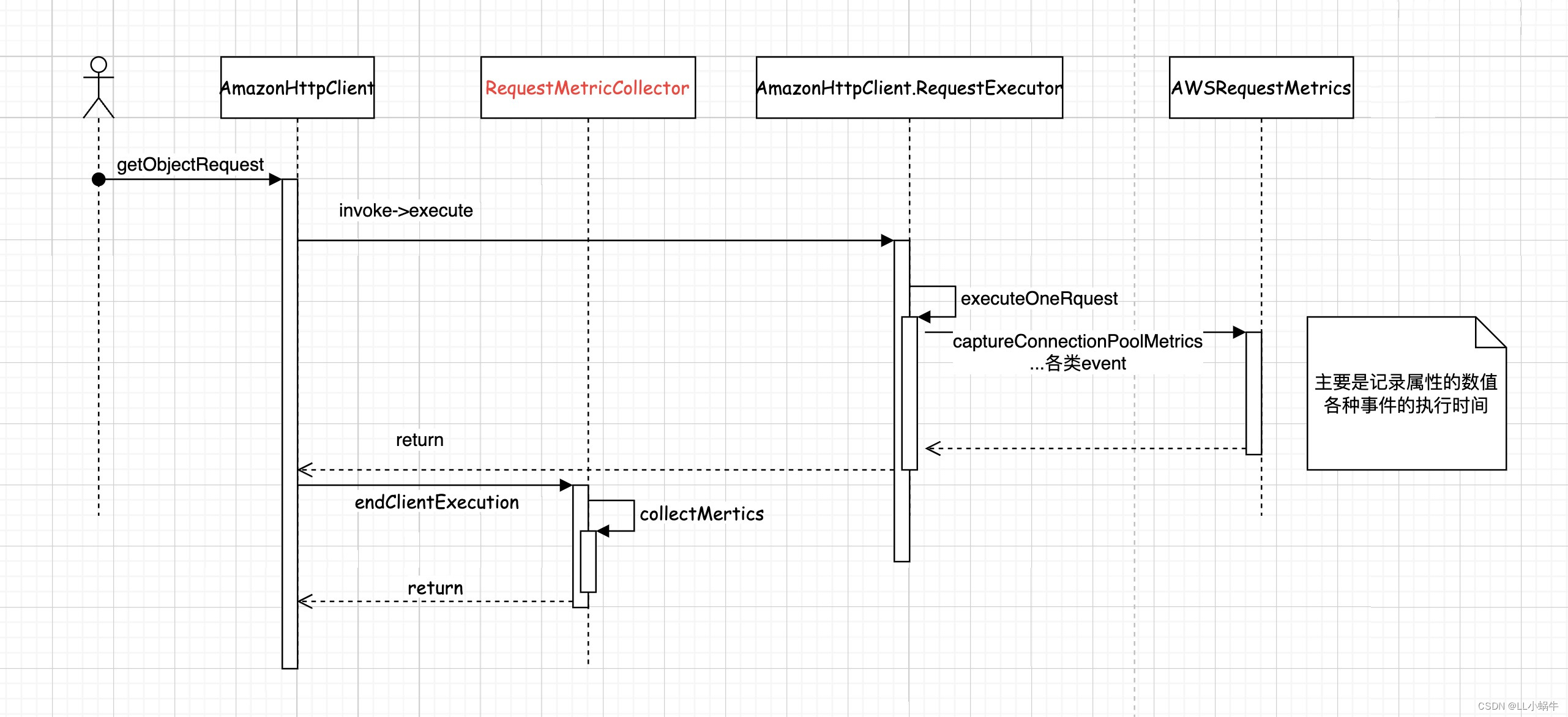
其中标红的类可以自定义逻辑,比如收集指标并上传到prometheus,用于排查问题
而是否开启指标监控由以下方法决定,可以看到request或者client有自定义的指标收集器的话,便会使用AWSRequestMetricsFullSupport 来做为收集器的实现,默认使用AWSRequestMetrics
com.amazonaws.AmazonWebServiceClient#createExecutionContext(com.amazonaws.AmazonWebServiceRequest, com.amazonaws.internal.auth.SignerProvider)通过以下方法去寻找收集器,优先级为request>client>sdk,默认实现为什么都不做(RequestMetricCollector#NONE)
com.amazonaws.AmazonWebServiceClient#findRequestMetricCollector指标收集
如上所示,可以在构建client时统一添加收集器逻辑
- s3Client = AmazonS3ClientBuilder.standard()
- .withMetricsCollector(new RequestMetricCollector() {
- @Override
- public void collectMetrics(Request request, Response response) {
- //do something
- AWSRequestMetrics awsRequestMetrics = request.getAWSRequestMetrics();
- TimingInfo timingInfo = awsRequestMetrics.getTimingInfo();
- Map
- Map
- System.out.println("finish");
- }
- })
- .build();
也可以为特定请求进行指标收集
- client.getObject(new GetObjectRequest(bucketName, fileName).withRequestMetricCollector(new RequestMetricCollector() {
- @Override
- public void collectMetrics(Request request, Response response) {
- }
- }));
可以发现有如下指标,具体解释

根据业务来收集上报需要的指标
以下是demo收集示例
- @Slf4j
- public class S3MetricCollector extends RequestMetricCollector {
- public static Set
DEFAULT_TIME_INFO = new HashSet<>(); - static {
- DEFAULT_TIME_INFO.add("HttpRequestTime");
- DEFAULT_TIME_INFO.add("HttpClientReceiveResponseTime");
- }
- private static volatile String INSTANCE_NAME = null;
- private Gauge httpGauge = null;
- private Gauge connectionGauge = null;
- private Counter counter = null;
- private static final S3MetricCollector INSTANCE = new S3MetricCollector();
- private static final ThreadLocal
- private S3MetricCollector() {
- httpGauge = Gauge.build().name("s3_client_http_info").labelNames("machine_id", "env", "counter").help("ceph客户端排查").register();
- connectionGauge = Gauge.build().name("s3_client_connection_info").labelNames("machine_id", "env", "properties", "type").help("链接相关").register();
- counter = Counter.build("s3_client_request", "s3 client返回状态").labelNames("machine_id", "env", "status", "type").register();
- }
- public static S3MetricCollector getINSTANCE() {
- return INSTANCE;
- }
- public static void finish(AmazonS3 s3Client) {
- getINSTANCE().doFinish(s3Client);
- }
- private void doFinish(AmazonS3 s3Client) {
- String env = getEnv();
- try {
- Field field = AmazonWebServiceClient.class.getDeclaredField("client");
- field.setAccessible(true);
- AmazonHttpClient amazonHttpClient = (AmazonHttpClient) field.get(s3Client);
- Field httpClient = AmazonHttpClient.class.getDeclaredField("httpClient");
- httpClient.setAccessible(true);
- ConnectionManagerAwareHttpClient o = (ConnectionManagerAwareHttpClient) httpClient.get(amazonHttpClient);
- ConnPoolControl httpClientConnectionManager = (ConnPoolControl) o.getHttpClientConnectionManager();
- PoolStats totalStats = httpClientConnectionManager.getTotalStats();
- httpGauge.labels(INSTANCE_NAME, env
- , HttpClientPoolAvailableCount.name()
- ).set(totalStats.getAvailable());
- httpGauge.labels(INSTANCE_NAME, env
- , HttpClientPoolLeasedCount.name()
- ).set(totalStats.getLeased());
- httpGauge.labels(INSTANCE_NAME, env
- , HttpClientPoolPendingCount.name()
- ).set(totalStats.getPending());
- for (String s : DEFAULT_TIME_INFO) {
- for (String type : TYPE_SET.get()) {
- connectionGauge.labels(INSTANCE_NAME, env, s, type).set(0.0);
- }
- }
- } catch (IllegalAccessException e) {
- throw new RuntimeException(e);
- } catch (NoSuchFieldException e) {
- throw new RuntimeException(e);
- } finally {
- TYPE_SET.remove();
- }
- }
- @Override
- public void collectMetrics(Request request, Response response) {
- AWSRequestMetricsFullSupport awsRequestMetrics = (AWSRequestMetricsFullSupport) request.getAWSRequestMetrics();
- TimingInfo timingInfo = awsRequestMetrics.getTimingInfo();
- Map
- String env = getEnv();
- String instanceName = getInstanceName();
- String type = getValue(awsRequestMetrics.getProperty(AWSRequestMetrics.Field.RequestType));
- for (Map.Entry
- httpGauge.labels(instanceName, env
- , entry.getKey()
- ).set(Double.parseDouble(entry.getValue().toString()));
- }
- Set
typeSet = TYPE_SET.get(); - if (typeSet == null) {
- typeSet = new HashSet<>();
- }
- if (typeSet.add(type)) {
- TYPE_SET.set(typeSet);
- }
- for (String s : DEFAULT_TIME_INFO) {
- TimingInfo subMeasurement = timingInfo.getSubMeasurement(s);
- connectionGauge.labels(instanceName, env, s, type).set(Optional.ofNullable(subMeasurement).map(TimingInfo::toString).map(Double::parseDouble).orElse(0.0));
- }
- counter.labels(instanceName, env, response.getHttpResponse().getStatusCode() + "", type).inc();
- }
- private static String getEnv() {
- String env = "local";
- try {
- env = SpringContextUtil.getProperties("spring.profiles.active");
- } catch (Exception e) {
- }
- return env;
- }
- public static void setInfo(AmazonWebServiceRequest serviceRequest) {
- serviceRequest.withRequestMetricCollector(S3MetricCollector.getINSTANCE());
- }
- public String getValue(List {
- if (values == null) {
- return "";
- }
- return values.stream().map(Object::toString).collect(Collectors.joining(","));
- }
- protected static String getInstanceName() {
- if (INSTANCE_NAME == null) {
- synchronized (S3MetricCollector.class) {
- if (INSTANCE_NAME == null) {
- String port = SpringContextUtil.getProperties("server.port");
- try {
- InetAddress addr = InetAddress.getLocalHost();
- INSTANCE_NAME = addr.getHostName() + ":" + port;
- } catch (UnknownHostException e) {
- log.error("get host error", e);
- INSTANCE_NAME = "unknown:" + port;
- }
- }
- }
- }
- return INSTANCE_NAME;
- }
- }
收集并上报到prometheus,并通过grafana进行查看,发现确实是由于链接数过多,占满了链接池(默认最大值为50),而导致后续获取超时,获取http链接逻辑为以下方法
org.apache.http.pool.AbstractConnPool#getPoolEntryBlocking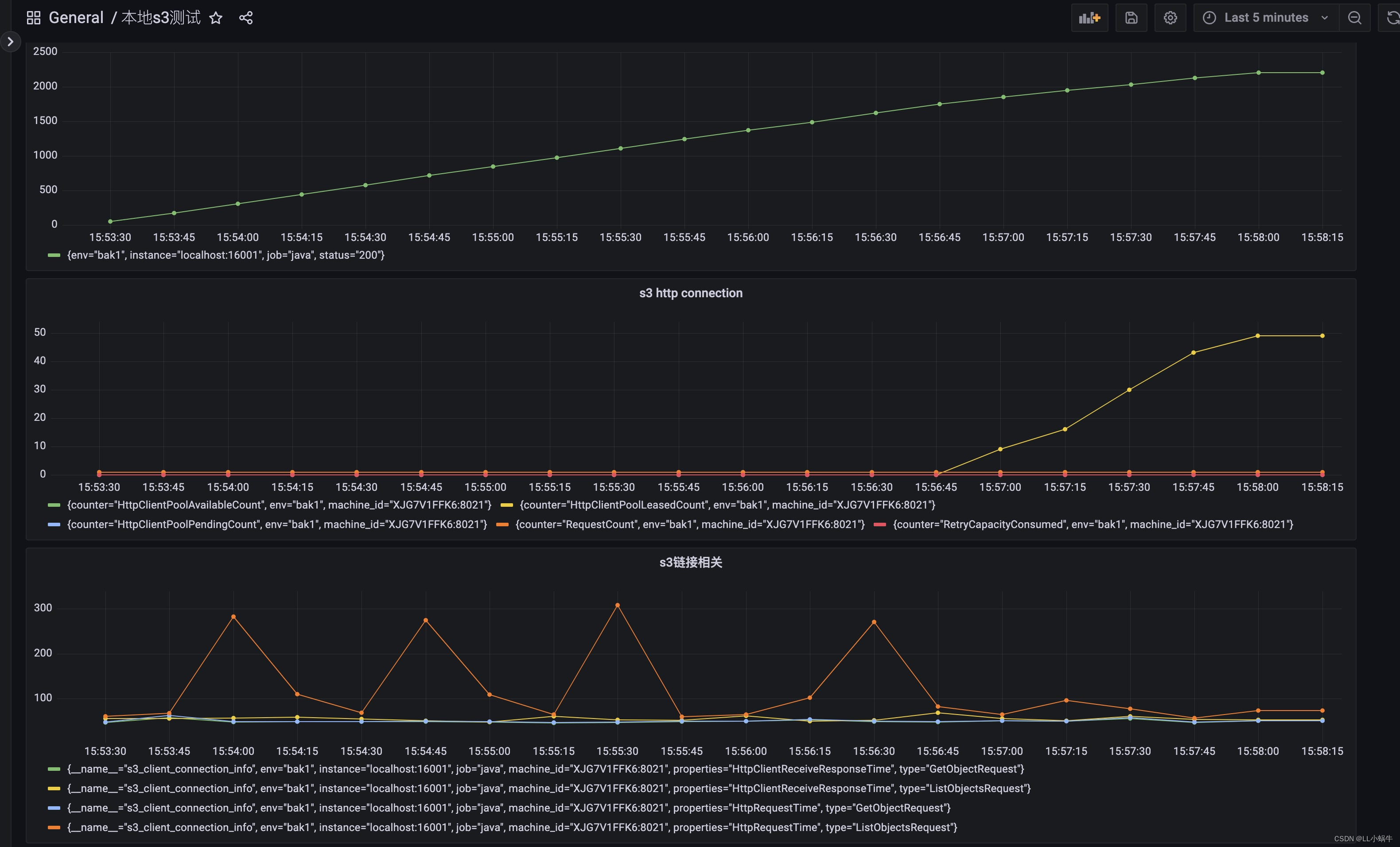
问题解决
可以看到占用链接一直增涨,下一步便是找到链接占用过多的原因,目前了解到的有如下原因
1.并发度高,确实打满链接池
2.某些链接没释放
显然属于第二点,找到占用链接数开始升高的时间节点,并查看相关的运行日志,发现确实有相关异常没处理,导致流没有关闭,链接也一直占用。
如下图,修正后没有出现该现象

总结
s3客户端提供相对丰富的指标辅助问题排查,通过自定义的指标上报,找出异常情况的时间节点,结合日志进行排查,相对方便地解决了问题,也可以做一些预警,比如请求的增速,链接占用数,慢操作等
-
相关阅读:
Wespeaker框架数据集准备(1)
SQL Server对象类型(3)——4.3.视图(View)
【滑动窗口】滑动窗口思想介绍及习题案例
Android开发基础——Activity基本用法
Hive:BUG记录,错误使用动态分区导致的插入失败
【函数式编程】Lambda、Stream、Optional、方法引用、并行流
[附源码]Python计算机毕业设计Django二次元信息分享平台的设计及实现
js数组根据同一id进行分组
【首因效应】第一印象
Flutter实战-请求封装(六)之设置抓包Proxy
- 原文地址:https://blog.csdn.net/weixin_37703281/article/details/127815753
