-
Flask实现简单的首页登录注销逻辑
0- 环境准备
1- 安装python环境
2- 安装虚拟环境virtualenv
3- 安装Flask
4- 创建Flask项目
5- 开始1- 我们先创建一个Flask项目
目录如下
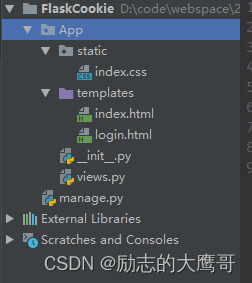
1) 项目中创建一个APP包, 包中包含1- static 前段静态资源如: css文件, js文件
2- templates 前段html页面: html文件
3- init.py 文件 App的初始配置
4- views.py 视图函数2) mange.py
Flask的启动
2- Flask项目详解
1- manage.py
from App import create_app app = create_app() if __name__ == '__main__': app.run(debug=True)- 1
- 2
- 3
- 4
- 5
- 6
- 7
- 8
2- App/__ init__.py
from flask import Flask from App.views import blue def create_app(): app = Flask(__name__) app.config['SECRET_KEY'] = "FlaskSecretKey13059155810" app.register_blueprint(blueprint=blue) return app- 1
- 2
- 3
- 4
- 5
- 6
- 7
- 8
- 9
- 10
- 11
- 12
3- App/views.py
from flask import Blueprint, render_template, request, redirect, url_for, session blue = Blueprint('user', __name__) @blue.route('/', methods=['GET', 'POST']) def index(): # username = request.cookies.get('username') username = session.get('username') if not username: username = '' return render_template('index.html', username=username) @blue.route('/login/', methods=['GET', 'POST']) def login(): if request.method == 'POST': # 校验用户名密码 username = request.form.get('username') password = request.form.get('password') if username == '13059155810' and password == '123456': print("登录成功, 开始设置cookie") res = redirect(url_for('user.index')) # 设置用户名 # res.set_cookie('username', username) session['username'] = username return res return render_template('login.html') @blue.route('/logout/') def logout(): res = redirect(url_for('user.index')) # res.delete_cookie('username') session.pop('username') return res- 1
- 2
- 3
- 4
- 5
- 6
- 7
- 8
- 9
- 10
- 11
- 12
- 13
- 14
- 15
- 16
- 17
- 18
- 19
- 20
- 21
- 22
- 23
- 24
- 25
- 26
- 27
- 28
- 29
- 30
- 31
- 32
- 33
- 34
- 35
- 36
- 37
- 38
- 39
- 40
- 41
- 42
- 43
- 44
4- App/templates/index.html
<!DOCTYPE html> <html lang="en"> <head> <meta charset="UTF-8"> <title>博客</title> <link rel="stylesheet" href="../static/index.css"> </head> <body> <h2>进入博客首页</h2> <br> <h3>欢迎您: {{ username }}</h3> <a href="{{ url_for('user.login') }}">登录</a> <a href="{{ url_for('user.logout') }}">注销</a> </body> </html>- 1
- 2
- 3
- 4
- 5
- 6
- 7
- 8
- 9
- 10
- 11
- 12
- 13
- 14
- 15
- 16
- 17
- 18
5- App/templates/login.html
<!DOCTYPE html> <html lang="en"> <head> <meta charset="UTF-8"> <title>登录页面</title> </head> <body> <h2>请登录</h2> <br> <form action="{{ url_for('user.login') }}" method="post"> <input type="text" name="username"> <br> <input type="password" name="password"> <br> <input type="submit" value="登录"> </form> </body> </html>- 1
- 2
- 3
- 4
- 5
- 6
- 7
- 8
- 9
- 10
- 11
- 12
- 13
- 14
- 15
- 16
- 17
- 18
6- App/static/index.css
h3 {color: red}- 1
以上就是简单是实现登录注销逻辑
-
相关阅读:
【数据结构】——顺序表完成杨辉三角(力扣)
CentOS 7 安装 Nginx
华为 EVC兼容性
纸牌游戏新版小猫钓鱼设计制作
2022年中总结
Python中的变量与注释
五、《图解HTTP》报文首部和HTTP缓存
从0到1基于ChatGLM-6B使用LoRA进行参数高效微调
设计模式——2. 工厂模式
再获认可!海云安典型案例入选《ISC 2023软件供应链安全洞察》报告
- 原文地址:https://blog.csdn.net/CSDN_Xying/article/details/127818418
