-
JavaScript 70 JavaScript Ajax 70.4 AJAX - 服务器响应
JavaScript
70 JavaScript Ajax
70.4 AJAX - 服务器响应
70.4.1 onreadystatechange 属性
readyState属性存留 XMLHttpRequest 的状态。onreadystatechange属性定义当 readyState 发生变化时执行的函数。status属性和statusText属性存有 XMLHttpRequest 对象的状态。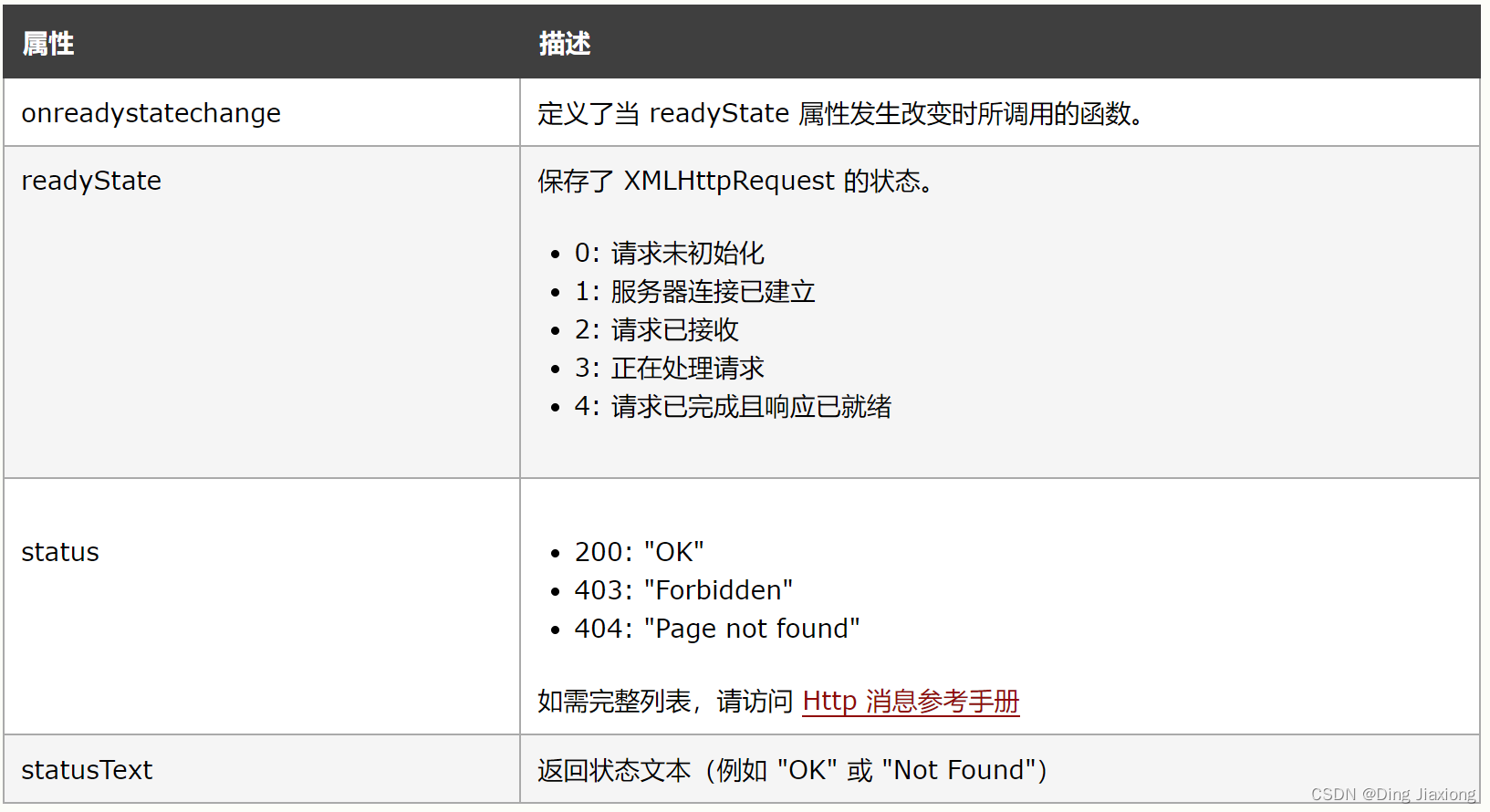
每当 readyState 发生变化时就会调用 onreadystatechange 函数。
当
readyState为4,status为200时,响应就绪:function loadDoc() { var xhttp = new XMLHttpRequest(); xhttp.onreadystatechange = function() { if (this.readyState == 4 && this.status == 200) { document.getElementById("demo").innerHTML = this.responseText; } }; xhttp.open("GET", "ajax_info.txt", true); xhttp.send(); }- 1
- 2
- 3
- 4
- 5
- 6
- 7
- 8
- 9
- 10
- 11
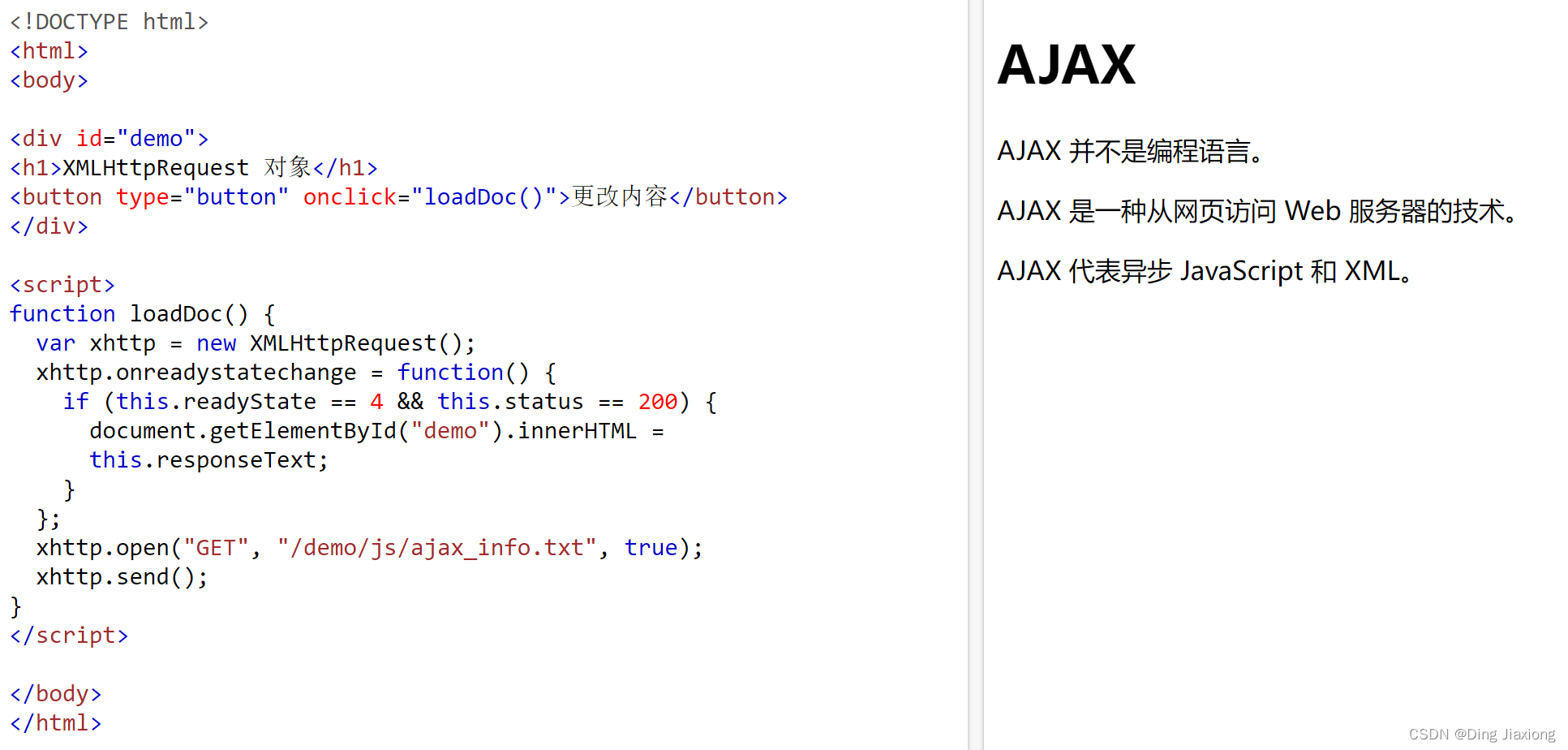
注释:
onreadystatechange被触发五次(0-4),每次readyState都发生变化。70.4.2 使用回调函数
回调函数是一种作为参数被传递到另一个函数的函数。
如果网站中有多个 AJAX 任务,那么您应该创建一个执行 XMLHttpRequest 对象的函数,以及一个供每个 AJAX 任务的回调函数。
该函数应当包含 URL 以及当响应就绪时调用的函数。
【举个栗子】
loadDoc("url-1", myFunction1); loadDoc("url-2", myFunction2); function loadDoc(url, cFunction) { var xhttp; xhttp = new XMLHttpRequest(); xhttp.onreadystatechange = function() { if (this.readyState == 4 && this.status == 200) { cFunction(this); } }; xhttp.open("GET", url, true); xhttp.send(); } function myFunction1(xhttp) { // 行动在这里 } function myFunction2(xhttp) { // 行动在这里 }- 1
- 2
- 3
- 4
- 5
- 6
- 7
- 8
- 9
- 10
- 11
- 12
- 13
- 14
- 15
- 16
- 17
- 18
- 19
- 20
- 21
- 22

70.4.3 服务器响应属性

70.4.4 服务器响应方法

70.4.5 responseText 属性
responseText属性以 JavaScript 字符串的形式返回服务器响应,因此可以这样使用它document.getElementById("demo").innerHTML = xhttp.responseText;- 1

70.4.6 responseXML 属性
XML HttpRequest 对象有一个內建的 XML 解析器。
ResponseXML属性以 XML DOM 对象返回服务器响应。使用此属性,可以把响应解析为 XML DOM 对象:
【举个栗子】
请求文件 music_list.xml,并对响应进行解析:
xmlDoc = xhttp.responseXML; txt = ""; x = xmlDoc.getElementsByTagName("ARTIST"); for (i = 0; i < x.length; i++) { txt += x[i].childNodes[0].nodeValue + "
"; } document.getElementById("demo").innerHTML = txt; xhttp.open("GET", "music_list.xml", true); xhttp.send();- 1
- 2
- 3
- 4
- 5
- 6
- 7
- 8
- 9

70.4.7 getAllResponseHeaders() 方法
getAllResponseHeaders()方法返回所有来自服务器响应的头部信息。var xhttp = new XMLHttpRequest(); xhttp.onreadystatechange = function() { if (this.readyState == 4 && this.status == 200) { document.getElementById("demo").innerHTML = this.getAllResponseHeaders(); } };- 1
- 2
- 3
- 4
- 5
- 6

70.4.8 getResponseHeader() 方法
getResponseHeader()方法返回来自服务器响应的特定头部信息。var xhttp = new XMLHttpRequest(); xhttp.onreadystatechange = function() { if (this.readyState == 4 && this.status == 200) { document.getElementById("demo").innerHTML = this.getResponseHeader("Last-Modified"); } }; xhttp.open("GET", "ajax_info.txt", true); xhttp.send();- 1
- 2
- 3
- 4
- 5
- 6
- 7
- 8

-
相关阅读:
Request(请求)&Response(响应)
【Linux】字节序理解
探索MATLAB在计算机视觉与深度学习领域的实战应用
Java---刷题01
队列模拟学习 C++
java-net-php-python-ssm电影推荐网站计算机毕业设计程序
vue获取 #后 ?前端 之间参数
PyQt5快速开发与实战 5.3 多线程
SpringBoot:如何优雅地进行响应数据封装、异常处理?
Argo CD快速入门教程(gitee+argo+k8s)
- 原文地址:https://blog.csdn.net/weixin_44226181/article/details/127799330
