-
Java-JDBC快速上手
目录

- package com.clear;
- import java.sql.Connection;
- import java.sql.DriverManager;
- import java.sql.ResultSet;
- import java.sql.Statement;
- /**
- * jdbc快速入门
- */
- public class jdbc_demo1 {
- public static void main(String[] args) throws Exception{
- // 1、注册驱动
- Class.forName("com.mysql.jdbc.Driver");
- // 2、获取数据库连接
- String url = "jdbc:mysql://localhost:3306/douban?useSSL=false";
- String username = "root";
- String password = "123456";
- Connection connection = DriverManager.getConnection(url, username, password);
- // 3、获取sql执行者对象
- Statement statement = connection.createStatement();
- String sql = "select * from douban_top250 limit 10";
- // 4、执行sql
- ResultSet rs = statement.executeQuery(sql);
- while (rs.next()){
- System.out.println(rs.getString(4));
- }
- // 5、释放连接
- statement.close();
- connection.close();
- }
- }
结果如下:

DriverManager(驱动管理类)
1.用于注册驱动
2.获取数据库连接
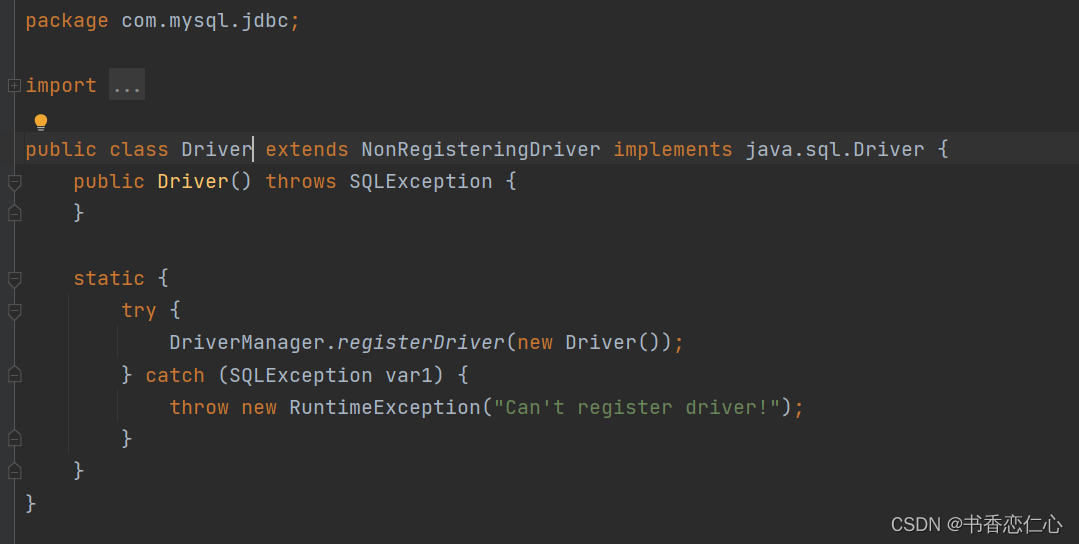
1.用于注册驱动

右图可知,Driver类中个静态代码块,会自动执行
DriverManager.registerDriver(new Driver())
 2.获取连接
- // 2、获取数据库连接
- String url = "jdbc:mysql://localhost:3306/douban?useSSL=false"; // useSSL=false关闭安全连接警告
- String username = "root";
- String password = "123456";
- Connection connection = DriverManager.getConnection(url, username, password);
connection(数据库连接对象)
1.获取执行sql的对象
2.事务管理


- package com.clear;
- import java.sql.*;
- /**
- * jdbc快速入门
- */
- public class jdbc_connection {
- public static void main(String[] args) throws Exception {
- // 1、注册驱动
- Class.forName("com.mysql.jdbc.Driver");
- // 2、获取连接
- String url = "jdbc:mysql://127.0.0.1:3306/db1?useSSL=false";
- String username = "root";
- String password = "123456";
- Connection connection = DriverManager.getConnection(url, username, password);
- // 3、获取执行sql的对象
- Statement statement = connection.createStatement();
- // 4、定义sql
- String sql = "update account set money= 2000 where name = '张三'";
- String sql2 = "update account set money= 2000 where name = '李四'";
- try {
- connection.setAutoCommit(false); // 关闭自动提交事务
- // 5、执行sql
- int line = statement.executeUpdate(sql);
- int a = 10 / 0; // 人为制造错误
- int line2 = statement.executeUpdate(sql2); // 影响的行数
- connection.commit(); // 手动提交事务
- } catch (Exception throwables) {
- connection.rollback();
- throwables.printStackTrace();
- }
- // 6、释放连接
- statement.close();
- connection.close();
- }
- }


Statement(获取执行sql的对象)

Result

PreparedStatement (防止sql注入)

开启预编译首先需要在数据库的 my.ini导入 以下
- log-output=FILE
- general-log=1
- general_log_file = "D:\mysql.log"
- slow-query-log = 1
- slow_query_log_file="D:\mysql_slow.log"
- long_query_time=2
开启预编译

useServerPrepStmts=true
以下是使用statement对象执行sql,结果被注入成功
- package com.clear;
- import java.sql.Connection;
- import java.sql.DriverManager;
- import java.sql.ResultSet;
- import java.sql.Statement;
- public class jdbc_preparedStatement {
- public static void main(String[] args) throws Exception {
- // 1、注册驱动
- Class.forName("com.mysql.jdbc.Driver");
- // 2、获取连接
- String url = "jdbc:mysql://127.0.0.1:3306/db1?useSSL=false&useServerPrepStmts=true"; # 开启预编译
- String username = "root";
- String password = "123456";
- Connection connection = DriverManager.getConnection(url, username, password);
- // 3、获取执行sql对象
- Statement statement = connection.createStatement();
- // 4、定义sql
- String name = "zhangsan";
- String pw = "123";
- String pw_inject = "' or '1' = '1"; // 注入语句
- String sql = "select * from tb_user where username='"+name+"'and password='"+pw_inject+"'";
- // 5、执行sql
- ResultSet resultSet = statement.executeQuery(sql);
- // 处理
- if (resultSet.next()){
- System.out.println("查询成功~~~");
- } else{
- System.out.println("查询失败^v^");
- }
- // 6、释放资源
- resultSet.close();
- statement.close();
- connection.close();
- }
- }
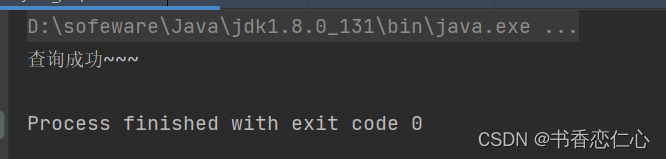
使用PreparedStatement对象后,sql注入失败
- package com.clear;
- import java.sql.Connection;
- import java.sql.DriverManager;
- import java.sql.ResultSet;
- import java.sql.PreparedStatement;
- public class jdbc_preparedStatement {
- public static void main(String[] args) throws Exception {
- // 1、注册驱动
- Class.forName("com.mysql.jdbc.Driver");
- // 2、获取连接
- String url = "jdbc:mysql://127.0.0.1:3306/db1?useSSL=false";
- String username = "root";
- String password = "123456";
- Connection connection = DriverManager.getConnection(url, username, password);
- // 3、定义sql
- String name = "zhangsan";
- String pw = "123";
- String pw_inject = "' or '1' = '1"; // 注入语句
- String sql = "select * from tb_user where username= ? and password=?";
- // 4、获取执行PreparedStatement对象(对sql语句有做转义处理)
- PreparedStatement preparedStatement = connection.prepareStatement(sql);
- // 4.1、设置?的值
- preparedStatement.setString(1,name);
- preparedStatement.setString(2,pw_inject);
- // 5、执行sql
- ResultSet resultSet = preparedStatement.executeQuery(); // 注意:这里不在写传sql
- // 处理
- if (resultSet.next()){
- System.out.println("查询成功~~~");
- } else{
- System.out.println("查询失败^v^");
- }
- // 6、释放资源
- resultSet.close();
- preparedStatement.close();
- connection.close();
- }
- }

数据库连接池(Druid)


案例如下:
首先配置druid.properties

- driverClassName=com.mysql.jdbc.Driver
- url=jdbc:mysql://127.0.0.1:3306/douban?useSSL=false&useServerPreStmts=true
- username=root
- password=123456
- # 初始化连接数量
- initialSize=5
- # 最大连接数
- maxActive=10
- # 最大等待时间 3s
- maxWait=3000
代码如下:
- package com.clear;
- import com.alibaba.druid.pool.DruidDataSourceFactory;
- import javax.sql.DataSource;
- import java.io.FileInputStream;
- import java.sql.ResultSet;
- import java.sql.Connection;
- import java.sql.PreparedStatement;
- import java.sql.SQLOutput;
- import java.util.Properties;
- /**
- * 简单上手数据库连接池(Druid)
- */
- public class jdbc_druid {
- public static void main(String[] args) throws Exception {
- // 1、导入jar包
- // 2、定义配置文件
- // 3、加载配置文件
- Properties properties = new Properties();
- // System.out.println(System.getProperty("user.dir")); // 查看当前目录
- properties.load(new FileInputStream("src/druid.properties"));
- // 4、获取连接池对象
- DataSource dataSource = DruidDataSourceFactory.createDataSource(properties);
- // 5、获取数据库连接
- Connection connection = dataSource.getConnection();
- // 6.获取PreparedStatement对象
- String sql = "select * from douban_top250 where id < ?";
- PreparedStatement preparedStatement = connection.prepareStatement(sql);
- // 设置?的值
- preparedStatement.setInt(1, 10);
- // 7.执行sql
- ResultSet resultSet = preparedStatement.executeQuery();
- while(resultSet.next()){
- System.out.println( resultSet.getString(4));
- }
- }
- }
测试结果

-
相关阅读:
工程建设行业智能供应链系统:优化产业链运作效率,实现全链路数字化建设
自定义appbarTitle + TabBarView 实现类似安卓tabHost+Fragment
Google Earth Engine(GEE)分析多个地区的植被覆盖趋势
vue当中的收集表单数据以及过滤器
2.2 Linux系统的目录结构与文件类型
Huggingface开源模型使用学习
《对比Excel,轻松学习Python数据分析》读书笔记------数据分组与数据透视表
【Gitee】使用IDEA上传本地的项目到Gitee
【JavaSE】继承那些事儿
AI 时代的企业级安全合规策略
- 原文地址:https://blog.csdn.net/weixin_56058578/article/details/127715968
