-
JDBC-03:PreparedStatement如何实现对数据库的增删改查操作
一、使用PreparedStatement实现CRUD操作
下文中测试用到的数据库
链接:https://pan.baidu.com/s/1WYs8loW7kA-a6-o_ItqEPQ
提取码:1234
(1)使用PreparedStatement实现增删改操作

- 预编译的SQL语句
操作步骤(大同小异)
//1.获取数据库的连接 //2.预编译sql语句,返回PreparedStatement的实例 //3.填充占位符 //4.执行 //5.资源的关闭- 1
- 2
- 3
- 4
- 5
1.PreparedStatement介绍
-
可以通过调用 Connection 对象的 preparedStatement(String sql) 方法获取 PreparedStatement 对象
-
PreparedStatement 接口是 Statement 的子接口,它表示一条预编译过的 SQL 语句
-
PreparedStatement 对象所代表的 SQL 语句中的参数用问号(?)来表示,调用 PreparedStatement 对象的 setXxx() 方法来设置这些参数. setXxx() 方法有两个参数,第一个参数是要设置的 SQL 语句中的参数的索引(从 1 开始),第二个是设置的 SQL 语句中的参数的值

2.实现数据库的添加操作
参考:Java中Data类的使用、JDK8之前日期时间API的讲解
步骤:注释中写了
异常处理:try/catch/finally
代码:
import org.junit.Test; import java.sql.*; import java.text.SimpleDateFormat; /* 使用PreparedStatement来替换Statement。实现对数据库的增删改查中的增删改操作 异常用try/catch/finally处理 */ public class Test1 { //向customer表中添加一条记录 @Test public void test1() { Connection c3 = null; PreparedStatement ps = null; try { //1.先连接数据库 Class.forName("com.mysql.jdbc.Driver"); String url="jdbc:mysql://localhost:3305/test"; String user="root"; String password="666666"; c3 = DriverManager.getConnection(url, user, password); System.out.println(c3); //2.获取PreparedStatement实例 String sql ="insert into customers(name,email,birth) value (?,?,?)";//?是占位符 ps = c3.prepareStatement(sql); //3.填充占位符(预编译sql语句,返回PreparedStatement实例)(注意java和数据库交互的时候是从1开始不再是0) ps.setString(1,"金士曼"); ps.setString(2,"1436589181@qq.com"); SimpleDateFormat sdf = new SimpleDateFormat("yyyy-MM-dd"); java.util.Date date = sdf.parse("2000-10-01"); ps.setDate(3,new Date(date.getTime())); //4.执行sql语句操作 ps.execute(); } catch (Exception e) { e.printStackTrace(); } finally { //5.资源的关闭(连接和PreparedStatement都需要关) try { if(ps!=null) ps.close(); } catch (SQLException e) { e.printStackTrace(); } try { if (c3!=null) c3.close(); } catch (SQLException e) { e.printStackTrace(); } } } }- 1
- 2
- 3
- 4
- 5
- 6
- 7
- 8
- 9
- 10
- 11
- 12
- 13
- 14
- 15
- 16
- 17
- 18
- 19
- 20
- 21
- 22
- 23
- 24
- 25
- 26
- 27
- 28
- 29
- 30
- 31
- 32
- 33
- 34
- 35
- 36
- 37
- 38
- 39
- 40
- 41
- 42
- 43
- 44
- 45
- 46
- 47
- 48
- 49
- 50
- 51
- 52
- 53
- 54
- 55
- 56
- 57
- 58
- 59
3.封装数据库连接和关闭操作
这里的异常直接抛出方便查看代码
因为操作都需要进行数据库的连接和资源的关闭,所以想到把数据库的连接和资源的关闭打包为数据包
打包工具类:JDBCUtils
import java.io.InputStream; import java.sql.Connection; import java.sql.DriverManager; import java.sql.SQLException; import java.sql.Statement; import java.util.Properties; /* 操作数据库的工具类 */ public class JDBCUtils { /* 获取数据库的连接 */ public static Connection getCollections() throws Exception { //1.读取配置文件中的4个基本信息(通过类的加载器) InputStream is = ClassLoader.getSystemClassLoader().getResourceAsStream("jdbc.properties"); Properties p1 = new Properties(); p1.load(is); String user = p1.getProperty("user"); String password = p1.getProperty("password"); String url = p1.getProperty("url"); String driverClass = p1.getProperty("driverClass"); //2.加载驱动 Class.forName(driverClass); //3.获取连接 Connection c3 = DriverManager.getConnection(url, user, password); return c3; } public void closeResource(Connection connection, Statement ps,ResultSet resultSet){ try { if(connection!=null) connection.close(); } catch (SQLException e) { e.printStackTrace(); } try { if (ps!=null) ps.close(); } catch (SQLException e) { e.printStackTrace(); } try { if(resultSet!=null) resultSet.close(); } catch (SQLException e) { e.printStackTrace(); } } }- 1
- 2
- 3
- 4
- 5
- 6
- 7
- 8
- 9
- 10
- 11
- 12
- 13
- 14
- 15
- 16
- 17
- 18
- 19
- 20
- 21
- 22
- 23
- 24
- 25
- 26
- 27
- 28
- 29
- 30
- 31
- 32
- 33
- 34
- 35
- 36
- 37
- 38
- 39
- 40
- 41
- 42
- 43
- 44
- 45
- 46
- 47
- 48
- 49
- 50
- 51
- 52
4.实现数据库的修改操作
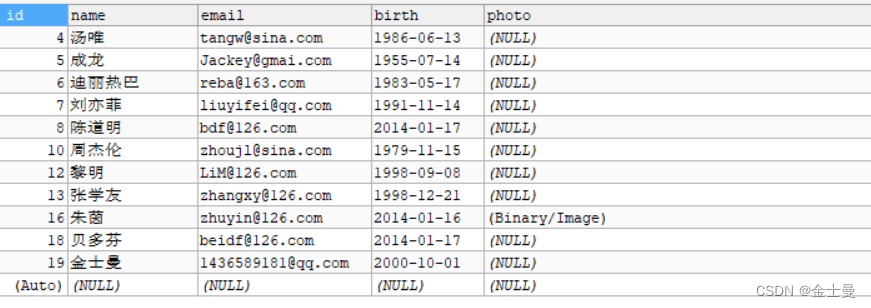
代码
import com.util.JDBCUtils; import org.junit.Test; import java.sql.Connection; import java.sql.PreparedStatement; /* 删除操作,此时已经打包好连接数据库和关闭数据库的工具类 */ public class Test2 { //修改customer的一条记录 @Test public void test2() throws Exception { //1.获取数据库的连接 Connection conn = JDBCUtils.getCollections(); //2.预编译sql语句,返回PreparedStatement的实例 String sql="update customers set name = ? where id = ?"; PreparedStatement ps = conn.prepareStatement(sql); //3.填充占位符 ps.setObject(1,"莫扎特"); ps.setObject(2,18); //4.执行 ps.execute(); //5.资源的关闭 JDBCUtils.closeResource(conn,ps); } }- 1
- 2
- 3
- 4
- 5
- 6
- 7
- 8
- 9
- 10
- 11
- 12
- 13
- 14
- 15
- 16
- 17
- 18
- 19
- 20
- 21
- 22
- 23
- 24
- 25
- 26
- 27
- 28
修改后

5.通用的增删改操作
因为增删改三个操作的步骤和流程都差不多,只是sql语句不同,所以考虑到可以包括再同一个模块里面,也就是通用的操作,只更改sql语句就行
可变形参参考:Java方法中可变个数的形参
import com.util.JDBCUtils; import org.junit.Test; import java.sql.Connection; import java.sql.PreparedStatement; /* 通用的增删改操作 */ public class test3 { public static void main(String[] args) { test3("update customers set name = ? where id = ?","金士曼",18); } @Test public static void test3(String sql,Object...args) {//sql当中占位符的格数与可变形参的长度相同 Connection conn = null; PreparedStatement ps = null; try { //1.获取数据库连接 conn = JDBCUtils.getCollections(); //2.预编译sql语句 ps = conn.prepareStatement(sql); //3.填充占位符(写几个占位符,可变形参就应该有几个) for (int i = 0; i <args.length ; i++) { ps.setObject(i+1,args[i]);//注意参数声明的角标问题 } //4.执行操作 ps.execute(); } catch (Exception e) { e.printStackTrace(); } finally { //5.关闭资源 JDBCUtils.closeResource(conn,ps); } } }- 1
- 2
- 3
- 4
- 5
- 6
- 7
- 8
- 9
- 10
- 11
- 12
- 13
- 14
- 15
- 16
- 17
- 18
- 19
- 20
- 21
- 22
- 23
- 24
- 25
- 26
- 27
- 28
- 29
- 30
- 31
- 32
- 33
- 34
- 35
- 36
- 37
6.ResultSet与ResultSetMetaData
ResultSet
-
查询需要调用PreparedStatement 的 executeQuery() 方法,查询结果是一个ResultSet 对象
-
ResultSet 对象以逻辑表格的形式封装了执行数据库操作的结果集,ResultSet 接口由数据库厂商提供实现
-
ResultSet 返回的实际上就是一张数据表。有一个指针指向数据表的第一条记录的前面。
-
ResultSet 对象维护了一个指向当前数据行的游标,初始的时候,游标在第一行之前,可以通过 ResultSet 对象的 next() 方法移动到下一行。调用 next()方法检测下一行是否有效。若有效,该方法返回 true,且指针下移。相当于Iterator对象的 hasNext() 和 next() 方法的结合体。
-
当指针指向一行时, 可以通过调用 getXxx(int index) 或 getXxx(int columnName) 获取每一列的值。
- 例如: getInt(1), getString(“name”)
- 注意:Java与数据库交互涉及到的相关Java API中的索引都从1开始。
-
ResultSet 接口的常用方法:
- boolean next()
- getString()
- …
ResultSetMetaData
-
可用于获取关于 ResultSet 对象中列的类型和属性信息的对象
-
ResultSetMetaData meta = rs.getMetaData();
-
getColumnName(int column):获取指定列的名称
-
getColumnLabel(int column):获取指定列的别名
-
getColumnCount():返回当前 ResultSet 对象中的列数。
-
getColumnTypeName(int column):检索指定列的数据库特定的类型名称。
-
getColumnDisplaySize(int column):指示指定列的最大标准宽度,以字符为单位。
-
isNullable(int column):指示指定列中的值是否可以为 null。
-
isAutoIncrement(int column):指示是否自动为指定列进行编号,这样这些列仍然是只读的。
-
6.PreparedStatement 和 Statement
-
代码的可读性和可维护性。
-
PreparedStatement 能最大可能提高性能:
- DBServer会对预编译语句提供性能优化。因为预编译语句有可能被重复调用,所以语句在被DBServer的编译器编译后的执行代码被缓存下来,那么下次调用时只要是相同的预编译语句就不需要编译,只要将参数直接传入编译过的语句执行代码中就会得到执行。
- 在statement语句中,即使是相同操作但因为数据内容不一样,所以整个语句本身不能匹配,没有缓存语句的意义.事实是没有数据库会对普通语句编译后的执行代码缓存。这样每执行一次都要对传入的语句编译一次。
- (语法检查,语义检查,翻译成二进制命令,缓存)
-
PreparedStatement 可以防止 SQL 注入
(2)使用PreparedStatement实现查询操作
增删改在代码执行完就完事了,但是查询不一样,需要结果,前面都是获取数据库连接,然后预编译,再填充占位符,但是增删改只需要执行就行,但是查询就不一样了,详细如下

1.针对具体表Customers表的操作
这里为了方便看代码,异常抛出,但是异常实际是需要try/catch捕获的
import com.util.JDBCUtils; import org.junit.Test; import java.net.Socket; import java.sql.Connection; import java.sql.Date; import java.sql.PreparedStatement; import java.sql.ResultSet; /* 使用PreparedStatement实现查询操作 */ public class Test4 { //针对具体表Customers表的操作 //这里为了方便看代码,异常抛出,但是异常实际是需要try/catch捕获的 @Test public void test1() throws Exception { //1.获取数据库连接 Connection conn = JDBCUtils.getCollections(); //2.预编译 String sql="SELECT id,`name`,email,birth FROM customers WHERE id = ?"; PreparedStatement ps = conn.prepareStatement(sql); ps.setObject(1,1); //3.执行,并返回结果集 ResultSet resultSet = ps.executeQuery(); //4.处理结果集 //(//next方法:判断结果集的吓一条是否有数据,如果有数据返回true, // 并指针下移,如果返回false,则指针不会下移直接结束) if(resultSet.next()){ //获取当前这条数据的各个字段值 int id = resultSet.getInt(1); String name = resultSet.getString(2); String email = resultSet.getString(3); Date birth = resultSet.getDate(4); // //处理信息方式一:(不建议) System.out.println("id="+id+"name="+name+"email"+email+"birth"+birth); // //处理信息方式二: // Object[] data = new Object[]{id,name,email,birth}; //处理信息方式三:将数据封装成一个对象 // Customer customer = new Customer(id,name,email,birth); // System.out.println(customer); } //5.关闭资源 JDBCUtils.closeResource(conn,ps,resultSet); } }- 1
- 2
- 3
- 4
- 5
- 6
- 7
- 8
- 9
- 10
- 11
- 12
- 13
- 14
- 15
- 16
- 17
- 18
- 19
- 20
- 21
- 22
- 23
- 24
- 25
- 26
- 27
- 28
- 29
- 30
- 31
- 32
- 33
- 34
- 35
- 36
- 37
- 38
- 39
- 40
- 41
- 42
- 43
- 44
- 45
- 46
2.处理结果集方法三:新建对象类
package com.jsm2.PreparedStatementUpdateTest; import java.sql.Date; public class Customer { private int id; private String name; private String email; private Date birth; public Customer() { } public Customer(int id, String name, String email, Date birth) { this.id = id; this.name = name; this.email = email; this.birth = birth; } @Override public String toString() { return "Customer{" + "id=" + id + ", name='" + name + '\'' + ", email='" + email + '\'' + ", birth=" + birth + '}'; } public int getId() { return id; } public void setId(int id) { this.id = id; } public String getName() { return name; } public void setName(String name) { this.name = name; } public String getEmail() { return email; } public void setEmail(String email) { this.email = email; } public Date getBirth() { return birth; } public void setBirth(Date birth) { this.birth = birth; } }- 1
- 2
- 3
- 4
- 5
- 6
- 7
- 8
- 9
- 10
- 11
- 12
- 13
- 14
- 15
- 16
- 17
- 18
- 19
- 20
- 21
- 22
- 23
- 24
- 25
- 26
- 27
- 28
- 29
- 30
- 31
- 32
- 33
- 34
- 35
- 36
- 37
- 38
- 39
- 40
- 41
- 42
- 43
- 44
- 45
- 46
- 47
- 48
- 49
- 50
- 51
- 52
- 53
3.针对Customers表的通用查询操作(重点重中之重)
参考文章:Java反射05:调用运行时类的指定结构
备注:详细过程见代码,这个在jdbc中都是很难的一部分,但是在Mybatis中又变得很简单,后续文章详解
异常通过抛出的方式是因为方便查看代码
package com.jsm2.PreparedStatementUpdateTest; import com.util.JDBCUtils; import org.junit.Test; import java.lang.reflect.Field; import java.sql.Connection; import java.sql.PreparedStatement; import java.sql.ResultSet; import java.sql.ResultSetMetaData; public class Test42 { public static void main(String[] args)throws Exception { String sql="select id,name,birth,email from customers where id = ?"; Customer customer = test1(sql, 13); System.out.println(customer); } @Test public static Customer test1(String sql,Object...args) throws Exception { Connection conn = JDBCUtils.getCollections(); PreparedStatement ps = conn.prepareStatement(sql); for (int i = 0; i <args.length ; i++) { ps.setObject(i+1,args[i]); } ResultSet rs = ps.executeQuery(); //获取结果集的元数据:ResultSetMetaData ResultSetMetaData rsmd = rs.getMetaData(); //获取结果集当中的列数: int columnCount = rsmd.getColumnCount(); if (rs.next()){ //第二步 Customer cust = new Customer();//只能造空参构造器(写里面是因为查到结果了才去造对象) //第一步:处理结果集一行数据中的每一个列 for (int i = 0; i <columnCount ; i++) { //获取列值 Object value = rs.getObject(i + 1);//Object具有通用性,列的值 /* 这时候拿到值了,但是需要放到对象当中,这时候有两种方式放到对象中, 要不直接调用构造器,要不就是空参构造器通过set方法放进去, 但是只能用第二种,因为不知道查询总共有几个列,构造器肯定不一定有 */ //第三步:给cust对象指定的某个对象,赋值为value //第四步:获取每个列的列名 String columnName = rsmd.getColumnName(i+1);//列的列名 //第五步:给cust对象指定的columnName属性,赋值为columValue:通过反射 Field f1 = Customer.class.getDeclaredField(columnName); f1.setAccessible(true);//暴力赋值(见参考文章) f1.set(cust,value); } return cust; } //关闭资源 JDBCUtils.closeResource(conn,ps,rs); return null; } }- 1
- 2
- 3
- 4
- 5
- 6
- 7
- 8
- 9
- 10
- 11
- 12
- 13
- 14
- 15
- 16
- 17
- 18
- 19
- 20
- 21
- 22
- 23
- 24
- 25
- 26
- 27
- 28
- 29
- 30
- 31
- 32
- 33
- 34
- 35
- 36
- 37
- 38
- 39
- 40
- 41
- 42
- 43
- 44
- 45
- 46
- 47
- 48
- 49
- 50
- 51
- 52
- 53
- 54
- 55
- 56
- 57
- 58
结果举例:

4.针对Order表的通用查询操作(重点重中之重)

第一步:Order类
(属性名和上面的列名不一样)
package com.jsm2.PreparedStatementUpdateTest; import java.sql.Date; public class Order { private int orderId; private String orderName; private Date orderDate; public Order(int orderId, String orderName, Date orderDate) { this.orderId = orderId; this.orderName = orderName; this.orderDate = orderDate; } public Order() { } public int getOrderId() { return orderId; } public void setOrderId(int orderId) { this.orderId = orderId; } public String getOrderName() { return orderName; } public void setOrderName(String orderName) { this.orderName = orderName; } public Date getOrderDate() { return orderDate; } public void setOrderDate(Date orderDate) { this.orderDate = orderDate; } @Override public String toString() { return "OrderTest{" + "orderId=" + orderId + ", orderName='" + orderName + '\'' + ", orderDate=" + orderDate + '}'; } }- 1
- 2
- 3
- 4
- 5
- 6
- 7
- 8
- 9
- 10
- 11
- 12
- 13
- 14
- 15
- 16
- 17
- 18
- 19
- 20
- 21
- 22
- 23
- 24
- 25
- 26
- 27
- 28
- 29
- 30
- 31
- 32
- 33
- 34
- 35
- 36
- 37
- 38
- 39
- 40
- 41
- 42
- 43
- 44
- 45
- 46
- 47
- 48
- 49
- 50
- 51
- 52
用针对Order表的方法写代码如下
(test1是用于测试,tset2才是模仿Customers写的通用方法,运行看main方法的测试)
/* */ package com.jsm2.PreparedStatementUpdateTest; import com.util.JDBCUtils; import jdk.nashorn.internal.scripts.JD; import org.junit.Test; import java.lang.reflect.Field; import java.sql.*; public class OrderTest { //搞定针对Order表的通用的时候先演示一般的如下test1 @Test//异常捕获用try/catch(这里为了代码看起来方便) public void test1() throws Exception { Connection conn = JDBCUtils.getCollections(); String sql="select order_id,order_name,order_date from `order` where order_id = ?"; PreparedStatement ps = conn.prepareStatement(sql); ps.setObject(1,1); ResultSet rs = ps.executeQuery(); if (rs.next()){ int id = (int) rs.getObject(1);//这里明确知道是那几个数据,所以不用Object先 String name=(String) rs.getObject(2); Date date=(Date) rs.getObject(3); Order order = new Order(id, name, date); System.out.println(order); } //关闭资源 JDBCUtils.closeResource(conn,ps,rs); } public static void main(String[] args) throws Exception { String sql="select order_id,order_name,order_date from `order` where order_id = ?"; Order order = test2(sql, 1); System.out.println(order); } //针对Order的通用操作 @Test public static Order test2(String sql,Object...args) throws Exception { Connection conn = JDBCUtils.getCollections(); PreparedStatement ps = conn.prepareStatement(sql); for (int i = 0; i <args.length ; i++) { ps.setObject(i+1,args[i]);//填充占位符 } //执行,获取结果集 ResultSet rs = ps.executeQuery(); //获取结果集的元数据 ResultSetMetaData rsmd = rs.getMetaData(); //获取列数 int columnCount = rsmd.getColumnCount(); if (rs.next()){ Order order = new Order(); for (int i = 0; i <columnCount ; i++) { //获取每个列的列值:通过结果集:ResultSet Object value = rs.getObject(i + 1); //获取每个列的列名:通过:ResultSetMetaData String columnName = rsmd.getColumnName(i+1); //按照之前针对Customer的方法来说下面需要反射了 //通过反射:将对象指定名columnName的属性赋值为指定的值columnValue Field field = Order.class.getDeclaredField(columnName); field.setAccessible(true); field.set(order,columnCount); } return order; } JDBCUtils.closeResource(conn,ps,rs); return null; } }- 1
- 2
- 3
- 4
- 5
- 6
- 7
- 8
- 9
- 10
- 11
- 12
- 13
- 14
- 15
- 16
- 17
- 18
- 19
- 20
- 21
- 22
- 23
- 24
- 25
- 26
- 27
- 28
- 29
- 30
- 31
- 32
- 33
- 34
- 35
- 36
- 37
- 38
- 39
- 40
- 41
- 42
- 43
- 44
- 45
- 46
- 47
- 48
- 49
- 50
- 51
- 52
- 53
- 54
- 55
- 56
- 57
- 58
- 59
- 60
- 61
- 62
- 63
- 64
- 65
- 66
- 67
- 68
- 69
- 70
- 71
- 72
- 73
- 74
- 75
运行结果报异常:java.lang.NoSuchFieldException: order_id
原因:查询的结果集列名是Order下划线加对应的名字,但是刻意的在Order类中对应的属性没有写相同的名字(实际情况中表的字段名和类的属性名经常不同)

5.用方法getColumnLabel()的使用,解决表名和类名不一致的问题
上述问题解决问题的方法:首先表名和类名,肯定都是不可以改的,所以用结果集去中间进行一个过度,用别名
方法:
- 原本:获取列的列名:getColumnName()
- 改为:获取列的别名:getColumnLabel()
- 测试的sql语句改为写别名的方式:select order_id orderId,order_name orderName,order_date orderDate from
orderwhere order_id = ?
注意:万一没有别名,就默认为列名了,所以一般默认使用getColumnLabel
代码:
@Test public static Order test3(String sql,Object...args) throws Exception {//设置为static是方便main测试,异常抛出是方便查看代码过程 Connection conn = JDBCUtils.getCollections(); PreparedStatement ps = conn.prepareStatement(sql); for (int i = 0; i <args.length ; i++) { ps.setObject(i+1,args[i]);//填充占位符 } //执行,获取结果集 ResultSet rs = ps.executeQuery(); //获取结果集的元数据 ResultSetMetaData rsmd = rs.getMetaData(); //获取列数 int columnCount = rsmd.getColumnCount(); if (rs.next()){ Order order = new Order(); for (int i = 0; i <columnCount ; i++) { //获取每个列的列值:通过结果集:ResultSet Object value = rs.getObject(i + 1); //获取每个列的列名:通过:ResultSetMetaData //获取列的列名:getColumnName() //获取列的别名:getColumnLabel() // String columnName = rsmd.getColumnName(i+1);-----不推荐使用 String columnLabel = rsmd.getColumnLabel(i+1); //按照之前针对Customer的方法来说下面需要反射了 //通过反射:将对象指定名columnName的属性赋值为指定的值columnValue Field field = Order.class.getDeclaredField(columnLabel); field.setAccessible(true); field.set(order,value); } return order; } JDBCUtils.closeResource(conn,ps,rs); return null; }- 1
- 2
- 3
- 4
- 5
- 6
- 7
- 8
- 9
- 10
- 11
- 12
- 13
- 14
- 15
- 16
- 17
- 18
- 19
- 20
- 21
- 22
- 23
- 24
- 25
- 26
- 27
- 28
- 29
- 30
- 31
- 32
- 33
- 34
- 35
- 36
- 37
- 38
- 39
6.总结
针对表的字段名和属性名不相同的情况
- 必须声明sql时,使用的类的属性名来命名字段的别名
- 使用ResultSetMetaData时,需要使用getColumnLabel()来替换getColumnName()来获取列的别名
- 补充说明:如果sql中没有给字段取别名,getColumnLabel方法获取的还是列名
二、总结
问题1:得到结果集后, 如何知道该结果集中有哪些列 ? 列名是什么?
需要使用一个描述 ResultSet 的对象, 即 ResultSetMetaData
问题2:关于ResultSetMetaData
- 如何获取 ResultSetMetaData: 调用 ResultSet 的 getMetaData() 方法即可
- 获取 ResultSet 中有多少列:调用 ResultSetMetaData 的 getColumnCount() 方法
- 获取 ResultSet 每一列的列的别名是什么:调用 ResultSetMetaData 的getColumnLabel() 方法
关于资源的释放
- 释放ResultSet, Statement,Connection。
- 数据库连接(Connection)是非常稀有的资源,用完后必须马上释放,如果Connection不能及时正确的关闭将导致系统宕机。Connection的使用原则是尽量晚创建,尽量早的释放。
- 可以在finally中关闭,保证及时其他代码出现异常,资源也一定能被关闭。
JDBC API小结
-
两种思想
-
面向接口编程的思想
-
ORM思想(object relational mapping)
- 一个数据表对应一个java类
- 表中的一条记录对应java类的一个对象
- 表中的一个字段对应java类的一个属性
sql是需要结合列名和表的属性名来写。注意起别名。
-
-
两种技术
- JDBC结果集的元数据:ResultSetMetaData
- 获取列数:getColumnCount()
- 获取列的别名:getColumnLabel()
- 通过反射,创建指定类的对象,获取指定的属性并赋值
图解查询操作的流程

- JDBC结果集的元数据:ResultSetMetaData
-
相关阅读:
区间素数筛
千亿参数开源大模型 BLOOM 背后的技术
【设计模式】Java设计模式 - 模板模式
肺部阴影识别检测 matlab算法技术
Typecho 添加 Emoji 表情报错「解决方案」
Github每日精选(第40期):为 Windows 带来 macOS “快速查看”功能QuickLook
Google Earth Engine(GEE)——两种线性回归计算(单变量linefit和多变量linearRegression)
GBase 8c以SSL方式通过JDBC连接-客户端配置
云原生分级SLA
怎么制作gif动态图,静态图片转成动态图的方法分享!
- 原文地址:https://blog.csdn.net/weixin_45869823/article/details/127699164
