-
k8s 之存储卷
1. 存储卷的分类
1.1 本地存储卷
- emptyDir pod删除,数据也会被清除,用于数据的临时存储
- hostPath 宿主机目录映射(本地存储卷)
1.2 网络存储卷
- NAS类 nsf等
- SAN类 iscsi,FC等
- 分布式存储: glusterfs,cephfs,rbd,cinder等
- 云存储 aws,azurefile 等
2. 存储卷的选择
2.1 按应用角度分类
- 文件存储:如nfs,glusterfs,cephfs
优点:数据共享
缺点: 性能相对较差 - 块存储:如 iscsi,rbd
优点: 性能相对于文件存储较好
缺点: 部分不能实现数据共享 - 对象存储: ceph对象存储
优点:性能好,数据共享
缺点: 使用方式特殊,支持较少
3. emptyDir
应用场景:pod之间的数据共享
特点:随着pod的删除,该卷也会被删除,不能用来做数据的持久化测试yaml
apiVersion: v1 kind: Pod metadata: name: volume-emptydir spec: containers: - name: write image: centos imagePullPolicy: IfNotPresent command: ["bash","-c","echo haha > /data/1.txt ; sleep 6000"] volumeMounts: - name: data mountPath: /data - name: read image: centos imagePullPolicy: IfNotPresent command: ["bash","-c","cat /data/1.txt; sleep 6000"] volumeMounts: - name: data mountPath: /data volumes: - name: data emptyDir: {}- 1
- 2
- 3
- 4
- 5
- 6
- 7
- 8
- 9
- 10
- 11
- 12
- 13
- 14
- 15
- 16
- 17
- 18
- 19
- 20
- 21
- 22
- 23
- 24
- 25
4. hostPath
- 应用场景:pod 与集群节点的目录映射,
- 缺点:如果集群节点挂掉,控制器在另一个集群节点 拉起容器,数据就会变成集群的另一个节点上的数据,不会进行数据共享
yaml列子文件
apiVersion: v1 kind: Pod metadata: name: volume-hostpath spec: containers: - name: busybox image: busybox imagePullPolicy: IfNotPresent command: ["/bin/sh","-c","echo haha > /data/1.txt ; sleep 600"] volumeMounts: - name: data mountPath: /data volumes: - name: data hostPath: path: /opt type: Directory- 1
- 2
- 3
- 4
- 5
- 6
- 7
- 8
- 9
- 10
- 11
- 12
- 13
- 14
- 15
- 16
- 17
- 18
- 19
5.nfs
5.1 构建一个nfs server
mkdir -p /data/nfs vim /etc/exports /data/nfs *(rw,no_root_squash,sync) systemctl restart nfs-server systemctl enable nfs-server [root@k8sslave3 ~]# showmount -e Export list for k8sslave3: /data/nfs *- 1
- 2
- 3
- 4
- 5
- 6
- 7
- 8
5.2 所有node节点安装nfs客户端的相关软件包
[root@k8s-worker1 ~]# yum install nfs-utils -y [root@k8s-worker2 ~]# yum install nfs-utils -y- 1
- 2
验证可用性
[root@k8sslave opt]# showmount -e 192.168.37.141 Export list for 192.168.37.141: /data/nfs *- 1
- 2
- 3
5.3 在master节点上创建yaml文件
apiVersion: apps/v1 kind: Deployment metadata: name: volume-nfs spec: replicas: 2 selector: matchLabels: app: nginx template: metadata: labels: app: nginx spec: containers: - name: nginx image: nginx:1.15-alpine imagePullPolicy: IfNotPresent volumeMounts: - name: documentroot mountPath: /usr/share/nginx/html ports: - containerPort: 80 volumes: - name: documentroot nfs: server: 192.168.37.141 path: /data/nfs- 1
- 2
- 3
- 4
- 5
- 6
- 7
- 8
- 9
- 10
- 11
- 12
- 13
- 14
- 15
- 16
- 17
- 18
- 19
- 20
- 21
- 22
- 23
- 24
- 25
- 26
- 27
- 28
6. pv与pvc
persistenvolume(PV) 是配置好的一段存储(可以是任意类型的存储卷)
- 也就是说将网络存储共享出来,配置定义成PV。
PersistentVolumeClaim(PVC)是用户pod使用PV的申请请求。
- 用户不需要关心具体的volume实现细节,只需要关心使用需求。
6.1 pv 与pvc之间的关系
- pv提供存储资源(生产者)
- pvc使用存储资源(消费者)
- 使用pvc绑定pv

6.2 实现nfs与pv和pvc的案列
6.2.1 创建pv
[root@k8s-master1 ~]# vim pv-nfs.yml apiVersion: v1 kind: PersistentVolume # 类型为PersistentVolume(pv) metadata: name: pv-nfs # 名称 spec: capacity: storage: 1Gi # 大小 accessModes: - ReadWriteMany # 访问模式 nfs: path: /data/nfs # nfs共享目录 server: 192.168.37.141 # nfs服务器IP- 1
- 2
- 3
- 4
- 5
- 6
- 7
- 8
- 9
- 10
- 11
- 12
- 13
访问模式有三种
- ReadWriteOnce 单节点读写挂载
- ReadOnlyMany 多节点只读挂载
- ReadWriteMany 多节点读写挂载

说明:- RWX为ReadWriteMany的简写
- Retain是回收策略
- Retain表示需要不使用了需要手动回收
- 参考: 参考地址
6.2.2 创建pvc
apiVersion: v1 kind: PersistentVolumeClaim # 类型为PersistentVolumeClaim(pvc) metadata: name: pvc-nfs # pvc的名称 spec: accessModes: - ReadWriteMany # 访问模式 resources: requests: storage: 1Gi # 大小要与pv的大小保持一致- 1
- 2
- 3
- 4
- 5
- 6
- 7
- 8
- 9
- 10

注:status 为bound状态表示pv与pvc进行了绑定6.2.3 编写deployment的yaml
apiVersion: apps/v1 kind: Deployment metadata: name: deploy-nginx-nfs spec: replicas: 2 selector: matchLabels: app: nginx template: metadata: labels: app: nginx spec: containers: - name: nginx image: nginx:1.15-alpine imagePullPolicy: IfNotPresent ports: - containerPort: 80 volumeMounts: - name: www mountPath: /usr/share/nginx/html volumes: - name: www persistentVolumeClaim: claimName: pvc-nfs- 1
- 2
- 3
- 4
- 5
- 6
- 7
- 8
- 9
- 10
- 11
- 12
- 13
- 14
- 15
- 16
- 17
- 18
- 19
- 20
- 21
- 22
- 23
- 24
- 25
- 26
- 27
6.3 subPath 挂载子目录的写法
6.3.1 pod
apiVersion: v1 kind: Pod metadata: name: pod1 spec: containers: - name: c1 image: busybox command: ["/bin/sleep","100000"] volumeMounts: - name: data mountPath: /opt/data1 subPath: data1 ##挂载的子目录位置 - name: data mountPath: /opt/data2 subPath: data2 volumes: - name: data persistentVolumeClaim: claimName: pvc-nfs- 1
- 2
- 3
- 4
- 5
- 6
- 7
- 8
- 9
- 10
- 11
- 12
- 13
- 14
- 15
- 16
- 17
- 18
- 19
- 20
- 21
6.3.2 pv
apiVersion: v1 kind: PersistentVolume # 类型为PersistentVolume(pv) metadata: name: pv-nfs # 名称 spec: capacity: storage: 1Gi # 大小 accessModes: - ReadWriteMany # 访问模式 nfs: path: /data/nfs # nfs共享目录 server: 192.168.37.141- 1
- 2
- 3
- 4
- 5
- 6
- 7
- 8
- 9
- 10
- 11
- 12
6.3.3 pvc
apiVersion: v1 kind: PersistentVolumeClaim # 类型为PersistentVolumeClaim(pvc) metadata: name: pvc-nfs # pvc的名称 spec: accessModes: - ReadWriteMany # 访问模式 resources: requests: storage: 1Gi # 大小要与pv的大小保持一致- 1
- 2
- 3
- 4
- 5
- 6
- 7
- 8
- 9
- 10
7. 动态供给
7.1 什么是动态供给
每次使用存储要先创建pv, 再创建pvc,真累! 所以我们可以实现使用存储的动态供给特性。
- 静态存储需要用户申请PVC时保证容量和读写类型与预置PV的容量及读写类型完全匹配, 而动态存储则无需如此.
- 管理员无需预先创建大量的PV作为存储资源
Kubernetes从1.4版起引入了一个新的资源对象StorageClass,可用于将存储资源定义为具有显著特性的类(Class)而不是具体
的PV。用户通过PVC直接向意向的类别发出申请,匹配由管理员事先创建的PV,或者由其按需为用户动态创建PV,这样就免去
了需要先创建PV的过程。
7.2 使用NFS文件系统创建存储动态供给
动态供给插件官方地址:storage-class
第三方插件的地址:地址


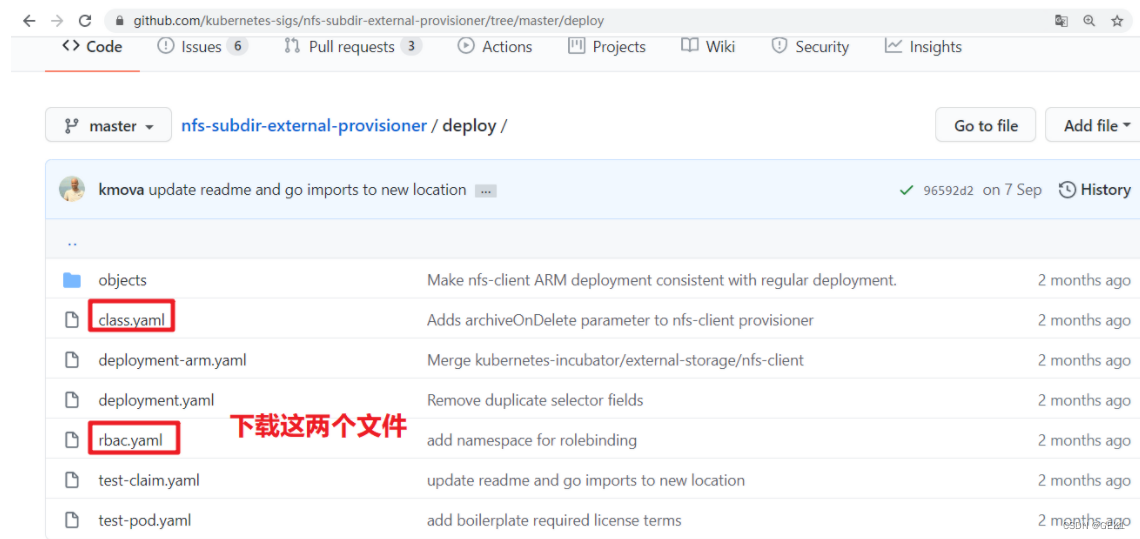
7.2.1 下载storageclass
[root@k8s-master1 ~]# wget https://raw.githubusercontent.com/kubernetes-sigs/nfs-subdir-external-provisioner/master/deploy/class.yaml [root@k8s-master1 ~]# mv class.yaml storageclass-nfs.yml- 1
- 2
[root@k8s-master1 ~]# cat storageclass-nfs.yml apiVersion: storage.k8s.io/v1 kind: StorageClass # 类型 metadata: name: nfs-client # 名称,要使用就需要调用此名称 provisioner: k8s-sigs.io/nfs-subdir-external-provisioner # 动态供给插件 parameters: archiveOnDelete: "false" # 删除数据时是否存档,false表示不存档,true表示存档- 1
- 2
- 3
- 4
- 5
- 6
- 7
- 8
[root@k8s-master1 ~]# kubectl apply -f storageclass-nfs.yml storageclass.storage.k8s.io/managed-nfs-storage created- 1
- 2
[root@k8s-master1 ~]# kubectl get storageclass NAME PROVISIONER RECLAIMPOLICY VOLUMEBINDINGMODE ALLOWVOLUMEEXPANSION AGE nfs-client k8s-sigs.io/nfs-subdir-external-provisioner Delete Immediate false 10s # RECLAIMPOLICY pv回收策略,pod或pvc被删除后,pv是否删除还是保留。 # VOLUMEBINDINGMODE Immediate 模式下PVC与PV立即绑定,主要是不等待相关Pod调度完成,不关心其运行节点,直接完成绑定。相反的 WaitForFirstConsumer模式下需要等待Pod调度完成后进行PV绑定。 # ALLOWVOLUMEEXPANSION pvc扩容- 1
- 2
- 3
- 4
- 5
- 6
- 7
7.2.2 下载并创建rbac
[root@k8s-master1 ~]# wget https://raw.githubusercontent.com/kubernetes-sigs/nfs-subdir-external-provisioner/master/deploy/rbac.yaml[root@k8s-master1 ~]# mv rbac.yaml storageclass-nfs-rbac.yaml- 1
[root@k8s-master1 ~]# cat storageclass-nfs-rbac.yaml apiVersion: v1 kind: ServiceAccount metadata: name: nfs-client-provisioner # replace with namespace where provisioner is deployed namespace: default --- kind: ClusterRole apiVersion: rbac.authorization.k8s.io/v1 metadata: name: nfs-client-provisioner-runner rules: - apiGroups: [""] resources: ["persistentvolumes"] verbs: ["get", "list", "watch", "create", "delete"] - apiGroups: [""] resources: ["persistentvolumeclaims"] verbs: ["get", "list", "watch", "update"] - apiGroups: ["storage.k8s.io"] resources: ["storageclasses"] verbs: ["get", "list", "watch"] - apiGroups: [""] resources: ["events"] verbs: ["create", "update", "patch"] --- kind: ClusterRoleBinding apiVersion: rbac.authorization.k8s.io/v1 metadata: name: run-nfs-client-provisioner subjects: - kind: ServiceAccount name: nfs-client-provisioner # replace with namespace where provisioner is deployed namespace: default roleRef: kind: ClusterRole name: nfs-client-provisioner-runner apiGroup: rbac.authorization.k8s.io --- kind: Role apiVersion: rbac.authorization.k8s.io/v1 metadata: name: leader-locking-nfs-client-provisioner # replace with namespace where provisioner is deployed namespace: default rules: - apiGroups: [""] resources: ["endpoints"] verbs: ["get", "list", "watch", "create", "update", "patch"] --- kind: RoleBinding apiVersion: rbac.authorization.k8s.io/v1 metadata: name: leader-locking-nfs-client-provisioner # replace with namespace where provisioner is deployed namespace: default subjects: - kind: ServiceAccount name: nfs-client-provisioner # replace with namespace where provisioner is deployed namespace: default roleRef: kind: Role name: leader-locking-nfs-client-provisioner apiGroup: rbac.authorization.k8s.io- 1
- 2
- 3
- 4
- 5
- 6
- 7
- 8
- 9
- 10
- 11
- 12
- 13
- 14
- 15
- 16
- 17
- 18
- 19
- 20
- 21
- 22
- 23
- 24
- 25
- 26
- 27
- 28
- 29
- 30
- 31
- 32
- 33
- 34
- 35
- 36
- 37
- 38
- 39
- 40
- 41
- 42
- 43
- 44
- 45
- 46
- 47
- 48
- 49
- 50
- 51
- 52
- 53
- 54
- 55
- 56
- 57
- 58
- 59
- 60
- 61
- 62
- 63
- 64
- 65
- 66
- 67
[root@k8s-master1 ~]# kubectl apply -f rbac.yaml serviceaccount/nfs-client-provisioner created clusterrole.rbac.authorization.k8s.io/nfs-client-provisioner-runner created clusterrolebinding.rbac.authorization.k8s.io/run-nfs-client-provisioner created role.rbac.authorization.k8s.io/leader-locking-nfs-client-provisioner created rolebinding.rbac.authorization.k8s.io/leader-locking-nfs-client-provisioner created- 1
- 2
- 3
- 4
- 5
- 6
7.2.3 创建动态供给的deployment
[root@k8s-master1 ~]# vim deploy-nfs-client-provisioner.yml apiVersion: apps/v1 kind: Deployment metadata: name: nfs-client-provisioner spec: replicas: 1 strategy: type: Recreate selector: matchLabels: app: nfs-client-provisioner template: metadata: labels: app: nfs-client-provisioner spec: serviceAccount: nfs-client-provisioner containers: - name: nfs-client-provisioner image: registry.cn-beijing.aliyuncs.com/pylixm/nfs-subdir-external-provisioner:v4.0.0 volumeMounts: - name: nfs-client-root mountPath: /persistentvolumes env: - name: PROVISIONER_NAME value: k8s-sigs.io/nfs-subdir-external-provisioner - name: NFS_SERVER value: 192.168.10.129 - name: NFS_PATH value: /data/nfs volumes: - name: nfs-client-root nfs: server: 192.168.10.129 path: /data/nfs- 1
- 2
- 3
- 4
- 5
- 6
- 7
- 8
- 9
- 10
- 11
- 12
- 13
- 14
- 15
- 16
- 17
- 18
- 19
- 20
- 21
- 22
- 23
- 24
- 25
- 26
- 27
- 28
- 29
- 30
- 31
- 32
- 33
- 34
- 35
- 36
[root@k8s-master1 ~]# kubectl apply -f deploy-nfs-client-provisioner.yml deployment.apps/nfs-client-provisioner created [root@k8s-master1 ~]# kubectl get pods |grep nfs-client-provisioner nfs-client-provisioner-5b5ddcd6c8-b6zbq 1/1 Running 0 34s- 1
- 2
- 3
- 4
- 5
7.2.4 测试动态供给是否可用
# vim nginx-sc.yaml --- apiVersion: v1 kind: Service metadata: name: nginx labels: app: nginx spec: ports: - port: 80 name: web clusterIP: None selector: app: nginx --- apiVersion: apps/v1 kind: StatefulSet metadata: name: web spec: selector: matchLabels: app: nginx serviceName: "nginx" replicas: 2 template: metadata: labels: app: nginx spec: imagePullSecrets: - name: huoban-harbor terminationGracePeriodSeconds: 10 containers: - name: nginx image: nginx:latest ports: - containerPort: 80 name: web volumeMounts: - name: www mountPath: /usr/share/nginx/html volumeClaimTemplates: - metadata: name: www spec: accessModes: [ "ReadWriteOnce" ] storageClassName: "nfs-client" resources: requests: storage: 1Gi- 1
- 2
- 3
- 4
- 5
- 6
- 7
- 8
- 9
- 10
- 11
- 12
- 13
- 14
- 15
- 16
- 17
- 18
- 19
- 20
- 21
- 22
- 23
- 24
- 25
- 26
- 27
- 28
- 29
- 30
- 31
- 32
- 33
- 34
- 35
- 36
- 37
- 38
- 39
- 40
- 41
- 42
- 43
- 44
- 45
- 46
- 47
- 48
- 49
- 50
- 51
- 52
- 53
7.2.5 验证
[root@k8s-master1 nfs]# kubectl get pods NAME READY STATUS RESTARTS AGE nfs-client-provisioner-9c988bc46-pr55n 1/1 Running 0 95s web-0 1/1 Running 0 95s web-1 1/1 Running 0 61s- 1
- 2
- 3
- 4
- 5
nfs-server服务器上查看
[root@nfsserver ~]# ls /data/nfs/ default-www-web-0-pvc-c4f7aeb0-6ee9-447f-a893-821774b8d11f default-www-web-1-pvc-8b8a4d3d-f75f-43af-8387-b7073d07ec01- 1
- 2
-
相关阅读:
随机森林可视化
用ts类型要描述 1到100范围的数字
ASP.NET Core Web API Action方法参数
HTML5-3-表格
Flink1.15源码阅读——PER_JOB vs APPLICATION执行流程
master theorem公式推导
AOP中的一些重要术语简介
Adobe Illustrator 2024 v28.4.1 (macOS, Windows) - 矢量绘图
【每日一题】528. 按权重随机选择
【ML on Kubernetes】第 8 章:使用平台构建完整的机器学习项目
- 原文地址:https://blog.csdn.net/yaoxie1534/article/details/127686977
