-
若依移动端Ruoyi-App——引入uview2.0开发项目
1. 背景:
若依移动端Ruoyi-App只有个人中心,登录,其他模块都是建设中,因uniapp本身样式不够美观,所以本文基于ruoyi移动端引入uview2.0,实现基本功能。
2.uViewj介绍
uView2.0是继
1.0以来的一次重大更新,2.0已全面兼容nvue,为了这个最初的梦想,我们曾日以夜继,挑灯夜战,闻鸡起舞。您能看到屏幕上的字,却看不到我们洒在键盘上的泪。介绍 | uView 2.0 - 全面兼容nvue的uni-app生态框架 - uni-app UI框架
特点:组件样式丰富,不用个人开发
3. 引入方法
参照若依UView插件 插件集成 | RuoYi
项目默认使用的是
uni-ui,如果不满足需求可以尝试集成uview,它整合了非常多组件,功能丰富、文档清晰,同时支持nvue。(1)NPM方式安装
在项目根目录执行如下命令即可:
- // 安装
- npm install uview-ui@2.0.31
- // 更新
- // npm update uview-ui
默认会下载到
node_modules目录下,建议剪切到RuoYi-App根目录下。(2)引入uview主JS库
在项目根目录中的
main.js中,引入并使用uview的JS库。- // 引入全局 uview 框架
- import uView from '@/uview-ui'
- Vue.use(uView)
(3)在引入uview的全局SCSS主题文件
在项目根目录的
uni.scss中引入此文件。@import '@/uview-ui/theme.scss';(4)引入uview基础样式
在项目的
static\scss\index.scss中引入此文件。- // uview-ui
- @import "@/uview-ui/index.scss";
(5) 配置easycom组件模式
此配置需要在项目根目录的pages.json中进行。
- // pages.json
- {
- // 此为本身已有的内容
- "pages": [
- // ......
- ]
- ........
- // 如果您是通过uni_modules形式引入uView,可以忽略此配置
- "easycom": {
- "^u-(.*)": "@/uview-ui/components/u-$1/u-$1.vue"
- }
- }
4. 在Ruoyi-App-master目录下的pages添加目录test,然后添加test1.vue页面,使用uview2.0的表格组件内容,并且搭配如下样式。
最终代码如下- <template>
- <view>
- <scroll-view scroll-y class="page">
- <!-- 注意,如果需要兼容微信小程序,最好通过setRules方法设置rules规则 -->
- <u--form
- labelPosition="left"
- :model="model1"
- :rules="rules"
- ref="form1"
- >
- <u-form-item
- label="姓名"
- prop="userInfo.name"
- borderBottom
- ref="item1"
- >
- <u--input
- v-model="model1.userInfo.name"
- border="none"
- ></u--input>
- </u-form-item>
- <u-form-item
- label="性别"
- prop="userInfo.sex"
- borderBottom
- @click="showSex = true; hideKeyboard()"
- ref="item1"
- >
- <u--input
- v-model="model1.userInfo.sex"
- disabled
- disabledColor="#ffffff"
- placeholder="请选择性别"
- border="none"
- ></u--input>
- <u-icon
- slot="right"
- name="arrow-right"
- ></u-icon>
- </u--form>
- <u-action-sheet
- :show="showSex"
- :actions="actions"
- title="请选择性别"
- description="如果选择保密会报错"
- @close="showSex = false"
- @select="sexSelect"
- >
- </u-action-sheet>
- </scroll-view>
- </view>
- </template>
- <script>
- export default {
- data() {
- return {
- showSex: false,
- model1: {
- userInfo: {
- name: 'uView UI',
- sex: '',
- },
- },
- actions: [{
- name: '男',
- },
- {
- name: '女',
- },
- {
- name: '保密',
- },
- ],
- fileList1: [],
- rules: {
- 'userInfo.name': {
- type: 'string',
- required: true,
- message: '请填写姓名',
- trigger: ['blur', 'change']
- },
- 'userInfo.sex': {
- type: 'string',
- max: 1,
- required: true,
- message: '请选择男或女',
- trigger: ['blur', 'change']
- },
- },
- radio: '',
- switchVal: false
- };
- },
- methods: {
- sexSelect(e) {
- this.model1.userInfo.sex = e.name
- this.$refs.form1.validateField('userInfo.sex')
- },
- onReady() {
- //如果需要兼容微信小程序,并且校验规则中含有方法等,只能通过setRules方法设置规则。
- this.$refs.form1.setRules(this.rules)
- }
- }
- }
- </script>
- <style lang="scss">
- .page {
- height: 100Vh;
- width: 100vw;
- background-color: #ffffff;
- padding: 12px;
- }
- .page.show {
- overflow: hidden;
- }
- </style>
7.在Ruoyi-App-master根目录下的pages.json添加如下内容
{
"path": "pages/test/test1",
"style": {
"navigationBarTitleText": "问题列表"
}
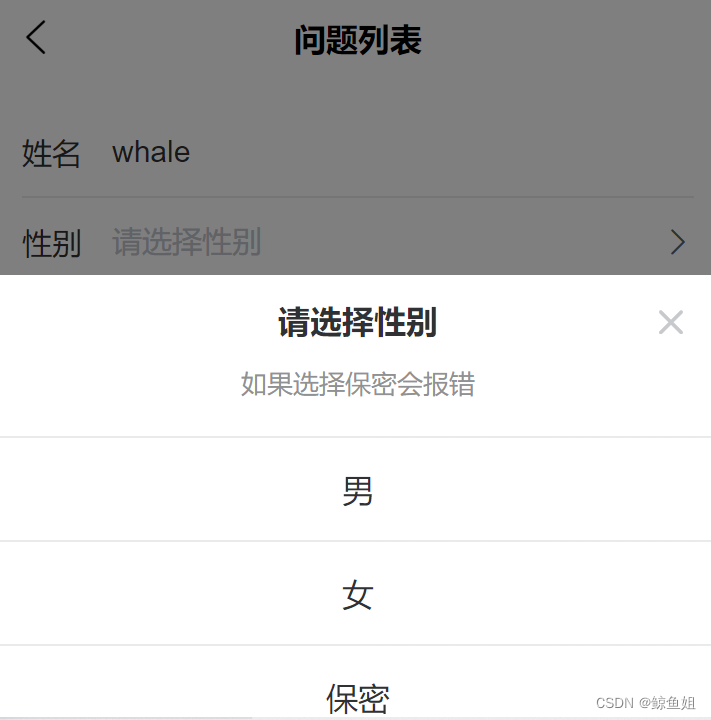
}8. 运行效果

9. 下一篇文章实现了使用uview2.0开发通知公告。
-
相关阅读:
springCloud-LoadBalancer负载均衡
算法通关村第十五关——从40亿个数中产生一个不存在的数的处理方法
硬件基础之HEX文件格式
后端:任何客户端的东西都不可信任
面向对象进阶
【uniapp】本地资源图片无法通过 WXSS 获取,可以使用网络图片,或者 base64,或者使用image标签
python安装wind10
电商财务对账
【POJ No. 1190】 生日蛋糕
Sermant在异地多活场景下的实践
- 原文地址:https://blog.csdn.net/zhaolulu916/article/details/127692044
