-
oauth2.0使用redis和mysql存储token
前言:
我们都知道oauth2.0存储token的方式有四种:分别是:基于redis,mysql,JWT,内存方式token接下来我们要使用代码实现token存储在redis和mysql中,其中客户端配置也是基于mysql数据库,即表oauth_client_details- 1
创建sprinboot项目

创建认证服务器
package com.guyu.config; import org.springframework.beans.factory.annotation.Autowired; import org.springframework.context.annotation.Bean; import org.springframework.context.annotation.Configuration; import org.springframework.data.redis.connection.RedisConnectionFactory; import org.springframework.security.authentication.AuthenticationManager; import org.springframework.security.crypto.bcrypt.BCryptPasswordEncoder; import org.springframework.security.oauth2.config.annotation.configurers.ClientDetailsServiceConfigurer; import org.springframework.security.oauth2.config.annotation.web.configuration.AuthorizationServerConfigurerAdapter; import org.springframework.security.oauth2.config.annotation.web.configuration.EnableAuthorizationServer; import org.springframework.security.oauth2.config.annotation.web.configurers.AuthorizationServerEndpointsConfigurer; import org.springframework.security.oauth2.config.annotation.web.configurers.AuthorizationServerSecurityConfigurer; import org.springframework.security.oauth2.provider.ClientDetailsService; import org.springframework.security.oauth2.provider.client.JdbcClientDetailsService; import org.springframework.security.oauth2.provider.token.DefaultTokenServices; import org.springframework.security.oauth2.provider.token.TokenStore; import org.springframework.security.oauth2.provider.token.store.JdbcTokenStore; import org.springframework.security.oauth2.provider.token.store.redis.RedisTokenStore; import javax.sql.DataSource; import java.util.concurrent.TimeUnit; @Configuration @EnableAuthorizationServer //开启认证服务 public class CustomAuthorizationConfig extends AuthorizationServerConfigurerAdapter { /** * Springboot2.x需要配置密码加密,否则报错:Encoded password does not look like BCrypt * * @return */ @Bean public BCryptPasswordEncoder passwordEncoder() { return new BCryptPasswordEncoder(); } @Autowired private DataSource dataSource; @Autowired private RedisConnectionFactory redisConnectionFactory; @Bean public TokenStore tokenStore() { // return new JdbcTokenStore(dataSource);//数据库方式存储token return new RedisTokenStore(redisConnectionFactory);//redis方式存储token } @Bean public ClientDetailsService customClientDetailsService() { return new JdbcClientDetailsService(dataSource); } /** * password 密码模式需要在认证服务器中设置 中配置AuthenticationManager 否则报错:Unsupported grant * type: password */ @Autowired private AuthenticationManager authenticationManager; @Override public void configure(ClientDetailsServiceConfigurer clients) throws Exception { /** * 必须将secret加密后存入数据库,否则报错:Encoded password does not look like BCrypt */ // System.out.println("OK:" + new BCryptPasswordEncoder().encode("secret")); clients.withClientDetails(customClientDetailsService()); } /** * [{"timestamp":"2021-01-08T05:56:40.950+0000","status":403,"error":"Forbidden","message":"Forbidden","path":"/oauth/check_token"}] */ @Override public void configure(AuthorizationServerSecurityConfigurer oauthServer) { oauthServer.tokenKeyAccess("permitAll()") .checkTokenAccess("isAuthenticated()") .allowFormAuthenticationForClients(); } @Override public void configure(AuthorizationServerEndpointsConfigurer endpoints) throws Exception { endpoints.tokenStore(tokenStore()); endpoints.authenticationManager(authenticationManager); DefaultTokenServices tokenServices = new DefaultTokenServices(); tokenServices.setTokenStore(endpoints.getTokenStore()); tokenServices.setSupportRefreshToken(true); tokenServices.setClientDetailsService(endpoints.getClientDetailsService()); tokenServices.setTokenEnhancer(endpoints.getTokenEnhancer()); tokenServices.setAccessTokenValiditySeconds((int) TimeUnit.DAYS.toSeconds(30)); // 30天 endpoints.tokenServices(tokenServices); } }- 1
- 2
- 3
- 4
- 5
- 6
- 7
- 8
- 9
- 10
- 11
- 12
- 13
- 14
- 15
- 16
- 17
- 18
- 19
- 20
- 21
- 22
- 23
- 24
- 25
- 26
- 27
- 28
- 29
- 30
- 31
- 32
- 33
- 34
- 35
- 36
- 37
- 38
- 39
- 40
- 41
- 42
- 43
- 44
- 45
- 46
- 47
- 48
- 49
- 50
- 51
- 52
- 53
- 54
- 55
- 56
- 57
- 58
- 59
- 60
- 61
- 62
- 63
- 64
- 65
- 66
- 67
- 68
- 69
- 70
- 71
- 72
- 73
- 74
- 75
- 76
- 77
- 78
- 79
- 80
- 81
- 82
- 83
- 84
- 85
- 86
- 87
- 88
- 89
- 90
- 91
- 92
- 93
开启redis或mysql存储token代码
开启数据库方式存储token:JdbcTokenStore(dataSource)
开启redis方式存储token:RedisTokenStore(redisConnectionFactory)@Bean public TokenStore tokenStore() { // return new JdbcTokenStore(dataSource);//数据库方式存储token return new RedisTokenStore(redisConnectionFactory);//redis方式存储token }- 1
- 2
- 3
- 4
- 5
创建Security权限登录限制
package com.guyu.config; import org.springframework.beans.factory.annotation.Autowired; import org.springframework.context.annotation.Bean; import org.springframework.context.annotation.Configuration; import org.springframework.security.authentication.AuthenticationManager; import org.springframework.security.config.annotation.authentication.builders.AuthenticationManagerBuilder; import org.springframework.security.config.annotation.web.configuration.EnableWebSecurity; import org.springframework.security.config.annotation.web.configuration.WebSecurityConfigurerAdapter; import org.springframework.security.crypto.bcrypt.BCryptPasswordEncoder; @Configuration @EnableWebSecurity //开启Security web 权限拦截 public class SecurityConfig extends WebSecurityConfigurerAdapter { @Autowired BCryptPasswordEncoder passwordEncoder; @Override protected void configure(AuthenticationManagerBuilder auth) throws Exception { auth.inMemoryAuthentication() .withUser("admin").password(passwordEncoder.encode("123456")).roles("ADMIN") .and() .withUser("user").password(passwordEncoder.encode("123456")).roles("USER"); } /** * password 密码模式需要在认证服务器中设置 中配置AuthenticationManager * 否则报错:Unsupported grant type: password */ @Bean @Override public AuthenticationManager authenticationManagerBean() throws Exception { return super.authenticationManagerBean(); } }- 1
- 2
- 3
- 4
- 5
- 6
- 7
- 8
- 9
- 10
- 11
- 12
- 13
- 14
- 15
- 16
- 17
- 18
- 19
- 20
- 21
- 22
- 23
- 24
- 25
- 26
- 27
- 28
- 29
- 30
- 31
- 32
- 33
- 34
- 35
- 36
- 37
获取密码
package com.guyu; import org.springframework.security.crypto.bcrypt.BCryptPasswordEncoder; public class PasswordUtils { public static void main(String[] args) { System.out.println("OK:" + new BCryptPasswordEncoder().encode("secretApp")); } }- 1
- 2
- 3
- 4
- 5
- 6
- 7
- 8
- 9
- 10
- 11
输出结果:
OK:$2a$10$ov0dNlOrQFcakN/5.71B7OyMYamwr.x5jJnEf/fv1RXZ/kb0kWES6- 1
- 2
创建启动类
package com.guyu; import org.springframework.boot.SpringApplication; import org.springframework.boot.autoconfigure.SpringBootApplication; @SpringBootApplication public class GuyuDbAuthrServerApplication { public static void main(String[] args) { SpringApplication.run(GuyuDbAuthrServerApplication.class, args); } }- 1
- 2
- 3
- 4
- 5
- 6
- 7
- 8
- 9
- 10
- 11
- 12
- 13
- 14
创建oauth_client_details表
oauth_client_details:是客户端配置表
CREATE TABLE `oauth_client_details` ( `client_id` varchar(128) NOT NULL COMMENT '客户端ID', `resource_ids` varchar(256) DEFAULT NULL COMMENT '资源ID集合,多个资源时用英文逗号分隔', `client_secret` varchar(256) DEFAULT NULL COMMENT '客户端密匙', `scope` varchar(256) DEFAULT NULL COMMENT '客户端申请的权限范围', `authorized_grant_types` varchar(256) DEFAULT NULL COMMENT '客户端支持的grant_type', `web_server_redirect_uri` varchar(256) DEFAULT NULL COMMENT '重定向URI', `authorities` varchar(256) DEFAULT NULL COMMENT '客户端所拥有的SpringSecurity的权限值,多个用英文逗号分隔', `access_token_validity` int(11) DEFAULT NULL COMMENT '访问令牌有效时间值(单位秒)', `refresh_token_validity` int(11) DEFAULT NULL COMMENT '更新令牌有效时间值(单位秒)', `additional_information` varchar(4096) DEFAULT NULL COMMENT '预留字段', `autoapprove` varchar(256) DEFAULT NULL COMMENT '用户是否自动Approval操作', PRIMARY KEY (`client_id`) ) ENGINE=InnoDB DEFAULT CHARSET=utf8 COMMENT='客户端信息';- 1
- 2
- 3
- 4
- 5
- 6
- 7
- 8
- 9
- 10
- 11
- 12
- 13
- 14
插入数据
client_secret是:secretApp
INSERT INTO `oauth2`.`oauth_client_details`(`client_id`, `resource_ids`, `client_secret`, `scope`, `authorized_grant_types`, `web_server_redirect_uri`, `authorities`, `access_token_validity`, `refresh_token_validity`, `additional_information`, `autoapprove`) VALUES ('clientApp', NULL, '$2a$10$5EbwX4rxq4w6rOlWJmd8kujWbmqdYQOzcpCEaXLqYb37lHHK.NGhK', 'all,read,write', 'authorization_code,client_credentials,implicit,password,refresh_token', 'http://www.baidu.com', NULL, 3600, 7200, NULL, 'false');- 1
- 2
基于redis存储access_token测试
开启redis存储token
@Bean public TokenStore tokenStore() { // return new JdbcTokenStore(dataSource);//数据库方式存储token return new RedisTokenStore(redisConnectionFactory);//redis方式存储token }- 1
- 2
- 3
- 4
- 5
1.使用postman测试–授权码模式
授权码模式-获取授权码
http://localhost:9000/guyu/oauth/authorize?client_id=clientApp&response_type=code- 1
第一次访问需要登录认证


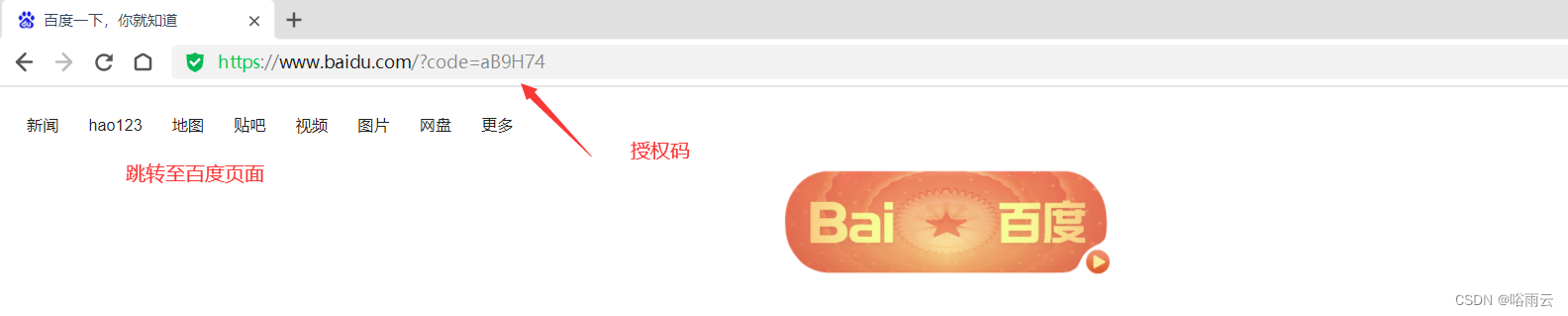
授权码模式-获取token

http://localhost:9000/guyu/oauth/token?code=VWPVnZ&grant_type=authorization_code&redirect_uri=http://www.baidu.com- 1

查看redis数据库生成token
与postman获取一致的access_token


授权码-模式刷新token
http://localhost:9000/guyu/oauth/token?grant_type=refresh_token&refresh_token=a67c019c-d04d-4d67-90e0-b59f2f7cbdb4&client_id=clientApp&client_secret=secretApp- 1


2.使用postman测试–密码模式
http://localhost:9000/guyu/oauth/token?client_id=clientApp&client_secret=secretApp&grant_type=password&username=admin&password=123456- 1
密码模式-获取token

密码模式-刷新token
刷新前数据库token

http://localhost:9000/guyu/oauth/token?client_id=clientApp&client_secret=secretApp&grant_type=refresh_token&refresh_token=a67c019c-d04d-4d67-90e0-b59f2f7cbdb4- 1

3.使用客户端模式获取token
http://localhost:9000/guyu/oauth/token?client_id=clientApp&grant_type=client_credentials&client_secret=secretApp- 1

4.简化模式获取token
访问浏览器后登录,url后的地址就是access_token
http://localhost:9000/guyu/oauth/authorize?client_id=clientApp&response_type=token&scope=all&redirect_uri=http://www.baidu.com- 1

总结:总结授权模式和密码模式都有刷新token,客户端模式和简化模式都没有刷新token
2.基于mysql存储access_token
代码修改
这样的方式是切换mysq存储token
@Bean public TokenStore tokenStore() { return new JdbcTokenStore(dataSource);//数据库方式存储token // return new RedisTokenStore(redisConnectionFactory);//redis方式存储token }- 1
- 2
- 3
- 4
- 5
存储token相关表

执行sql语句/* Navicat Premium Data Transfer Source Server : guyuyun Source Server Type : MySQL Source Server Version : 50718 Source Host : localhost:3306 Source Schema : oauth2 Target Server Type : MySQL Target Server Version : 50718 File Encoding : 65001 Date: 30/10/2022 17:08:27 */ SET NAMES utf8mb4; SET FOREIGN_KEY_CHECKS = 0; -- ---------------------------- -- Table structure for oauth_access_token -- ---------------------------- DROP TABLE IF EXISTS `oauth_access_token`; CREATE TABLE `oauth_access_token` ( `token_id` varchar(256) CHARACTER SET utf8 COLLATE utf8_general_ci NULL DEFAULT NULL COMMENT 'MD5加密的access_token的值', `token` blob NULL COMMENT 'OAuth2AccessToken.java对象序列化后的二进制数据', `authentication_id` varchar(256) CHARACTER SET utf8 COLLATE utf8_general_ci NOT NULL COMMENT 'MD5加密过的username,client_id,scope', `user_name` varchar(256) CHARACTER SET utf8 COLLATE utf8_general_ci NULL DEFAULT NULL COMMENT '登录的用户名', `client_id` varchar(256) CHARACTER SET utf8 COLLATE utf8_general_ci NULL DEFAULT NULL COMMENT '客户端ID', `authentication` blob NULL COMMENT 'OAuth2Authentication.java对象序列化后的二进制数据', `refresh_token` varchar(256) CHARACTER SET utf8 COLLATE utf8_general_ci NULL DEFAULT NULL COMMENT 'MD5加密后的refresh_token的值', PRIMARY KEY (`authentication_id`) USING BTREE ) ENGINE = InnoDB CHARACTER SET = utf8 COLLATE = utf8_general_ci COMMENT = '访问令牌' ROW_FORMAT = Dynamic; -- ---------------------------- -- Table structure for oauth_approvals -- ---------------------------- DROP TABLE IF EXISTS `oauth_approvals`; CREATE TABLE `oauth_approvals` ( `userId` varchar(256) CHARACTER SET utf8 COLLATE utf8_general_ci NULL DEFAULT NULL COMMENT '登录的用户名', `clientId` varchar(256) CHARACTER SET utf8 COLLATE utf8_general_ci NULL DEFAULT NULL COMMENT '客户端ID', `scope` varchar(256) CHARACTER SET utf8 COLLATE utf8_general_ci NULL DEFAULT NULL COMMENT '申请的权限', `status` varchar(10) CHARACTER SET utf8 COLLATE utf8_general_ci NULL DEFAULT NULL COMMENT '状态(Approve或Deny)', `expiresAt` datetime(0) NULL DEFAULT NULL COMMENT '过期时间', `lastModifiedAt` datetime(0) NULL DEFAULT NULL COMMENT '最终修改时间' ) ENGINE = InnoDB CHARACTER SET = utf8 COLLATE = utf8_general_ci COMMENT = '授权记录' ROW_FORMAT = Dynamic; -- ---------------------------- -- Table structure for oauth_client_details -- ---------------------------- DROP TABLE IF EXISTS `oauth_client_details`; CREATE TABLE `oauth_client_details` ( `client_id` varchar(128) CHARACTER SET utf8 COLLATE utf8_general_ci NOT NULL COMMENT '客户端ID', `resource_ids` varchar(256) CHARACTER SET utf8 COLLATE utf8_general_ci NULL DEFAULT NULL COMMENT '资源ID集合,多个资源时用英文逗号分隔', `client_secret` varchar(256) CHARACTER SET utf8 COLLATE utf8_general_ci NULL DEFAULT NULL COMMENT '客户端密匙', `scope` varchar(256) CHARACTER SET utf8 COLLATE utf8_general_ci NULL DEFAULT NULL COMMENT '客户端申请的权限范围', `authorized_grant_types` varchar(256) CHARACTER SET utf8 COLLATE utf8_general_ci NULL DEFAULT NULL COMMENT '客户端支持的grant_type', `web_server_redirect_uri` varchar(256) CHARACTER SET utf8 COLLATE utf8_general_ci NULL DEFAULT NULL COMMENT '重定向URI', `authorities` varchar(256) CHARACTER SET utf8 COLLATE utf8_general_ci NULL DEFAULT NULL COMMENT '客户端所拥有的SpringSecurity的权限值,多个用英文逗号分隔', `access_token_validity` int(11) NULL DEFAULT NULL COMMENT '访问令牌有效时间值(单位秒)', `refresh_token_validity` int(11) NULL DEFAULT NULL COMMENT '更新令牌有效时间值(单位秒)', `additional_information` varchar(4096) CHARACTER SET utf8 COLLATE utf8_general_ci NULL DEFAULT NULL COMMENT '预留字段', `autoapprove` varchar(256) CHARACTER SET utf8 COLLATE utf8_general_ci NULL DEFAULT NULL COMMENT '用户是否自动Approval操作', PRIMARY KEY (`client_id`) USING BTREE ) ENGINE = InnoDB CHARACTER SET = utf8 COLLATE = utf8_general_ci COMMENT = '客户端信息' ROW_FORMAT = Dynamic; -- ---------------------------- -- Records of oauth_client_details -- ---------------------------- INSERT INTO `oauth_client_details` VALUES ('clientApp', NULL, '$2a$10$5EbwX4rxq4w6rOlWJmd8kujWbmqdYQOzcpCEaXLqYb37lHHK.NGhK', 'all,read,write', 'authorization_code,client_credentials,implicit,password,refresh_token', 'http://www.baidu.com', NULL, 3600, 7200, NULL, 'false'); -- ---------------------------- -- Table structure for oauth_client_token -- ---------------------------- DROP TABLE IF EXISTS `oauth_client_token`; CREATE TABLE `oauth_client_token` ( `token_id` varchar(256) CHARACTER SET utf8 COLLATE utf8_general_ci NULL DEFAULT NULL COMMENT 'MD5加密的access_token值', `token` blob NULL COMMENT 'OAuth2AccessToken.java对象序列化后的二进制数据', `authentication_id` varchar(128) CHARACTER SET utf8 COLLATE utf8_general_ci NOT NULL COMMENT 'MD5加密过的username,client_id,scope', `user_name` varchar(256) CHARACTER SET utf8 COLLATE utf8_general_ci NULL DEFAULT NULL COMMENT '登录的用户名', `client_id` varchar(256) CHARACTER SET utf8 COLLATE utf8_general_ci NULL DEFAULT NULL COMMENT '客户端ID', PRIMARY KEY (`authentication_id`) USING BTREE ) ENGINE = InnoDB CHARACTER SET = utf8 COLLATE = utf8_general_ci COMMENT = '该表用于在客户端系统中存储从服务端获取的token数据' ROW_FORMAT = Dynamic; -- ---------------------------- -- Table structure for oauth_code -- ---------------------------- DROP TABLE IF EXISTS `oauth_code`; CREATE TABLE `oauth_code` ( `code` varchar(256) CHARACTER SET utf8 COLLATE utf8_general_ci NULL DEFAULT NULL COMMENT '授权码(未加密)', `authentication` blob NULL COMMENT 'AuthorizationRequestHolder.java对象序列化后的二进制数据' ) ENGINE = InnoDB CHARACTER SET = utf8 COLLATE = utf8_general_ci COMMENT = '授权码' ROW_FORMAT = Dynamic; -- ---------------------------- -- Table structure for oauth_refresh_token -- ---------------------------- DROP TABLE IF EXISTS `oauth_refresh_token`; CREATE TABLE `oauth_refresh_token` ( `token_id` varchar(256) CHARACTER SET utf8 COLLATE utf8_general_ci NULL DEFAULT NULL COMMENT 'MD5加密过的refresh_token的值', `token` blob NULL COMMENT 'OAuth2RefreshToken.java对象序列化后的二进制数据', `authentication` blob NULL COMMENT 'OAuth2Authentication.java对象序列化后的二进制数据' ) ENGINE = InnoDB CHARACTER SET = utf8 COLLATE = utf8_general_ci COMMENT = '更新令牌' ROW_FORMAT = Dynamic; SET FOREIGN_KEY_CHECKS = 1;- 1
- 2
- 3
- 4
- 5
- 6
- 7
- 8
- 9
- 10
- 11
- 12
- 13
- 14
- 15
- 16
- 17
- 18
- 19
- 20
- 21
- 22
- 23
- 24
- 25
- 26
- 27
- 28
- 29
- 30
- 31
- 32
- 33
- 34
- 35
- 36
- 37
- 38
- 39
- 40
- 41
- 42
- 43
- 44
- 45
- 46
- 47
- 48
- 49
- 50
- 51
- 52
- 53
- 54
- 55
- 56
- 57
- 58
- 59
- 60
- 61
- 62
- 63
- 64
- 65
- 66
- 67
- 68
- 69
- 70
- 71
- 72
- 73
- 74
- 75
- 76
- 77
- 78
- 79
- 80
- 81
- 82
- 83
- 84
- 85
- 86
- 87
- 88
- 89
- 90
- 91
- 92
- 93
- 94
- 95
- 96
- 97
- 98
- 99
- 100
- 101
- 102
- 103
- 104
- 105
密码模式-获取token
http://localhost:9000/guyu/oauth/token?client_id=clientApp&client_secret=secretApp&grant_type=password&username=admin&password=123456- 1

数据库表生成token
oauth_access_token
oauth_refresh_token


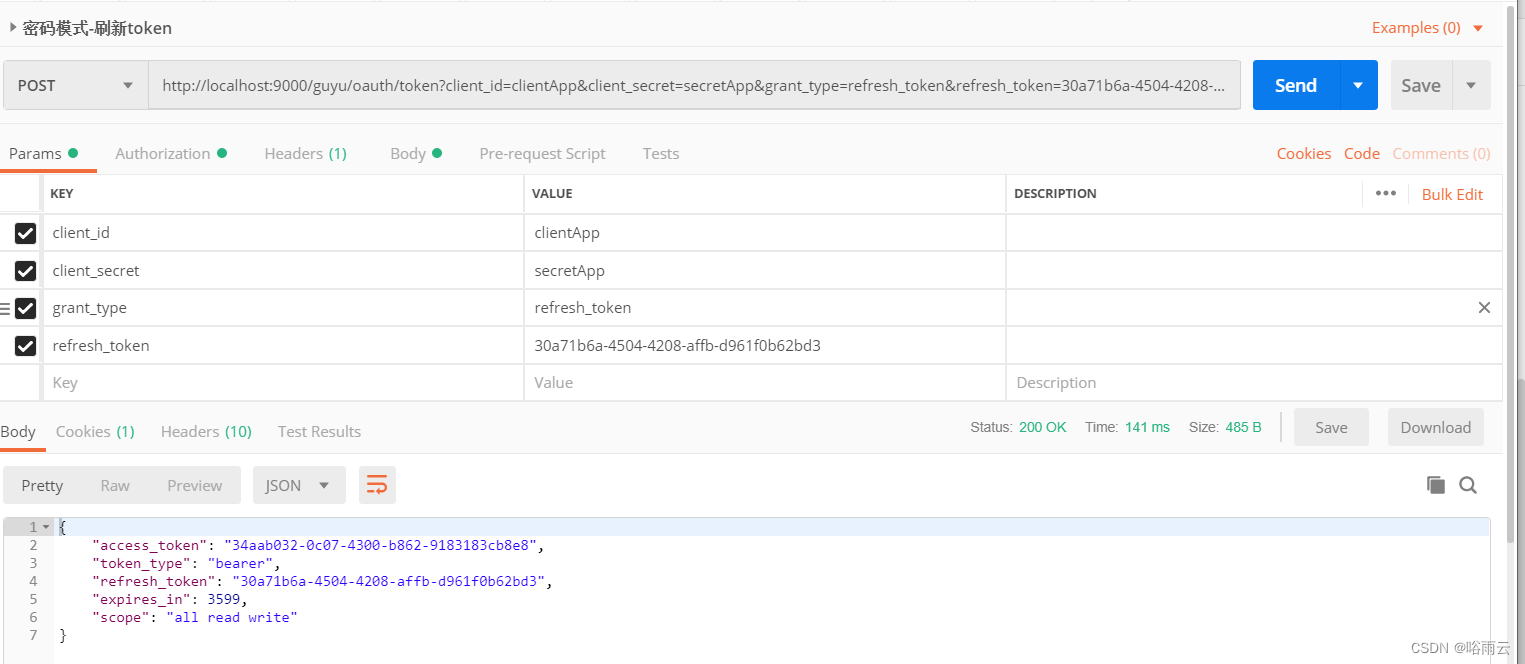
密码模式刷新token
http://localhost:9000/guyu/oauth/token?client_id=clientApp&client_secret=secretApp&grant_type=refresh_token&refresh_token=30a71b6a-4504-4208-affb-d961f0b62bd3- 1
总结:
1.在实际开发中建议使用redis存储token,因为redis的查询效率比mysql高,
而redis自带失效时间更好控制失效时间。2.mysql或redis存储token四种请求的模式都是一样的。- 1
-
相关阅读:
.gitignore 文件
C语言之动态内存管理_柔性数组篇(2)
除了增删改查你对MySQL还了解多少?
【Debug危机系列】Embedding层的千层套路
Flask 入门
最长上升子序列Ⅱ
Go-Zero从0到1实现微服务项目开发(二)
JavaSE基础1
【linux命令讲解大全】076.pgrep命令:查找和列出符合条件的进程ID
接口开放太麻烦?试试阿里云API网关吧
- 原文地址:https://blog.csdn.net/shijinjins/article/details/127599974
