-
【Redis】# 常见报错Unsatisfied dependency、设置密码、主从配置
1. Unsatisfied dependency expressed through field ‘redisTemplate‘
场景:SpringBoot 集成 Redis后,启动时报错
一般配置 Redis 时是
<dependency> <groupId>org.springframework.bootgroupId> <artifactId>spring-boot-starter-data-redisartifactId> dependency>- 1
- 2
- 3
- 4
但是还不够,
缺少一个依赖:commons-pool2<dependency> <groupId>org.apache.commonsgroupId> <artifactId>commons-pool2artifactId> dependency> <dependency> <groupId>org.springframework.bootgroupId> <artifactId>spring-boot-starter-data-redisartifactId> dependency>- 1
- 2
- 3
- 4
- 5
- 6
- 7
- 8
- 9
2. 设置密码
2.1 临时设置密码
-
客户端查看是否有密码
// 在客户端输入命令 > config get requirepass "requirepass" "" // 默认空- 1
- 2
- 3
- 4
-
设置密码
> config set requirepass 12345- 1
-
在当前连接中,一旦设置密码,必须先验证通过密码,否则所有操作不可用
> auth 12345- 1
-
再次使用客户端进行连接时,需要输入密码
redis-cli.exe -h 127.0.0.1 -p 6379 -a 12345- 1
2.2 永久设置密码(修改配置文件)
-
在 Redis的根目录下,找到对应的配置文件redis.***.conf(windows中需要在“服务”中查看读取的是哪个配置文件),打开文件后找到 requirepass,然后添加密码
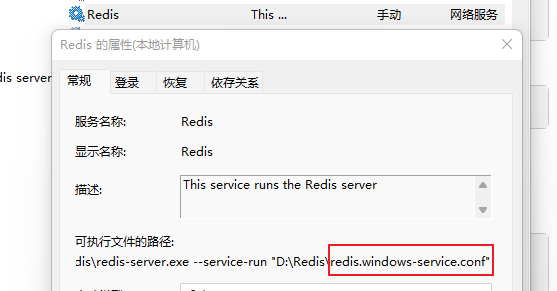
# requirepass foobared requirepass 12345 -- 注意:行前不能有空格- 1
- 2
-
重启服务
> redis-server.exe redis.windows.conf // 需要指定使用哪一个配置文件,若修改的为之前使用的配置文件,便无需指定- 1
3. windows下配置主从服务器
-
复制一份 Redis 的文件,作为从库文件使用
-
修改从库的配置文件
-
修改端口port 为 8888
-
添加配置,使之成为从库
# replicaofmasterauth 12345 -- 若主服务器设置了密码,则需要进行增加 - 1
- 2
- 3
- 4
- 5
-
-
进入到 Redis从库文件夹中,安装服务
redis-server --service-install redis.windows.conf --service-name Redis8888- 1
-
启动 Redis8888 服务即可完成主从配置(从库默认不允许写入)
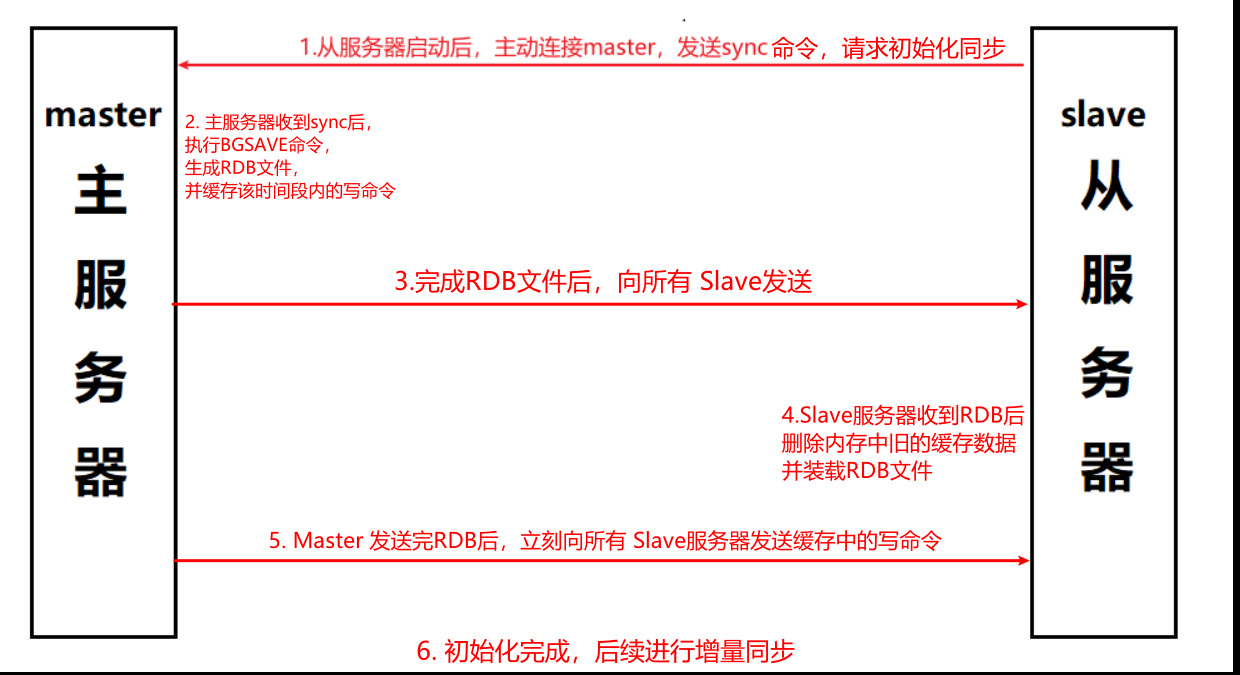
主从同步过程:
-
相关阅读:
Fastjson 1.2.24反序列化漏洞(Vulhub)使用方法
Python:实现djb2哈希算法(附完整源码)
【阅读笔记】如何阅读一本书
指针(三)- 二级指针、野指针、空指针
精通Java事务编程(7)-可串行化隔离级别之两阶段锁定
如何使用界面控件Telerik UI for WinForms开发步骤进度条?
docker 学习
什么是RabbitMQ,RabbitMQ基本概念,RabbitMQ的使用场景
Batch设计注意点
数据治理之数据质量管理
- 原文地址:https://blog.csdn.net/qq_38134242/article/details/127587733