-
【Node.js实战】一文带你开发博客项目(使用假数据处理)
个人简介
👀个人主页: 前端杂货铺
🙋♂️学习方向: 主攻前端方向,也会涉及到服务端
📃个人状态: 在校大学生一枚,已拿 offer(秋招)
🥇推荐学习:🍍前端面试宝典 🍉Vue2 🍋Vue3 🍓Vue2&Vue3项目实战 🥝Node.js
🌕个人推广:每篇文章最下方都有加入方式,旨在交流学习&资源分享,快加入进来吧Node.js系列文章目录
内容 参考链接 Node.js(一) 初识 Node.js Node.js(二) Node.js——开发博客项目之接口
一、前言
2022-10-24,首先祝大家节日快乐,工作和学习中再无 bug~~
本文 开发博客项目的接口,是使用的 假数据 处理的。
后续 的文章还会使用 各种框架和数据库进行重构,敬请期待~
该项目的 开发模式,是 常规通用 的方式,所以学习这种 层次渐进的开发模式 也是很有意义的!
二、博客项目实现
1、文件目录
项目开发的层次感:
www.js(第一层)——> app.js(第二层)——> ./router(第三层)——> ./controller(第四层)
第一层:项目执行的地方
第二层:一些配置,请求响应头,格式化,promise实例等
第三层:路由接口,只关心路由,不管深层次的逻辑
第四层:只关心数据的地方
2、环境配置
初始化 package.json(配置相关文件)
npm init -y- 1
安装依赖(安装相关依赖文件)
npm install- 1
安装 nodemon(自动重启服务)
npm install nodemon cross-env --save-dev- 1

3、开发接口
博客相关接口 && 用户相关接口

4、开发过程
./bin/www.js 文件
- 项目执行的文件
- 引入 http 模块
- 创建服务,传入文件(易开发和维护)
- 监听端口
// 引入 http 内置模块 const http = require('http') // 端口 const PORT = 8000 // 引入 app.js const serverHandle = require('../app') // 创建服务 const server = http.createServer(serverHandle) // 监听端口 server.listen(PORT)- 1
- 2
- 3
- 4
- 5
- 6
- 7
- 8
- 9
- 10
- 11
…/src/app.js 文件
- 参数处理
- 响应头
- 格式化
- 处理博客和用户的相关路由
// 便于处理 url const querystring = require('node:querystring') // 博客相关路由 const handleBlogRouter = require('./src/router/blog') // 用户登录相关路由 const handleUserRouter = require('./src/router/user') // 用于处理 POST 请求的数据 const getPostData = (req) => { // 创建 promise 实例 const promise = new Promise((resolve, reject) => { // 不是 post 请求 直接返回 if (req.method !== 'POST') { resolve({}) return } // 请求头不是 application/json 格式 直接返回 if (req.headers['content-type'] !== 'application/json') { resolve({}) return } // 初始化 postData let postData = '' // 每次发送的数据 记录在 postData 中 req.on('data', chunk => { postData += chunk.toString() }) // 数据发送完成 转义 JSON 为对象 req.on('end', () => { if (!postData) { resolve({}) return } resolve( JSON.parse(postData) ) }) }) // 返回实例对象 return promise } // 处理服务 const serverHandle = (req, res) => { // 设置响应头的格式 JSON res.setHeader('Content-type', 'application/json') // 获取请求地址 path const url = req.url // 截取前半部分的地址 ? 前面的部分 req.path = url.split('?')[0] // 获取 ? 的前半部分 // 截取后半部分的地址 ? 后面的部分 也是要查询的地址 req.query = querystring.parse(url.split('?')[1]) // 处理 post data getPostData(req).then(postData => { // 解析 POST 请求中的数据 req.body = postData // 处理 blog 路由 const blogData = handleBlogRouter(req, res) // 请求成功 格式化 blogData 并结束 if (blogData) { res.end( JSON.stringify(blogData) ) return } // 处理 user 路由 const userData = handleUserRouter(req, res) // 请求成功 格式化 userData 并结束 if (userData) { res.end( JSON.stringify(userData) ) return } // 未命中路由,返回 404 res.writeHead(404, { "Content-type": "text/plain" }) // 在浏览器显示的内容 res.write("404 Not Found\n") // 结束服务端和客户端的连接 res.end() }) } // 模块化 把 serverHandle 暴露出去 module.exports = serverHandle- 1
- 2
- 3
- 4
- 5
- 6
- 7
- 8
- 9
- 10
- 11
- 12
- 13
- 14
- 15
- 16
- 17
- 18
- 19
- 20
- 21
- 22
- 23
- 24
- 25
- 26
- 27
- 28
- 29
- 30
- 31
- 32
- 33
- 34
- 35
- 36
- 37
- 38
- 39
- 40
- 41
- 42
- 43
- 44
- 45
- 46
- 47
- 48
- 49
- 50
- 51
- 52
- 53
- 54
- 55
- 56
- 57
- 58
- 59
- 60
- 61
- 62
- 63
- 64
- 65
- 66
- 67
- 68
- 69
- 70
- 71
- 72
- 73
- 74
- 75
- 76
- 77
- 78
- 79
- 80
- 81
- 82
- 83
- 84
- 85
- 86
- 87
- 88
- 89
- 90
- 91
- 92
- 93
…/src/model/resModel.js 文件
- 基础模型(对象类型和字符串类型)
- 成功的模型(继承)
- 失败的模型(继承)
// 基础模型 class BaseModel { // data 是对象类型 message 是字符串类型 constructor(data, message) { if (typeof data === 'string') { this.message = data data = null message = null } if (data) { this.data = data } if (message) { this.message = message } } } // 成功模型 errno 赋值 0 class SuccessModel extends BaseModel { constructor(data, message) { // 继承父类 super(data, message) // 成功的值 0 this.errno = 0 } } // 失败模型 errno 赋值 -1 class ErrorModel extends BaseModel { constructor(data, message) { // 继承父类 super(data, message) // 失败的值 -1 this.errno = -1 } } // 导出共享 module.exports = { SuccessModel, ErrorModel }- 1
- 2
- 3
- 4
- 5
- 6
- 7
- 8
- 9
- 10
- 11
- 12
- 13
- 14
- 15
- 16
- 17
- 18
- 19
- 20
- 21
- 22
- 23
- 24
- 25
- 26
- 27
- 28
- 29
- 30
- 31
- 32
- 33
- 34
- 35
- 36
- 37
- 38
- 39
- 40
- 41
…/src/router/blog.js 文件
- 博客相关路由接口
- 调用相关函数
- 返回实例
// 导入博客和用户控制器相关内容 const { getList, getDetail, newBlog, updateBlog, delBlog } = require('../controller/blog') // 导入成功和失败的模型 const { SuccessModel, ErrorModel } = require('../model/resModel') // blog 路由 const handleBlogRouter = (req, res) => { const method = req.method // GET/POST const id = req.query.id // 获取 id // 获取博客列表 GET 请求· if (method === 'GET' && req.path === '/api/blog/list') { // 博客的作者 req.query 用在 GET 请求中 const author = req.query.author || '' // 博客的关键字 const keyword = req.query.keyword || '' // 执行函数 获取博客列表数据 const listData = getList(author, keyword) // 创建并返回成功模型的实例对象 return new SuccessModel(listData) } // 获取博客详情 GET 请求 if (method === 'GET' && req.path === '/api/blog/detail') { // 获取博客详情数据 const data = getDetail(id) // 创建并返回成功模型的实例对象 return new SuccessModel(data) } // 新建一篇博客 POST 请求 if (method === 'POST' && req.path === '/api/blog/new') { // req.body 用于获取请求中的数据(用在 POST 请求中) const data = newBlog(req.body) // 创建并返回成功模型的实例对象 return new SuccessModel(data) } // 更新一篇博客 if (method === 'POST' && req.path === '/api/blog/update') { // 传递两个参数 id 和 req.body const result = updateBlog(id, req.body) if (result) { return new SuccessModel() } else { return new ErrorModel('更新博客失败') } } // 删除一篇博客 if (method === 'POST' && req.path === '/api/blog/delete') { const result = delBlog(id) if (result) { return new SuccessModel() } else { return new ErrorModel('删除博客失败') } } } // 导出 module.exports = handleBlogRouter- 1
- 2
- 3
- 4
- 5
- 6
- 7
- 8
- 9
- 10
- 11
- 12
- 13
- 14
- 15
- 16
- 17
- 18
- 19
- 20
- 21
- 22
- 23
- 24
- 25
- 26
- 27
- 28
- 29
- 30
- 31
- 32
- 33
- 34
- 35
- 36
- 37
- 38
- 39
- 40
- 41
- 42
- 43
- 44
- 45
- 46
- 47
- 48
- 49
- 50
- 51
- 52
- 53
- 54
- 55
- 56
- 57
- 58
- 59
- 60
- 61
- 62
- 63
…/src/router/user.js 文件
- 博客相关路由接口
- 调用相关函数
- 返回实例
// 导入用户登录内容 const { loginCheck } = require('../controller/user') // 导入成功和失败的模板 const { SuccessModel, ErrorModel } = require('../model/resModel') // user 路由 const handleUserRouter = (req, res) => { const method = req.method // 登录 if (method === 'POST' && req.path === '/api/user/login') { const { username, password } = req.body // 传入两个参数 用户名 密码 const result = loginCheck(username, password) if (result) { return new SuccessModel() } return new ErrorModel('登录失败') } } // 导出共享 module.exports = handleUserRouter- 1
- 2
- 3
- 4
- 5
- 6
- 7
- 8
- 9
- 10
- 11
- 12
- 13
- 14
- 15
- 16
- 17
- 18
- 19
- 20
- 21
- 22
- 23
…/src/controller/blog.js 文件
- 博客的相关数据处理
- 返回的是假数据(后续会使用数据库)
// 获取博客列表(通过作者和关键字) const getList = (author, keyword) => { // 先返回假数据(格式是正确的) return [{ id: 1, title: '标题1', content: '内容1', createTime: 1665832332896, author: 'zahuopu' }, { id: 1, title: '标题2', content: '内容2', createTime: 1665832418727, author: 'xiaoming' }, ] } // 获取博客详情(通过 id) const getDetail = (id) => { // 先返回假数据 return { id: 1, title: '标题1', content: '内容1', createTime: 1665832332896, author: 'zahuopu' } } // 新建博客 newBlog 若没有,就给它一个空对象 const newBlog = (blogData = {}) => { // blogData 是一个博客对象 包含 title content 属性 console.log('newBlog', blogData) return { id: 3 // 表示新建博客,插入到数据表里的 id } } // 更新博客(通过 id 更新) const updateBlog = (id, blogData = {}) => { // id 就是要更新博客的 id // blogData 是一个博客对象 包含 title content 属性 console.log('update blog', id, blogData) return true } // 删除博客(通过 id 删除) const delBlog = (id) => { return true } // 导出共享 module.exports = { getList, getDetail, newBlog, updateBlog, delBlog }- 1
- 2
- 3
- 4
- 5
- 6
- 7
- 8
- 9
- 10
- 11
- 12
- 13
- 14
- 15
- 16
- 17
- 18
- 19
- 20
- 21
- 22
- 23
- 24
- 25
- 26
- 27
- 28
- 29
- 30
- 31
- 32
- 33
- 34
- 35
- 36
- 37
- 38
- 39
- 40
- 41
- 42
- 43
- 44
- 45
- 46
- 47
- 48
- 49
- 50
- 51
- 52
- 53
- 54
- 55
- 56
- 57
- 58
- 59
- 60
- 61
- 62
…/src/controller/user.js 文件
- 用户登录的相关数据处理
- 返回的是假数据(后续会使用数据库)
// 登录(通过用户名和密码) const loginCheck = (username, password) => { // 先使用假数据 if (username === 'zahuopu' && password === '123') { return true } return false } // 导出共享 module.exports = { loginCheck }- 1
- 2
- 3
- 4
- 5
- 6
- 7
- 8
- 9
- 10
- 11
- 12
- 13
三、各个接口的测试
现在我们 已经完成 博客项目的开发了,接下来进入到 测试环节~~
通过关键字和作者 查询博客(GET 请求)

通过 id 获取 博客详情(GET 请求)

通过 ApiPost/Postman 工具测试 新增博客(POST 请求)

通过 ApiPost/Postman 工具测试 更新博客(POST 请求)


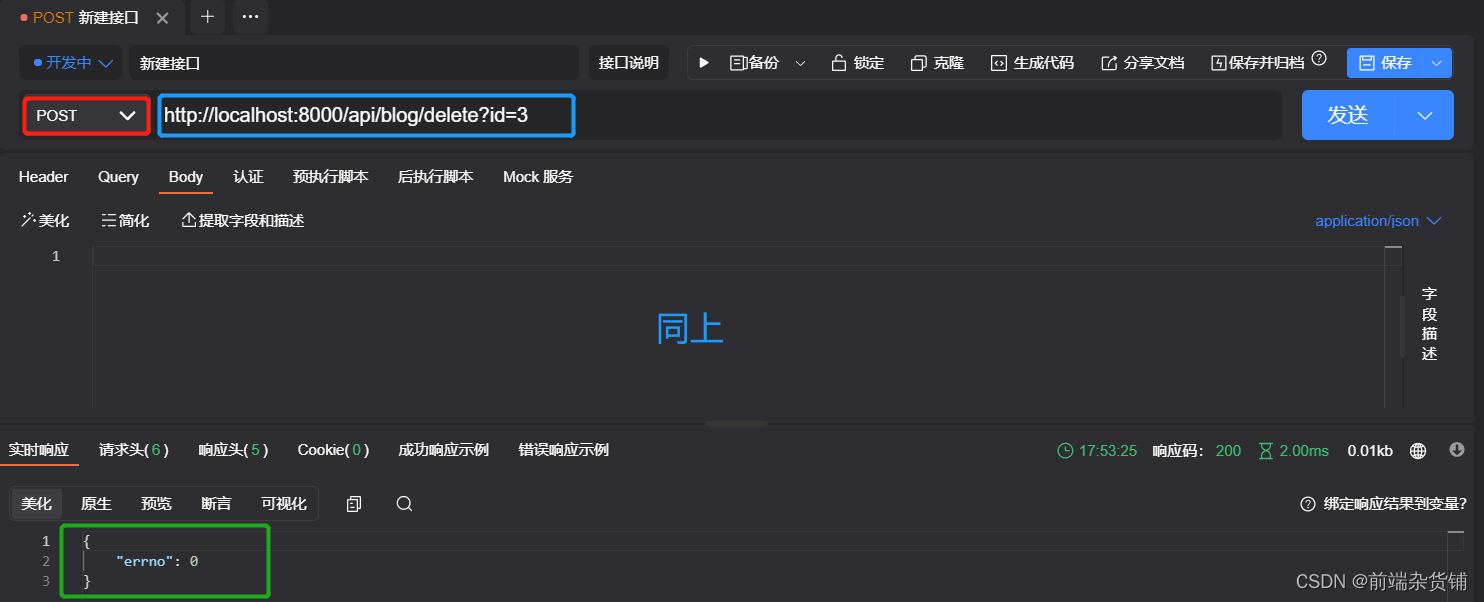
通过 ApiPost/Postman 工具测试 删除博客(POST 请求)
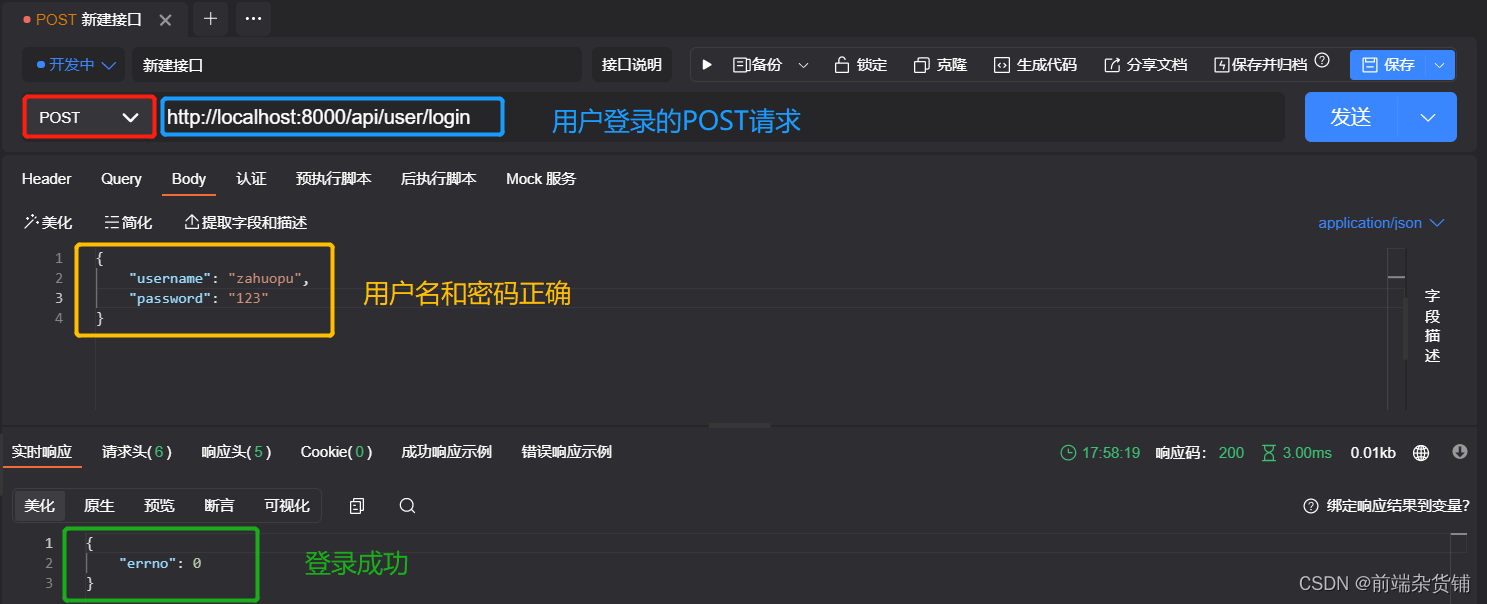
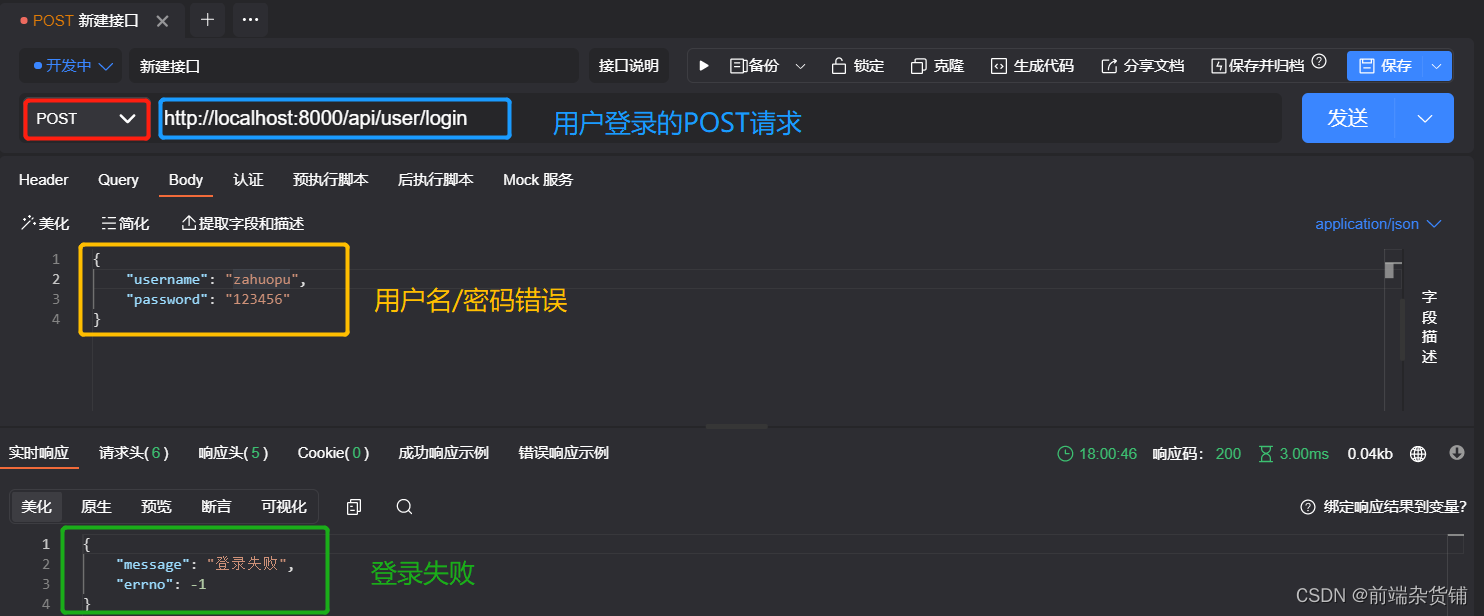
通过 ApiPost/Postman 工具测试 登录请求(POST 请求)
四、写在最后(附源码)
至此,开发博客的项目(假数据版,并没有使用数据库)就完成了。
后续会对该项目进行多次重构【多种框架(express,koa)和数据库(mysql,sequelize,mongodb)】
如果你需要该项目的 源码,请通过本篇文章最下面的方式 加入 进来~~
-
相关阅读:
操作系统——计算机系统概述补充
IDEA连mysql
C#邮件发送
音视频开发—V4L2介绍,FFmpeg 打开摄像头输出yuv文件
现代 CSS 指南 -- at-rule 规则扫盲
MIT课程分布式系统学习04——PrimaryBackup Replication for Fault Tolerance
Spark 读取ES采坑系列
USB过压过流保护IC
13-Linux之rpm软件管理
尚医通-预约挂号
- 原文地址:https://blog.csdn.net/qq_45902692/article/details/127387804