-
多旋翼无人机仿真 rotors_simulator:用键盘控制无人机飞行
前言
RotorS 是一个MAV gazebo 仿真系统。
提供了几种多旋翼仿真模型,例如
- AscTec Hummingbird
- AscTec Pelican
- AscTec Firefly
但是仿真系统不限于使用这几种模型
AscTec 是 德国Ascending Technologies公司的缩写。
是很早的无人机了,实物张下面这个样子:

仿真系统中包含很多种仿真传感器,都可以安装在无人机上,例如:
- IMU
- 里程计
- 视觉惯导相机
功能包中包含了几种控制器,包含位置控制,游戏手柄控制灯
github的地址为:https://github.com/ethz-asl/rotors_simulator
书接上文
在上一篇博客中 : https://www.guyuehome.com/40362 分析了 rotors_simulator 自带的一个控制接口
需要输入 roll pitch yawrate thrust 的指令即可控制无人机的飞行。但是在那篇文章也说了,它自带的键盘控制的节点功能启动不成功,导致无法在gazebo里控制无人机飞。
本篇博客将基于上篇分析的控制接口,再写一个键盘的指令发布功能,对应到接口指令的转换,来控制无人机先飞起来。
接口测试
RollPitchYawrateThrustControllerNode.cpp中送到控制器的 控制指令变量类型是这个
mav_msgs::EigenRollPitchYawrateThrust
这变量类型的定义是这样的
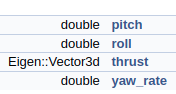
所以推力是 三维 的给z轴一个推力,那么可以这样写
在里程计的回调函数里mav_msgs::EigenRollPitchYawrateThrust roll_pitch_yawrate_thrust; // 先自己固定一个控制量 roll_pitch_yawrate_thrust.roll = 0.1; roll_pitch_yawrate_thrust.thrust.z() = 15; // 送入控制器中 roll_pitch_yawrate_thrust_controller_.SetRollPitchYawrateThrust(roll_pitch_yawrate_thrust);- 1
- 2
- 3
- 4
- 5
- 6
- 7
相当于 给一直给 z轴一个15的推力 期望的横滚角是0.1 弧度
可看到飞机横着飞了起来

ok,接口测通了,那么可自己写个键盘的指令发送器了。
键盘指令发布
键盘的指令发布有很多的现成功能包
我使用的最多的就是 teleop_twist_keyboard 这个功能包。
运行的时候终端会出现下面的界面:

从输出的信息上可以看出,其功能是发布Twist的速度控制指令。其源码如下:
#!/usr/bin/env python from __future__ import print_function import roslib; roslib.load_manifest('teleop_twist_keyboard') import rospy from geometry_msgs.msg import Twist import sys, select, termios, tty msg = """ Reading from the keyboard and Publishing to Twist! --------------------------- Moving around: u i o j k l m , . For Holonomic mode (strafing), hold down the shift key: --------------------------- U I O J K L M < > t : up (+z) b : down (-z) anything else : stop q/z : increase/decrease max speeds by 10% w/x : increase/decrease only linear speed by 10% e/c : increase/decrease only angular speed by 10% CTRL-C to quit """ moveBindings = { 'i':(1,0,0,0), 'o':(1,0,0,-1), 'j':(0,0,0,1), 'l':(0,0,0,-1), 'u':(1,0,0,1), ',':(-1,0,0,0), '.':(-1,0,0,1), 'm':(-1,0,0,-1), 'O':(1,-1,0,0), 'I':(1,0,0,0), 'J':(0,1,0,0), 'L':(0,-1,0,0), 'U':(1,1,0,0), '<':(-1,0,0,0), '>':(-1,-1,0,0), 'M':(-1,1,0,0), 't':(0,0,1,0), 'b':(0,0,-1,0), } speedBindings={ 'q':(1.1,1.1), 'z':(.9,.9), 'w':(1.1,1), 'x':(.9,1), 'e':(1,1.1), 'c':(1,.9), } def getKey(): tty.setraw(sys.stdin.fileno()) select.select([sys.stdin], [], [], 0) key = sys.stdin.read(1) termios.tcsetattr(sys.stdin, termios.TCSADRAIN, settings) return key def vels(speed,turn): return "currently:\tspeed %s\tturn %s " % (speed,turn) if __name__=="__main__": settings = termios.tcgetattr(sys.stdin) pub = rospy.Publisher('cmd_vel', Twist, queue_size = 1) rospy.init_node('teleop_twist_keyboard') speed = rospy.get_param("~speed", 0.5) turn = rospy.get_param("~turn", 1.0) x = 0 y = 0 z = 0 th = 0 status = 0 try: print(msg) print(vels(speed,turn)) while(1): key = getKey() if key in moveBindings.keys(): x = moveBindings[key][0] y = moveBindings[key][1] z = moveBindings[key][2] th = moveBindings[key][3] elif key in speedBindings.keys(): speed = speed * speedBindings[key][0] turn = turn * speedBindings[key][1] print(vels(speed,turn)) if (status == 14): print(msg) status = (status + 1) % 15 else: x = 0 y = 0 z = 0 th = 0 if (key == '\x03'): break twist = Twist() twist.linear.x = x*speed; twist.linear.y = y*speed; twist.linear.z = z*speed; twist.angular.x = 0; twist.angular.y = 0; twist.angular.z = th*turn pub.publish(twist) except Exception as e: print(e) finally: twist = Twist() twist.linear.x = 0; twist.linear.y = 0; twist.linear.z = 0 twist.angular.x = 0; twist.angular.y = 0; twist.angular.z = 0 pub.publish(twist) termios.tcsetattr(sys.stdin, termios.TCSADRAIN, settings)- 1
- 2
- 3
- 4
- 5
- 6
- 7
- 8
- 9
- 10
- 11
- 12
- 13
- 14
- 15
- 16
- 17
- 18
- 19
- 20
- 21
- 22
- 23
- 24
- 25
- 26
- 27
- 28
- 29
- 30
- 31
- 32
- 33
- 34
- 35
- 36
- 37
- 38
- 39
- 40
- 41
- 42
- 43
- 44
- 45
- 46
- 47
- 48
- 49
- 50
- 51
- 52
- 53
- 54
- 55
- 56
- 57
- 58
- 59
- 60
- 61
- 62
- 63
- 64
- 65
- 66
- 67
- 68
- 69
- 70
- 71
- 72
- 73
- 74
- 75
- 76
- 77
- 78
- 79
- 80
- 81
- 82
- 83
- 84
- 85
- 86
- 87
- 88
- 89
- 90
- 91
- 92
- 93
- 94
- 95
- 96
- 97
- 98
- 99
- 100
- 101
- 102
- 103
- 104
- 105
- 106
- 107
- 108
- 109
- 110
- 111
- 112
- 113
- 114
- 115
- 116
- 117
- 118
- 119
- 120
- 121
- 122
- 123
- 124
- 125
- 126
- 127
- 128
- 129
- 130
- 131
- 132
- 133
通过查看源码可知,该功能包最终通过扫描键盘按键,
最终发布 topic 名称为cmd_vel的消息
消息的格式为:geometry_msgs::Twist指令转换与发布
由于键盘指令发布功能包 发布的命令和rotors_simulator我想用的控制接口的命令不一致
所以需要写一个节点来进行控制指令的转换
下面给出指令转换节点的 核心思想和重要代码
ros::Subscriber keyboard_cmd_vel_sub_;- 1
声明订阅句柄
keyboard_cmd_vel_sub_ = nh.subscribe("/cmd_vel",1,&PidPositionControllerNode::KeyboardCmdVelCallback,this);- 1
订阅句柄赋值 /cmd_vel 就是键盘指令发布节点发布的topic的名称
然后实现其回调函数
void KeyboardCmdVelCallback(const geometry_msgs::TwistConstPtr& cmdvel_msg) { // 取出指令 geometry_msgs::Twist cmd_vel = *cmdvel_msg; roll =gain_roll* cmd_vel.linear.x ; pitch = gain_pitch* cmd_vel.linear.y ; thrust = gain_thrust* cmd_vel.linear.z ; yawrate = gain_yawrate* cmd_vel.angular.z ; }- 1
- 2
- 3
- 4
- 5
- 6
- 7
- 8
- 9
- 10
将指令转换成 roll pitch thrust yawrate的指令
ros::Publisher Control_RollPitchYawrateThrust_pub_;- 1
声明转换后指令的发布句柄
Control_RollPitchYawrateThrust_pub_ = nh.advertise<mav_msgs::RollPitchYawrateThrust>("control_keyboard_cmd",1);- 1
赋值句柄,将发布的消息名称定义为:control_keyboard_cmd
void PubControlMsg() { // 控制量 mav_msgs::RollPitchYawrateThrust roll_pitch_yawrate_thrust; roll_pitch_yawrate_thrust.thrust.z= thrust_z; roll_pitch_yawrate_thrust.roll = roll_; roll_pitch_yawrate_thrust.pitch = pitch_; roll_pitch_yawrate_thrust.yaw_rate = yawrate_; Control_RollPitchYawrateThrust_pub_.publish(roll_pitch_yawrate_thrust); }- 1
- 2
- 3
- 4
- 5
- 6
- 7
- 8
- 9
- 10
最后写一个发布指令msg的函数,完成对接口指令的发布
修改 rotors_simulator 的控制接口节点
下面需要做的就是修改rotors_simulator的控制接口节点
也就是roll_pitch_yawrate_thrust_controller_node.cppros::Subscriber Control_RollPitchYawrateThrust_sub_;- 1
声明订阅指令的句柄
Control_RollPitchYawrateThrust_sub_ = nh.subscribe("/control_pid_pos", 1, &RollPitchYawrateThrustControllerNode::ControlCallback, this);- 1
- 2
赋值订阅句柄,消息名称要是 control_keyboard_cmd 和上面的能对应上
// 控制指令回调函数 void RollPitchYawrateThrustControllerNode::ControlCallback( const mav_msgs::RollPitchYawrateThrustConstPtr& roll_pitch_yawrate_thrust_reference_msg) { // 转成eigen的格式 mav_msgs::EigenRollPitchYawrateThrust roll_pitch_yawrate_thrust; mav_msgs::eigenRollPitchYawrateThrustFromMsg(*roll_pitch_yawrate_thrust_reference_msg, &roll_pitch_yawrate_thrust); // 送入控制器中 roll_pitch_yawrate_thrust_controller_.SetRollPitchYawrateThrust(roll_pitch_yawrate_thrust); }- 1
- 2
- 3
- 4
- 5
- 6
- 7
- 8
- 9
- 10
- 11
在回调函数中,将接收的指令,完成对控制器的输送。
测试
下面则可以打开 gazebo 和控制节点、键盘发布节点和指令转换节点,来进行测试了。

无人机可以按照期望的指令飞行。
但是无人机非常的不好控制,比如上下需要不断的改变推力,使得无人机高度保持。
也需要不断的改变姿态,使得无人机不至于飘的太远。这是因为控制接口实现的仅是姿态控制,垂直上,没有实现闭环控制。
下一节将基于roll pitch yawrate thrust 控制接口,并订阅无人机里程计数据,实现pid闭环控制。使得无人机飞行更加稳定。 -
相关阅读:
Go(八)函数
B2B企业常用的邮件营销推广策略
LeetCode 3---Longest Substring Without Repeating Characters
FreqBlender: Enhancing DeepFake Detection by Blending Frequency Knowledge
【自动化测试】测试开发工具大合集
【二十六】springboot实现多线程事务处理
SetProxy.bat 设置代理
使用CyberController来将旧手机改造成电脑外挂------手机交互翻译、人脸解锁、语音识别....各个功能等你来探索
基于Python开发的AI智能联系人管理程序(源码+可执行程序+程序配置说明书+程序使用说明书)
Spring创建Bean实例的方式
- 原文地址:https://blog.csdn.net/qq_32761549/article/details/127297142